
[转]ASP.NET MVC 5 List Editor with Bootstrap Modals
本文转自:https://www.codeproject.com/articles/786085/asp-net-mvc-list-editor-with-bootstrap-modals
Introduction
The idea is to display standard Edit View with standard scaffolded editors for the master object and augment it with the list of editors allowing to edit list of child objects on same page.
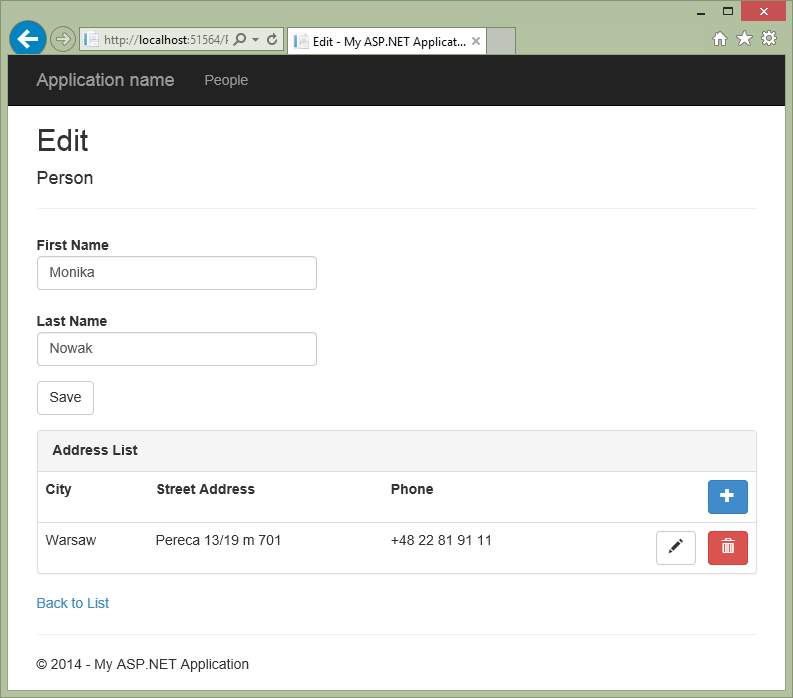
Background
Normally what we get out of the box from VS2013 Asp.Net MVC template and scaffoldings concerns simple models. After creating few projects I decided to create an invoice sample. Immediately I found out that it is not so simply task until I've discovered the magic RenderAction Http extension. I've tried to keep attached example very simple to follow but the basic knowledge of Asp.Net MVC is required.
The code
At first let's create the standard new Asp.Net project called TestAjax by selecting MVC template with core references set to MVC and without Authentication.
To keep it simple let's create two models: Person and a list of Addresses assigned to each Person.
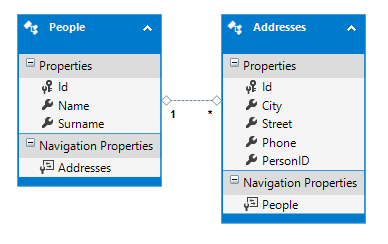
In the Models folder add two classes:
namespace TestAjax.Models

{

    public class Person

    {

        public int Id { get; set; }

        [Display(Name = "First Name")]

        [Required]

        [StringLength(255, MinimumLength = 3)]

        public string Name { get; set; }

        [Display(Name = "Last Name")]

        [Required]

        [StringLength(255, MinimumLength = 3)]

        public string  Surname { get; set; }

        public virtual ICollection<Address> Addresses { get; set; }

    }

}
namespace TestAjax.Models

{

    public class Address

    {

        public int Id { get; set; }

        [Required]

        [StringLength(255, MinimumLength = 3)]

        public string City { get; set; }

        [Display(Name = "Street Address")]

        public string Street { get; set; }

        [Phone]

        public string Phone { get; set; }

        public int PersonID { get; set; }

        public virtual Person Person  { get; set; }

    }

}
Now, as we have our models in place let's create controllers. Right clicking Controllers folder select the Add, Controller... menu, and from the dialog select "MVC 5 Controller with views, using Entity Framework". Let's select Person as a model class, create new DataDb context and have all checkboxes set in the dialog. Rebuild the project and add another controller for Address selecting the already created DataDb context.
To end preparation stage remove HomeController and Home folder from Views. In the shared _Layout View let's replace standard menu items for Home, About, Contact with the one that points to People: @Html.ActionLink("People", "Index", "People"), and finally in App_Start\RouteConfig.cs we must replace the word Home with People so our app will point to People controller by default.
Now, as we have our project up and running we will modify the presentation.
Bootstrap icons in buttons
To prettify buttons in the sample I've decided to decorate them with bootstrap glyphicons.
Because of glyphicons syntax:
<button type="button" class="btn btn-default btn-lg">

  <span class="glyphicon glyphicon-star"></span> Star

</button>
I've added additional helper to achieve correct html output from ActionLink helper.
In the project let's create Helpers folder and inside of that the MyHelper.cs class.
Helper code:
// As the text the: "<span class='glyphicon glyphicon-plus'></span>" can be entered

        public static MvcHtmlString NoEncodeActionLink(this HtmlHelper htmlHelper,

                                             string text, string title, string action,

                                             string controller,

                                             object routeValues = null,

                                             object htmlAttributes = null)

        {

            UrlHelper urlHelper = new UrlHelper(htmlHelper.ViewContext.RequestContext);

            TagBuilder  builder = new TagBuilder("a");

            builder.InnerHtml = text;

            builder.Attributes["title"] = title;

            builder.Attributes["href"] = urlHelper.Action(action, controller, routeValues);

            builder.MergeAttributes(new RouteValueDictionary(HtmlHelper.AnonymousObjectToHtmlAttributes(htmlAttributes)));

            return MvcHtmlString.Create(builder.ToString());

        }
So, now to output glyphed button using ActionLink I can use this syntax:
@Html.NoEncodeActionLink("<span class='glyphicon glyphicon-plus'></span>", "Add new Person", "Create", "People", routeValues: null, htmlAttributes: new { @class = "btn btn-primary" })
In the Index View of People Controller let's add the @using TestAjax.Helpers directive at the top of the page. After that let's replace the @Html.ActionLink("Create New", "Create") with
<div class="pull-right">

 @Html.NoEncodeActionLink("<span class='glyphicon glyphicon-plus'></span>", "Add new Person", "Create", "People", routeValues: null, htmlAttributes: new { @class = "btn btn-primary" })

</div>
and Edit, Details, Create ActionLinks with
<div class="pull-right">
@Html.NoEncodeActionLink("<span class='glyphicon glyphicon-pencil'></span>", "Edit", "Edit", "People", routeValues: new { id = item.Id }, htmlAttributes: new { data_modal = "", @class = "btn btn-default" })
@Html.NoEncodeActionLink("<span class='glyphicon glyphicon-search'></span>", "Details", "Details", "People", routeValues: new { id = item.Id }, htmlAttributes: new { data_modal = "", @class = "btn btn-default" })
@Html.NoEncodeActionLink("<span class='glyphicon glyphicon-trash'></span>", "Delete", "Delete", "People", routeValues: new { id = item.Id }, htmlAttributes: new { data_modal = "", @class = "btn btn-danger" })
</div>
Now we should have our icons in place.
The list
To develop list of addresses in the Person Edit View I will try to implement the following idea:
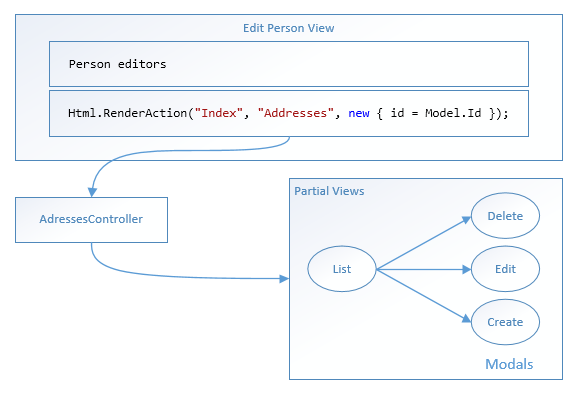
The Html.RenderAction will inject output from different action to the view. The only thing we must remember is that the child controller must not allow to "escape" from the view. For this reason we will implement all of the child Views as Partials edited in-place with Modals.
To start, edit the Edit View of People Controller. Just before the "Back to list" div let's add the following part:
<div class="row">

    <div class="col-md-offset-2 col-md-10">

        @{ Html.RenderAction("Index", "Addresses", new { id = Model.Id }); }

    </div>

</div>
Now we must modify the Addresses Controller because it returns the standard View in the Index Action , what we need is the PartialView instead. So I've tried to enter this kind of code for the Index Action:
// GET: Addresses

[ChildActionOnly]

public async Task<ActionResult> Index(int id)

{

    ViewBag.PersonID = id;

    var addresses = db.Addresses.Where(a => a.PersonID == id);

    return PartialView("_Index", await addresses.ToListAsync());

}
After startup I received the error "HttpServerUtility. Execute was blocked by waiting for the end of an asynchronous operation." After little investigation in internet I found out that asynchronous operations are still not allowed in child actions in this version of MVC. So as a quick fix let's delete Addresses Controller and Addresses Folder in Views, after that let's rescaffold the Addresses Controller again but with "Use async controller actions" unchecked this time. The edited Index action now should look like:
[ChildActionOnly]

public ActionResult Index(int id)

{

    ViewBag.PersonID = id;

    var addresses = db.Addresses.Where(a => a.PersonID == id);

    return PartialView("_Index", addresses.ToList());

}
Then we have to rename the "Index.cshtml" to "_Index.cshtml" in the Views\Addresses and we can give it a run. I've decorated the Index action with the [ChildActionOnly] attribute because we don't want this method to be called directly. The id parameter allows us to retrieve addresses for the given person. The ViewBag.PersonID will be useful to call Create Address in the Index later on.
The program is now running but we did not implemented the in-place editing of addresses yet so clicking in Create link would take us to another view - you can try that by removing temporally the [ChildActionOnly] attribute and clicking that link. To avoid escaping from the View we will use Bootstrap Modals with some help of javaScript.
Bootstrap Modals
I'm not a javaScript wiz but somehow I've developed the following script to display bootstrap modals:
// modalform.js

$(function () {

    $.ajaxSetup({ cache: false });

    $("a[data-modal]").on("click", function (e) {

        // hide dropdown if any

        $(e.target).closest('.btn-group').children('.dropdown-toggle').dropdown('toggle');

        $('#myModalContent').load(this.href, function () {

            $('#myModal').modal({

                /*backdrop: 'static',*/

                keyboard: true

            }, 'show');

            bindForm(this);

        });

        return false;

    });

});

function bindForm(dialog) {

    $('form', dialog).submit(function () {

        $.ajax({

            url: this.action,

            type: this.method,

            data: $(this).serialize(),

            success: function (result) {

                if (result.success) {

                    $('#myModal').modal('hide');

                    //Refresh

                    location.reload();

                } else {

                    $('#myModalContent').html(result);

                    bindForm(dialog);

                }

            }

        });

        return false;

    });

}
The script to function requires three things:
1. In the view this sort of placeholder:
<!-- modal placeholder-->

<div id='myModal' class='modal fade in'>

    <div class="modal-dialog">

        <div class="modal-content">

            <div id='myModalContent'></div>

        </div>

    </div>

</div>
2. In the view that we want to place in the modal this kind of markup:
<div class="modal-header">
<button type="button" class="close" data-dismiss="modal" aria-hidden="true">×</button>
<h4 class="modal-title" id="myModalLabel">Add new Address</h4>
</div> @using (Html.BeginForm())
{
<div class="modal-body">
// Place Form editors here
</div>
</div>
<div class="modal-footer">
<button class="btn" data-dismiss="modal">Cancel</button>
<input class="btn btn-primary" type="submit" value="Add" />
</div>
}
3. The action supporting View in the modal must return Json(new { success = true }); instead of the View();
Notice: Please note that script needs the data-modal attribute in invoking ActionLink
Notice: It is good to add type="button" attribute to the data-dismiss button - you will avoid problems with Bootstrap Modal when user presses Return key to accept dialog - in some browsers Modal without this attribute is just closed.
For more complete Bootstrap 3.1.1 Modals in MVC 5 focused sample please visit this site.
In our project I've added the modalform.js to the \Sripts folder and the
bundles.Add(newScriptBundle("~/bundles/modalform").Include("~/Scripts/modalform.js"));
line to the AppStart\BundleConfig.cs.
Now edit the "_Index.schtml" to have this layout:
@using TestAjax.Helpers

@model IEnumerable<TestAjax.Models.Address>

<!-- modal placeholder-->

<div id='myModal' class='modal fade in'>

    <div class="modal-dialog">

        <div class="modal-content">

            <div id='myModalContent'></div>
Add support for modals in the "Edit.cshtml" of People in the scripts section:
@section Scripts {

    @Scripts.Render("~/bundles/jqueryval")

    @Scripts.Render("~/bundles/modalform")

}
To work with Modals in the Addresses Controller we must also modify the Create methods:
public ActionResult Create(int PersonID)

{

    Address address = new Address();

    address.PersonID = PersonID;

    return PartialView("_Create", address);

}

[HttpPost]

[ValidateAntiForgeryToken]

public ActionResult Create([Bind(Include = "Id,City,Street,Phone,PersonID")] Address address)

{

    if (ModelState.IsValid)

    {

        db.Addresses.Add(address);

        db.SaveChanges();

        return Json(new { success = true });

    }

    return PartialView("_Create");

}
And finally the renamed "_Create.cshtml" of Addresses should have this shape:
@model TestAjax.Models.Address <div class="modal-header">
<button type="button" class="close" data-dismiss="modal" aria-hidden="true">×</button>
<h4 class="modal-title" id="myModalLabel">Add new Address</h4>
</div> @using (Html.BeginForm())
{
<div class="modal-body"> @Html.AntiForgeryToken()
<div class="form-horizontal">
@Html.ValidationSummary(true, "", new { @class = "text-danger" }) <div class="form-group">
@Html.LabelFor(model => model.City, htmlAttributes: new { @class = "control-label col-md-2" })
<div class="col-md-10">
@Html.EditorFor(model => model.City, new { htmlAttributes = new { @class = "form-control" } })
@Html.ValidationMessageFor(model => model.City, "", new { @class = "text-danger" })
</div>
</div> <div class="form-group">
@Html.LabelFor(model => model.Street, htmlAttributes: new { @class = "control-label col-md-2" })
<div class="col-md-10">
@Html.EditorFor(model => model.Street, new { htmlAttributes = new { @class = "form-control" } })
@Html.ValidationMessageFor(model => model.Street, "", new { @class = "text-danger" })
</div>
</div> <div class="form-group">
@Html.LabelFor(model => model.Phone, htmlAttributes: new { @class = "control-label col-md-2" })
<div class="col-md-10">
@Html.EditorFor(model => model.Phone, new { htmlAttributes = new { @class = "form-control" } })
@Html.ValidationMessageFor(model => model.Phone, "", new { @class = "text-danger" })
</div>
</div> </div>
</div>
<div class="modal-footer">
<button class="btn" data-dismiss="modal">Cancel</button>
<input class="btn btn-primary" type="submit" value="Add" />
</div>
}
Now we can add new Address line without escaping from the Person Edit View.
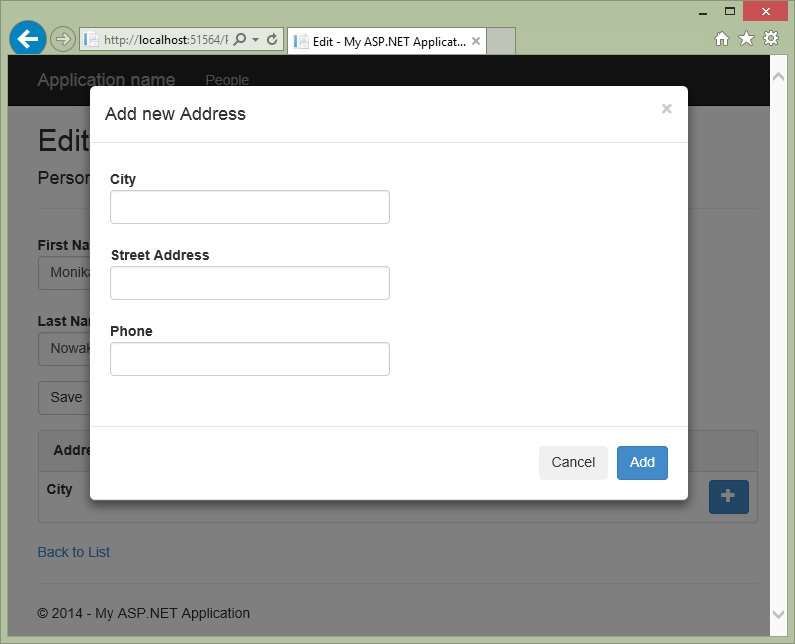
Same pattern should be followed to create _Edit and _Delete Partials.
Additionaly we can create a _List Partial to be displayed in the Details View of Person.
For the rest of the Partials please refer to the attached download which contains full source for the project.
Notice: Rebuild project to update Nuget packages in the attachment. You should have both "Allow Nuget to download missing packages" and "Automatically check for missing packages during build in Visual Studio" options checked in NuGet settings.
The Problem
There is one deficiency with proposed solution:
The People Edit View gets refreshed each time the Address is added, changed or deleted.
The Solution
The solution of above glitch is to Ajaxify the thing.
Full page refresh comes from this line in my script:
location.reload();
To fix it, we must prepare a new version:
// modalform.js

$(function () {

    $.ajaxSetup({ cache: false });

    $("a[data-modal]").on("click", function (e) {

        // hide dropdown if any (this is used wehen invoking modal from link in bootstrap dropdown )

        //$(e.target).closest('.btn-group').children('.dropdown-toggle').dropdown('toggle');

        $('#myModalContent').load(this.href, function () {

            $('#myModal').modal({

                /*backdrop: 'static',*/

                keyboard: true

            }, 'show');

            bindForm(this);

        });

        return false;

    });

});

function bindForm(dialog) {

    $('form', dialog).submit(function () {

        $.ajax({

            url: this.action,

            type: this.method,

            data: $(this).serialize(),

            success: function (result) {

                if (result.success) {

                    $('#myModal').modal('hide');

                    $('#replacetarget').load(result.url); //  Load data from the server and place the returned HTML into the matched element

                } else {

                    $('#myModalContent').html(result);

                    bindForm(dialog);

                }

            }

        });

        return false;

    });

}
As you can see, now we are replacing the content of DOM element with id="replacetarget" using url received as JSON from the Action.
Some refactoring in our project will be required for script to function properly.
First, let's move the @Scripts.Render("~/bundles/jquery") line in Shared\_Layout.cshtml to the <head> area at the top of the page. The reason for that is we will need access to jQuery earlier then before.
Now, in the Edit View of People Controller let's modify the part after the ending bracket of the form:
} // End of @using (Html.BeginForm())

<!-- modal placeholder-->

<div id='myModal' class='modal fade in'>

    <div class="modal-dialog">

        <div class="modal-content">

            <div id='myModalContent'></div>

        </div>

    </div>

</div>

<div class="row">

    <div class="col-md-offset-2 col-md-10" id="replacetarget">

        @{ Html.RenderAction("Index", "Addresses", new { id = Model.Id }); }

    </div>

</div>

<p>

    @Html.ActionLink("Back to List", "Index")

</p>

@section Scripts {

    @Scripts.Render("~/bundles/jqueryval")

}
As you see we have moved the modal placeholder here (removed from the _Index partial) because we do not want this part to be replaced with the script. Just before Html.RenderAction I've added id="replacetarget" to the div. This is the div to be replaced by the script. Script section now contains only validation.
In the _Index Partial remove the modal block as mentioned above and add @Scripts.Render("~/bundles/modalform") at the end of page add content of the modalform.js in the <script></script> tags (as @Script.Render will not work in Partial). This is why we need jQuery so early. The modalform script is placed here because all of the <div> content will be replaced by javaScript code, so we need to recreate it at each time this happens.
The last thing that we must provide is the result.url JSON data used in our script.
Dig into Addresses Controller code and replace each:
return Json(new { success = true});
line with:
string url = Url.Action("Index", "Addresses", new { id = address.PersonID });
return Json(new { success = true, url = url });
We are using the the Url.Action helper here to build the correct url with the PersonID that we are currently editing.
And finally remove the [ChildActionOnly] attribute from Index method since it will be called by script, not only by RenderAction in Edit View of Person.
As before the code is available for download above.
Points of Interest
From downloads you can learn:
- How to deal with in-place dynamic lists in View.
- How to display Forms in Bootstrap Modals.
- How to decorate Bootstrap buttons with glyph icons.
- How to highlight Bootstrap active navbar menu item
- How to use Ajax to refresh only part of the page
[转]ASP.NET MVC 5 List Editor with Bootstrap Modals的更多相关文章
- 翻译:使用 ASP.NET MVC 4, EF, Knockoutjs and Bootstrap 设计和开发站点 - 3
原文地址:http://ddmvc4.codeplex.com/ 原文名称:Design and Develop a website using ASP.NET MVC 4, EF, Knockout ...
- 翻译:使用 ASP.NET MVC 4, EF, Knockoutjs and Bootstrap 设计和开发站点 - 1
原文地址:http://ddmvc4.codeplex.com/ 原文名称:Design and Develop a website using ASP.NET MVC 4, EF, Knockout ...
- 使用 ASP.NET MVC 4, EF, Knockoutjs and Bootstrap 设计和开发站点 - 6 - 业务逻辑
翻译:使用 ASP.NET MVC 4, EF, Knockoutjs and Bootstrap 设计和开发站点 - 6 - 业务逻辑 Part 3: 设计逻辑层:核心开发 如前所述,我们的解决方案 ...
- 翻译:使用 ASP.NET MVC 4, EF, Knockoutjs and Bootstrap 设计和开发站点 - 6 - 业务逻辑
Part 3: 设计逻辑层:核心开发 如前所述,我们的解决方案如下所示: 下面我们讨论整个应用的结构,根据应用中不同组件的逻辑相关性,分离到不同的层中,层与层之间的通讯通过或者不通过限制.分层属于架构 ...
- Asp.net MVC利用Ajax.BeginForm实现bootstrap模态框弹出,并进行前段验证
1.新建Controller public ActionResult Index() { return View(); } public ActionResult Person(int? id) { ...
- 翻译:使用 ASP.NET MVC 4, EF, Knockoutjs and Bootstrap 设计和开发站点 - 5 - 数据库设计
数据库方面我们需要的主要功能如下: 联系人有姓名和电子邮件地址. 联系人可以拥有多个地址. 联系人可以拥有多个电话. 为了实现目标,我们需要在数据库中创建下列表.表与表的关系如下图所示: 数据库的脚本 ...
- 翻译:使用 ASP.NET MVC 4, EF, Knockoutjs and Bootstrap 设计和开发站点 - 4 - 验证
验证: 快要完成我们程序的界面部分了.剩下的事情就是在用户点击 "保存" 的时候管理验证问题了.验证是主要需求,今天就是最无知的应用也不会忽视它.通过正确的验证,用户可以知道应该输 ...
- 翻译:使用 ASP.NET MVC 4, EF, Knockoutjs and Bootstrap 设计和开发站点 - 2
我们的目标: 需求 Screen 1: 联系人列表 - 查看所有联系人 1.1 这个 screen 将显示数据库中的所有联系人. 1.2 用户可以删除任何联系人.1.3 用户可以编辑任何联系人的详细信 ...
- ASP.NET MVC使用Bootstrap系列(5)——创建ASP.NET MVC Bootstrap Helpers
阅读目录 序言 内置的HTML Helpers 创建自定义的Helpers 使用静态方法创建Helpers 使用扩展方法创建Helpers 创建Fluent Helpers 创建自动闭合的Helper ...
随机推荐
- 「BZOJ 3209」花神的数论题
Title Link 戳我 Title Solution 这道题可以运用组合数的思想啊,数位dp也可以,随便你怎么做,这里就讲一讲组合数的做法吧,要小于n,所以我们可以枚举n二进制下1的位置,在i-1 ...
- 自用 Pycharm 主题配色分享(主题才是开发第一生产力)
写在前面的话 是的,我又回来了,上一篇[使用 Visual Studio Code(VSCode)搭建简单的 Python + Django 开发环境]才说真香,结果用两天就发现很多恶心的问题拦住了菜 ...
- poi将图片导入excel(Java代码)
package com.fh.util;import java.awt.image.BufferedImage; import java.io.ByteArrayOutputStream; imp ...
- React基础篇 (3)-- 生命周期
生命周期是react中的重要部分,理解它有助于我们更合理的书写逻辑. 组件的生命周期可分成三个状态: Mounting:已插入真实 DOM Updating:正在被重新渲染 Unmounting:已移 ...
- 【bzoj5093】 [Lydsy1711月赛]图的价值 组合数+斯特林数+NTT
Description "简单无向图"是指无重边.无自环的无向图(不一定连通). 一个带标号的图的价值定义为每个点度数的k次方的和. 给定n和k,请计算所有n个点的带标号的简单无向 ...
- 【bzoj3601】一个人的数论 莫比乌斯反演+莫比乌斯函数性质+高斯消元
Description Sol 这题好难啊QAQ 反正不看题解我对自然数幂求和那里是一点思路都没有qwq 先推出一个可做一点的式子: \(f(n)=\sum_{k=1}^{n}[(n,k)=1]k^d ...
- 洛谷P2775 机器人路径规划问题
传送门 题解 至今没看懂这深搜怎么写的…… //minamoto #include<iostream> #include<cstdio> #include<cstring ...
- HDU6298-2018ACM暑假多校联合训练1001-Maximum Multiple
题意大致是给你一个整数n,让你确定是否有三个正整数x,y,z既能被n整除,又能x+y+z=n,并使xyz最大 从中根据规律可以看出,只有被3或被4整除的数才能满足题目要求 被3整除的最大值为n^3/3 ...
- spark_flume_mysql 整合
本人的开发环境: 1.虚拟机centos 6.5 2.jdk 1.8 3.spark2.2.0 4.scala 2.11.8 5.maven 3.5.2 在开发和搭环境时必须注意版本兼容的问题 ...
- springcloud微服务总结五 服务熔断
一:雪崩效应 如下图所示:A作为服务提供者,B为A的服务消费者,C和D是B的服务消费者.A不可用引起了B的不可用,并将不可用像滚雪球一样放大到C和D时,导致整个系统瘫痪,雪崩效应就形成了. 雪崩过程: ...