
非等高cell实战--实现微博页面
前言
学习过UITableView、AutoLayout以及MVC的相关知识,接下来通过一个微博页面实战来整合一下。
效果图
首先看一下效果图:

程序实现
需求分析
此页面为非等高cell,tableview的组数为1
cell内容根据数据动态展示
cell自适应高度,根据微博有无图片,适配自己高度
项目准备
数据均为本地数据(status.plist 和 images)
上手操作
1、创建工程、导入资源

2、创建MVC对应文件,本案例为:XYStatusesViewController、XYStatus、XYStatusCell控制器逻辑:
3、控制器只需管理逻辑.至于cell的创建和内部细节,全部封装起来
懒加载本地plist数据
- (NSMutableArray *)status {

        if (_status == nil) {

        NSString *path = [[NSBundle mainBundle] pathForResource:@"statuses.plist" ofType:nil];

        NSArray *array = [NSArray arrayWithContentsOfFile:path];

       NSMutableArray *arrayM = [NSMutableArray new];

       for (NSDictionary *dict in array) {

           XYStatus *status = [XYStatus statusWithDict:dict];

            [arrayM addObject:status];

        }

         _status = arrayM;

      }

      return _status;

  }
返回tableView对应的数据源
#pragma mark - Table view data source

  - (NSInteger)tableView:(UITableView *)tableView numberOfRowsInSection:(NSInteger)section {

    return self.status.count;

}

  - (UITableViewCell *)tableView:(UITableView *)tableView cellForRowAtIndexPath:(NSIndexPath *)indexPath {

    XYStatusCell *cell = [XYStatusCell cellWithTableView:tableView];

    cell.status = self.status[indexPath.row];

    NSLog(@"cell.height = %zd",cell.height);

    return cell;

}

/**

 *  不知是Xcode8的特性还是iOS10 特性。所以这种通过model保存高度的方法,可以不用写估算方法也行。

 *  因为最初精算,返回值为0,Model中没有保存。然后返回cell之后,再精算的时候返回真实的保存值。

 */

 - (CGFloat)tableView:(UITableView *)tableView heightForRowAtIndexPath:(NSIndexPath *)indexPath

{

    NSLog(@"-----heightForRowAtIndexPath------");

    XYStatus *status = self.status[indexPath.row];

    return status.cellHeight;

}

/**

 *  这个方法很重要:是估算cell的高度。有这个方法的调用顺序是: 1.估算 2.返回cell 3. 计算准确高度

 *                                            否则:1.计算准确高度 2.返回cell 3.再计算准确高度

 *

 *  不知是Xcode8的特性还是iOS10 特性。所以这种通过model保存高度的方法,可以不用写估算方法也行

 */

 - (CGFloat)tableView:(UITableView *)tableView estimatedHeightForRowAtIndexPath:(NSIndexPath *)indexPath

{

    NSLog(@"-----estimatedHeightForRowAtIndexPath------");

    return 200;

}
模型的封装:模型用来存储内部数据、并通过KVC来保存传入数据
@property (nonatomic, copy) NSString *text;

@property (nonatomic, copy) NSString *name;

@property (nonatomic, copy) NSString *icon;

@property (nonatomic, copy) NSString *picture;

@property (nonatomic, assign,getter=isVip) BOOL vip;

/**

 *  cellHeight

 */

@property (nonatomic, assign) CGFloat cellHeight;

+ (instancetype)statusWithDict:(NSDictionary *)dict;

- (instancetype)initWithDict:(NSDictionary *)dict;

// 内部实现

    + (instancetype)statusWithDict:(NSDictionary *)dict

{

    return [[self alloc] initWithDict:dict];

}

- (instancetype)initWithDict:(NSDictionary *)dict

{

    if (self == [super init]) {

        [self setValuesForKeysWithDictionary:dict];

    }

    return self;

}
View的封装,cell推荐使用xib创建,因为方便
首先cell需要一个status属性、并提供一个类方法创建实例
@property (nonatomic, strong) XYStatus *status;

+ (instancetype)cellWithTableView:(UITableView *)tableView;
在Xib中设置内容控件并拖到.m中(设置好复用标识)

根据Xib创建view的步骤来,设置cell
cell类方法的实现
+ (instancetype)cellWithTableView:(UITableView *)tableView

{

    static NSString *ID = @"cell";

    XYStatusCell *cell = [tableView dequeueReusableCellWithIdentifier:ID];

    if (cell == nil) {

        cell = [[[NSBundle mainBundle] loadNibNamed:NSStringFromClass(self) owner:nil options:nil] lastObject];

    }

    return cell;

}
设置cell的数据 status
- (void)setStatus:(XYStatus *)status

{

    _status = status;

    self.iconView.image = [UIImage imageNamed:status.icon];

    self.nameLabel.text = status.name;

    self.contentLabel.text = status.text;

    if (status.isVip) {

        self.vipView.hidden = NO;

        self.vipView.image = [UIImage imageNamed:@"vip"];

        self.nameLabel.textColor = [UIColor orangeColor];

    }else

    {

        self.vipView.hidden = YES;

        self.nameLabel.textColor = [UIColor blackColor];

    }

    if (status.picture) {

        self.pictureView.hidden = NO;

        self.pictureView.image = [UIImage imageNamed:status.picture];

        _height = CGRectGetMaxY(self.pictureView.frame) + 10;

    }else

    {

        self.pictureView.hidden = YES;

        _height = CGRectGetMaxY(self.contentLabel.frame) + 10;

    }

    // 强制布局

    [self layoutIfNeeded];

    // 计算并标记高度保存到model中去

    if (self.pictureView.hidden) {

        _height = CGRectGetMaxY(self.contentLabel.frame) + 10;

    }else

    {

        _height = CGRectGetMaxY(self.pictureView.frame) + 10;

    }

    // 这里有个注意点:

    // 通过强制布局使得cell子控件设置数据,计算出具体frame。

    // 通过计算的cell的高度,来重新保存到status模型中

    // 这里是C语言中指针的知识,如果有问题,欢迎留言

    status.cellHeight = _height;

}
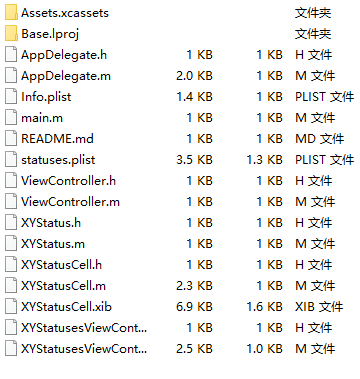
项目代码结构截图
源码截图如下
小结:
麻雀虽小,五脏俱全。非等高cell实战--实现微博页面
注:本文著作权归作者,由demo大师代发,拒绝转载,转载需要作者授权
非等高cell实战--实现微博页面的更多相关文章
- 非等高cell实战(01)-- 实现微博页面
非等高cell实战(01)-- 实现微博页面 学习过UITableView.AutoLayout以及MVC的相关知识,接下来通过一个微博页面实战来整合一下. 首先看一下效果图: 需求分析 此页面为非等 ...
- 自定义非等高 Cell
1.自定义非等高 Cell介绍 1.1 代码自定义(frame) 新建一个继承自 UITableViewCell 的类. 重写 initWithStyle:reuseIdentifier: 方法. 添 ...
- iOS开发——UI进阶篇(三)自定义不等高cell,如何拿到cell的行高,自动计算cell高度,(有配图,无配图)微博案例
一.纯代码自定义不等高cell 废话不多说,直接来看下面这个例子先来看下微博的最终效果 首先创建一个继承UITableViewController的控制器@interface ViewControll ...
- iOS边练边学--自定义非等高的cell
一.使用xib或者storyboard自定义非等高的cell实现方式差不多,这里简单介绍一下通过xib文件实现的方法 <1.1>创建一个继承自UITableViewCell的子类,比如Ch ...
- Netty Redis 亿级流量 高并发 实战 (长文 修正版)
目录 疯狂创客圈 Java 分布式聊天室[ 亿级流量]实战系列之 -30[ 博客园 总入口 ] 写在前面 1.1. 快速的能力提升,巨大的应用价值 1.1.1. 飞速提升能力,并且满足实际开发要求 1 ...
- 《Netty Zookeeper Redis 高并发实战》 图书简介
<Netty Zookeeper Redis 高并发实战> 图书简介 本书为 高并发社群 -- 疯狂创客圈 倾力编著, 高度剖析底层原理,深度解读面试难题 疯狂创客圈 Java 高并发[ ...
- java高并发实战Netty+协程(Fiber)|系列1|事件驱动模式和零拷贝
今天开始写一些高并发实战系列. 本系列主要讲两大主流框架: Netty和Quasar(java纤程库) 先介绍netty吧,netty是业界比较成熟的高性能异步NIO框架. 简单来说,它就是对NIO2 ...
- LVS集群和Keepalived高可用实战
第四十章LVS集群和Keepalived高可用实战 一.ARP协议 1.概念 地址解析协议,即ARP(AddressResolutionProtocol),是根据IP地址获取物理MAC地址的一个TCP ...
- 自定义不等高cell—storyBoard或xib自定义不等高cell
1.iOS8之后利用storyBoard或者xib自定义不等高cell: 对比自定义等高cell,需要几个额外的步骤(iOS8开始才支持) 添加子控件和contentView(cell的content ...
随机推荐
- Sublime text3 插件ColorPicker(调色板)不能使用快捷键的解决方法
我的原因是:convertToUTF8和ColorPicker快捷键冲突,convertoUTF8的默认转换GBK的快捷键 和 ColorPicker打开调色板的快捷键都是ctrl+shift+c . ...
- tomcat并发优化
配置参考 <Connector port="9027" protocol="HTTP/1.1" maxHttpHeaderSize="8192& ...
- Spark GraphX宝刀出鞘,图文并茂研习图计算秘笈与熟练的掌握Scala语言【大数据Spark实战高手之路】
Spark GraphX宝刀出鞘,图文并茂研习图计算秘笈 大数据的概念与应用,正随着智能手机.平板电脑的快速流行而日渐普及,大数据中图的并行化处理一直是一个非常热门的话题.图计算正在被广泛地应用于社交 ...
- Codeforces Round #403 (Div. 2, based on Technocup 2017 Finals )D. Innokenty and a Football League(2-sat)
D. Innokenty and a Football League time limit per test 2 seconds memory limit per test 256 megabytes ...
- 简单的INSERT语句
INSERT INTO 语句用来向数据表中插入数据,比如执行下面的语句就可以向T_Person表中插入一条数据: INSERT INTO T_Person(FName,FAge,FRemark) VA ...
- 后门工具dbd
后门工具dbd dbd功能类似于Netcat,但提供强大的加密功能,支持AES-CBC-128和HMAC-SHA1加密.该工具可以运行在类Unix和Windows系统中.渗透测试人员首先使用该工具 ...
- Combination Sum IV -- LeetCode
Given an integer array with all positive numbers and no duplicates, find the number of possible comb ...
- [USACO06DEC] Milk Patterns
题目描述 Farmer John has noticed that the quality of milk given by his cows varies from day to day. On f ...
- Java堆内存不足
1)使用IDEA开发程序时有时候会提示“Java Heap space error”,说明IDEA默认配置的Java堆内存不足,程序需要更多的堆内存. 2)堆(Heap)和非堆(Non-heap)内存 ...
- Java高级架构师(一)第08节:基本业务功能和数据字典