
How To Install Git on CentOS 7
Introduction
Version control has become an indispensable tool in modern software development. Version control systems allow you to keep track of your software at the source level. You can track changes, revert to previous stages, and branch off from the base code to create alternative versions of files and directories.
One of the most popular version control systems is git. Many projects maintain their files in a Git repository, and sites like GitHub and Bitbucket have made sharing and contributing to code with Git easier than ever.
In this guide, we will demonstrate how to install Git on a CentOS 7 server. We will cover how to install the software in a couple of different ways, each with their own benefits, along with how to set up Git so that you can begin collaborating right away.
Prerequisites
Before you begin with this guide, there are a few steps that need to be completed first.
You will need a CentOS 7 server installed and configured with a non-root user that has sudo privileges. If you haven't done this yet, you can run through steps 1-4 in the CentOS 7 initial server setup guide to create this account.
Once you have your non-root user, you can use it to SSH into your CentOS server and continue with the installation of Git.
Install Git
The two most common ways to install Git will be described in this section. Each option has their own advantages and disadvantages, and the choice you make will depend on your own needs. For example, users who want to maintain updates to the Git software will likely want to use yum to install Git, while users who need features presented by a specific version of Git will want to build that version from source.
Option One — Install Git with Yum
The easiest way to install Git and have it ready to use is to use CentOS's default repositories. This is the fastest method, but the Git version that is installed this way may be older than the newest version available. If you need the latest release, consider compiling git from source (the steps for this method can be found further down this tutorial).
Use yum, CentOS's native package manager, to search for and install the latest git package available in CentOS's repositories:
sudo yum install git
If the command completes without error, you will have git downloaded and installed. To double-check that it is working correctly, try running Git's built-in version check:
git --version
If that check produced a Git version number, then you can now move on to Setting up Git, found further down this article.
Option Two — Install Git from Source
If you want to download the latest release of Git available, or simply want more flexibility in the installation process, the best method for you is to compile the software from source. This takes longer, and will not be updated and maintained through the yum package manager, but it will allow you to download a newer version than what is available through the CentOS repositories, and will give you some control over the options that you can include.
Before you begin, you'll need to install the software that git depends on. These dependencies are all available in the default CentOS repositories, along with the tools that we need to build a binary from source:
sudo yum groupinstall "Development Tools"

sudo yum install gettext-devel openssl-devel perl-CPAN perl-devel zlib-devel
After you have installed the necessary dependencies, you can go ahead and look up the version of Git that you want by visiting the project's releases page on GitHub.
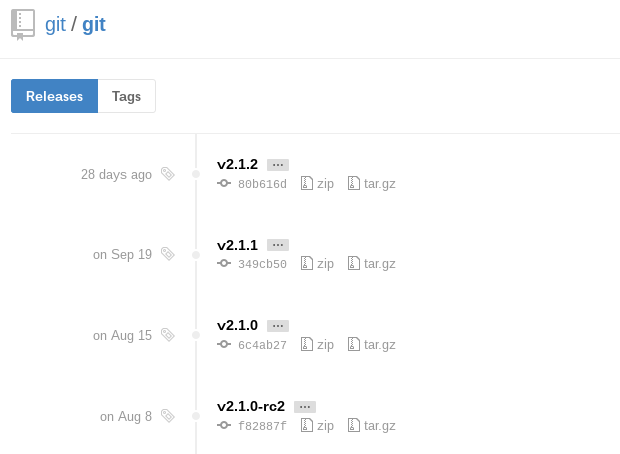
The version at the top of the list is the most recent release. If it does not have -rc (short for "Release Candidate") in the name, that means that it is a stable release and is safe for use. Click on the version you want to download to be taken to that version's release page. Then right-click on the Source code (tar.gz)button and copy the link to your clipboard.

Now we are going to use the wget command in our CentOS server to download the source archive from the link that we copied, renaming it to git.tar.gz in the process so that it is easier to work with.
Note: the URL that you copied may be different from mine, since the release that you download may be different.
wget https://github.com/git/git/archive/v2.1.2.tar.gz -O git.tar.gz
Once the download is complete, we can unpack the source archive using tar. We'll need a few extra flags to make sure that the unpacking is done correctly: z decompresses the archive (since all .gz files are compressed), x extracts the individual files and folders from the archive, and f tells tar that we are declaring a filename to work with.
tar -zxf git.tar.gz
This will unpack the compressed source to a folder named after the version of Git that we downloaded (in this example, the version is 2.1.2, so the folder is named git-2.1.2). We'll need to move to that folder to begin configuring our build. Instead of bothering with the full version name in the folder, we can use a wildcard (*) to save us some trouble in moving to that folder.
cd git-*
Once we are in the source folder, we can begin the source build process. This starts with some pre-build checks for things like software dependencies and hardware configurations. We can check for everything that we need with the configure script that is generated by make configure. This script will also use a --prefix to declare /usr/local (the default program folder for Linux platforms) as the appropriate destination for the new binary, and will create a Makefile to be used in the following step.
make configure

./configure --prefix=/usr/local
Makefiles are scriptable configuration files that are processed by the make utility. Our Makefile will tell makehow to compile a program and link it to our CentOS installation so that we can execute the program properly. With a Makefile in place, we can now execute make install (with sudo privileges) to compile the source code into a working program and install it to our server:
sudo make install
Git should now be built and installed on your CentOS 7 server. To double-check that it is working correctly, try running Git's built-in version check:
git --version
If that check produced a Git version number, then you can now move on to Setting up Git below.
Set Up Git
Now that you have git installed, you will need to submit some information about yourself so that commit messages will be generated with the correct information attached. To do this, use the git configcommand to provide the name and email address that you would like to have embedded into your commits:
git config --global user.name "Your Name"

git config --global user.email "you@example.com"
To confirm that these configurations were added successfully, we can see all of the configuration items that have been set by typing:
git config --list
user.name=Your Name

user.email=you@example.com
This configuration will save you the trouble of seeing an error message and having to revise commits after you submit them.
How To Install Git on CentOS 7的更多相关文章
- Install latest git on CentOS 6/7
Assuming you have sudo/root permission. Try rpmforge-extras first. yum --disablerepo=base,updates -- ...
- Install ssdb-rocks on CentOS 6
Install ssdb-rocks on CentOS 6 C.C. 发表于 2014年08月10日 20:14 | Hits: 649 为了优化节操精选的弹幕系统,打算更换到Facebook的R ...
- how to install git 1.8 rpm
git版本在低于1.8之前,对于私有项目会出现401的pull失败错误,只能通过升级git版本来解决 It appears that git18 is no longer available from ...
- git的CentOS服务端安装和windows客户端的使用
git的CentOS服务端安装和windows客户端的使用 此教程以 搬瓦工vps CentOS 6 x64 的系统为环境,搭建 git 服务端.windows 7 系统为客户端. git客户端 在W ...
- How To Install Java on CentOS and Fedora
PostedDecember 4, 2014 453.8kviews JAVA CENTOS FEDORA Introduction This tutorial will show you how ...
- Install Redis on CentOS 6.4--转
Install Redis on CentOS 6.4 source:http://thoughts.z-dev.org/2013/05/27/install-redis-on-centos-6-4/ ...
- Steps to Install Hadoop on CentOS/RHEL 6---reference
http://tecadmin.net/steps-to-install-hadoop-on-centosrhel-6/# The Apache Hadoop software library is ...
- How to install MP4box on CentOS 6
How to install MP4box on CentOS 6 MP4Box is a MP4 multiplexer. It can import MPEG-4 video, DivX, Xvi ...
- cygwin install git
Installation with Cygwin If you're comfortable with Cygwin, then use it to install git, ssh, wget an ...
随机推荐
- iOS自动化探索(三)WebDriverAgent Python Client
之前我们在终端试着调用过WDA API, 今天我们在看一个Python封装的api库 https://github.com/openatx/facebook-wda 安装方式(一): pip inst ...
- falsh developer 快捷键
1.文件夹搜索是Ctrl+I2.注释// Ctrl+Q 3.注释/*...*/ Ctrl+Shift+Q4. 代码提示 Ctrl+Alt+space5. 复制一行 Ctrl+D ctrl+shift+ ...
- 由PostgreSQL的区域与字符集说起(转)
转自:http://blog.chinaunix.net/uid-354915-id-3502551.html 由PostgreSQL的区域与字符集说起 一.PostgreSQL的区域区域属性有以下几 ...
- python学习网址
http://kuanghy.github.io/categories/#Python
- python-数据处理的包Numpy,scipy,pandas,matplotlib
一,NumPy包(numeric python,数值计算) 该包主要包含了存储单一数据类型的ndarry对象的多维数组和处理数组能力的函数ufunc对象.是其它包数据类型的基础.只能处理简单的数据分析 ...
- Zookeeper在Dubbo中的作用及Zk集群的选举原理
转自 : https://blog.csdn.net/zh15732621679/article/details/80723358
- GitLab non-standard SSH port
/***************************************************************************** * GitLab non-standard ...
- rebar安装及创建项目
rebar作为erlang开发中编译,构建,发布,打包,动态升级的常用工具,下面我记录下rebar工具的安装及使用 从源码安装rebar 1. 建立文件 install_rebar.sh 2. 拷贝如 ...
- NOIP模拟题 管道
题目大意 给定$n$个点的无向图,求它的$Dfs$序方案数$n\leq 18$ 题解 状压$Dp+$记忆化搜索. 设$F_{i,now}$表示到达$i$其中$now$集合代表的点集已经遍历过,还需要遍 ...
- C++之内核对象进行线程同步
用户模式下的线程同步机制提供了非常好的性能,但他们也的确存在一些局限性,而且不适用于许多应用程序,例如,对Interlocked系列函数只能对一个值进行操作,它们从来不会把线程切换到等待状态.我们可以 ...