
自定义AppSession
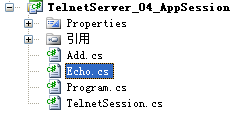
TelnetSession.cs
     public  class TelnetSession:AppSession<TelnetSession>

     {

         protected override void OnSessionStarted()

         {

             Send("Welcome to SuperSocket Telnet Server");

         }

         protected override void HandleUnknownRequest(SuperSocket.SocketBase.Protocol.StringRequestInfo requestInfo)

         {

             Send("Unknow request");

         }

         protected override void HandleException(Exception e)

         {

             this.Send("Application error: {0}", e.Message);

         }

         protected override void OnSessionClosed(CloseReason reason)

         {

             //add you logics which will be executed after the session is closed

             base.OnSessionClosed(reason);

         }

     }
Echo.cs
     public class Echo : CommandBase<TelnetSession, StringRequestInfo>

     {

         public override void ExecuteCommand(TelnetSession session, StringRequestInfo requestInfo)

         {

             session.Send(requestInfo.Body);

         }

     }
在这个command代码中,你可以看到类ECHO的父类是CommandBase<AppSession, StringRequestInfo>, 它有一个泛型参数AppSession。 是的,它是默认的AppSession类。 如果你在你的系统中使用你自己建立的AppSession类,那么你必须将你自己定义的AppSession类传进去,否则你的服务器无法发现这个Command:
Add.cs
     public class Add : CommandBase<TelnetSession, StringRequestInfo>

     {

         public override void ExecuteCommand(TelnetSession session, StringRequestInfo requestInfo)

         {

             session.Send(requestInfo.Parameters.Select(p => Convert.ToInt32(p)).Sum().ToString());

         }

     }
Program.cs
     class Program

     {

         static void Main(string[] args)

         {

             Console.WriteLine("Press any key to start the server!");

             Console.ReadKey();

             Console.WriteLine();

             var appServer = new AppServer<TelnetSession>();

             var serverConfig = new ServerConfig

             {

                 Port =

             };

             //Setup the appServer

             if (!appServer.Setup(serverConfig))

             {

                 Console.WriteLine("Failed to setup!");

                 Console.ReadKey();

                 return;

             }

             Console.WriteLine();

             //Try to start the appServer

             if (!appServer.Start())

             {

                 Console.WriteLine("Failed to start!");

                 Console.ReadKey();

                 return;

             }

             Console.WriteLine("The server started successfully, press key 'q' to stop it!");

             while (Console.ReadKey().KeyChar != 'q')

             {

                 Console.WriteLine();

                 continue;

             }

             Console.WriteLine();

             appServer.Stop();

             Console.WriteLine("The server was stopped!");

         }

     }
自定义AppSession的更多相关文章
- SuperSocket快速入门(三):实现你的AppServer和AppSession
什么是AppSession? AppSession 代表一个和客户端的逻辑连接,基于连接的操作应该定义于在该类之中.你可以用该类的实例发送数据到客户端,接收客户端发送的数据或者关闭连接.同时可以保存客 ...
- SuperSocket入门(二)- 探索AppServer、AppSession,Conmmand和App.config
在上一篇文章中,我们已经了解到了如何在SuperSocket处理客户端请求. 同时我们可能会发现一个问题,如果我们的服务器端包含有很多复杂的业务逻辑,这样的switch/case代码将会很 ...
- SuperSocket 1.6.4 通过FixedHeaderReceiveFilter解析自定义协议
SuperSocket 提供了一些通用的协议解析工具, 你可以用他们简单而且快速的实现你自己的通信协议: TerminatorReceiveFilter (SuperSocket.SocketBase ...
- SuperSocket使用 IRequestInfo 和 IReceiveFilter 等对象实现自定义协议
为什么你要使用自定义协议? 通信协议用于将接收到的二进制数据转化成您的应用程序可以理解的请求. SuperSocket提供了一个内置的通信协议“命令行协议”定义每个请求都必须以回车换行"\r ...
- supersockets和 AppSession,AppServer 配合工作
现在, 你已经有了 RequestInfo, ReceiveFilter 和 ReceiveFilterFactory, 但是你还没有正式使用它们. 如果你想让他们在你的程序里面可用, 你需要定义你们 ...
- 使用SuperSocket实现自定义协议C/S设计
一.简介: 21世纪是出于互联网+的时代,许多传统行业和硬件挂钩的产业也逐步转向了系统集成智能化,简单来说就是需要软硬件的结合.这时,软硬件通讯便是这里面最主要的技术点,我们需要做到的是让硬件能够听懂 ...
- 关于Unity3D自定义编辑器的学习
被人物编辑器折腾了一个月,最终还是交了点成品上去(还要很多优化都还么做). 刚接手这项工作时觉得没概念,没想法,不知道.后来就去看<<Unity5.X从入门到精通>>中有关于 ...
- 一起学微软Power BI系列-使用技巧(5)自定义PowerBI时间日期表
1.日期函数表作用 经常使用Excel或者PowerBI,Power Pivot做报表,时间日期是一个重要的纬度,加上做一些钻取,时间日期函数表不可避免.所以今天就给大家分享一个自定义的做日期表的方法 ...
- JavaScript自定义浏览器滚动条兼容IE、 火狐和chrome
今天为大家分享一下我自己制作的浏览器滚动条,我们知道用css来自定义滚动条也是挺好的方式,css虽然能够改变chrome浏览器的滚动条样式可以自定义,css也能够改变IE浏览器滚动条的颜色.但是css ...
随机推荐
- Unity知识结构总结
前言 本篇以知识结构图的形式对Unity引擎的常用基础知识内容进行了总结和梳理. 如果你学了一点关于Unity引擎的知识,又觉得太杂乱,那么希望本篇会给你一些帮助. 对应引擎版本:Unity 4.6 ...
- android 管理手机短信
为了看代码方便,一边在网上google资料,一边看Android java 源代码. 偶然发现了一个类MmsSmsDatabaseHelper.java,原来android将所有的短信信息都存入了mm ...
- velocity.properties配置说明
1.Runtime Log runtime.log = velocity.log 用以指定 Velocity 运行时日志文件的路劲和日志文件名,如不是全限定的绝对路径,系统会认为想对于 当前目录 ...
- Android之RAS加密算法测试
import java.security.Key; import java.security.KeyFactory; import java.security.KeyPair; import java ...
- Python3.6学习笔记(六)
WSGI Python Web Server Gateway Interface 规范学习 由于Python的灵活性,提供了多种方式可以作为服务端语言,包括Python编写的服务器(Medusa).P ...
- iOS开发-plist文件增删改查
plist第一次看到这个后缀名文件的时候感觉怪怪的,不过接触久了也就习以为常了,plist是Property List的简称可以理解成属性列表文件,主要用来存储串行化后的对象的文件.扩展名为.plis ...
- NYOJ-267 郁闷的C小加(二)
郁闷的C小加(二) 时间限制:1000 ms | 内存限制:65535 KB 难度:4 描述 聪明的你帮助C小加解决了中缀表达式到后缀表达式的转换(详情请参考“郁闷的C小加(一)”),C小加很 ...
- AndroidManifest 中android:exported
假设Service等的AndroidManifest中声明为android:exported="false" 则该服务不可以跨进程使用. Permission De ...
- php -- 取路径:getcwd()、__DIR__、__FILE__ 的区别
getcwd() :显示是 在哪个文件里调用此文件 的目录 __DIR__ :当前内容写在哪个文件就显示这个文件目录 __FILE__ : 当前内容写在哪个文件就显示这个文件目录+文件名
- FM遇到错误RQP-DEF-0354和QE-DEF-0144
版本:Cognos 10.2.1 系统:Win10 操作过程:在FM调用了一个存储过程,其中引用了前端page页面的参数如下图所示,在验证和保存查询主题的时候一直提示参数没有替换值,错误 信息如下图所 ...