
windows如何查看nvidia显卡(GPU)的利用率和温度
windows如何查看nvidia显卡(GPU)的利用率和温度
nvidia-smi
只要在文件夹C:\Program Files\NVIDIA Corporation\NVSMI里找到文件nvidia-smi.exe,把该文件拖到命令提示符窗口(win+R,再输入‘CMD’进入),就可以显示关于GPU的信息,如下图所示:

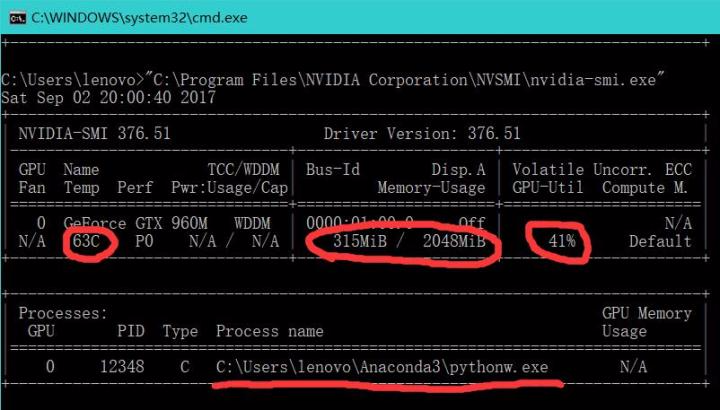
Windows 上不显示每个程序显存占用 N/A nvidia-smi
If you perform the following : nvidia-smi -q you will see the following:
Processes

        Process ID                  : 6564

            Type                    : C+G

            Name                    : C:\Windows\explorer.exe

            Used GPU Memory         : Not available in WDDM driver model
Not available in WDDM driver model => WDDM stand for Windows Display Driver Model. You can switch to TCC and obtain the information with the command: nvidia-smi -dm 1, however this operation can only performed if you do not have any display attached to the GPU. So... It's mostly impossible...
By the way, don't worry about a high memory usage, Tensorflow reserve as much GPU memory as it can to speed up its processes. If you prefer a finer grained control on the memory taken use the following (it may slow down a little bit your computations):
config = tf.ConfigProto()

config.gpu_options.allow_growth = True

sess = tf.Session(config=config)
You can create a dual boot on Ubuntu or just forget about this.
windows如何查看nvidia显卡(GPU)的利用率和温度的更多相关文章
- windows 系统查看NVIDIA显卡GPU情况,nvidia-smi在windows上使用
cd C:\Program Files\NVIDIA Corporation\NVSMI nvidia-smi 当batch_size设置越大的时候,GPU加速越明显,但是batch_size设置 ...
- Win7如何查看nvidia显卡(GPU)的利用率
1.在文件夹C:\Program Files\NVIDIA Corporation\NVSMI里找到文件nvidia-smi.exe2.把该文件拖到命令提示符窗口(win+R,再输入‘CMD’进入), ...
- Redhat下如何查看nvidia显卡的工作状况
安装完毕nvidia显卡驱动后,可以使用命令来查看显卡的工作状况,命令如下: nvidia-smi 输入上述命令后,显示界面如下 安装nvidia显卡驱动的步骤,请参照驱动安装cuda和cudnn.
- ubuntu查看nvidia显卡状态
nvidia-smi 连续查看显卡状态 sudo watch nvidia-smi
- 查看nvidia的GPU
nvidia-smi就可以查看,可以看到进程的占用率,可以kill杀掉进程 注意这里的-前后都不要空格,连起来写
- 查看nvidia显卡命令
http://blog.csdn.net/luo123n/article/details/50296973 nvidia-smi
- NVIDIA 显卡信息(CUDA信息的查看)
1. nvidia-smi 查看显卡信息 nvidia-smi 指的是 NVIDIA System Management Interface: 在安装完成 NVIDIA 显卡驱动之后,对于 windo ...
- Nvidia显卡怎样查看显存大小及硬件相关信息
在电脑上安装Nvidia显卡驱动,平时也会通过Nvidia控制面板来查看显示显存位宽及宽带.显示显存容量和显示显存芯片信息等等,那么该如何查看Nvidia显存大小以及Nvidia硬件相关信息呢? 1. ...
- ubuntu14.04安装、NVIDIA显卡驱动安装及CUDA8.0、Cudnn5.1的环境搭建
安装环境:hp-Z440工作站.64位Ubuntu14.04(64位Ubuntu16.04).Cuda8.0.Cudnn5.1.Nvidia GeForce GT 705.Tesla K40c 本文可 ...
随机推荐
- POJ 1260
//状态转移方程: F[i] = min{f[k] + (a[k+1]+………+a[i]+10} * p[i]} #include <iostream> #define MAXN 105 ...
- Label Propagation Algorithm LPA 标签传播算法解析及matlab代码实现
转载请注明出处:http://www.cnblogs.com/bethansy/p/6953625.html LPA算法的思路: 首先每个节点有一个自己特有的标签,节点会选择自己邻居中出现次数最多的标 ...
- 50道JAVA基础编程练习题
50道JAVA基础编程练习题 [程序1] 题目:古典问题:有一对兔子,从出生后第3个月起每个月都生一对兔子,小兔子长到第三个月后每个月又生一对兔子,假如兔子都不死,问每个月的兔子对数为多少? 程序分析 ...
- 【转】linux下杀死进程(kill)的N种方法
转载一篇,最原始的出处已不可考,望见谅! 常规篇: 首先,用ps查看进程,方法如下: $ ps -ef ……smx 1822 1 0 11:38 ? 00:00:4 ...
- java对象流与序列化
Object流,直接把obj写入或读出. 前言: 比如 画图的程序,咣当画一个三角形出来,咣当画一正方形出来.然后存盘,当你下次再打开软件的时候三角形.方块还在原来的位置上.如果用面向对象的思维,三角 ...
- DotNetOpenAuth 服务端搭建
新建项目: 安装DotNetOpenAuth: 新增OAuthController: 代码如下: public class OAuthController : Controller { private ...
- android瓦片地图技术研究
最近根据公司项目需求,需要制作场馆的室内图并且实现根据rfid信号的自动定位功能,研究了好久找到了一个目前为止还算好用的瓦片地图工具——TileView. github连接:https://githu ...
- Unable to handle kernel NULL pointer dereference at virtual address 00000000问题的解决
今天在编译好内核模块后,安装内核模块memdev.ko的时候,出现了Unable to handle kernel NULL pointer dereference at virtual addres ...
- maven私服配置
1.maven私服setting.xml的配置 <?xml version="1.0" encoding="UTF-8"?> <setting ...
- centos7防暴力破解五种方法
什么是暴力破解,简单来说就是对一个服务器进行无数次尝试登陆,并用不同的密码进行登陆直到可以登陆成功.暴力破解的基本步骤可以分为以下几步: 1. 找到对应的linux服务器 Ip地址 2.扫描端口 ...