
Netty URL路由方案探讨
最近在用Netty做开发,需要提供一个http web server,供调用方调用。采用Netty本身提供的HttpServerCodec handler进行Http协议的解析,但是需要自己提供路由。
最开始是通过对Http method及uri 采用多层if else 嵌套判断的方法路由到真正的controller类:
String uri = request.uri();

HttpMethod method = request.method();

if (method == HttpMethod.POST) {

    if (uri.startsWith("/login")) {

        //url参数解析,调用controller的方法

    } else if (uri.startsWith("/logout")) {

        //同上

    }

} else if (method == HttpMethod.GET) {

    if (uri.startsWith("/")) {

    } else if (uri.startsWith("/status")) {

    }

}
在只需提供login及logoutAPI时,代码可以完成功能,可是随着API的数量越来越多,需要支持的方法及uri越来越多,else if 越来越多,代码越来越复杂。

在阿里开发手册中也提到过:
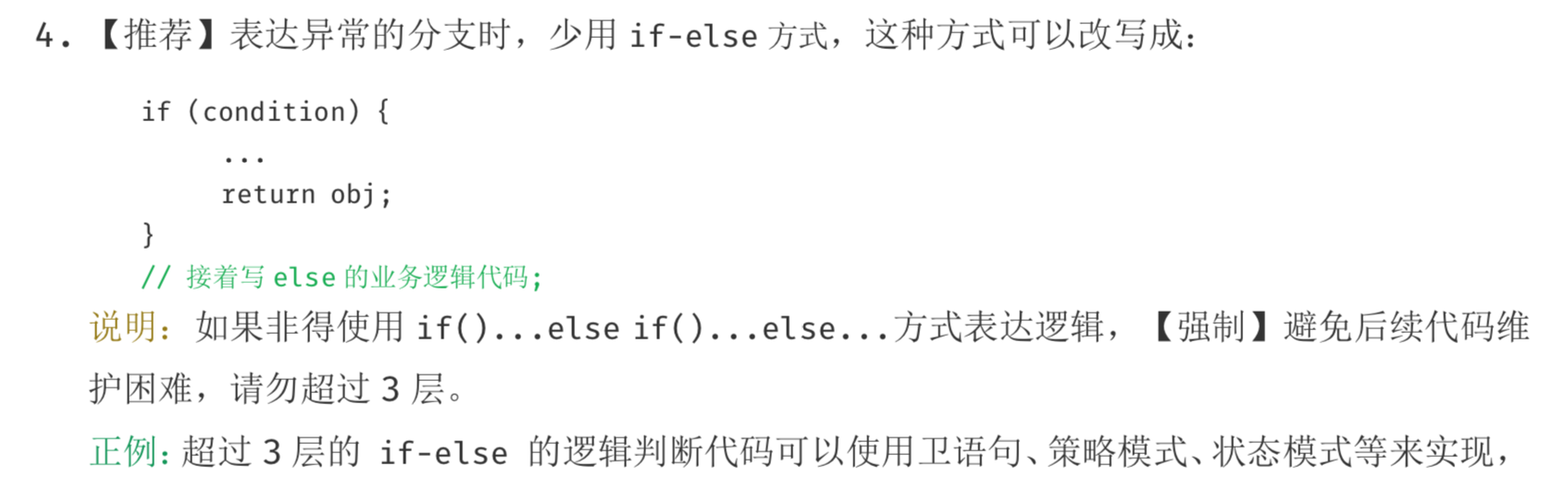
因此首先考虑采用状态设计模式及策略设计模式重构。
状态模式
状态模式的角色:
- state状态
表示状态,定义了根据不同状态进行不同处理的接口,该接口是那些处理内容依赖于状态的方法集合,对应实例的state类 - 具体的状态
实现了state接口,对应daystate和nightstate - context
context持有当前状态的具体状态的实例,此外,他还定义了供外部调用者使用的状态模式的接口。
首先我们知道每个http请求都是由method及uri来唯一标识的,所谓路由就是通过这个唯一标识定位到controller类的中的某个方法。
因此把HttpLabel作为状态
@Data

@AllArgsConstructor

public class HttpLabel {

    private String uri;

    private HttpMethod method;

}
状态接口:
public interface Route {

    /**

     * 路由

     *

     * @param request

     * @return

     */

    GeneralResponse call(FullHttpRequest request);

}
为每个状态添加状态实现:
public void route() {

    //单例controller类

    final DemoController demoController = DemoController.getInstance();

    Map<HttpLabel, Route> map = new HashMap<>();

    map.put(new HttpLabel("/login", HttpMethod.POST), demoController::login);

    map.put(new HttpLabel("/logout", HttpMethod.POST), demoController::login);

}
接到请求,判断状态,调用不同接口:
public class ServerHandler extends SimpleChannelInboundHandler<FullHttpRequest> {

    @Override

    public void channelRead0(ChannelHandlerContext ctx, FullHttpRequest request) {

        String uri = request.uri();

        GeneralResponse generalResponse;

        if (uri.contains("?")) {

            uri = uri.substring(0, uri.indexOf("?"));

        }

        Route route = map.get(new HttpLabel(uri, request.method()));

        if (route != null) {

            ResponseUtil.response(ctx, request, route.call(request));

        } else {

            generalResponse = new GeneralResponse(HttpResponseStatus.BAD_REQUEST, "请检查你的请求方法及url", null);

            ResponseUtil.response(ctx, request, generalResponse);

        }

    }

}
使用状态设计模式重构代码,在增加url时只需要网map里面put一个值就行了。
Netty实现类似SpringMVC路由
后来看了 JAVA反射+运行时注解实现URL路由 发现反射+注解的方式很优雅,代码也不复杂。
下面介绍Netty使用反射实现URL路由。
路由注解:
@Target(ElementType.METHOD)

@Retention(RetentionPolicy.RUNTIME)

public @interface RequestMapping {

    /**

     * 路由的uri

     *

     * @return

     */

    String uri();

    /**

     * 路由的方法

     *

     * @return

     */

    String method();

}
json格式的body:
@Target(ElementType.PARAMETER)

@Retention(RetentionPolicy.RUNTIME)

public @interface RequestBody {

}
异常类(用于全局异常处理,实现 @ControllerAdvice 异常处理):
@Data

public class MyRuntimeException extends RuntimeException {

    private GeneralResponse generalResponse;

    public MyRuntimeException(String message) {

        generalResponse = new GeneralResponse(HttpResponseStatus.INTERNAL_SERVER_ERROR, message);

    }

    public MyRuntimeException(HttpResponseStatus status, String message) {

        generalResponse = new GeneralResponse(status, message);

    }

    public MyRuntimeException(GeneralResponse generalResponse) {

        this.generalResponse = generalResponse;

    }

    @Override

    public synchronized Throwable fillInStackTrace() {

        return this;

    }

}
扫描classpath下带有@RequestMapping注解的方法,将这个方法放进一个路由Map:Map<HttpLabel, Action<GeneralResponse>> httpRouterAction,key为上面提到过的Http唯一标识 HttpLabel,value为通过反射调用的方法:
@Slf4j

public class HttpRouter extends ClassLoader {

    private Map<HttpLabel, Action<GeneralResponse>> httpRouterAction = new HashMap<>();

    private String classpath = this.getClass().getResource("").getPath();

    private Map<String, Object> controllerBeans = new HashMap<>();

    @Override

    protected Class<?> findClass(String name) throws ClassNotFoundException {

        String path = classpath + name.replaceAll("\\.", "/");

        byte[] bytes;

        try (InputStream ins = new FileInputStream(path)) {

            try (ByteArrayOutputStream out = new ByteArrayOutputStream()) {

                byte[] buffer = new byte[1024 * 5];

                int b = 0;

                while ((b = ins.read(buffer)) != -1) {

                    out.write(buffer, 0, b);

                }

                bytes = out.toByteArray();

            }

        } catch (Exception e) {

            throw new ClassNotFoundException();

        }

        return defineClass(name, bytes, 0, bytes.length);

    }

    public void addRouter(String controllerClass) {

        try {

            Class<?> cls = loadClass(controllerClass);

            Method[] methods = cls.getDeclaredMethods();

            for (Method invokeMethod : methods) {

                Annotation[] annotations = invokeMethod.getAnnotations();

                for (Annotation annotation : annotations) {

                    if (annotation.annotationType() == RequestMapping.class) {

                        RequestMapping requestMapping = (RequestMapping) annotation;

                        String uri = requestMapping.uri();

                        String httpMethod = requestMapping.method().toUpperCase();

                        // 保存Bean单例

                        if (!controllerBeans.containsKey(cls.getName())) {

                            controllerBeans.put(cls.getName(), cls.newInstance());

                        }

                        Action action = new Action(controllerBeans.get(cls.getName()), invokeMethod);

                        //如果需要FullHttpRequest,就注入FullHttpRequest对象

                        Class[] params = invokeMethod.getParameterTypes();

                        if (params.length == 1 && params[0] == FullHttpRequest.class) {

                            action.setInjectionFullhttprequest(true);

                        }

                        // 保存映射关系

                        httpRouterAction.put(new HttpLabel(uri, new HttpMethod(httpMethod)), action);

                    }

                }

            }

        } catch (Exception e) {

            log.warn("{}", e);

        }

    }

    public Action getRoute(HttpLabel httpLabel) {

        return httpRouterAction.get(httpLabel);

    }

}
通过反射调用controller 类中的方法:
@Data

@RequiredArgsConstructor

@Slf4j

public class Action {

    @NonNull

    private Object object;

    @NonNull

    private Method method;

    private List<Class> paramsClassList;

    public GeneralResponse call(Object... args) {

        try {

            return (GeneralResponse) method.invoke(object, args);

        } catch (InvocationTargetException e) {

            Throwable targetException = e.getTargetException();

            //实现 `@ControllerAdvice` 异常处理,直接抛出自定义异常

            if (targetException instanceof MyRuntimeException) {

                return ((MyRuntimeException) targetException).getGeneralResponse();

            }

            log.warn("method invoke error: {}", e);

            return new GeneralResponse(HttpResponseStatus.INTERNAL_SERVER_ERROR, String.format("Internal Error: %s", ExceptionUtils.getRootCause(e)), null);

        } catch (IllegalAccessException e) {

            log.warn("method invoke error: {}", e);

            return new GeneralResponse(HttpResponseStatus.INTERNAL_SERVER_ERROR, String.format("Internal Error: %s", ExceptionUtils.getRootCause(e)), null);

        }

    }

}
ServerHandler.java处理如下:
public void channelRead0(ChannelHandlerContext ctx, FullHttpRequest request) {

    String uri = request.uri();

    GeneralResponse generalResponse;

    if (uri.contains(DELIMITER)) {

        uri = uri.substring(0, uri.indexOf(DELIMITER));

    }

    //根据不同的请求API做不同的处理(路由分发)

    Action action = httpRouter.getRoute(new HttpLabel(uri, request.method()));

    if (action != null) {

        String s = request.uri();

        if (request.headers().get(HttpHeaderNames.CONTENT_TYPE.toString()).equals(HttpHeaderValues.APPLICATION_X_WWW_FORM_URLENCODED.toString())) {

            s = s + "&" + request.content().toString(StandardCharsets.UTF_8);

        }

        QueryStringDecoder queryStringDecoder = new QueryStringDecoder(s);

        Map<String, List<String>> parameters = queryStringDecoder.parameters();

        Class[] classes = action.getMethod().getParameterTypes();

        Object[] objects = new Object[classes.length];

        for (int i = 0; i < classes.length; i++) {

            Class c = classes[i];

            //处理@RequestBody注解

            Annotation[] parameterAnnotation = action.getMethod().getParameterAnnotations()[i];

            if (parameterAnnotation.length > 0) {

                for (int j = 0; j < parameterAnnotation.length; j++) {

                    if (parameterAnnotation[j].annotationType() == RequestBody.class &&

                            request.headers().get(HttpHeaderNames.CONTENT_TYPE.toString()).equals(HttpHeaderValues.APPLICATION_JSON.toString())) {

                        objects[i] = JsonUtil.fromJson(request, c);

                    }

                }

                //处理数组类型

            } else if (c.isArray()) {

                String paramName = action.getMethod().getParameters()[i].getName();

                List<String> paramList = parameters.get(paramName);

                if (CollectionUtils.isNotEmpty(paramList)) {

                    objects[i] = ParamParser.INSTANCE.parseArray(c.getComponentType(), paramList);

                }

            } else {

                //处理基本类型和string

                String paramName = action.getMethod().getParameters()[i].getName();

                List<String> paramList = parameters.get(paramName);

                if (CollectionUtils.isNotEmpty(paramList)) {

                    objects[i] = ParamParser.INSTANCE.parseValue(c, paramList.get(0));

                } else {

                    objects[i] = ParamParser.INSTANCE.parseValue(c, null);

                }

            }

        }

        ResponseUtil.response(ctx, HttpUtil.isKeepAlive(request), action.call(objects));

    } else {

        //错误处理

        generalResponse = new GeneralResponse(HttpResponseStatus.BAD_REQUEST, "请检查你的请求方法及url", null);

        ResponseUtil.response(ctx, HttpUtil.isKeepAlive(request), generalResponse);

    }

}
DemoController 方法配置:
@RequestMapping(uri = "/login", method = "POST")

    public GeneralResponse login(@RequestBody User user, FullHttpRequest request,

                                 String test, Integer test1, int test2,

                                 long[] test3, Long test4, String[] test5, int[] test6) {

        System.out.println(test2);

        log.info("/login called,user: {} ,{} ,{} {} {} {} {} {} {} {} ", user, test, test1, test2, test3, test4, test5, test6);

        return new GeneralResponse(null);

    }
测试结果如下:
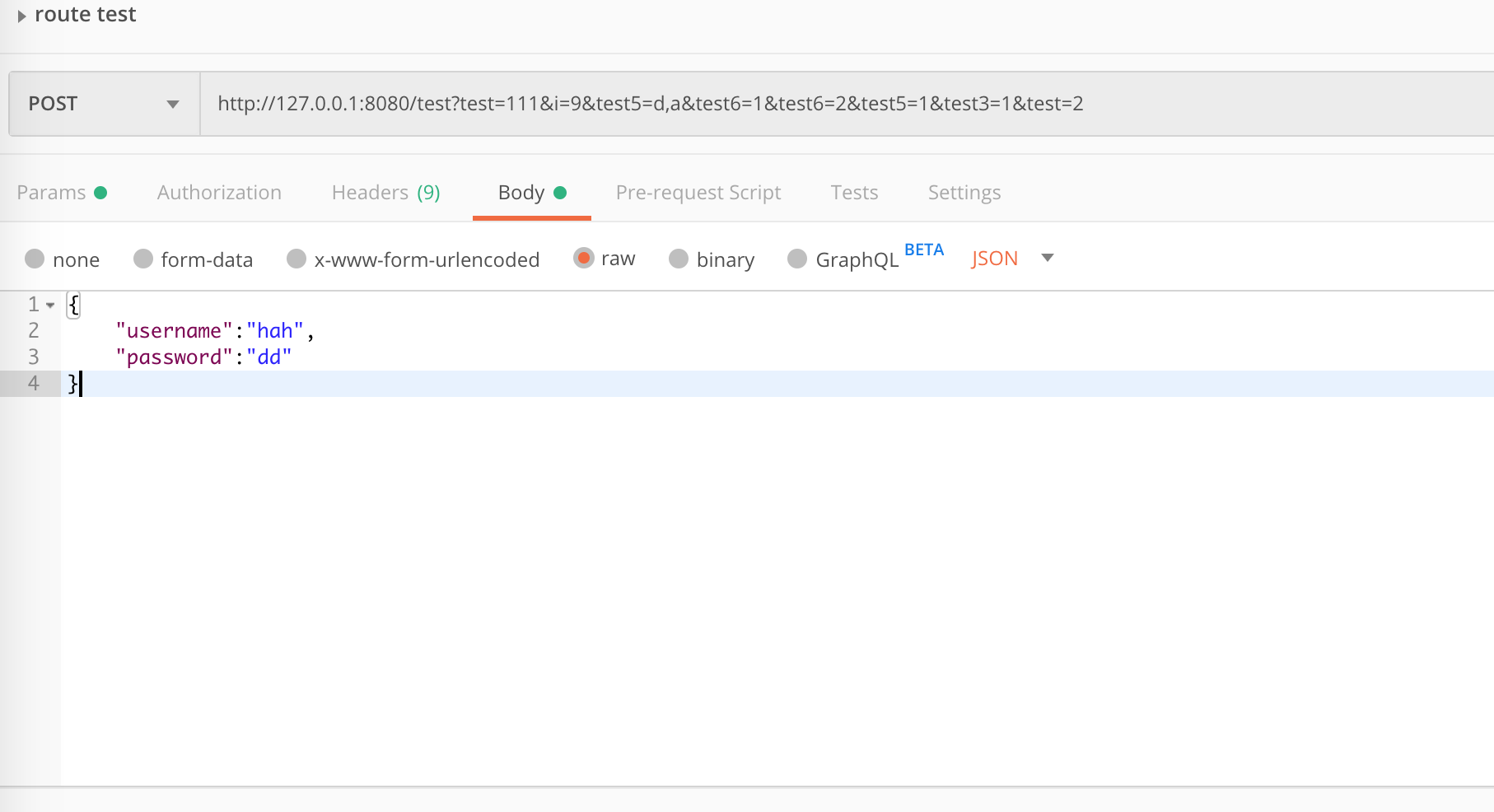
netty-route 得到结果如下:
user=User(username=hah, password=dd),test=111,test1=null,test2=0,test3=[1],test4=null,test5=[d,a, 1],test6=[1, 2]
完整代码在 https://github.com/morethink/Netty-Route
Netty URL路由方案探讨的更多相关文章
- 一种dubbo逻辑路由方案
背景介绍 现在很多的公司都在用dubbo.springcloud做为服务化/微服务的开发框架,服务化之后应用越来越多,链路越来越长,服务环境的治理变的很困难.比如:研发团队的人很多的,同时有几个分支在 ...
- 一种dubbo逻辑路由方案(服务化隔离环境)
背景介绍 现在很多的公司都在用dubbo.springcloud做为服务化/微服务的开发框架,服务化之后应用越来越多,链路越来越长,服务环境的治理变的很困难.比如:研发团队的人很多的,同时有几个分支在 ...
- ASP.NET Core 2.2 : 十六.扒一扒新的Endpoint路由方案
ASP.NET Core 从2.2版本开始,采用了一个新的名为Endpoint的路由方案,与原来的方案在使用上差别不大,但从内部运行方式上来说,差别还是很大的.上一篇详细介绍了原版路由方案的运行机制, ...
- vue单页应用前进刷新后退不刷新方案探讨
引言 前端webapp应用为了追求类似于native模式的细致体验,总是在不断的在向native的体验靠拢:比如本文即将要说到的功能,native由于是多页应用,新页面可以启用一个的新的webview ...
- python django基础二URL路由系统
URL配置 基本格式 from django.conf.urls import url #循环urlpatterns,找到对应的函数执行,匹配上一个路径就找到对应的函数执行,就不再往下循环了,并给函数 ...
- ASP.NET Core 2.2 : 十六.扒一扒新的Endpoint路由方案 try.dot.net 的正确使用姿势 .Net NPOI 根据excel模板导出excel、直接生成excel .Net NPOI 上传excel文件、提交后台获取excel里的数据
ASP.NET Core 2.2 : 十六.扒一扒新的Endpoint路由方案 ASP.NET Core 从2.2版本开始,采用了一个新的名为Endpoint的路由方案,与原来的方案在使用上差别不 ...
- 【转】Asp.Net MVC4 之Url路由
MVC4常见路由的处理方式 //直接方法重载+匿名对象 routes.MapRoute( name: "Default", url: "{controller}/{act ...
- Asp.Net MVC4 之Url路由
先来看下面两个个url,对比一下: http://xxx.yyy.com/Admin/UserManager.aspx http://xxx.yyy.com/Admin/DeleteUser/1001 ...
- ASP.NET Core 2.2 : 十六.扒一扒2.2版更新的新路由方案
原文:ASP.NET Core 2.2 : 十六.扒一扒2.2版更新的新路由方案 ASP.NET Core 从2.2版本开始,采用了一个新的名为Endpoint的路由方案,与原来的方案在使用上差别不大 ...
随机推荐
- 单片机FLASH与RAM、ROM的关系
片机FLASH主要用作程序存贮器,就是替代以前的ROM,最大的有有点是降低了芯片的成本并且可以做到电擦写,目前市场上单片机的FALSH寿命相差比较大,擦写次数从1000~10万的都有,但存储时间可以保 ...
- sql%bulk_rowcount && sql%rowcount 的使用
说明: %BULK_ROWCOUNT 属性计算FORALL迭代影响行数 在进行SQL数据操作语句时,SQL引擎打开一个隐式游标(命名为SQL),该游标的标量属性(scalar attribute)有 ...
- 使用FileReader对象的readAsDataURL方法来读取图像文件
使用FileReader对象的readAsDataURL方法来读取图像文件 FileReader对象的readAsDataURL方法可以将读取到的文件编码成Data URL.Data URL是一项 ...
- 基于 Jmeter 的 web 端接口自动化测试平台
简介 基于之前的react+unittest+flask的接口自动化平台开发经验,和趟过的坑,我重新开发了这个接口自动化平台.平台前端采用的antd+dva+umi的antd-pro模板,结合平台业务 ...
- [转帖]overlay文件系统解析
overlay文件系统解析 来源:http://dockone.io/article/1511 原作者: 陈爱珍 布道师@七牛云 一个 overlay 文件系统包含两个文件系统,一个 upper 文件 ...
- mybatis映射文件的使用(一),工程目录结构、源代码和数据库
代码开发环境 开发工具为IDEA 工程构建方式为maven 数据库为mysql 5.7.20 mybatis版本为 3.1.1 mysql-connect-java jar包版本为 5.1.34 数据 ...
- springmvc+mybatis 实现分页查询
为简化分页功能,设计了一个分页的JSP标签,只需要在页面使用分页标签,就可以完成所有页面的分页功能. 1. 项目结构和数据库设计 (1) 项目结构: (2) 数据库设计 2. PageModel.ja ...
- LOJ #143. 质数判定
题目描述 判定输入的数是不是质数. 输入格式 若干行,一行一个数 x. 行数不超过 1.5×10⁴. 输出格式 对于输入的每一行,如果 x 是质数输出一行 Y,否则输出一行 N. 样例 样例输入 ...
- Day22-Django之缓存
由于Django是动态网站,所有每次请求均会去数据进行相应的操作,当程序访问量大时,耗时必然会更加明显,最简单解决方式是使用:缓存,缓存将一个某个views的返回值保存至内存或者memcache中,5 ...
- Harbor快速部署到Kubernetes集群及登录问题解决
Harbor(https://goharbor.io)是一个功能强大的容器镜像管理和服务系统,用于提供专有容器镜像服务.随着云原生架构的广泛使用,原来由VMWare开发的Harbor也加入了云原生基金 ...