
Eclipse – Java.Lang.OutOfMemoryError: Java Heap Space(转)
In Eclipse IDE, if your program is consuming a lot of memory (loading big data) like this :
  List<Domain> list = domainBo.findAllDomain(100000);


  for(Domain domain : list){

	process(domain.getDomainName());

  }
It can easily hit java.lang.OutOfMemoryError: Java heap space :
Exception in thread "main" java.lang.OutOfMemoryError: Java heap space

	at java.util.HashMap.<init>(HashMap.java:209)

	at java.util.LinkedHashMap.<init>(LinkedHashMap.java:181)
1. Solution – VM arguments
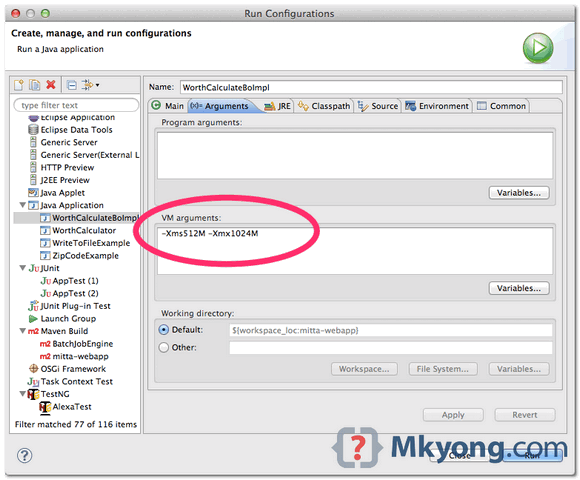
On Eclipse menu, clicks Run -> Run Configurations.., select the Java application you want to run, clicks on theArguments tab, update the VM arguments with the following options
-Xms<size> - Set initial Java heap size

-Xmx<size> - Set maximum Java heap size
For example, -Xms512M -Xmx1024M
2. Mistake – eclipse.ini
The memory settings in eclipse.ini is allocated to Eclipse IDE only, not the program you want to run. A very common mistake is updated the heap size in eclipse.ini, and expects it to solve above out of memory problem.
The Java application, Ant / Maven build scripts, or unit test cases, are run as an external tool from Eclipse, and it does not inherit the VM settings in eclipse.ini.
But, if your Eclipse IDE is always crashed by no reason, you can try to increase the heap size and perm gen ineclipse.ini.
	-startu

	openFile

	-showsplash

        //...

	-XX:MaxPermSize=512m

	-Xms512m

	-Xmx1024m

        //...

	-Xdock:icon=../Resources/Eclipse.icns

	-XstartOnFirstThread
P.S eclipse.ini is located in the Eclipse installation folder.
Eclipse – java.lang.OutOfMemoryError: Java heap space
http://www.mkyong.com/eclipse/eclipse-java-lang-outofmemoryerror-java-heap-space/
Eclipse – Java.Lang.OutOfMemoryError: Java Heap Space(转)的更多相关文章
- eclipse内存溢出报错:java.lang.OutOfMemoryError:Java heap space
今天执行了一个比較大的程序,处理的数据达到126MB数据,将数据导入数据库中,用eclipse 来訪问时候,总是出现java.lang.OutOfMemoryError:Java heap space ...
- eclipse:Tomcat设置jvm,解决java.lang.OutOfMemoryError: Java heap space 堆内存溢出
eclipse 有启动参数里设置jvm大小,因为eclipse运行时自己也需要jvm,所以eclipse.ini里设置的jvm大小不是具体某个程序运行时所用jvm的大小,这和具体程序运行的jvm大小无 ...
- eclipse中报错:java.lang.OutOfMemoryError: Java heap space
问题: 在eclipse中执行java程序.去重100多万的数据,报例如以下错误: java.lang.OutOfMemoryError: Java heap space 异常原因: 在JVM中假设9 ...
- Eclipse迅速执行:Exception in thread "main" java.lang.OutOfMemoryError: Java heap space
问题叙述性说明: Exception in thread "main" java.lang.OutOfMemoryError: Java heap space 问题原因: 程序中对 ...
- eclipse运行程序时报java.lang.OutOfMemoryError: Java heap space内存不足问题
System.setProperty("webdriver.firefox.bin", "D:\\Mozilla Firefox\\firefox.exe"); ...
- 解决eclipse maven install 造成JVM 内存溢出(java.lang.OutOfMemoryError: Java heap space)
maven install 报错信息: The system is out of resources.Consult the following stack trace for details.jav ...
- 【转】java.lang.OutOfMemoryError: Java heap space的解决
原文地址:http://blog.sina.com.cn/s/blog_4b12778b0100v0bb.html Myeclipse下java.lang.OutOfMemoryError: Java ...
- 关于java.lang.OutOfMemoryError: Java heap space的错误分析
今天无意间遇到这个错误:java.lang.OutOfMemoryError: Java heap space 问题出现原因:使用a标签实现快速下载[当然已经实现了,但想了想还是要归纳解决这类问题] ...
- Exception in thread "main" java.lang.OutOfMemoryError: Java heap space
Exception in thread "main" java.lang.OutOfMemoryError: Java heap space解决方法 问题描述 Exception ...
随机推荐
- Python 3 利用机器学习模型 进行手写体数字检测
0.引言 介绍了如何生成手写体数字的数据,提取特征,借助 sklearn 机器学习模型建模,进行识别手写体数字 1-9 模型的建立和测试. 用到的几种模型: 1. LR,Logistic Regres ...
- Flink架构分析之RPC详解
主要抽象 Flink RPC 框架主要抽象了RpcService,RpcEndpoint,RpcGateway,RpcServer这几个接口,具体实现可以采用多种方式,比如:akka,netty Rp ...
- 正确配置 debian squeeze apt 源
本想在 Debian Squeeze 上安装一些依赖,没想到刚执行 apt-get update ,就出现这样的错误信息. W: GPG error: http://mirrors.163.com s ...
- Hyperledger Fabric 1.0.1至Hyperledger Fabric 1.0.5所升级的内容及修复的问题
基础更新 各版本每次迭代都会有一些基础更新内容,如文档修改覆盖.测试用例完善.用户体验改进及删除冗余无效代码等… 下面分类介绍的是一些版本迭代的重要更新内容,因个人实操和理解有限,部分更新并未明确,如 ...
- python数据分析系列(2)--numpy
NumPy(Numerical Python的简称)是Python数值计算最重要的基础包.大多数提供科学计算的包都是用NumPy的数组作为构建基础. NumPy的部分功能如下: ndarray,一个具 ...
- DockerCon2017前瞻 - Docker企业版体验
DockerCon 2017将于四月17号在美国Austin召开.在去年DockerCon上,Docker公司一系列的发布吹响了进军企业市场的号角.今天,容器技术已经愈发成熟,被越来越多的企业所关注和 ...
- Python20-Day05
一.模块与包 1.模块 什么是模块? 在python中,模块可以分为四个通用类别: 1. 使用python编写的.py文件 2. 已经被编译为共享库或DLL的c或者c++扩展 3. 把一系列模块组织到 ...
- oozie-ext
安装oozie的时候需要ext的包支持,网站上找了一遍不是没有就是这个csdn下载还需要币,麻蛋...下面给出这个链接,在百度云上,如果失效了,在评论区或者给我留言,再发,一下是ext2.2.zip ...
- url的param与dict转换
urllib.parse.urlencode urlencode from urllib import parse from urllib.request import urlopen from ur ...
- 通过NPM快速发布你的NodeJS模块(组件包)
1.更新 NPM - [ npm install -g npm | 该步骤可选:最好使用新版本] 楼主当前版本号 2.6.1 ,如果更新报错,可以尝试 国内淘宝镜像 $ npm -v 2.6.1 // ...