
Android动画-补间(Tween)动画
Android动画的两种方式,其中帧动画上篇文章已经讲了,这次主要讲解的就是补间动画,补间动画就是动画业务场景中常用的旋转,平移,缩放,和渐变效果,帧动画是通过轮播动画实现动画效果,补间动画通过在两个关键帧之间补充渐变的动画效果来实现的,相对而言补间动画的暂用的空间更小,补间动画有两种方式,一种是直接在代码中是实现,另外一种是在XML文件中定义,然后通过代码调用,如果以后有需要直接改xml文件就行不需要改代码。
布局文件
先来看下是实现的效果:
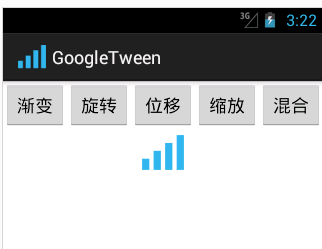
Layout中xml设置:
<RelativeLayout xmlns:android="http://schemas.android.com/apk/res/android"

    xmlns:tools="http://schemas.android.com/tools"

    android:layout_width="match_parent"

    android:layout_height="match_parent"

    tools:context="com.example.googletween.MainActivity" >

    <LinearLayout

        android:id="@+id/line"

        android:layout_width="match_parent"

        android:layout_height="wrap_content"

        android:orientation="horizontal" >

        <Button

            android:onClick="alphaEvent"

            android:layout_width="0dip"

            android:layout_height="wrap_content"

            android:layout_weight="1"

            android:text="渐变"

            />

         <Button

            android:onClick="roateEvent"

            android:layout_width="0dip"

            android:layout_height="wrap_content"

            android:layout_weight="1"

            android:text="旋转"

            />

          <Button

            android:onClick="tranEvent"

            android:layout_width="0dip"

            android:layout_height="wrap_content"

            android:layout_weight="1"

            android:text="位移"

            />

           <Button

            android:onClick="scaleEvent"

            android:layout_width="0dip"

            android:layout_height="wrap_content"

            android:layout_weight="1"

            android:text="缩放"

            />

              <Button

            android:onClick="multiEvent"

            android:layout_width="0dip"

            android:layout_height="wrap_content"

            android:layout_weight="1"

            android:text="混合"

            />

    </LinearLayout>

    <ImageView

        android:id="@+id/image_change"

        android:layout_width="wrap_content"

        android:layout_below="@id/line"

		android:layout_height="wrap_content"

		android:layout_centerHorizontal="true"

		android:layout_centerVertical="true"

		android:src="@drawable/ic_launcher"

        />

</RelativeLayout>
动画效果
渐变透明度,初始化构造函数的时候两个数字最小透明度和最大透明度:
 	AlphaAnimation alphaAnimation=new AlphaAnimation(0.1f, 1f);

    	//设置动画时间

    	alphaAnimation.setDuration(3000);

    	//重复次数

    	alphaAnimation.setRepeatCount(1);

    	alphaAnimation.setRepeatMode(Animation.REVERSE);

    	image.startAnimation(alphaAnimation);
旋转效果,初始化的时候是旋转0度到360度:
RotateAnimation rotateAnimation=new RotateAnimation(0f, 360f);

		rotateAnimation.setDuration(2000);

		image.startAnimation(rotateAnimation);
位移效果,第一个参数fromXDelta ,第二个参数toXDelta:分别是动画起始、结束时X坐标,第三个参数fromYDelta ,第四个参数toYDelta:分别是动画起始、结束时Y坐标:
	TranslateAnimation translateAnimation=new TranslateAnimation(0f, 100f, 0f, 100f);

    	translateAnimation.setDuration(2000);

    	image.startAnimation(translateAnimation);
缩放效果
   	ScaleAnimation scaleAnimation=new ScaleAnimation(0.1f, 1f, 0.1f, 1f);

    	scaleAnimation.setDuration(2000);

    	image.startAnimation(scaleAnimation);
缩放的同时移动(最后两种效果混合):
AnimationSet  animationSet=new AnimationSet(true);

    	TranslateAnimation translateAnimation=new TranslateAnimation(0f, 100f, 0f, 100f);

    	ScaleAnimation scaleAnimation=new ScaleAnimation(0.1f, 1f, 0.1f, 1f);

    	animationSet.addAnimation(translateAnimation);

    	animationSet.addAnimation(scaleAnimation);

    	animationSet.setDuration(2000);

    	image.startAnimation(animationSet);
第二种是在xml文件中定义,将代码中的属性值在xml中设置即可:
渐变xml
<?xml version="1.0" encoding="utf-8"?>

<alpha

    xmlns:android="http://schemas.android.com/apk/res/android"

    android:fromAlpha="0.1"

    android:toAlpha="1.0"

    android:duration="2000"

    android:repeatCount="1"

    android:repeatMode="reverse">

</alpha>
调用:
   	Animation alphaAnimation=AnimationUtils.loadAnimation(this, R.anim.alpha);

    	image.startAnimation(alphaAnimation);
旋转xml:
<?xml version="1.0" encoding="utf-8"?>

<rotate

    xmlns:android="http://schemas.android.com/apk/res/android"

    android:duration="2000"

    android:fromDegrees="0"

    android:toDegrees="360">

</rotate>
调用:
	Animation rotateAnimation=AnimationUtils.loadAnimation(this, R.anim.roate);

    	image.startAnimation(rotateAnimation);
缩放xml:
<?xml version="1.0" encoding="utf-8"?>

<scale

    xmlns:android="http://schemas.android.com/apk/res/android"

    android:duration="2000"

    android:fromXScale="0"

    android:toXScale="1"

    android:fromYScale="0"

    android:toYScale="1">

</scale>
调用:
  	Animation scaleAnimation=AnimationUtils.loadAnimation(this, R.anim.scale);

    	image.startAnimation(scaleAnimation);
位移xml:
<?xml version="1.0" encoding="utf-8"?>

<translate

    xmlns:android="http://schemas.android.com/apk/res/android"

     android:duration="2000"

     android:fromXDelta="0"

     android:toXDelta="100"

     android:fromYDelta="0"

     android:toYDelta="100">

</translate>
调用:
Animation translateAnimation=AnimationUtils.loadAnimation(this, R.anim.tran);

    	image.startAnimation(translateAnimation);
组合xml:
<?xml version="1.0" encoding="utf-8"?>

<set>

    <alpha

        xmlns:android="http://schemas.android.com/apk/res/android"

        android:duration="2000"

        android:fromAlpha="0.1"

        android:repeatCount="1"

        android:repeatMode="reverse"

        android:toAlpha="1.0" >

    </alpha>

    <rotate

        xmlns:android="http://schemas.android.com/apk/res/android"

        android:duration="2000"

        android:fromDegrees="0"

        android:toDegrees="360" >

    </rotate>

    <scale

        xmlns:android="http://schemas.android.com/apk/res/android"

        android:duration="2000"

        android:fromXScale="0"

        android:fromYScale="0"

        android:toXScale="1"

        android:toYScale="1" >

    </scale>

    <translate

        xmlns:android="http://schemas.android.com/apk/res/android"

        android:duration="2000"

        android:fromXDelta="0"

        android:fromYDelta="0"

        android:toXDelta="100"

        android:toYDelta="100" >

    </translate>

</set>
调用:
Animation animationSet=AnimationUtils.loadAnimation(this, R.anim.set);

    	image.startAnimation(animationSet);
Android动画-补间(Tween)动画的更多相关文章
- js 动画补间 Tween
1 /* RunningList (触发过程中可以安全的删除自己) 2 如果触发过程中删除(回调函数中删除正在遍历的数组), 不仅 len 没有变(遍历前定义的len没有变, 真实的len随之减少), ...
- Tween(补间)动画
视图动画,也叫Tween(补间)动画可以在一个视图容器内执行一系列简单变换(位置.大小.旋转.透明度).譬如,如果你有一个TextView对象,您可以移动.旋转.缩放.透明度设置其文本,当然,如果它有 ...
- Android(java)学习笔记199:Android中补间动画(Tween Animation)
本文主要简单介绍补间动画使用代码实现, 关于使用xml实现补间动画,可以参看:自定义控件三部曲之动画篇(一)——alpha.scale.translate.rotate.set的xml属性及用法 1. ...
- Android(java)学习笔记142:Android中补间动画(Tween Animation)
本文主要简单介绍补间动画使用代码实现, 关于使用xml实现补间动画, 可以参看:自定义控件三部曲之动画篇(一)——alpha.scale.translate.rotate.set的xml属性及用法 1 ...
- android 帧动画,补间动画,属性动画的简单总结
帧动画——FrameAnimation 将一系列图片有序播放,形成动画的效果.其本质是一个Drawable,是一系列图片的集合,本身可以当做一个图片一样使用 在Drawable文件夹下,创建ani ...
- Android笔记(六十四) android中的动画——补间动画(tweened animation)
补间动画就是只需要定义动画开始和结束的位置,动画中间的变化由系统去补齐. 补间动画由一下四种方式: 1.AplhaAnimation——透明度动画效果 2.ScaleAnimation ——缩放动画效 ...
- 属性动画 补间动画 帧动画 基本使用案例 MD
Markdown版本笔记 我的GitHub首页 我的博客 我的微信 我的邮箱 MyAndroidBlogs baiqiantao baiqiantao bqt20094 baiqiantao@sina ...
- 【Android动画】之Tween动画 (渐变、缩放、位移、旋转)
Android 平台提供了两类动画. 一类是Tween动画,就是对场景里的对象不断的进行图像变化来产生动画效果(旋转.平移.放缩和渐变). 第二类就是 Frame动画,即顺序的播放事先做好的图像,与g ...
- Android 动画 属性动画 视图动画 补间动画 帧动画 详解 使用
Android动画 Property Animation res/animator/filename.xml In Java: R.animator.filename In XML: @[packag ...
随机推荐
- Java异常处理中的恢复模型
异常处理理论上有两种基本模型.Java支持终止模型,在这种模型中,假设错误非常关键,以至于程序无法返回到异常发生的地方继续执行.一旦异常被抛出,就表明错误已无法挽回,也不能回来继续执行.长久以来,尽管 ...
- 文件系统层级结构标准(FHS)
参考资料:FHS 简介 FHS目前发展到3.0版本,发布于2015年6月3日,由Linux基金会在负责维护.它规定了Linux的文件层级结构,使得各Linux发行版.软件开发商知道应该将哪些文件放在哪 ...
- m3u8转mp4
先进行一波操作 新建一个文件夹,里面床两个txt文件 如图 里面随意写一些内容 之后新建一个demo.bat文件.里面输入 copy /b 1.txt+2.txt new.txt 之后双击会有一个ne ...
- Gumbel-Softmax Trick和Gumbel分布
之前看MADDPG论文的时候,作者提到在离散的信息交流环境中,使用了Gumbel-Softmax estimator.于是去搜了一下,发现该技巧应用甚广,如深度学习中的各种GAN.强化学习中的A2 ...
- 镣铐之舞:美团安全工程师Black Hat USA演讲
背景 2018年8月9日,全球顶级安全会议——Black Hat USA在美国拉斯维加斯的曼德勒海湾会议中心落下了帷幕,这场盛会在全球黑客心中几乎等同于“世界杯”和“奥斯卡”一样的存在.这场一年一度的 ...
- FGPA 中的计数器Verilog语言(时钟分频器)
在quartusII8.0中为ALTERAFPGA设置一个分频器(计数器) 输入时钟48Mhz 输出时钟9600HZ /* 实验名称: 计数器 ** 程序功能: 将48Mhz的时钟分频为9600Hz ...
- python的可变与不可变数据类型
<python的可变与不可变数据类型> python与C/C++不一样,它的变量使用有自己的特点,当初学python的时候,一定要记住“一切皆为对象,一切皆为对象的引用”这句话,其 ...
- BlocksKit(1)-基本类型的分类
BlocksKit(1)-基本类型的分类 BlocksKit是一个用block的方式来解决我们日常用对集合对象遍历.对象快速生成使用.block作为委托对象的一种综合便利封装库.这个库主要分三个大块C ...
- python配置文件操作——configparser模块
# -*- coding: utf-8 -*- ''' Version : Python27 Author : Spring God Date : 2012-4-26 Info : 配置文件ini所在 ...
- python开发_tkinter_窗口控件_自己制作的Python IDEL_博主推荐(二)
在上一篇blog:python开发_tkinter_窗口控件_自己制作的Python IDEL_博主推荐 中介绍了python中的tkinter的一些东西,你可能对tkinter有一定的了解了.这篇b ...