
iOS开发-委托实战
昨天晚上头疼,写了一部分草草的收笔了,早上起来补发一篇文章,昨天关于委托的基本使用和概念都稍微讲了一下,最开始学习委托的时候苹果官网和中文的博客文章看了不少,相似指数比较高。委托在命名要准确,最好是一看名字就知道用法,看名字就知道是干什么用的,比如说UINavigationControllerDelegate,UITableViewDelegate,这样命名不管是自己开始还是别人维护都是一个非常省心的事情,一举两得。
页面布局
先来看下效果图,这样大概知道应该实现的内容,效果如下:
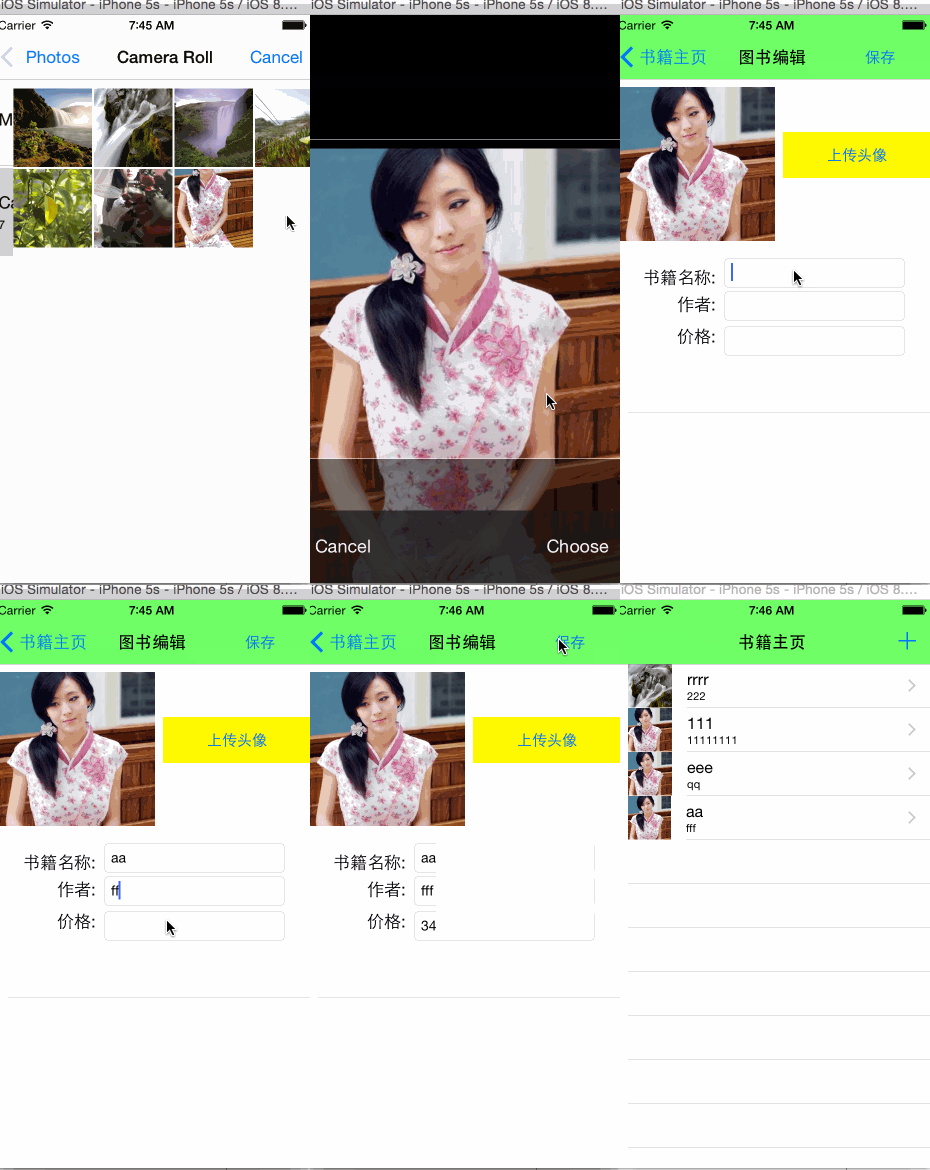
这种实现,在故事板中的布局就是一个NavigationController和一个UITableView的静态表格:
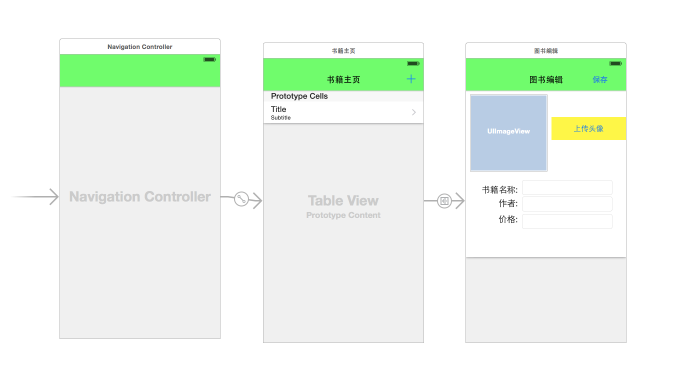
其实添加的按钮是控件库中的Bar Buttom Item,将其中的Identifier设置为Add就可以是上面的效果,有一点需要说明的,添加书籍的视图中是静态单元格,需要删除控制器中多余的方法,不然无法出现效果。
Demo实现
上面跟委托有关联的地方就是保存的时候需要将数据讲给主视图去新增,而不是自己新增数据,可以通过定义一个委托实现上面的效果,具体可以参考本人的上一篇文章。需要先定义一个Book类用来存储数据:
#import <Foundation/Foundation.h>

#import <UIKit/UIKit.h>

@interface Book : NSObject<NSCoding>

@property (strong,nonatomic) UIImage *ConverPicture;

@property (strong,nonatomic) NSString *BookName;

@property (strong,nonatomic) NSString *Author;

@property (strong,nonatomic) NSNumber *Price;

@end
Book.m需要存储数据实现两个方法,具体参考之前的文章NSCoder存储数据:
//

//  Book.m

//  MySearchBar

//

//  Created by keso on 15/2/4.

//  Copyright (c) 2015年 keso. All rights reserved.

//

#import "Book.h"

@implementation Book

- (void)encodeWithCoder:(NSCoder *)aCoder{

    //注意这里是存储的是JPG图片的调用

    [aCoder encodeObject:UIImageJPEGRepresentation(self.ConverPicture,1.0)forKey:@"ConverPicture"];

    [aCoder encodeObject:_BookName forKey:@"BookName"];

    [aCoder encodeObject:_Author forKey:@"Author"];

    [aCoder encodeObject:_Price forKey:@"Price"];

}

- (id)initWithCoder:(NSCoder *)aDecoder{

    self.ConverPicture=[UIImage imageWithData:[aDecoder decodeObjectForKey:@"ConverPicture"]];

    self.BookName=[aDecoder decodeObjectForKey:@"BookName"];

    self.Author=[aDecoder decodeObjectForKey:@"Author"];

    self.Price=[aDecoder decodeObjectForKey:@"Price"];

    return self;

}

@end
首先来看第一个视图:RootViewController.h中的声明:
#import <UIKit/UIKit.h>

#import "EditViewController.h"

@interface RootViewController : UITableViewController<CustomEditViewControllerDelegate>

@end
RootViewController.m中ViewDiLoad中方法加载数据:
- (void)viewDidLoad {

    [super viewDidLoad];

    NSArray *codepath= NSSearchPathForDirectoriesInDomains(NSDocumentDirectory, NSUserDomainMask, YES);

    self.BookPath= [codepath[0] stringByAppendingPathComponent:@"Book.plist"];

    //这个路径暂时好像还没有存储数据的说

    NSFileManager *fileManager = [NSFileManager defaultManager];

    self.BookList=[[NSMutableArray alloc]init];

    NSLog(@"%@",NSHomeDirectory());

    if([fileManager fileExistsAtPath:_BookPath]){

         self.BookList=[NSKeyedUnarchiver unarchiveObjectWithFile:self.BookPath];

    }

}
实现UITableView中的方法:
- (NSInteger)numberOfSectionsInTableView:(UITableView *)tableView {

    return 1;

}

- (NSInteger)tableView:(UITableView *)tableView numberOfRowsInSection:(NSInteger)section {

    return [self.BookList count];

}

- (UITableViewCell *)tableView:(UITableView *)tableView cellForRowAtIndexPath:(NSIndexPath *)indexPath {

    static NSString *cellflag = @"BookCellFlag";

    UITableViewCell *cell = [tableView dequeueReusableCellWithIdentifier:cellflag];

    Book *book=self.BookList[indexPath.row];

    [cell.textLabel setText:book.BookName];

    [cell.detailTextLabel setText:book.Author];

    [cell.imageView setImage:book.ConverPicture];

    return cell;

}

- (void)prepareForSegue:(UIStoryboardSegue *)segue sender:(id)sender{

    if ([segue.identifier isEqualToString:@"editSegue"]) {

        EditViewController *controller = segue.destinationViewController;

        [controller setCustomDelegate:self];

    }

}
prepareForSegue用来处理新增的动作,主视图生命了自定义的委托,需要实现其方法供子视图调用:
-(void)saveBookInfo:(EditViewController *)controller{

    if (self.BookList==nil) {

        self.BookList=[[NSMutableArray alloc]init];

    }

    Book *book=controller.OriginalBook;

    [self.BookList addObject:book];

    //将文件整体写入之后更新数据

    [NSKeyedArchiver archiveRootObject:self.BookList toFile:self.BookPath];

    [self.tableView reloadData];

}
子视图的.h文件中的声明:
#import <UIKit/UIKit.h>

#import "Book.h"

@class EditViewController;

#pragma mark - 自定义委托

@protocol CustomEditViewControllerDelegate <NSObject>

//定义一个方法,在根视图中保存数据

- (void)saveBookInfo:(EditViewController *)controller;

@end

@interface EditViewController : UITableViewController <UIImagePickerControllerDelegate,UIPickerViewDelegate,UIPickerViewDataSource,

UINavigationControllerDelegate>

@property (weak, nonatomic) id<CustomEditViewControllerDelegate> customDelegate;

@property (strong,nonatomic) Book  *OriginalBook;

@property (weak, nonatomic) IBOutlet UIImageView *converImage;

@property (weak, nonatomic) IBOutlet UITextField *bookNameText;

@property (weak, nonatomic) IBOutlet UITextField *authorText;

@property (weak, nonatomic) IBOutlet UITextField *priceText;

@end
其中需要注意的是自定义的委托,需要传递一个子视图,先用Class声明一下使用到的类,子视图也比较简单,选择图片之前有一篇博客已经写过如何使用,其他的就是控件赋值,详细代码如下:
//

//  EditViewController.m

//  MySearchBar

//

//  Created by keso on 15/2/4.

//  Copyright (c) 2015年 keso. All rights reserved.

//

#import "EditViewController.h"

@interface EditViewController ()

@end

@implementation EditViewController

- (void)viewDidLoad {

    [super viewDidLoad];

    // Uncomment the following line to preserve selection between presentations.

    // self.clearsSelectionOnViewWillAppear = NO;

    // Uncomment the following line to display an Edit button in the navigation bar for this view controller.

    // self.navigationItem.rightBarButtonItem = self.editButtonItem;

}

- (IBAction)chooseConverImage:(id)sender {

    UIImagePickerController *picker=[[UIImagePickerController alloc]init];

    // 指定照片源

    [picker setSourceType:UIImagePickerControllerSourceTypePhotoLibrary];

    // 指定是否允许修改

    [picker setAllowsEditing:YES];

    // 指定代理

    [picker setDelegate:self];

    // 显示照片选择控制器

    [self.navigationController presentViewController:picker animated:YES completion:nil];

}

- (void)imagePickerController:(UIImagePickerController *)picker didFinishPickingMediaWithInfo:(NSDictionary *)info{

    UIImage *image = info[@"UIImagePickerControllerEditedImage"];

    //设置图片

    [self.converImage setImage:image];

    [self.navigationController dismissViewControllerAnimated:YES completion:nil];

}

- (IBAction)saveBook:(id)sender {

    if (self.OriginalBook==nil) {

        self.OriginalBook=[[Book alloc]init];

    }

    //书籍名称

    _OriginalBook.BookName=_bookNameText.text;

    //封面

    _OriginalBook.ConverPicture=_converImage.image;

    _OriginalBook.Author=_authorText.text;

    _OriginalBook.Price=[[NSNumber alloc] initWithFloat:[_priceText.text floatValue]];

    // 通知父视图控制器(用户列表)保存用户记录,并且返回

    [_customDelegate saveBookInfo:self];

    //返回到上级视图

    [self.navigationController popViewControllerAnimated:YES];

}

- (void)didReceiveMemoryWarning {

    [super didReceiveMemoryWarning];

    // Dispose of any resources that can be recreated.

}

@end
这个也算是一个委托的小Demo吧,比昨天那两个稍微好点,用到的知识点之前的博客中已经写过,如果有问题可以共同探讨,如有不当,可以评论区交流,感激不尽~
iOS开发-委托实战的更多相关文章
- iOS开发-委托(Delegate)浅谈
委托其实并不是OC中才有,C#中也有,不过彼此的理解方式是不一样的,OC中委托是协议的一种,需要使用@protocol声明,委托一般在iOS开发中页面中传值用的比较多.委托是Cocoa中最简单.最灵活 ...
- iOS开发-CocoaPods实战
CocoaPods 是开发 OS X 和 iOS 应用程序的第三方库的依赖管理工具,如果是正常的开发不需要使用的第三方的代码,CocoaPods是不需要的,但是从实际情况上,为了提高开发效率,Coco ...
- iOS开发项目实战——Swift实现图片轮播与浏览
近期開始开发一个新的iOS应用,自己决定使用Swift.进行了几天之后,发现了一个非常严峻的问题.那就是无论是书籍,还是网络资源,关于Swift的实在是太少了,随便一搜全都是OC实现某某某功能.就算是 ...
- iOS开发项目实战——Swift实现ScrollView滚动栏功能
手机作为一个小屏设备,须要显示的信息往往无法在一个屏幕上显示,此时就须要使用到滚动栏,当然除了像TableView这样能够自带滚动功能的. 假设一个界面上View较多,那就必须要使用到ScrollVi ...
- IOS开发----委托机制
委托模式从GoF装饰模式.适配器模式和模板方法等演变过来,几乎每一个应用都会或多或少的用到委托模式. 在古希腊有一个哲学家,他毕生只做三件事情:“睡觉”.“吃饭”.和“工作”.为了更好的生活,提高工作 ...
- iOS开发-UIScreenEdgePanGestureRecognizer实战
UIScreenEdgePanGestureRecognizer名字很长,而且关于其文档也是少的的可怜,苹果官方给的唯一的一个属性是edges,文档中的解释是这样的: A UIScreenEdgePa ...
- IOS开发-项目实战-点赞功能的实现
实现思路: 1.每一条新闻就是一个cell,在cell上添加点赞按钮. 2.让cell的控制器成为自定义cell的代理,将点击了哪一个cell放在代理方法中传出去. 3.并将这条新闻的ID和当前用户的 ...
- iOS开发——项目实战总结&Block使用注意点浅析
Block使用注意点浅析 1.在使用block前需要对block指针做判空处理. 不判空直接使用,一旦指针为空直接产生崩溃. if (!self.isOnlyNet) { if (succBlock ...
- iOS开发——项目实战总结&带你看看Objective-C的精髓
带你看看Objective-C的精髓 1:接口与实现 @interface...@end @implementation...@end @class 接口(头文件) 实现文件 向前引用 注:类别通过增 ...
随机推荐
- Bunch 转换为 HDF5 文件:高效存储 Cifar 等数据集
关于如何将数据集封装为 Bunch 可参考 关于 『AI 专属数据库的定制』的改进. PyTables 是 Python 与 HDF5 数据库/文件标准的结合.它专门为优化 I/O 操作的性能.最大限 ...
- Anaconda 安装好了,却无法运行?
使用管理员运行:conda prompt 或者 Windows PowerShell 执行命令 conda update anaconda-navigator 还是不行就试试命令: anaconda- ...
- (三)宏 __cplusplus C/C++混合编程
前面一些篇目的内容作为一个在校生,很少用到,可能工作的人会见得多一点,但是第一次整体性的学习还是不希望有落下的东西,虽然不常用但至少要有个印象 那么就进入第三篇<宏 __cplusplus> ...
- python流行的原因
12~14年是云计算最火的几年,大批创业公司和巨头挤破头地进军云计算领域,大家都在做IAAS,最著名的云计算开源平台OpenStack 就是基于Python 开发的,为此催生出不少Python 岗位 ...
- 验证码60s倒计时前端效果
<!doctype html> <html lang="en"> <head> <meta charset="UTF-8&quo ...
- 【20181031T2】几串字符【数位DP思想+组合数】
题面 [错解] 一眼数位DP 设\(f(i,c00,c01,c10,c11)\)-- 神tm DP 哎好像每两位就一定对应c中的一个,那不用记完 所以可以设\(f(i,c00,c01,c10)\)-- ...
- bzoj 1027 floyd求有向图最小环
结合得好巧妙.... 化简后的问题是: 给你两个点集A,B,求B的一个子集BB,使得BB的凸包包含A的凸包,求BB的最小大小. 先特判答案为1,2的情况,答案为3的情况,我们先构造一个有向图: 对于B ...
- Sql server 存储过程基础语法
一.定义变量 --简单赋值 declare @a int print @a --使用select语句赋值 declare @user1 nvarchar() select @user1='张三' pr ...
- 详解Object.constructor
对象的constructor属性引用了该对象的构造函数.对于 Object 对象,该指针指向原始的 Object() 函数.如下: var obj = {}; obj.constructor //ƒ ...
- HDU 4716 A Computer Graphics Problem (水题)
A Computer Graphics Problem Time Limit: 2000/1000 MS (Java/Others) Memory Limit: 32768/32768 K (J ...