
第36篇 Asp.Net源码解析(一)
上面两篇文章说了http协议和IIS处理,这次说下当IIS把请求交给Asp.net后的过程。
AppManagerAppDomainFactory
当IIS把请求交给asp.net时候,如果AppDomain还不存在则创建APPDomain,将AppDomain指派给与请求对应的应用程序,这通过AppManagerAppDomainFactory类中的Create方法实现,代码如下:
public Object Create(String appId, String appPath) {
   try {

       if (appPath[0] == '.') {
           System.IO.FileInfo file = new System.IO.FileInfo(appPath);
           appPath = file.FullName;
       }
       if (!StringUtil.StringEndsWith(appPath, '\\')) {
           appPath = appPath + "\\";
       }

       ...

       ISAPIApplicationHost appHost = new ISAPIApplicationHost(appId, appPath,false);
       //创建环境,包括编译环境
       ISAPIRuntime isapiRuntime = (ISAPIRuntime)_appManager.CreateObjectInternal(appId, typeof(ISAPIRuntime), appHost,  false, null);
       isapiRuntime.StartProcessing();

       return new ObjectHandle(isapiRuntime);

   }
   catch (Exception e) {
         ...
   }
   }
创建完成后,非托管代码开始调用 ISAPIRuntime 中ProcessRequest方法(通过COM调用 )
ISAPIRuntime--asp.net入口
- 首先看下ISAPIRuntime中的ProcessRequest方法签名
public int ProcessRequest(IntPtr ecb, int iWRType);- ProcessRequest有两个参数,一个是请求报文的ecb句柄,一个请求的类型,在运行的过程中,ecb首先被再次封装成托管资源的请求报文wr。 把封装好的代码传递给HttpRuntime类中的ProcessRequestNoDemand. 核心代码如下:
    bool useOOP = (iWRType == WORKER_REQUEST_TYPE_OOP);
    wr = ISAPIWorkerRequest.CreateWorkerRequest(ecb, useOOP);
    wr.Initialize();

    // check if app path matches (need to restart app domain?)
    String wrPath = wr.GetAppPathTranslated();
    String adPath = HttpRuntime.AppDomainAppPathInternal;

    if (adPath == null ||
        StringUtil.EqualsIgnoreCase(wrPath, adPath))
    {

        HttpRuntime.ProcessRequestNoDemand(wr);
        return 0;
    }
    else
    {
        // need to restart app domain
        HttpRuntime.ShutdownAppDomain(ApplicationShutdownReason.PhysicalApplicationPathChanged,
                                    SR.GetString(SR.Hosting_Phys_Path_Changed,
                                                                        adPath,
                                                                        wrPath));
        return 1;
    }
HttpRuntime
- HttpRuntime收到传递过来的HttpWorkerRequest类的实例对象wr,通过调用当前类中的ProcessRequestNow方法,把参数传递给ProcessRequestInternal(ProcessRequestNow的调用了ProcessRequestInternal)。
    internal static void ProcessRequestNoDemand(HttpWorkerRequest wr) {
        RequestQueue rq = _theRuntime._requestQueue;

        wr.UpdateInitialCounters();

        if (rq != null)  // could be null before first request
            wr = rq.GetRequestToExecute(wr);

        if (wr != null) {
            CalculateWaitTimeAndUpdatePerfCounter(wr);
            wr.ResetStartTime();
            ProcessRequestNow(wr);
        }
    }

    internal static void ProcessRequestNow(HttpWorkerRequest wr) {
        _theRuntime.ProcessRequestInternal(wr);
}- 在ProcessRequestInternal中,创建了HttpContext和HttpApplication对象实例,核心代码如下
    private void ProcessRequestInternal(HttpWorkerRequest wr) {

        ...

    // Construct the Context on HttpWorkerRequest, hook everything together
    HttpContext context;

    try {
        context = new HttpContext(wr, false /* initResponseWriter */);
    }
    catch {
        ...
    }

    ...

    try {
            ...
        // Get application instance
        IHttpHandler app = HttpApplicationFactory.GetApplicationInstance(context);

        if (app == null)
            throw new HttpException(SR.GetString(SR.Unable_create_app_object));

            ...

        if (app is IHttpAsyncHandler) {
            // asynchronous handler
            IHttpAsyncHandler asyncHandler = (IHttpAsyncHandler)app;
            context.AsyncAppHandler = asyncHandler;
            asyncHandler.BeginProcessRequest(context, _handlerCompletionCallback, context);
        }
        else {
            // synchronous handler
            app.ProcessRequest(context);
            FinishRequest(context.WorkerRequest, context, null);
        }
    }
    catch (Exception e) {
        ...
    }
}- 在ProcessRequestInternal方法的内部,实现对HttpContext类和HttpApplicationFactory的对象实例的创建,核心代码: 根据上面代码,当获得HttApplication对象后,判断是否是IHttpAsyncHandler类型,如果是则调用BeginProcessRequest方法,此处的if条件是一直成立的,因为HttpApplication实现了IHttpAsyncHandler接口,而ProcessRequest方法的实现也仅仅是抛出了一个异常,笔者觉得此处应该是微软留了一个扩展的地方。
   public class HttpApplication:IComponent,IHttpAsyncHandler, IRequestCompletedNotifier, ISyncContext {
        ...

    }
   void IHttpHandler.ProcessRequest(HttpContext context) {
            throw new HttpException(SR.GetString(SR.Sync_not_supported));
        }
HttpContext对象
这个对象是一个请求响应的结合体,里面包含了HttpRequest和HttpResponse对象,在构造HttpContext对象时,同时也对HttpRequest和HttpResponse也进行了初始化,代码如下:
   internal HttpContext(HttpWorkerRequest wr, bool initResponseWriter) {
        _wr = wr;
        Init(new HttpRequest(wr, this), new HttpResponse(wr, this));

        if (initResponseWriter)
            _response.InitResponseWriter();

        PerfCounters.IncrementCounter(AppPerfCounter.REQUESTS_EXECUTING);
    }
创建HttpApplication
通过HttpApplicationFactory中的静态方法GetApplicationInstance来获得实例对象(常用的工厂模式),在创建对象的时候调用了 _theApplicationFactory.GetNormalApplicationInstance(context);方法(其中context形参是上文创建的HttpContext)来执行实例化操作,核心代码如下:
  internal static IHttpHandler GetApplicationInstance(HttpContext context) {
       if (_customApplication != null)
           return _customApplication;

       // Check to see if it's a debug auto-attach request
       if (context.Request.IsDebuggingRequest)
           return new HttpDebugHandler();

       _theApplicationFactory.EnsureInited();

       _theApplicationFactory.EnsureAppStartCalled(context);

       return _theApplicationFactory.GetNormalApplicationInstance(context);
   }
这个方法里有三个方法的调用,分别是:
i. _theApplicationFactory.EnsureInited()
主要功能是对Global.asxc文件进行编译和处理,并反射出对其中的事件,放到ArrayList中,核心代码如下:
找到global.asax路径进行编译
 private void Init() {
       if (_customApplication != null)
               return;
           try {
               try {
                   _appFilename = GetApplicationFile();
                   CompileApplication();
               }
               finally {
                   SetupChangesMonitor();
               }
           }
           catch {
               throw;
           }
  }
调用ReflectOnApplicationType方法把事件装入ArrayList
   private void CompileApplication() {
           _theApplicationType = BuildManager.GetGlobalAsaxType();
            BuildResultCompiledGlobalAsaxType result = BuildManager.GetGlobalAsaxBuildResult();
            if (result != null) {
                if (result.HasAppOrSessionObjects) {
                    GetAppStateByParsingGlobalAsax();
                }
                _fileDependencies = result.VirtualPathDependencies;
            }

            if (_state == null) {
                _state = new HttpApplicationState();
            }
            ReflectOnApplicationType();
        }
   private void ReflectOnApplicationType() {
        ArrayList handlers = new ArrayList();
        MethodInfo[] methods;
        // get this class methods
        methods = _theApplicationType.GetMethods(BindingFlags.NonPublic | BindingFlags.Public | BindingFlags.Instance | BindingFlags.Static);
        foreach (MethodInfo m in methods) {
            if (ReflectOnMethodInfoIfItLooksLikeEventHandler(m))
                handlers.Add(m);
        }
        Type baseType = _theApplicationType.BaseType;
        if (baseType != null && baseType != typeof(HttpApplication)) {
            methods = baseType.GetMethods(BindingFlags.NonPublic | BindingFlags.Instance | BindingFlags.Static);
            foreach (MethodInfo m in methods) {
                if (m.IsPrivate && ReflectOnMethodInfoIfItLooksLikeEventHandler(m))
                    handlers.Add(m);
            }
        }
        _eventHandlerMethods = new MethodInfo[handlers.Count];
        for (int i = 0; i < _eventHandlerMethods.Length; i++)
            _eventHandlerMethods[i] = (MethodInfo)handlers[i];
    }
ii. _theApplicationFactory.EnsureAppStartCalled(context)
创建特定的HttpApplication实例,触发ApplicationOnStart事件,执行ASP.global_asax中的Application_Start(object sender, EventArgs e)方法。这里创建的HttpApplication实例在处理完事件后,就被回收。 具体实现:
private void EnsureAppStartCalled(HttpContext context) {
 if (!_appOnStartCalled) {
     lock (this) {
       if (!_appOnStartCalled) {
          using (new DisposableHttpContextWrapper(context)) {
               // impersonation could be required (UNC share or app credentials)

               WebBaseEvent.RaiseSystemEvent(this, WebEventCodes.ApplicationStart);

               // fire outside of impersonation as HttpApplication logic takes
               // care of impersonation by itself
               FireApplicationOnStart(context);
           }
           _appOnStartCalled = true;
        }
     }
   }
 }
iii. _theApplicationFactory.GetNormalApplicationInstance(context);
主要是获得HttpApplication实例,首先从队列中去取,如果取出为空,则利用反射创建,调用InitInternal方法
 private HttpApplication GetNormalApplicationInstance(HttpContext context) {
         HttpApplication app = null;
         lock (_freeList) {
             if (_numFreeAppInstances > 0) {
                 app = (HttpApplication)_freeList.Pop();
                 _numFreeAppInstances--;

                 if (_numFreeAppInstances < _minFreeAppInstances) {
                     _minFreeAppInstances = _numFreeAppInstances;
                 }
             }
         }
         if (app == null) {
             // If ran out of instances, create a new one
             app = (HttpApplication)HttpRuntime.CreateNonPublicInstance(_theApplicationType);
             using (new ApplicationImpersonationContext()) {
                // 调用BuildSteps和获得所有的HttpModule
                 app.InitInternal(context, _state, _eventHandlerMethods);
             }
         }
         if (AppSettings.UseTaskFriendlySynchronizationContext) {
             // When this HttpApplication instance is no longer in use, recycle it.
             app.ApplicationInstanceConsumersCounter = new CountdownTask(1); // representing required call to HttpApplication.ReleaseAppInstance
             app.ApplicationInstanceConsumersCounter.Task.ContinueWith((_, o) => RecycleApplicationInstance((HttpApplication)o), app, TaskContinuationOptions.ExecuteSynchronously);
         }
         return app;
     }
从代码中可以分析到,在HttpApplication创建的过程中,是有一个_freeList的一个堆栈来控制的。当对象创建成功后,执行app.InitInternal(context, _state, _eventHandlerMethods)来进行后续的操作。整个的代码流程,可以理解成以下过程:
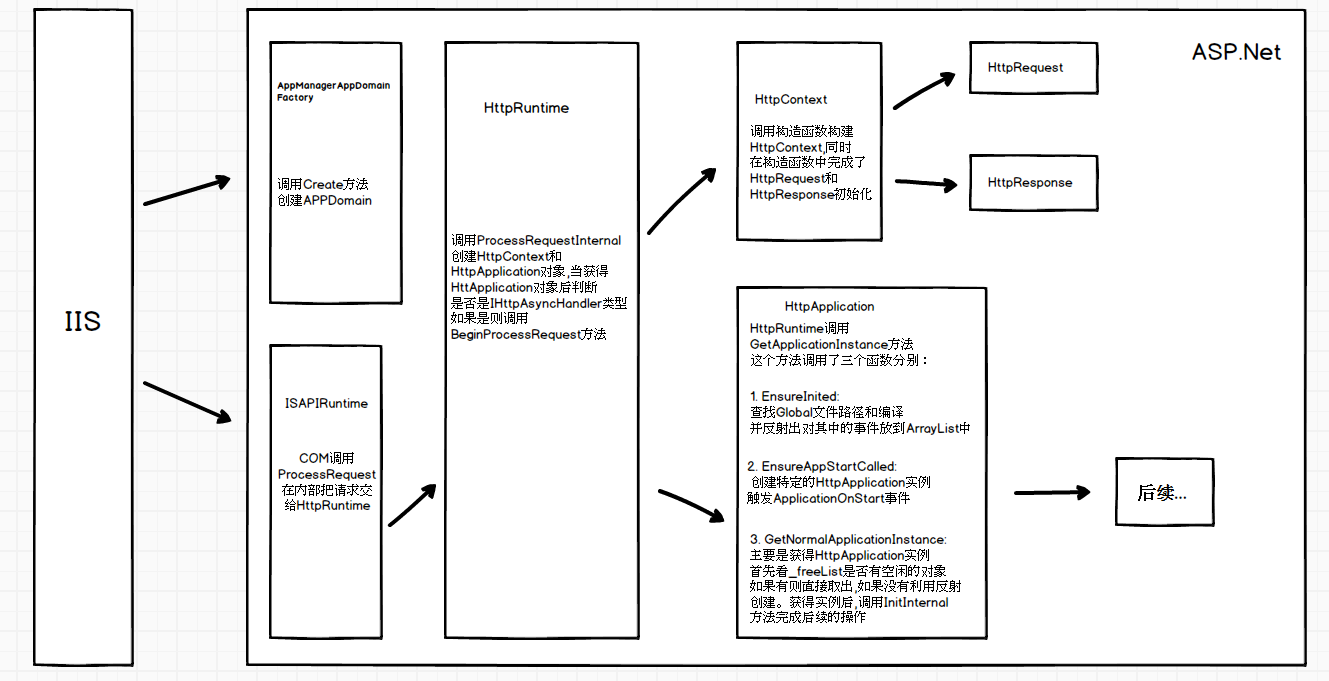
源码git地址:https://github.com/fuwei199006/Source/tree/master/dotnet46/Source
写于 2017.03.07
第36篇 Asp.Net源码解析(一)的更多相关文章
- 第37篇 Asp.Net源码解析(二)--详解HttpApplication
这篇文章花了点时间,差点成烂到电脑里面,写的过程中有好几次修改,最终的这个版本也不是很满意,东西说的不够细,还需要认真的去看下源码才能有所体会,先这样吧,后面有时间把细节慢慢的再修改.顺便对于开发的学 ...
- ExcelReport第二篇:ExcelReport源码解析
导航 目 录:基于NPOI的报表引擎——ExcelReport 上一篇:使用ExcelReport导出Excel 下一篇:扩展元素格式化器 概述 针对上一篇随笔收到的反馈,在展开对ExcelRep ...
- jQuery2.x源码解析(缓存篇)
jQuery2.x源码解析(构建篇) jQuery2.x源码解析(设计篇) jQuery2.x源码解析(回调篇) jQuery2.x源码解析(缓存篇) 缓存是jQuery中的又一核心设计,jQuery ...
- jQuery2.x源码解析(构建篇)
jQuery2.x源码解析(构建篇) jQuery2.x源码解析(设计篇) jQuery2.x源码解析(回调篇) jQuery2.x源码解析(缓存篇) 笔者阅读了园友艾伦 Aaron的系列博客< ...
- jQuery2.x源码解析(设计篇)
jQuery2.x源码解析(构建篇) jQuery2.x源码解析(设计篇) jQuery2.x源码解析(回调篇) jQuery2.x源码解析(缓存篇) 这一篇笔者主要以设计的角度探索jQuery的源代 ...
- jQuery2.x源码解析(回调篇)
jQuery2.x源码解析(构建篇) jQuery2.x源码解析(设计篇) jQuery2.x源码解析(回调篇) jQuery2.x源码解析(缓存篇) 通过艾伦的博客,我们能看出,jQuery的pro ...
- jQuery2.x源码解析(DOM操作篇)
jQuery2.x源码解析(构建篇) jQuery2.x源码解析(设计篇) jQuery2.x源码解析(回调篇) jQuery2.x源码解析(缓存篇) jQuery这个类库最为核心重要的功能就是DOM ...
- ExcelReport源码解析
ExcelReport第二篇:ExcelReport源码解析 导航 目 录:基于NPOI的报表引擎——ExcelReport 上一篇:使用ExcelReport导出Excel 下一篇:扩展元素 ...
- Laravel源码解析--看看Lumen到底比Laravel轻在哪里
在前面一篇<Laravel源码解析--Laravel生命周期详解>中我们利用xdebug详细了解了下Laravel一次请求中到底做了哪些处理.今天我们跟 Lumen 对比下,看看 Lume ...
随机推荐
- codeforces 755D. PolandBall and Polygon
D. PolandBall and Polygon time limit per test 4 seconds memory limit per test 256 megabytes input st ...
- sqlite3编译
1.sqlite3编译: 1.PC版: 1.解压: tar xvf sqlite-autoconf-3140100.tar.gz cd sqlite-autoconf-3140100/ 2.检查配置 ...
- JDBC连接SQL Server 2005步骤详解
一.设置SQL Server服务器: 1.“开始” → “程序” → “Microsoft SQL Server 2005” → “配置工具” → “SQL Server Configurati ...
- 必应地图api文档,微软必应地图web开发版详解,可以在国内使用国外地图
最近,公司项目要求在页面中嵌入地图,需求还算简单,但是由于必须具备响应式(主要是pc和移动端),而且由于公司业务是全球性的,要支持国外地点搜索.考虑到百度,腾讯,高德等等国内地图无法显示国外数据,谷歌 ...
- 支持Angular 2的表格控件
前端框架一直这最近几年特别火的一个话题,尤其是Angular 2拥有众多的粉丝.在2016年9月份Angular 2正式发布之后,大量的粉丝的开始投入到了Angular 2的怀抱.当然这其中也包括我. ...
- Web压力测试小工具:webbench、http_load、Siege、ab
webbench 安装 下载地址:http://home.tiscali.cz/~cz210552/distfiles/webbench-1.5.tar.gz 或者 http://soft.vpser ...
- android ExpandableListView实现不同的布局
最近有一个需求要实现listview的不同布局!因为有好几上header,就想到了ExpandableListView! 这个是我的需求模型:看图(自己画的) 然后百度~google~发帖~总算有点效 ...
- WdatePicker 日历控件使用方法+基本常用方法
WdatePicker 日历控件使用方法+基本常用方法,记录一下. 很好的文章. 网上转来的. 1. 跨无限级框架显示 无论你把日期控件放在哪里,你都不需要担心会被外层的iframe所遮挡进而影响客户 ...
- viewpager翻页的窗帘效果动画
前端时间比较忙,好长时间没有更新微博,就工作中出现的部分问题,与大家分享一下. 大家都知道viewpager在android开发中是运用率比较高的控件,现在就其窗帘下过的动画分享. 文章出处:http ...
- 日志组件 logback
一.简介 Logback是由log4j创始人设计的又一个开源日志组件.logback当前分成三个模块:logback-core,logback- classic和logback-access.logb ...