
tool 'xcodebuild' requires Xcode, but active developer directory '/Library/Developer/CommandLineTools' is a command line tools instance
在执行自动化打包的时候报错,检查发现是Xcode的路径被改了
标记3的地方原来默认是没有内容的,点击它,然后会自动弹出一个选项,就是xcode的版本。
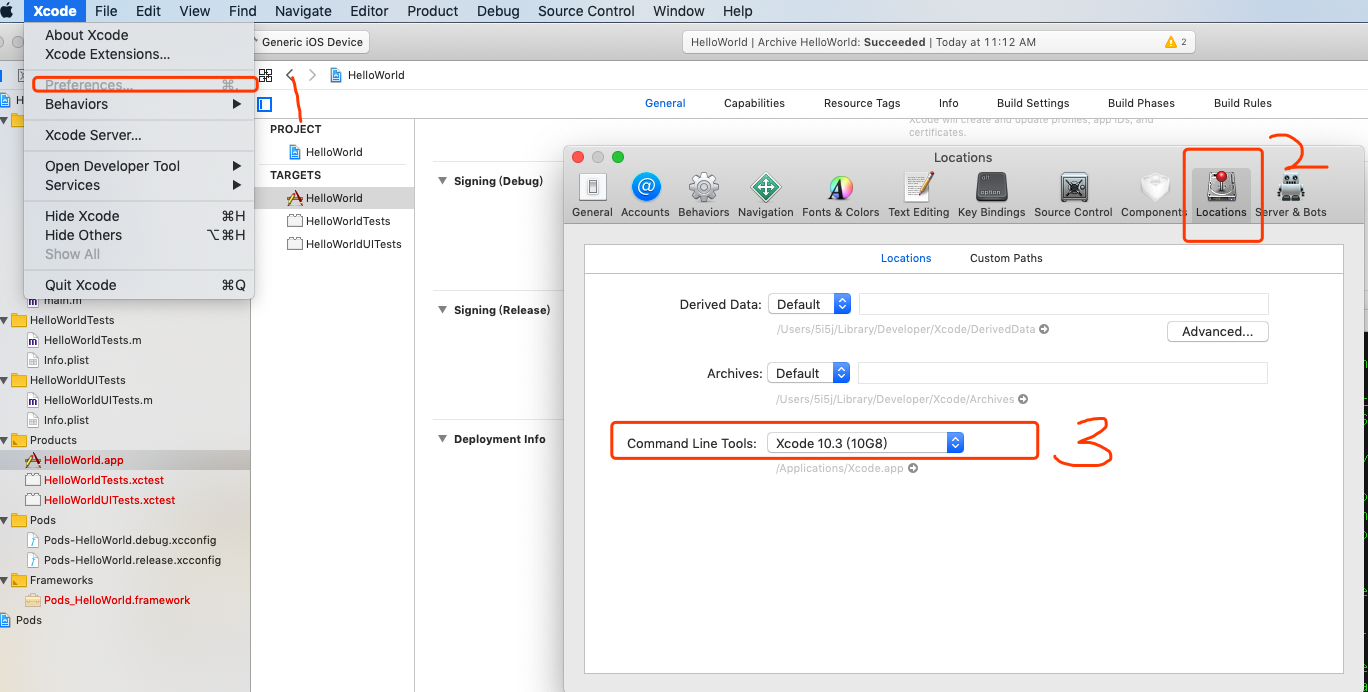
修改后,在命令行输入xcodebuild命令测试:
Mac mini:~ wangju$ xcodebuild -version

Xcode 10.3

Build version 10G8
发现可以正常使用了
tool 'xcodebuild' requires Xcode, but active developer directory '/Library/Developer/CommandLineTools' is a command line tools instance的更多相关文章
- ios 自动化构建 code-select: error: tool 'xcodebuild' requires Xcode, but active developer directory.....
问题描述: Pod installation complete! There are 2 dependencies from the Podfile and 3 total pods installe ...
- stderr: xcode-select: error: tool 'xcodebuild' requires Xcode, but active developer directory '/Library/Developer/CommandLineTools' is a command line tools instance
错误提示: (1). stderr: xcode-select: error: tool 'xcodebuild' requires Xcode, but active developer direc ...
- Mac下idea启动H5报错:xcode-select: error: tool 'xcodebuild' requires Xcode, but active developer directory '/Library/Deve
1. 执行“ xcodebuild -showsdks ”,报错如下“xcode-select: error: tool 'xcodebuild' requires Xcode, but active ...
- xcode-select: error: tool 'xcodebuild' requires Xcode, but active developer directory '/Library/Developer/CommandLineTools' is a command line tools instance
运行xcode命令报错: sh-3.2# xcodebuild xcode-select: error: tool 'xcodebuild' requires Xcode, but active de ...
- iOS自动化构建 xcode-select: error: tool 'xcodebuild' requires Xcode, but active developer directory '/Library/D...
报这个错误的原因是xcode-select不在默认的路径 1.找到xcode-select的当前路径终端命令行 xcode-select --print-path /Library/Developer ...
- xcode-select: error: tool 'xcodebuild' requires Xcode, but active developer directory '/Library/Deve
以上错误是因为安装了 xcode , 但并不是系统默认的位置, 所以可以使用以下命令把 xcode 的路径修改为你安装的位置即可 sudo xcode-select --switch /Applica ...
- Xcode - xcode-select: error: tool 'xcodebuild' requires Xcode报错解决方案
用mac 自带的终端执行的命令,安装安装Vapor和toolbox 安装指令: macdeMacBook-Pro:~ mac$ curl -sL check.vapor.sh| bash 结果报这个错 ...
- Mac Angular打包报错xcode-select: error: tool 'xcodebuild' requires Xcode
Mac Angular打包报错: Error: xcode-select: error: tool 'xcodebuild' requires Xcode, but active developer ...
- 关于 ReactNative 环境搭建之 error: invalid developer directory '/Library/Developer/CommandLineTools' - RN
简要说明,此次尝试安装 ReactNative 时当前 MacPro 版本为 10.13.6.Xcode 版本为 Version 9.4.1 (9F2000),按照官方的完整原生环境搭建流程一步步执行 ...
随机推荐
- 错误: JMX 连接器服务器通信错误: service:jmx:rmi://***
电脑没有空间了,正想清理一下硬盘空间,这时不知道金山毒霸啥时候装上了,就想把它卸载了,卸载的过程中看到有空间清理,随手一点,清理出了10个G,然后再打开idea运行项目就报出这个错. 错误: JMX ...
- LNMP环境搭建哈哈
经过一番折腾,终于将LNMP环境搭建完成了.本文介绍的LNMP环境是在windows的Oracle VM VirtualBox中的Centos虚拟机上搭建的,各个软件的版本为:Centos7 + Ng ...
- STL容器概述
STL容器 1.容器概述 1.1.容器分类 1.1.1.顺序容器:提供对元素序列的访问,顺序容器为元素连续分配内存或将元素组织为链表,元素的类型是容器成员value_type. 顺序容器 说明 vec ...
- vue : 无法加载文件 C:\Users\XXX\AppData\Roaming\npm\vue.ps1,因为在此系统上禁止运行脚本
问题: 使用命令行安装完成vue/cli后,使用vue ui无法创建demo vue : 无法加载文件 C:\Users\yangx\AppData\Roaming\npm\vue.ps1,因为在此系 ...
- Python 中的Lock与RLock
摘要 由于多线程共享进程的资源和地址空间,因此,在对这些公共资源进行操作时,为了防止这些公共资源出现异常的结果,必须考虑线程的同步和互斥问题. 为什么加锁:1.用于非线程安全, 2.控制一段代码,确保 ...
- 面试编程题拾遗(06) --- 打印n对括号的全部有效组合
如题所述,当n=3时,可能的组合有:(()()), ((())), ()(()), (())(), ()()() 代码如下(有注释): import java.util.ArrayList; impo ...
- 35C3 CTF - Web - php
参考链接 https://ctftime.org/task/7404 题目描述 PHP's unserialization mechanism can be exceptional. 解题流程 程序代 ...
- css3 transform中的matrix矩阵
CSS3中的矩阵CSS3中的矩阵指的是一个方法,书写为matrix()和matrix3d(),前者是元素2D平面的移动变换(transform),后者则是3D变换.2D变换矩阵为3*3, 如上面矩阵示 ...
- 工作中常用到的linux命令总结
linux系统ubantu debian系统下载文件:wget https://github.com/buger/goreplay/releases/download/v1.0.0/gor_1.0.0 ...
- snmpwalk工具使用
snmpwalk是SNMP的一个工具,它使用SNMP的GETNEXT请求查询指定OID(SNMP协议中的对象标识)入口的所有OID树信息,并显示给用户. 在linux下使用snmpwalk工具,我们 ...