
Identity MVC:UI
基于原来做的cookie认证的代码:MvcCookieAuthSample

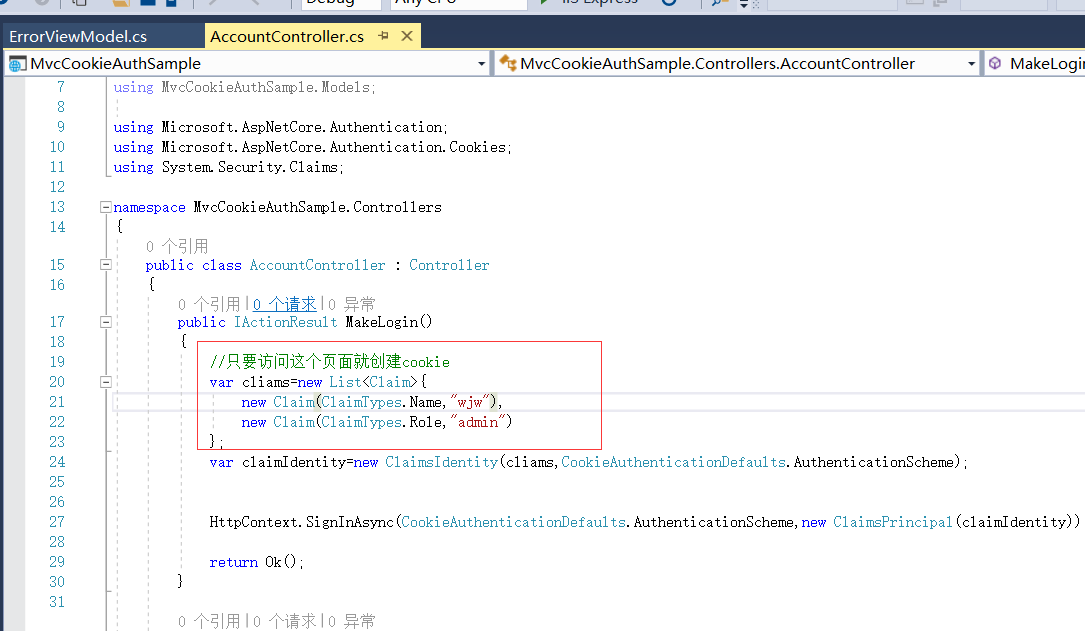
增加登陆和退出的方法:
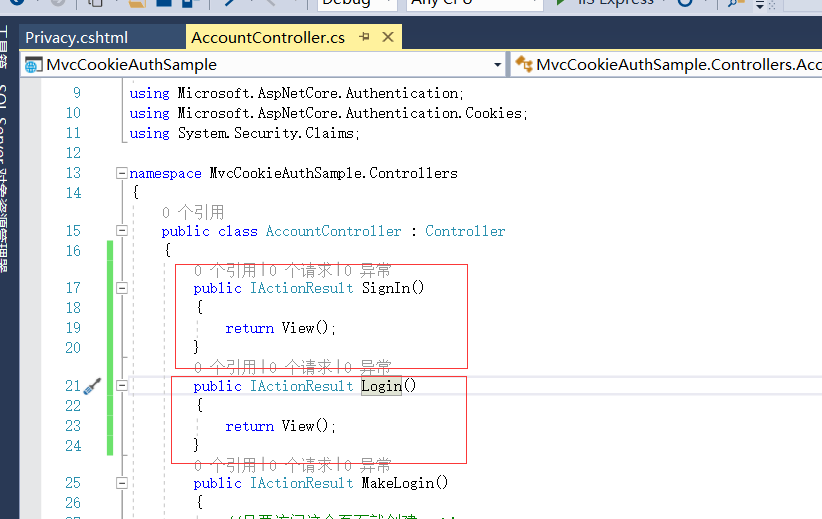
增加Login和SignIn这两个Action方法。
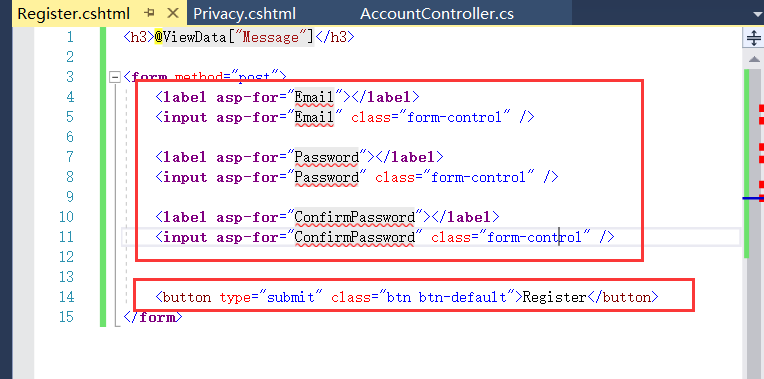
在Views下面创建Account文件夹,然后在里面创建两个视图页面。
我是赋值下面的Privacy.cshtml页面到Account文件夹。然后改了名字为Register.cshtml和Login.cshtml这两个视图页面。

创建文件夹:ViewModels
再创建RegisterViewModel.cs


using System;
using System.Collections.Generic;
using System.Linq;
using System.Threading.Tasks; namespace MvcCookieAuthSample.ViewModels
{
public class RegisterViewModel
{
public string Email { get; set; }
public string Password { get; set; }</span><span style="color: #0000ff;">public</span> <span style="color: #0000ff;">string</span> ConfirmPassword { <span style="color: #0000ff;">get</span>; <span style="color: #0000ff;">set</span><span style="color: #000000;">; }
}
}
RegisterViewModel
Login.cshtml 简单的登陆页面

在布局页面 把登陆和注册也加上去

引入ViewModel的命名空间:
Register和Login的视图页面都要引用

<ul class="navbar-nav flex-grow-1">
<li class="nav-item">
<a class="nav-link text-dark" asp-area="" asp-controller="Home" asp-action="Index">Home</a>
</li>
<li class="nav-item">
<a class="nav-link text-dark" asp-area="" asp-controller="Home" asp-action="Privacy">Privacy</a>
</li><li <span style="color: #0000ff;">class</span>=<span style="color: #800000;">"</span><span style="color: #800000;">nav-item</span><span style="color: #800000;">"</span>>
<a <span style="color: #0000ff;">class</span>=<span style="color: #800000;">"</span><span style="color: #800000;">nav-link text-dark</span><span style="color: #800000;">"</span> asp-area=<span style="color: #800000;">""</span> asp-controller=<span style="color: #800000;">"</span><span style="color: #800000;">Account</span><span style="color: #800000;">"</span> asp-action=<span style="color: #800000;">"</span><span style="color: #800000;">Register</span><span style="color: #800000;">"</span>>Register</a>
</li>
<li <span style="color: #0000ff;">class</span>=<span style="color: #800000;">"</span><span style="color: #800000;">nav-item</span><span style="color: #800000;">"</span>>
<a <span style="color: #0000ff;">class</span>=<span style="color: #800000;">"</span><span style="color: #800000;">nav-link text-dark</span><span style="color: #800000;">"</span> asp-area=<span style="color: #800000;">""</span> asp-controller=<span style="color: #800000;">"</span><span style="color: #800000;">Account</span><span style="color: #800000;">"</span> asp-action=<span style="color: #800000;">"</span><span style="color: #800000;">Login</span><span style="color: #800000;">"</span>>Log <span style="color: #0000ff;">in</span></a>
</li> </ul></pre>
_Layout.cshtml菜单部分代码

运行我们的程序
Register页面

login的页面

Identity MVC:UI的更多相关文章
- 任务43:Identity MVC:UI
基于原来做的cookie认证的代码:MvcCookieAuthSample 增加登陆和退出的方法: 增加Login和SignIn这两个Action方法. 在Views下面创建Account文件夹,然后 ...
- 任务45:Identity MVC:注册逻辑实现
任务45:Identity MVC:注册逻辑实现 做登陆 在注册成功直接进行登陆,使用SignIn 这里的signIn实际上是HttpContext.Signin的封装 await _signMana ...
- 任务46:Identity MVC:登录逻辑实现
任务46:Identity MVC:登录逻辑实现 实现登陆的方法 退出方法 _layout里面增加如下的代码: Login.cshtml 运行代码测试: 这个地方的单词之前拼错了.这里进行修正 输入账 ...
- 任务47:Identity MVC:ReturnUrl实现
任务47:Identity MVC:ReturnUrl实现 在最上面加一个私有的方法 登陆也加上returnUrl Login的post方法.加入returnUrl的参数 登陆界面也需要加上 asp- ...
- 任务48:Identity MVC:Model后端验证
任务48:Identity MVC:Model后端验证 RegisterViewModel using System; using System.Collections.Generic; using ...
- 任务49:Identity MVC:Model前端验证
任务49:Identity MVC:Model前端验证 前端验证使用的是jquery的validate的组件 _ValidationScriptsPartial.cshtml 在我们的layout里面 ...
- 任务50:Identity MVC:DbContextSeed初始化
任务50:Identity MVC:DbContextSeed初始化 首先添加seed 每次应用程序启动,监测一下,是否是第一次启动.如果是第一次执行,我们需要在数据库内添加一个记录 比如说我们的用户 ...
- 任务44:Identity MVC: EF + Identity实现
使用VSCode开发 Razer的智能感知不好.所以这里切换为VS2017进行开发: 新建一个Data的文件夹来存放我们的DBContext.在Data文件夹下新建: ApplicationDbCon ...
- 43-Identity MVC:UI
1-打开之前写的MvcCookieAuthSample项目, 在AccountController新加Register,Login方法 public class AccountController : ...
随机推荐
- 记一次在mac上源码编译curl,使其支持NSS的过程
一.背景 在一次学习https原理的过程中,希望客户端指定特定的cipher suites来抓包分析SSL/TLS的握手过程,就想到了使用curl工具,而不是使用浏览器. 接下来使用man curl找 ...
- 新特性2-lambda表达式
最近几天学习了一下lambda表达式,看了不少博客,感觉有一篇博客总结的一句话总结的很好:lambda表达式是一段可以传递的代码,它的核心思想是将面向对象中的传递数据变成传递行为.其实以前也有传递行为 ...
- thinkphp 模板变量输出替换和赋值
一.变量输出的几个方法 <?php namespace app\index\controller; use http\Params; use think\Config; use think\Co ...
- css 块级格式化上下文(BFC)
一.块级格式化上下文(BFC) 1.什么是块级格式化上下文? Block Formatting Contexts (BFC,块级格式化上下文)就是一个块级元素 的渲染显示规则 (可以把 BFC 理解为 ...
- CKEDITOR Copying images from word
自动导入Word图片,或者粘贴Word内容时自动上传所有的图片,并且最终保留Word样式,这应该是Web编辑器里面最基本的一个需求功能了.一般情况下我们将Word内容粘贴到Web编辑器(富文本编辑器) ...
- div上下左右居中几种方式
1.绝对定位(常用于登录模块)备注:前提条件div需要有宽高 #html <div class="box"></div> #css .box{ positi ...
- ctrl+鼠标左键监听
<!DOCTYPE html> <html lang="en"> <head> <meta charset="UTF-8&quo ...
- XML大作业
XML大作业 共两题,均于实验上机完成 第一题:在xml文档中使用DTD 第二题:掌握使用xsl显示xml文件的基本方法 第一题: 一.实验目的 (1)通过本实验,使学生能够了解并掌握XML DTD的 ...
- (转)运行pip报错:Fatal error in launcher: Unable to create process using '"'
转:https://blog.csdn.net/cjeric/article/details/73518782 在新环境上安装python的时候又再次遇到了这个情况,这次留意了一下,发现原来的文章有错 ...
- 北风设计模式课程---状态模式State(对象行为型)
北风设计模式课程---状态模式State(对象行为型) 一.总结 一句话总结: 状态模式 具体状态的行为在具体的状态类中就解决,不用交给外部做判断.实质是将多条件判断弄成了多个类,在不同的类中做判断 ...