
二、IDS4配置服务
它是根据定义配置服务Config.cs文件来生成客户端和API使用该服务所需的配置数据。
一、IDS4签名服务
1、为项目添加NuGet包。
2、IDS4服务制定的配置Config.cs。
using IdentityServer4.Models;

using System;

using System.Collections.Generic;

using System.Linq;

using System.Threading.Tasks;

namespace ids4

{

    //一、IDS4服务制定

    public class Config

    {

        //1、定义API资源

        public static IEnumerable<ApiResource> GetApis() //ApiResource是属于using IdentityServer4.Models;内的。

        {

            return new List<ApiResource>

            {

                new ApiResource("api1", "My API")

            };

        }

        //2、定义客户端

        public static IEnumerable<Client> GetClients()

        {

            return new List<Client>

            {

                new Client

                {

                    ClientId = "client",

                    // no interactive user, use the clientid/secret for authentication

                    AllowedGrantTypes = GrantTypes.ClientCredentials,

                    // secret for authentication

                    ClientSecrets =

                    {

                       new Secret("secret".Sha256())

                    },

                    // scopes that client has access to

                    AllowedScopes = { "api1" }

                }

            };

        }

    }

}
3、Startup.cs内添加IDS4服务。
using IdentityServer4.Models;

using Microsoft.AspNetCore.Builder;

using Microsoft.AspNetCore.Hosting;

using Microsoft.AspNetCore.Http;

using Microsoft.AspNetCore.Mvc;

using Microsoft.Extensions.Configuration;

using Microsoft.Extensions.DependencyInjection;

namespace ids4

{

    //二、添加IDS4服务

    public class Startup

    {

        public Startup(IConfiguration configuration)

        {

            Configuration = configuration;

        }

        public IConfiguration Configuration { get; }

        // This method gets called by the runtime. Use this method to add services to the container.

        public void ConfigureServices(IServiceCollection services)

        {

            services.Configure<CookiePolicyOptions>(options =>

            {

                // This lambda determines whether user consent for non-essential cookies is needed for a given request.

                options.CheckConsentNeeded = context => true;

                options.MinimumSameSitePolicy = SameSiteMode.None;

            });

            services.AddMvc().SetCompatibilityVersion(CompatibilityVersion.Version_2_1);

            //1、注入服务添&加在最底部

            var builder = services.AddIdentityServer()

            //.AddInMemoryIdentityResources(Config.GetIdentityResources())  //注入GetIdentityResources资源。

            .AddInMemoryApiResources(Config.GetApis()) //注入ApiResources资源对应定义的API资源。

            .AddInMemoryClients(Config.GetClients());  //注入定义的客户端

        }

        // This method gets called by the runtime. Use this method to configure the HTTP request pipeline.

        public void Configure(IApplicationBuilder app, IHostingEnvironment env)

        {

            app.UseIdentityServer();//2、添加服务&添加在顶部

            if (env.IsDevelopment())

            {

                app.UseDeveloperExceptionPage();

            }

            else

            {

                app.UseExceptionHandler("/Home/Error");

                app.UseHsts();

            }

            app.UseHttpsRedirection();

            app.UseStaticFiles();

            app.UseCookiePolicy();

            app.UseMvc(routes =>

            {

                routes.MapRoute(

                    name: "default",

                    template: "{controller=Home}/{action=Index}/{id?}");

            });

        }

    }

}
4、运行服务器并浏览浏览器 http://localhost:5000/.well-known/openid-configuration 您应该会看到所谓的发现文档。客户端和API将使用它来下载必要的配置数据。
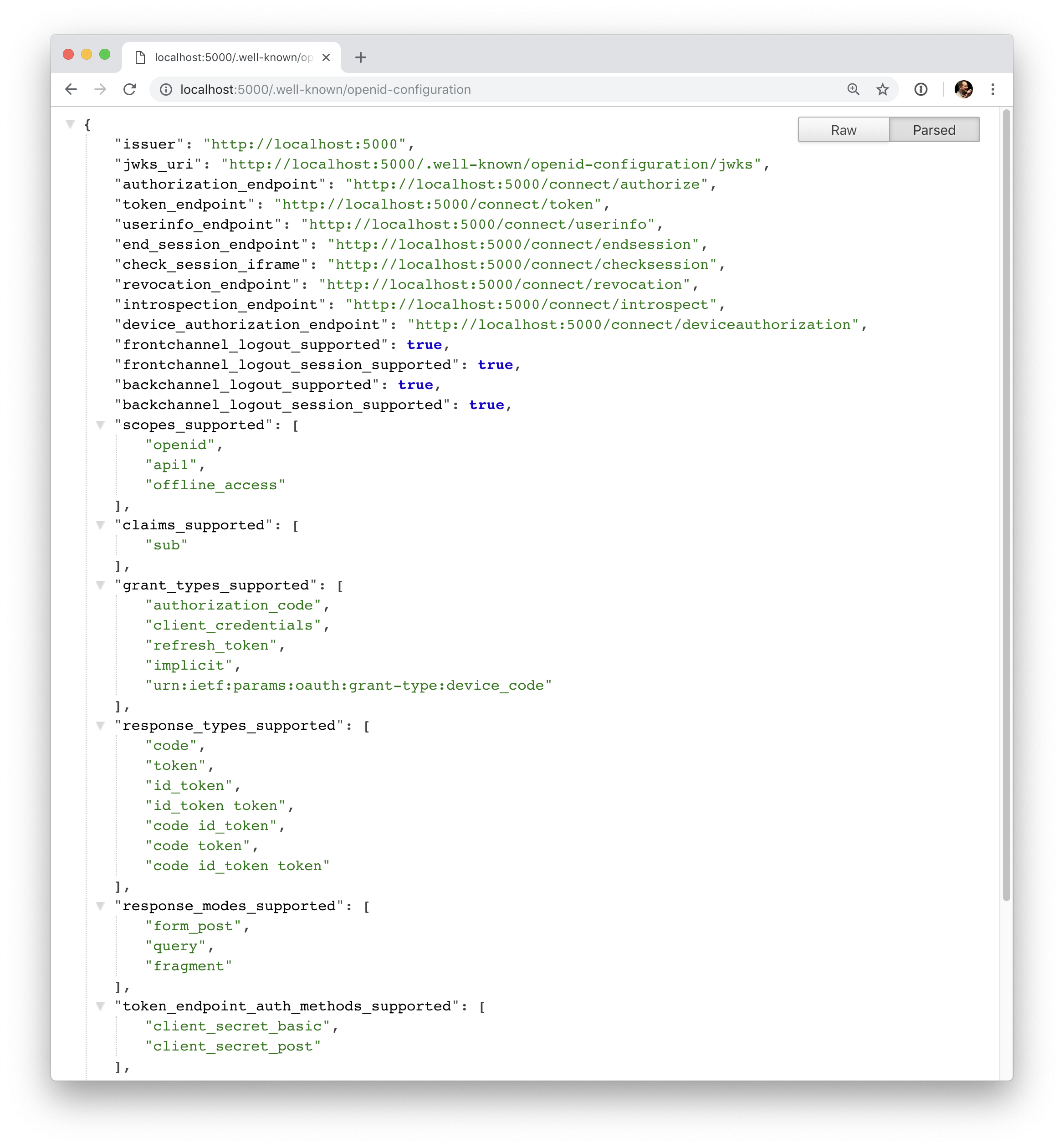
{

    "issuer": "http://localhost:5000",

    "authorization_endpoint": "http://localhost:5000/connect/authorize",

    "token_endpoint": "http://localhost:5000/connect/token",

    "userinfo_endpoint": "http://localhost:5000/connect/userinfo",

    "end_session_endpoint": "http://localhost:5000/connect/endsession",

    "check_session_iframe": "http://localhost:5000/connect/checksession",

    "revocation_endpoint": "http://localhost:5000/connect/revocation",

    "introspection_endpoint": "http://localhost:5000/connect/introspect",

    "device_authorization_endpoint": "http://localhost:5000/connect/deviceauthorization",

    "frontchannel_logout_supported": true,

    "frontchannel_logout_session_supported": true,

    "backchannel_logout_supported": true,

    "backchannel_logout_session_supported": true,

    "scopes_supported": ["api1", "offline_access"],

    "claims_supported": [],

    "grant_types_supported": ["authorization_code", "client_credentials", "refresh_token", "implicit", "urn:ietf:params:oauth:grant-type:device_code"],

    "response_types_supported": ["code", "token", "id_token", "id_token token", "code id_token", "code token", "code id_token token"],

    "response_modes_supported": ["form_post", "query", "fragment"],

    "token_endpoint_auth_methods_supported": ["client_secret_basic", "client_secret_post"],

    "subject_types_supported": ["public"],

    "id_token_signing_alg_values_supported": ["RS256"],

    "code_challenge_methods_supported": ["plain", "S256"]

}
二、IDS4配置服务的更多相关文章
- 【WCF全析(二)】--服务配置部署详解
上篇文章主要讨论了WCF的基本内容,其中包括WCF的术语.创建方法及WCF在开发过程中使用的意义,它不仅能够提供程序之间的通信,而且还能提供程序和数据间的通信,WCF提供了多样化的程序 ...
- 5、SAMBA服务二:配置实例
①:SAMBA服务一:参数详解 ②:SAMBA服务二:配置实例 5.2.3.Samba共享目录配置实例 1.允许匿名用户读取/it共享目录,修改/etc/samba/smb.conf,在最后添加以下内 ...
- 《深入理解Spring Cloud与微服务构建》学习笔记(二十)~配置中心Spring Cloud Config
本例重新创建项目,构建一个空的mavan工程. 一.Config Server 从本地读取配置文件 新建一个moudle config_server ,pom添加依赖 <dependency ...
- AgileEAS.NET SOA 中间件平台5.2版本下载、配置学习(二):配置WinClient分布式运行环境
一.前言 AgileEAS.NET SOA 中间件平台是一款基于基于敏捷并行开发思想和Microsoft .Net构件(组件)开发技术而构建的一个快速开发应用平台.用于帮助中小型软件企业建立一条适合市 ...
- 第四十二章 微服务CICD(4)- jenkins + gitlab + webhooks + publish-over-ssh(2)
上一节完成了"当git客户端push代码到gitlab后,jenkins会立即去gitlab拉取代码并构建". 目的:本节完成jenkins自动构建之后,自动的将jar包部署到应用 ...
- 【WCF--初入江湖】03 配置服务
03 配置服务 数据库 生成数据库脚本: CREATE DATABASE [EmployeeDb]; CREATE TABLE [dbo].[T_Employee]( [Id] [,) NOT NUL ...
- mysql 5.6.20的安装、配置服务、设置编码格式
一.安装 安装环境 系统:Window 32 版本:Mysql 5.6.20 1. 首先从官网上http://dev.mysql.com/downloads/mysql/ ...
- WCF技术剖析之二十三:服务实例(Service Instance)生命周期如何控制[下篇]
原文:WCF技术剖析之二十三:服务实例(Service Instance)生命周期如何控制[下篇] 在[第2篇]中,我们深入剖析了单调(PerCall)模式下WCF对服务实例生命周期的控制,现在我们来 ...
- NFS 配置服务
NFS 配置服务 北京市海淀区 张俊浩 一.NFS.即网络文件系统(Network File System,NFS).一种使用于分散式文件系统的协议,由升阳公司开发.于1984年向外发布.功能是通过 ...
随机推荐
- shiro框架在springboot项目中的应用
地址:https://blog.csdn.net/taojin12/article/details/88343990 地址2:https://blog.csdn.net/bicheng4769/art ...
- js事件循环机制
本文参考链接:https://www.jianshu.com/p/cf47bc0bf2ab 一.先搞懂两个东西:堆和栈 栈由操作系统自动分配释放,用于存放函数的参数值.局部变量等一些基本的数据类型,其 ...
- php array_combine()函数 语法
php array_combine()函数 语法 作用:通过合并两个数组来创建一个新数组,其中的一个数组是键名,另一个数组的值为键值.dd马达价格 语法:array_combine(keys,valu ...
- php选择文件夹上传
最近遇见一个需要上传百兆大文件的需求,调研了七牛和腾讯云的切片分段上传功能,因此在此整理前端大文件上传相关功能的实现. 在某些业务中,大文件上传是一个比较重要的交互场景,如上传入库比较大的Excel表 ...
- [luogu]P1133 教主的花园[DP]
[luogu]P1133 教主的花园 ——!x^n+y^n=z^n 题目描述 教主有着一个环形的花园,他想在花园周围均匀地种上n棵树,但是教主花园的土壤很特别,每个位置适合种的树都不一样,一些树可能会 ...
- 【HDOJ6635】Nonsense Time(时间倒流,lis)
题意:给定n个数的数列,第i个数为a[i],刚开始所有位置都处于禁用状态,第i次之后位置p[i]变为可用,求每次变化后的lis长度 n,a[i],p[i]<=5e4 保证a[i],p[i]均为随 ...
- Oracle 中 not exists (select 'X' ...) 的含义
select a.col1,a.col2 from temp1 a where not exists (select 'X' from temp2 b where b.col2 = a.col1);s ...
- 《数据结构与算法(C语言版)》严蔚敏 | 第五章 建立二叉树,并完成三/四种遍历算法
PS:所有的代码示例使用的都是这个图 2019-10-29 利用p126的算法5.3建立二叉树,并完成三种遍历算法 中序 后序 先序 #include<iostream> #include ...
- python-zx笔记11-测试压力管理
一.添加测试用例 calculator.py class Math: def __init__(self,a,b): self.a = int(a) self.b = int(b) def add(s ...
- (转)Kubernetes部署WordPress+MySQL
转:http://www.showerlee.com/archives/2336 这部分我们结合之前的k8s知识点给大家展示如何使用kubernetes部署wordpress+MySQL, 并利用NF ...