
[python]数据整理,将取得的众多的沪深龙虎榜数据整一整
将昨日取得的众多的沪深龙虎榜数据整一整
提取文件夹内所有抓取下来的沪深龙虎榜数据,整理出沪深两市(含中小创)涨幅榜股票及前5大买入卖出资金净值,保存到csv文件
再手动使用数据透视表进行统计
原始数据:
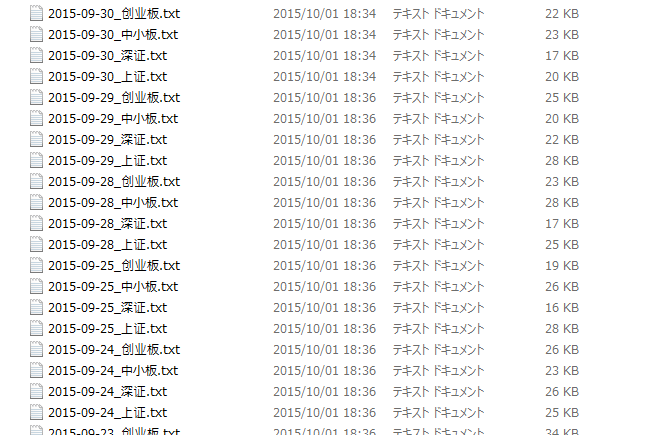

整理后数据:

代码如下(如果觉得对于炒股又用,敬请使用):
 #coding=utf-8

 import re

 import os

 import time

 import datetime

 def writeFile(file,stocks,BS,day):

     for s in stocks:

         allfile.write('\n')

         allfile.write(day

                       +',"\''+s['code']

                       +'","'+s['name']

                       +'",'+str(float(BS[s['code']]['buy'])-float(BS[s['code']]['sell']))

                       +','+BS[s['code']]['buy']

                       +','+BS[s['code']]['sell']

                       +','+s['偏离值']

                       +',"'+s['成交量']

                       +'","'+s['成交金额(万元)']+'"')

         '''

         allfile.write(day

                       +",'"+s["code"]

                       +"','"+s["name"]

                       +"',"+str(float(BS[s["code"]]["buy"])-float(BS[s["code"]]["sell"]))

                       +","+BS[s["code"]]["buy"]

                       +","+BS[s["code"]]["sell"]

                       +","+s["偏离值"]

                       +",'"+s["成交量"]

                       +"','"+s["成交金额(万元)"]+"'")

         '''

 path=r'./files'

 #path=r'./a'

 files = os.listdir(path)

 files.sort()

 nowDayStr = ''

 now = datetime.datetime.now()

 nowStr = now.strftime("%Y-%m-%d")

 allfile = open(r'./沪深龙虎榜统计_'+nowStr+'.csv','w')

 allfile.write('"日期","代码","名称","净流入流出","流入","流出","偏离值","成交量","成交金额(万元)"')

 for f in files:

     if(os.path.isfile(path+'/'+f) &

        f.endswith('.txt')):

         #print(path+'/'+f.replace('.txt',''))

         a = f.replace('.txt','').split('_')

         print('读取文件:'+path+'/'+f)

         '''

         if(nowDayStr!=a[0]):

             #print('a')

         else:

             #print('b')

             nowDayStr = a[0]

         '''

         nowDayStr = a[0]

         f=open(path+'/'+f,'rt')

         infos = f.readlines()

         f.close()

         if(a[1]=='上证'):

             #continue #test jump

             #上证

             readStocks = 1

             readBS = 0

             readBuy = 0

             readSell = 0

             nowStock = ''

             stocks = []

             BS = dict()

             buy = 0

             sell = 0

             for info in infos:

                 info = re.sub('\ +', '_',info)

                 info = re.sub('\n', '',info)

                 #print('line:' +info)

                 if(readStocks==1 and

                    info.startswith('_2')):

                     break

                 if(readStocks==1 and

                    (not info.startswith('_证券代码:')) and

                    info.startswith('_(')):

                     tmp = info.split('_')

                     dictTmp = {'code':tmp[2],'name':tmp[3],'偏离值':tmp[4],'成交量':tmp[5],'成交金额(万元)':tmp[6]}

                     stocks.append(dictTmp)

                 elif(readStocks==1 and

                      info.startswith('_证券代码:')):

                     readStocks = 0

                     readBS = 1

                     #continue

                 if(readBS==1 and

                    info.startswith('_证券代码')):

                     tmp = info.split('_')

                     #print('code:'+tmp[2])

                     nowStock = tmp[2]

                     readBS = 0

                     readBuy = 1

                     continue

                 if(readBuy == 1 and

                    info.startswith('_(') and

                    (not info.startswith('_卖出'))):

                     tmp = info.split('_')

                     buy = buy + float(tmp[3])

                     #print('buy:'+str(buy))

                 elif(readBuy == 1 and

                    info.startswith('_卖出')):

                     readBuy = 0

                     readSell = 1

                     continue

                 if(readSell == 1 and

                    info.startswith('_(') and

                    ((not info.startswith('_2')) or

                    (not info.startswith('_证券')))):

                     tmp = info.split('_')

                     sell = sell + float(tmp[3])

                     #print('sell:'+str(sell))

                 elif(readSell == 1 and

                    (info.startswith('_2') or

                    info.startswith('_证券'))):

                     readSell = 0

                     if(info.startswith('_证券')):

                         readBS = 1

                         #dictTmp = {nowStock:{'buy':str(buy),'sell':str(sell)}}

                         BS[nowStock]={'buy':str(buy),'sell':str(sell)};

                         buy = 0

                         sell = 0

                         if(readBS==1 and

                            info.startswith('_证券代码')):

                             tmp = info.split('_')

                             #print('code:'+tmp[2])

                             nowStock = tmp[2]

                             readBS = 0

                             readBuy = 1

                             continue

                     else:

                         #dictTmp = {nowStock:{'buy':str(buy),'sell':str(sell)}}

                         BS[nowStock]={'buy':str(buy),'sell':str(sell)};

                         #write to doc

                         #print(stocks[0]['成交金额(万元)'])

                         #print(BS)

                         writeFile(allfile,stocks,BS,nowDayStr);

                         break;

         else:

             #深证,中小创

             readStocks = 0

             #readBS = 0

             readBuy = 0

             readSell = 0

             nowStock = ''

             stocks = []

             BS = dict()

             buy = 0

             sell = 0

             threeBlank = 0

             for info in infos:

                 if(info.startswith('--') and readStocks==1 and len(stocks)>1):

                     readStocks=1

                     readSell=0

                     BS[nowStock]={'buy':str(buy),'sell':str(sell)};

                     buy = 0

                     sell = 0

                     writeFile(allfile,stocks,BS,nowDayStr);

                     break;

                 #print('-----'+info)

                 if(threeBlank==3):

                     threeBlank = 0

                     haveBreaked = True

                 else:

                     haveBreaked = False

                 info = re.sub('\ +', '_',info)

                 info = re.sub('\n', '',info)

                 #print('line:' +info)

                 if(info == ''):

                     threeBlank = threeBlank + 1

                     continue

                 if((not info.startswith('日涨幅偏离值达到7%的前五只证券')) and

                    readStocks==0 and readBuy==0 and readSell==0):

                     continue

                 elif(readStocks==0 and readBuy==0 and readSell==0):

                     if(info.endswith('无')):

                         break

                     readStocks=1

                     continue

                 if(#haveBreaked and

                    readStocks==1 and

                    len(info.split('(代码'))>1):

                     if(info.startswith('--')):

                         #print(stocks)

                         #print(BS)

                         writeFile(allfile,stocks,BS,nowDayStr);

                         break;

                     #print('1'+info)

                     code = info.split('(代码')[1].split(')')[0]

                     name = info.split('(代码')[0]

                     plz = info.split('涨幅偏离值:')[1].split('_')[0]

                     cjl = info.split('成交量:')[1].split('_')[0]

                     cje = info.split('成交金额:_')[1]#.split('万元')[0]

                     nowStock = code

                     dictTmp = {'code':code,'name':name,'偏离值':plz,'成交量':cjl,'成交金额(万元)':cje}

                     stocks.append(dictTmp)

                     #print(dictTmp)

                     readStocks = 0

                     readBuy = 1

                     continue

                 if(readBuy == 1 and info!='' and

                    (not info.startswith('买入金额最大的前5名')) and

                    (not info.startswith('营业部或交易单元名称')) ):

                     #print('1'+info)

                     if(info.startswith('卖出金额最大的前5名')):

                         readBuy=0

                         readSell=1

                         continue

                     else:

                         buy = buy + float(info.split('_')[1]) - float(info.split('_')[2])

                         continue

                 if(readSell == 1 and info!='' and

                    (not info.startswith('营业部或交易单元名称')) ):

                     #print('2'+info)

                     if(info.startswith('--')):

                         readStocks=1

                         readSell=0

                         #dictTmp = {nowStock:{'buy':str(buy),'sell':str(sell)}}

                         #print(nowStock)

                         BS[nowStock]={'buy':str(buy),'sell':str(sell)};

                         buy = 0

                         sell = 0

                         #print(stocks)

                         #print(BS)

                         writeFile(allfile,stocks,BS,nowDayStr);

                         break;

                     if(len(info.split('代码'))>1):

                         readStocks=1

                         readSell=0

                         #dictTmp = {nowStock:{'buy':str(buy),'sell':str(sell)}}

                         #print(nowStock)

                         BS[nowStock]={'buy':str(buy),'sell':str(sell)};

                         buy = 0

                         sell = 0

                         #read code

                         #print('2'+info)

                         code = info.split('(代码')[1].split(')')[0]

                         name = info.split('(代码')[0]

                         plz = info.split('涨幅偏离值:')[1].split('_')[0]

                         cjl = info.split('成交量:')[1].split('_')[0]

                         cje = info.split('成交金额:_')[1]#.split('万元')[0]

                         nowStock = code

                         dictTmp = {'code':code,'name':name,'偏离值':plz,'成交量':cjl,'成交金额(万元)':cje}

                         stocks.append(dictTmp)

                         #print(dictTmp)

                         readStocks = 0

                         readBuy = 1

                         continue

                     else:

                         sell = sell - float(info.split('_')[1]) + float(info.split('_')[2])

                         continue

         #break

 allfile.close();

 print('统计完成!'+'文件:'+'./沪深龙虎榜统计_'+nowStr+'.csv')
[python]数据整理,将取得的众多的沪深龙虎榜数据整一整的更多相关文章
- [python]沪深龙虎榜数据导入通达信的自选板块,并标注于K线图上
将沪深龙虎榜数据导入通达信的自选板块,并标注于K线图上 原理:python读取前一次处理完的计算5日后涨跌幅输出的csv文件 文件名前加"[paint]" 安照通达信的画图文件和板 ...
- [python]沪深龙虎榜数据进一步处理,计算日后5日的涨跌幅
沪深龙虎榜数据进一步处理,计算日后5日的涨跌幅 事前数据: 前面处理得到的csv文件 文件名前加入“[wait]”等待程序处理 python代码从雅虎股票历史数据api获取数据,计算后面5日的涨跌幅 ...
- Python模块整理(三):子进程模块subprocess
文章 原始出处 http://ipseek.blog.51cto.com/1041109/807513. 本来收集整理网络上相关资料后整理: 从python2.4版本开始,可以用subprocess这 ...
- 基于python的《Hadoop权威指南》一书中气象数据下载和map reduce化数据处理及其可视化
文档内容: 1:下载<hadoop权威指南>中的气象数据 2:对下载的气象数据归档整理并读取数据 3:对气象数据进行map reduce进行处理 关键词:<Hadoop权威指南> ...
- Pandas数据处理实战:福布斯全球上市企业排行榜数据整理
手头现在有一份福布斯2016年全球上市企业2000强排行榜的数据,但原始数据并不规范,需要处理后才能进一步使用. 本文通过实例操作来介绍用pandas进行数据整理. 照例先说下我的运行环境,如下: w ...
- 孤荷凌寒自学python第六十天在windows10上搭建本地Mongodb数据服务
孤荷凌寒自学python第六十天在windows10上找搭建本地Mongodb数据服务 (完整学习过程屏幕记录视频地址在文末) 今天是学习mongoDB数据库的第六天.成功在本地搭建了windows ...
- 【Python文件处理】递归批处理文件夹子目录内所有txt数据
因为有个需求,需要处理文件夹内所有txt文件,将txt里面的数据筛选,重新存储. 虽然手工可以做,但想到了python一直主张的是自动化测试,就想试着写一个自动化处理数据的程序. 一.分析数据格式 需 ...
- [python]初试页面抓取——抓取沪深股市交易龙虎榜数据
[python]抓取沪深股市交易龙虎榜数据 python 3.5.0下运行 没做自动建立files文件夹,需要手动在py文件目录下建立files文件夹后运行 #coding=utf-8 import ...
- 一些用于数据整理的excel函数
我们经常要从外部数据源(如数据库.文本文件或网页等)将数据导入excel中,但是此类数据往往比较混乱,无法满足我们的要求,因此在进行数据分析之前,需要将这些数据进行整理清洗,excel由于将数据的管理 ...
随机推荐
- 小谈Java里的线程
今天,我们来谈一谈Java里的线程. 一.进程与线程的基本概念 大家可能没听过线程这个概念,但是相信,用计算机的朋友都听过进程这个概念.打开电脑的任务管理器,我们就可以看到许多进程.它们主要分为三类, ...
- sql复习第四次
1.关系操作的特点是集合操作 2.关系模型的完整性规则包括实体完整性规则,参照完整性规则,用户定义的完整性规则 3.rou联接运算是由笛卡儿积和选择操作组合而成的 4.自然联接运算是由笛卡儿积,选择, ...
- 每天多一点(2016.12.04)》Javascript隐式转换
乱想 javascript为什么需要隐式转换?如果没有会出现什么情况? 找了一圈没有看到关于这个的讨论,只好自己研究了,可能不一定正确,自行辨知. 郁闷就是郁闷在好好的,为什么要搞个隐式转换,一般来讲 ...
- sizzle编译函数
一个人去完成一件事情,如果派多个人去做的话,只要配合默契,效率比一个人做肯定要高,效率提高,所需的时间就减少了.如果只能一个人完成,那么必须设法提高自己的劳动效率,这个提高可以是量的改变也可以是质的改 ...
- 使用HTML5里的classList操作CSS类
在HTML5 API里,页面DOM里的每个节点上都有一个classList对象,程序员可以使用里面的方法新增.删除.修改节点上的CSS类.使用classList,程序员还可以用它来判断某个节点是否被赋 ...
- nodejs+edatagrid读取本地excel表格
- mac下安装tomcat
在window下面搭建tomcat环境很简单,那是因为我们不熟悉mac系统,当我们习惯了命令行的时候,也是so easy,只要通过以下几个步骤就可以解决,本人亲测可用,不会可以留言. 1.进入apch ...
- 如何用C#代码判断一个类的类型
var s = ""; s.GetType().IsClass; 来自为知笔记(Wiz)
- 跌倒了,再爬起来:ASP.NET 5 Identity
"跌倒了"指的是这一篇博文:爱与恨的抉择:ASP.NET 5+EntityFramework 7 如果想了解 ASP.NET Identity 的"历史"及&q ...
- C语言 第七章 数组与字符串
一.数组 1.1.数组的概念 用来存储一组相同类型数据的数据结构.有点像班上放手机的手机袋,超市的储物柜. 特点:只能存放一种类型的数据,如全部是int型或者全部是char型,数组里的数据成为元素. ...