
Bootstrap插件之Carousel轮播效果(2015年-05月-21日)
<!DOCTYPE html>
<html>
<head lang="en">
<meta charset="UTF-8">
<!--引入boorstrap的css文件-->
<link rel="stylesheet" href="css/bootstrap.min.css">
<!--在引入bootstrap的js文件之前 引入jquery文件,因为bootstrap是依赖于jquery的 -->
<script src="jquery-1.11.2.min.js"></script>
<!--引入bootstrap的js文件 -->
<script src="js/bootstrap.min.js"></script>
<title>carousel轮播效果</title>
<script>
/**
         * 幻灯播放效果的选项
         */
$(function () {
$(".carousel").carousel({
interval:3000,      //设置轮播切换速度
keyboard:true,   //设置是否启用鼠标控制图片轮播切换
pause:"hover",   //鼠标进入时暂停轮播循环,鼠标离开时恢复轮播循环。
wrap:true      //设置是否循环播放
});
        });

/**
         *以下是一些常用的方法
         */
$(function () {
//开始轮播
$("#start").click(function() {
$("#carousel-example-generic").carousel('cycle');
            });

//暂停播放
$("#pause").click(function() {
$("#carousel-example-generic").carousel('pause');
            });

//上一张
$("#prev").click(function() {
$("#carousel-example-generic").carousel('prev');
            });

//下一张
$("#prev").click(function() {
$("#carousel-example-generic").carousel('next');
            });

//跳至第三张(下标从0开始)
$("#toThree").click(function() {
$("#carousel-example-generic").carousel(2);
            });

        });
</script>
</head>
<body>
<!--data-ride="carousel"属性用于控制是否在页面加载时就开始播放动画 -->
<div id="carousel-example-generic" class="carousel slide" data-ride="carousel" >
<!--
    轮播的指标(下方的小圆点)
    使用 data-slide-to 来向轮播床底一个原始滑动索引,data-slide-to="2" 将把滑块移动到一个特定的索引,索引从 0 开始计数。
     -->
<ol class="carousel-indicators">
<li data-target="#carousel-example-generic" data-slide-to="0" class="active"></li>
<li data-target="#carousel-example-generic" data-slide-to="1"></li>
<li data-target="#carousel-example-generic" data-slide-to="2"></li>
<li data-target="#carousel-example-generic" data-slide-to="3"></li>
</ol>

<!-- 轮播的项目,可以是图像、内嵌框架、视频或者其他您想要放置的任何类型的内容。 -->
<div class="carousel-inner" role="listbox">
<!--class=item属性的div中一定要有一个div的class属性为active,不然轮播项目不可见 -->
<div class="item active">
<img src="data:images/pic1.png" alt="..." style="width: 100%;height: 500px;">
<!--下面的div中可以放置任何我们想放置的内容 -->
<div class="carousel-caption">
<h1>First slide label</h1>
<p>Some content in this you can write</p>
</div>
</div>
<div class="item">
<img src="data:images/pic2.png" alt="..." style="width: 100%;height: 500px;">
<div class="carousel-caption">
<h1>Second slide label</h1>
<p>Some content in this you can write</p>
</div>
</div>

<div class="item">
<img src="data:images/pic3.png" alt="..." style="width: 100%;height: 500px;">
<div class="carousel-caption">
<h1>Third slide label</h1>
<p>Some content in this you can write</p>
</div>
</div>

<div class="item">
<img src="data:images/pic4.png" alt="..." style="width: 100%;height: 500px;">
<div class="carousel-caption">
<h1>Fourth slide label</h1>
<p>Some content in this you can write</p>
</div>
</div>

</div>

<!--
    轮播的控制导航
    data-slide:接受prev、next关键字,用于控制幻灯片相对于当前的位置
     -->
<a class="left carousel-control" href="#carousel-example-generic" role="button" data-slide="prev">
<span class="glyphicon glyphicon-chevron-left" aria-hidden="true"></span>
<span class="sr-only">Previous</span>
</a>
<a class="right carousel-control" href="#carousel-example-generic" role="button" data-slide="next">
<span class="glyphicon glyphicon-chevron-right" aria-hidden="true"></span>
<span class="sr-only">Next</span>
</a>
</div>
<!--控制按钮 -->
<div style="text-align: center;">
<input type="button" class="btn btn-default" id="start" value="开始"/>
<input type="button" class="btn btn-default" id="pause" value="暂停"/>
<input type="button" class="btn btn-default" id="prev" value="上一个"/>
<input type="button" class="btn btn-default" id="next" value="下一个"/>
<input type="button" class="btn btn-default" id="toThree" value="跳至第三个"/>
</div>

</body>
</html>
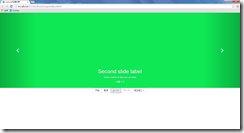
效果图:
Bootstrap插件之Carousel轮播效果(2015年-05月-21日)的更多相关文章
- Bootstrap之Footer页尾布局(2015年05月28日)
直接上页尾部分的代码: <!--采用container-fluid,使得整个页尾的宽度为100%,并设置它的背景色--><footer class="container-f ...
- 使用Ajax+jQuery来实现前端收到的数据在console上显示+简单的主页设计与bootstrap插件实现图片轮播
1.实现前端输入的数据在console上显示 上一篇是解决了在前端的输入信息在cygwin上显示,这次要给前台们能看见的数据,因为数据库里插入的数据少,所以写的语句翻来覆去就那几个词,emmm···当 ...
- js插件-图片椭圆轮播效果
插件效果图: html 代码如下: <div id="container"> <img src="images/cartoon/1.jpg" ...
- Bootstrap简单Demo(2015年05月-18日)
Bootstrap的简单使用 1.Bootstrap是什么? 这是Bootstrap官网上对它的描述:Bootstrap是最受欢迎的HTML.CSS和JS框架,用于开发响应式布局.移动设备优先的WEB ...
- 初识CSS3之媒体查询(2015年05月31日)
一.什么是媒体查询 媒体查询是面向不同设备提供不同样式的一种实现方式,它可以为每种类型的用户提供最佳的体验,也是响应式设计的实现方式. 现今每天都有更多的手机和平板电脑问市.消费者能够拥有可想象到的各 ...
- 初识Less(2015年05月23日)
因为最近在研究Bootstrap,然后才了解到Less,听说Less很强大,又听说Bootstrap+Less会更搭,所以就决定也顺带了解下Less的相关知识. come on...... 一.简介 ...
- 1、关于Boolean(2015年05月30日)
背景:刚在看Effective Java,看到一段关于Boolean提供一个返回实例的静态方法的例子,便去看了下Boolean的源码,发现有些内容是之前没注意到的,于是便有了下面这些. 1. Bool ...
- java之enum枚举(2015年05月28日)
背景: 今天启动了一个新的项目,由于要从之前的旧项目中拿过来一些代码,所以就看了下公司之前项目代码,发现有定义的常量类,也有枚举类,然后就在想着两者的功能差不多,那他们之间到底有什么区别呢,所以就决定 ...
- 实用工具推荐(Live Writer)(2015年05月26日)
1.写博客的实用工具 推荐软件:Live Writer 使用步骤: 1.安装 Live Essential 2011,下载地址:http://explore.live.com/windows-live ...
随机推荐
- [iOS基础控件 - 6.10.7] UIWindow
A.UIWindow概念 1.继承UIView,是一种特殊的UIView 2.通常一个APP只有一个UIWindow 3.iOS程序启动后,创建的第一个视图就是UIWindow 4.没有UIWindo ...
- Spring Data JPA教程, 第四部分: JPA Criteria Queries(未翻译)
The third part of my Spring Data JPA tutorialdescribed how you can create custom queries by using qu ...
- 利用WPF创建含多种交互特性的无边框窗体
咳咳,标题一口气读下来确实有点累,让我先解释一下.另外文章底部有演示程序的下载. 本文介绍利用WPF创建一个含有以下特性的窗口: 有窗口阴影,比如QQ窗口外围只有几像素的阴影: 支持透明且无边框,为了 ...
- Unity3D之空间转换学习笔记(一):场景物体变换
该系列笔记基于Unity3D 5.x的版本学习,部分API使用和4.x不一致. 目前在Unity3D中,除了新的UGUI部分控件外,所有的物体(GameObject)都必带有Transform组件,而 ...
- ASP.NET MVC- Area 使用
ASP.NET MVC允许使用 Area(区域)来组织Web应用程序,每个Area代表应用程序的不同功能模块.这对于大的工程非常有用,Area 使每个功能模块都有各自的文件夹,文件夹中有自己的Cont ...
- vsftpd 权限设置
vsftpd 虚拟用户 多用户不同权限 2010-06-27 00:54:20| 分类: linux大杂绘|举报|字号 订阅 1.需要建立一个用户,这个用户是linux系统的本地用户,各ft ...
- Xdebug的使用
1.http://www.cnblogs.com/mo-beifeng/articles/2446142.html 2.http://www.cnblogs.com/ximu/articles/200 ...
- 发现一个不错的十六进制编辑器-HxD
十六进制编辑器我觉得是个必需的工具,遥想当年用文曲星的时候,Pacmanager.Ewayeditor…… 之前都在用WinHex,好用,但是是个收费软件,老用着破解版心里还是不舒服 后来发现这个名叫 ...
- spring-mvc整合freemarker并在ftl模版中显示服务端校验的错误信息,JSR303或者JSR349
写法有多种,应该可以任意组合,最重要的是要引入spring.ftl 1.Bean里面的就不再多写了,来个简单就可以了 @NotEmpty(message="用户密码码不可为空") ...
- 框架使用的技术主要是SpringMVC 在此基础上进行扩展
框架使用的技术主要是SpringMVC 在此基础上进行扩展 1 Web前端使用 2 前段控制器采用SpringMVC零配置 3 IOC容器Spring 4 ORM使用 Mybites或者hiberna ...