
C# to Maxscript
I figured I’d do a quick tutorial about something a little more difficult, but still very important. I’m going to take you step-by-step through integrating a maxscript document and a C# class library so that you can access the powerful and robust features of the dotnet framework in the rather limited environment that maxscript provides. This lets you do such powerful things as access databases, grab web-deployed content, and more. It is my opinion that dotnet connectivity is the best thing to ever happen to maxscript.
This tutorial is written for C# users. However, the themes here apply to any language that is part of the common language runtime (CLR) framework. If you chose to use C++, VB, etc. you should still be able to compile a class library that can integrate in much the same way.
Step 1: Make a new class library project in Visual Studio.
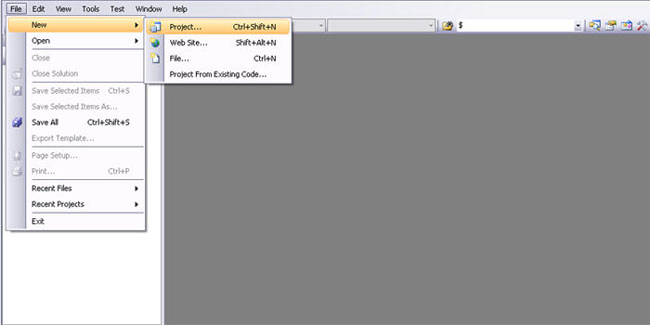
New class library creation.
So from the startup screen in visual studio, go ahead and go to File > New > Project.
Select a C# class library. I’m going to name mine “Maxscript Sandbox”.
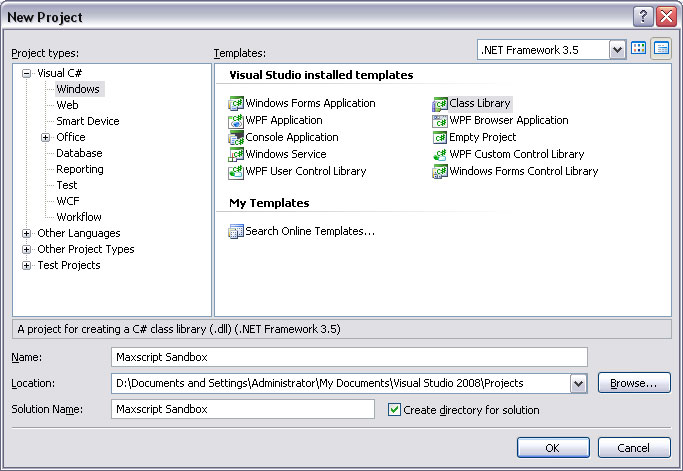
Name your library.
Step 2: Write a test class.
Now let’s write a test class for our new class library. In this screenshot I’ve written a very simple class that contains a string you pass on creation. Once the object exists, you can access the name, or you can call a function that provides you with a sentence that includes the name. Simple enough!
Rename the class to TestObject, and fill in the code you see below.
public class TestObject

{

    string Name;

    public TestObject(string thisName)

    {

        Name = thisName;

    }

    public string GetLongName()

    {

        return ("You can call me " + Name + "!");

    }

}

Insert some placeholder code.
Step 3: Compile.
From the drop-down along the top bar, change the build mode from Debug to Release. This means that the compiler will optimize the code for fast execution rather than for debugging and trying to find out what the problem is. On that note, I think there exists a way to debug the class from your script. However, it’s outside the scope of this tutorial. If you’re burning to debug, make a console app that wraps your class and tests functionality from there.
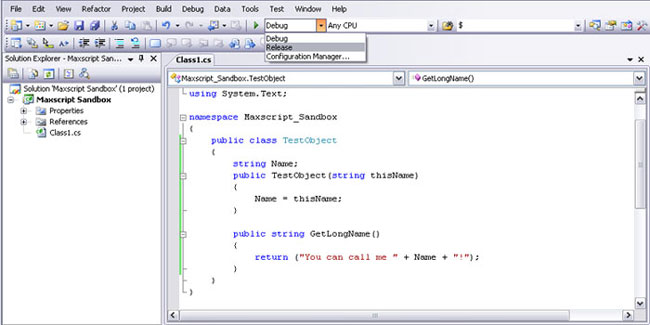
Change to "Release" compilation.
Now, hit F6 or go to Build > Build Solution.
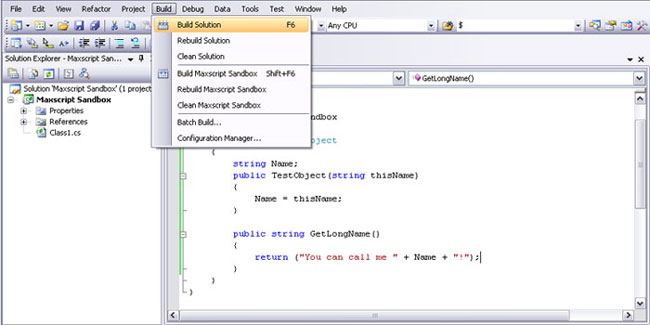
Build the solution to a DLL.
Step 4: Call the new object from Maxscript.
I’ve commented a lot of the code in the next image, but it’s actually a lot shorter than it looks. All you have to do is load the new class library you’ve created, instantiate the object, and then do whatever you want with it.
Notice that I’ve moved the .dll file that resulted from building my class library to somewhere shorter. Normally, your class library would compile to a directory within the project folder you selected when you created the project (like C:/…/Maxscript Sandbox/ Maxscript Sandbox/bin/release/Maxscript Sandbox.dll). I’ve moved that file from that incredibly long directory to something more digestable like C:/Temp/Maxscript Sandbox.dll.
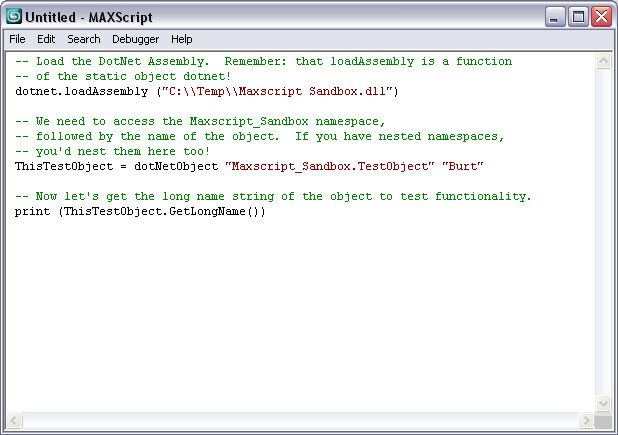
Call the library from Maxscript.
dotnet.loadAssembly ("C:\Temp\Maxscript Sandbox.dll")

ThisTestObject = dotNetObject "Maxscript_Sandbox.TestObject" "Burt"

print (ThisTestObject.GetLongName())
When you run this program, and the dll is in the right place, you’ll find that it outputs as though the object was a native max object. However it’s actually running in the dotnet framework. You can read more about creating objects and the syntax surrounding the Maxscript/C# connection in the documentation. This tutorial was just meant to clarify some of the logistical issues surrounding getting it working.
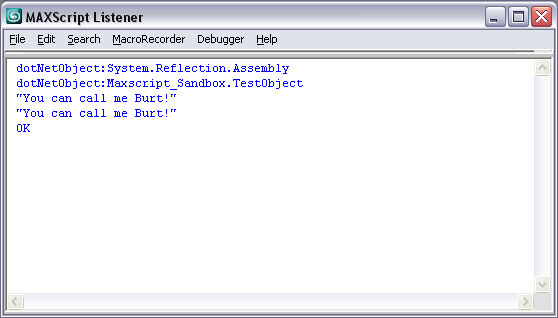
The final output from the script.
Until next time, happy scripting!
C# to Maxscript的更多相关文章
- 【转】MaxScript.Net接收本地端口的消息执行
MaxScript里开不了线程,但是可以用.Net的BackgroundWorker来做后台处理 BackgroundWorker Fn BackgroundTcpListenerDoWork the ...
- MaxScript重启3dsMax的重新思考
前天看到一位大神写用MaxScript实现重启3dsMax的方法,用的是.net临时编译一个exe出来,然后用这个新的进程来关闭并开启新的max.感觉这种思路不错,或许可以用在别的地方.不过谈及max ...
- 关于 MAXScript 拷贝文件夹及内容到其他位置
之前用 hiddenDOSCommand 本机测试通过,但是换其他电脑有时会不能用... fn xcopy oldfile newfile = ( newfilepath = newfile + &q ...
- 关于如何获取/清除 MAXScript 侦听器内的文本
关于如何获取/清除 MAXScript 侦听器内的文本 用来保存记录?还没想到实际用处,先记上. macroRecorder as string listener as stringclearList ...
- 关于 MAXScript 中文路径返回上级目录(精简版)
之前写过一个 关于 MAXScript 中文路径返回上级目录 的博文 今天无意中发现了一个更简单的方法 代码如下: fn newfile filepath = ( nf = getfilenamepa ...
- 关于 MAXScript 如何剪切文件夹
MAXScript 中可以对文件进行创建删除复制等操作但是唯独不能删除文件夹... 网上搜了一下批处理的剪切方法,在 MAXScript 里调用一下就好了 fn xcopy oldfile newfi ...
- 关于 MAXScript 逐行写入文本
官方帮助文档FileStream Values部分有相关介绍. fn format_txt filepath filetext = ( if doesFileExist filepath == tru ...
- 关于 MAXScript 获取全部文件
MAXScript 官方文档里关于获取文件夹下所有文件的方法 fn getFilesRecursive root pattern = ( dir_array = GetDirectories (roo ...
- maxscript, 批量导出物体
1,将场景中所有选中物体整体导出为一个fbx文件 exportfile filename #noprompt selectedOnly:true using:FBXEXP 2,将场景中所有选中物体各导 ...
- maxscript, 数组和字符串下标是从1开始的
maxscript中数组和字符串下标是从1开始的.
随机推荐
- cocos2d-x 让精灵按照自己设定的运动轨迹行动
转自:http://blog.csdn.net/ufolr/article/details/7447773 在cocos2d中,系统提供了CCMove.CCJump.CCBezier(贝塞尔曲线)等让 ...
- PHP+MySQL多语句执行<转自wooyun>
发起这个帖子,估计就很多人看到题目就表示不屑了.一直以来PHP+MySQL环境下,无论是写程序或者是注入攻击,是无法多语句执行的,这么广为人知的常识,没理由会有人不知道.可权威就是用来被挑战的,常识也 ...
- 图像切割之(五)活动轮廓模型之Snake模型简单介绍
图像切割之(五)活动轮廓模型之Snake模型简单介绍 zouxy09@qq.com http://blog.csdn.net/zouxy09 在"图像切割之(一)概述"中咱们简单了 ...
- 开始学习web前端技术
不能再蹉跎了,不能再徘徊了,不能再犹豫了,犹豫徘徊等于白来…… 感觉之前浪费了太多的岁月,必须得学习一门实用的技术来充实自己空虚的心情了. 想来想去网页应该是万金油的,大大小小多多少少都得用到.既然如 ...
- SQL Server中DML语句要申请的锁
对于select语句: 1.当採用表扫描时,会直接锁定page,而不是锁定详细的某条记录,所以会有这些锁: A.数据库S锁 B.表的IS锁 C.页的S锁 2.当採用索引来查找数据时,会锁定详细的记录, ...
- Android自定义radiobutton(文字靠左,选框靠右)
<RadioButton android:id="@+id/rb_never" android:layout_width="fill_parent" an ...
- 优秀js插件收藏
1. 滚动视差效果,类似锤子主页等效果实现 https://github.com/hahnzhu/parallax.js 2. jQuery全屏滚动插件 http://www.dowebok.com/ ...
- mysql 日期函数格式
mysql中的from_unixtime函数的format表达式字段描述: %M 月名字(January……December) %W 星期名字(Sunday……Saturday) %D 有英语前缀的 ...
- Ruby on Rails Tutorial 第三章 静态页面
1.生成静态页面 $ rails generate controller StaticPages home help #生成主页和帮助页面的路由.控制器及静态页面 $ rails destroy ...
- 1083. List Grades (25)
the problem is from PAT,which website is http://pat.zju.edu.cn/contests/pat-a-practise/1083 and the ...