
2.ASP.NET MVC 中使用Crystal Report水晶报表
上一篇,介绍了怎么导出Excel文件,这篇文章介绍在ASP.NET MVC中使用水晶报表。
项目源码下载:https://github.com/caofangsheng93/CrystalReportInMac
前提条件:你需要有VS,SQL Server 当然最重要的就是安装Crystal Report。
这里我提供我百度网盘的安装文件:http://pan.baidu.com/s/1bpcK3ZD,我这里是Crystal Report for VS2013的版本。需要其他的版本大家自己去搜去下载。
环境搭配好之后,就开始干,我们先创建数据库:
USE master

GO

IF EXISTS(SELECT * FROM sysdatabases WHERE name='CustomerDB')

DROP DATABASE CustomerDB

GO

CREATE DATABASE CustomerDB

GO

USE CustomerDB

GO

IF EXISTS(SELECT * FROM sysobjects WHERE name='Customers')

DROP TABLE Customers

GO

CREATE TABLE Customers

(

CustomerID INT NOT NULL PRIMARY KEY IDENTITY(,),

CustomerName NVARCHAR() NULL,

CustomerEmail NVARCHAR() NULL,

CustomerZipCode INT NULL,

CustomerCountry NVARCHAR() NULL,

CustomerCity NVARCHAR() NULL

)

--插入测试数据

INSERT INTO dbo.Customers

SELECT N'李易峰','李易峰@163.com','',N'中国',N'深圳'

UNION ALL

SELECT N'孙尚香','孙尚香@163.com','',N'中国',N'上海'

UNION ALL

SELECT N'兰陵王','兰陵王@163.com','',N'中国',N'北京'

UNION ALL

SELECT N'孙悟空','孙悟空@163.com','',N'中国',N'武汉'

UNION ALL

SELECT N'曹操','曹操@163.com','',N'中国',N'杭州'
然后,我们的项目是这样的:
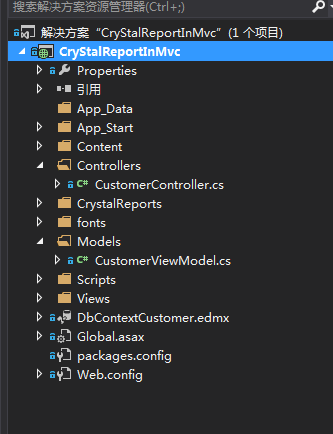
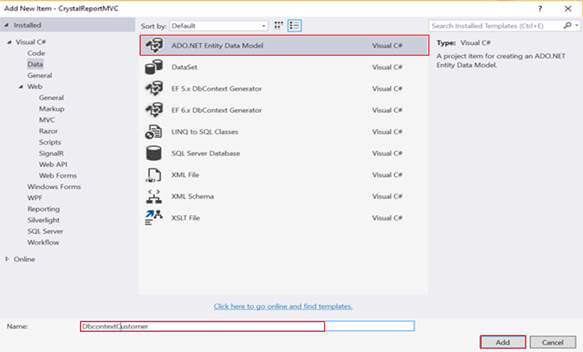
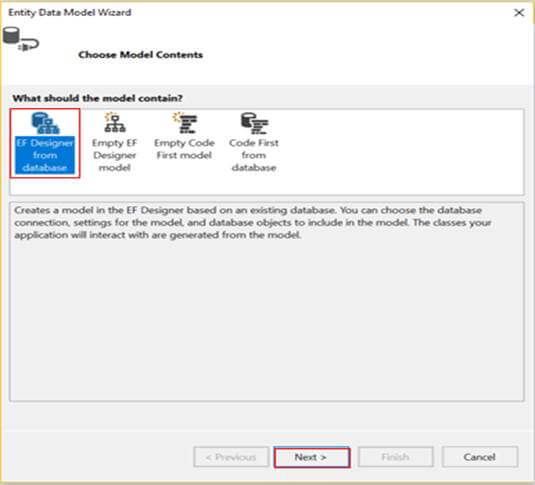
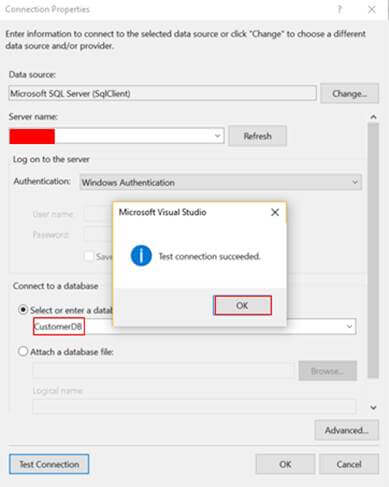
弄好数据库之后,我们新建一个ADO.NET实体数据模型:命名随便,我这里命名:DbContextCustomer
接着就是新建一个水晶报表了:


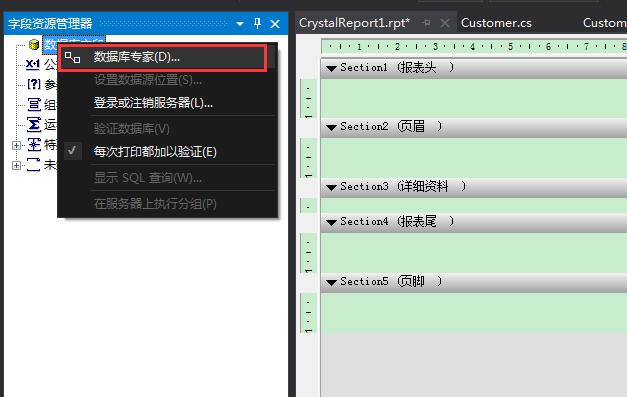
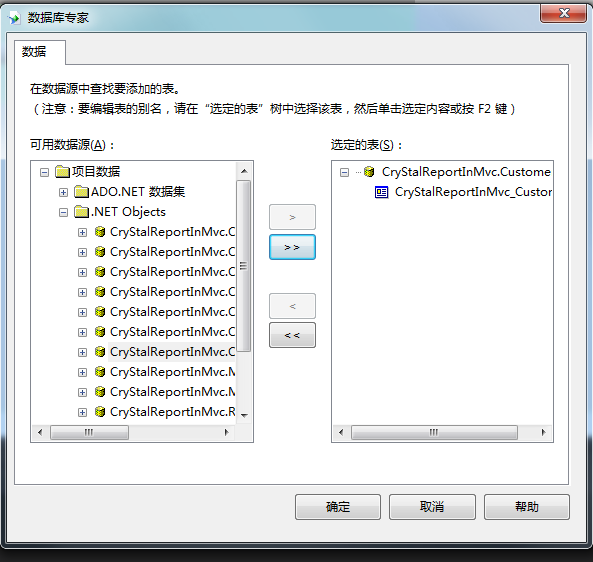
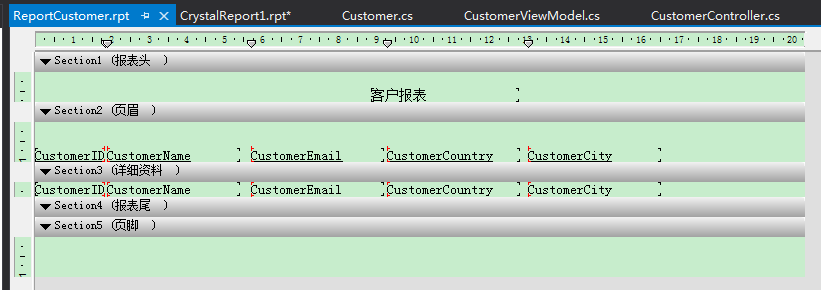
然后就是创建控制器:
 public class CustomerController : Controller

    {

        private CustomerDBEntities context = new CustomerDBEntities();

        public ActionResult Index()

        {

           var customerList= context.Customers.ToList();

           return View(customerList);

        }

        public ActionResult ExportCustomers()

        {

            List<Customer> allCustomer = new List<Customer>();

            allCustomer = context.Customers.ToList();

            ReportDocument rd = new ReportDocument();

            rd.Load(Path.Combine(Server.MapPath("~/CrystalReports"), "ReportCustomer.rpt"));

            rd.SetDataSource(ToDataTable<Customer>(allCustomer));

            Response.Buffer = false;

            Response.ClearContent();

            Response.ClearHeaders();

            Stream stream = rd.ExportToStream(CrystalDecisions.Shared.ExportFormatType.PortableDocFormat);

            stream.Seek(, SeekOrigin.Begin);

            return File(stream, "application/pdf", "CustomerList.pdf");

        }

        /// <summary>

        /// 将泛型集合类转换成DataTable

        /// </summary>

        /// <typeparam name="T">集合项类型</typeparam>

        /// <param name="list">集合</param>

        /// <param name="propertyName">需要返回的列的列名</param>

        /// <returns>数据集(表)</returns>

        public static DataTable ToDataTable<T>(IList<T> list, params string[] propertyName)

        {

            List<string> propertyNameList = new List<string>();

            if (propertyName != null)

                propertyNameList.AddRange(propertyName);

            DataTable result = new DataTable();

            if (list.Count > )

            {

                PropertyInfo[] propertys = list[].GetType().GetProperties();

                foreach (PropertyInfo pi in propertys)

                {

                    if (propertyNameList.Count == )

                    {

                        result.Columns.Add(pi.Name, pi.PropertyType);

                    }

                    else

                    {

                        if (propertyNameList.Contains(pi.Name))

                            result.Columns.Add(pi.Name, pi.PropertyType);

                    }

                }

                for (int i = ; i < list.Count; i++)

                {

                    ArrayList tempList = new ArrayList();

                    foreach (PropertyInfo pi in propertys)

                    {

                        if (propertyNameList.Count == )

                        {

                            object obj = pi.GetValue(list[i], null);

                            tempList.Add(obj);

                        }

                        else

                        {

                            if (propertyNameList.Contains(pi.Name))

                            {

                                object obj = pi.GetValue(list[i], null);

                                tempList.Add(obj);

                            }

                        }

                    }

                    object[] array = tempList.ToArray();

                    result.LoadDataRow(array, true);

                }

            }

            return result;

        }

    }
视图代码:
@model IEnumerable<CryStalReportInMvc.Customer>

@{

    ViewBag.Title = "Index";

}

<h2>Index</h2>

<p>

    @Html.ActionLink("Create New", "Create")

    <div><a href="@Url.Action("ExportCustomers")">Report PDF</a></div>

</p>

<table class="table">

    <tr>

        <th>

            @Html.DisplayNameFor(model => model.CustomerName)

        </th>

        <th>

            @Html.DisplayNameFor(model => model.CustomerEmail)

        </th>

        <th>

            @Html.DisplayNameFor(model => model.CustomerZipCode)

        </th>

        <th>

            @Html.DisplayNameFor(model => model.CustomerCountry)

        </th>

        <th>

            @Html.DisplayNameFor(model => model.CustomerCity)

        </th>

        <th></th>

    </tr>

@foreach (var item in Model) {

    <tr>

        <td>

            @Html.DisplayFor(modelItem => item.CustomerName)

        </td>

        <td>

            @Html.DisplayFor(modelItem => item.CustomerEmail)

        </td>

        <td>

            @Html.DisplayFor(modelItem => item.CustomerZipCode)

        </td>

        <td>

            @Html.DisplayFor(modelItem => item.CustomerCountry)

        </td>

        <td>

            @Html.DisplayFor(modelItem => item.CustomerCity)

        </td>

        <td>

            @Html.ActionLink("Edit", "Edit", new { id=item.CustomerID }) |

            @Html.ActionLink("Details", "Details", new { id=item.CustomerID }) |

            @Html.ActionLink("Delete", "Delete", new { id=item.CustomerID })

        </td>

    </tr>

}

</table>
效果图:
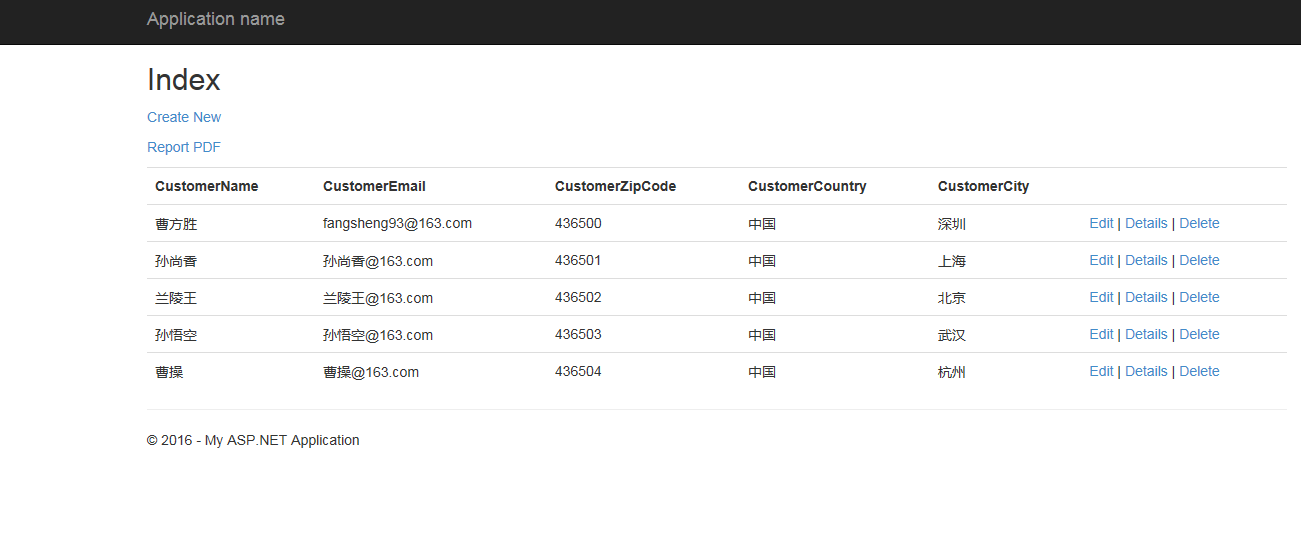
点击Report PDF之后:

这样就实现了报表的功能。
2.ASP.NET MVC 中使用Crystal Report水晶报表的更多相关文章
- [转]解决crystal report水晶报表在浏览器提示bobj未定义的错误
网上的中文文章(比如这篇文章)都是写的部署到服务器后出现的问题,同时也指出要把crystal report的aspnet_client文件夹拷贝到对应项目的根目录里,这样就可以正常显示了,但是具体到我 ...
- 解决crystal report水晶报表在浏览器提示bobj未定义的错误
网上的中文文章(比如这篇文章)都是写的部署到服务器后出现的问题,同时也指出要把crystal report的aspnet_client文件夹拷贝到对应项目的根目录里,这样就可以正常显示了,但是具体到我 ...
- C# WinForm开发系列 - Crystal Report水晶报表
转自:ttp://www.cnblogs.com/peterzb/archive/2009/07/11/1521325.html 水晶报表(Crystal Report)是业内最专业.功能最强的报表系 ...
- Crystal Report - 水晶报表导出文件的格式设置
水晶报表中自带的导出和打印功能用起来确实很方便,只不过有时候需要导出的文件并不需要那么多种类型,在网上找到一些朋友的代码总结了一下,可以通过代码实现自定义导出文件类型 首先需要定义一个枚举: publ ...
- Crystal Report水晶报表碰到的一些纠结问题
1.插入PNG文件时,透明的背景会变成黑色.试了矢量图WMF文件,是可以正常显示的,不过毕竟得到矢量图比较困难. 后来找到个方法,就是把JPG图片放在子报表里,调整子报表在父报表的位置并且保持JP ...
- 在asp.net mvc中如何使用Grid++ Report (锐浪报表)
在asp.net mvc中如何使用Grid++ Report (锐浪报表) 在cshtml,razor中的处理方法 以官方的asp.net(csharp)中的第一个示例"1a.简单表格&qu ...
- 在ASP.NET MVC 中使用ActiveReports报表控件
随着MVC模式的广泛运用,对Web应用系统的开发带来了巨大的影响,我们好像又回到了原来的ASP时代,视乎这是一种后退而不是一种进步,不过MVC模式给我们带来的影响不仅限于我们所看到的这一点..MVC看 ...
- 关于 ASP.NET MVC 中的视图生成
在 ASP.NET MVC 中,我们将前端的呈现划分为三个独立的部分来实现,Controller 用来控制用户的操作,View 用来控制呈现的内容,Model 用来表示处理的数据. 从控制器到视图 通 ...
- 在Asp.Net MVC 中配置 Serilog
Serilog 是一种非常简便记录log 的处理方式,使用Serilog可以生成本地的text文件, 也可以通过 Seq 来在Web界面中查看具体的log内容. 接下来就简单的介绍一下在Asp.Net ...
随机推荐
- nodejs进阶(1)—输出hello world
下面将带领大家一步步学习nodejs,知道怎么使用nodejs搭建服务器,响应get/post请求,连接数据库等. 搭建服务器页面输出hello world var http = require ...
- 谈谈一些有趣的CSS题目(八)-- 纯CSS的导航栏Tab切换方案
开本系列,谈谈一些有趣的 CSS 题目,题目类型天马行空,想到什么说什么,不仅为了拓宽一下解决问题的思路,更涉及一些容易忽视的 CSS 细节. 解题不考虑兼容性,题目天马行空,想到什么说什么,如果解题 ...
- [转载]Cookie/Session的机制与安全
Cookie和Session是为了在无状态的HTTP协议之上维护会话状态,使得服务器可以知道当前是和哪个客户在打交道.本文来详细讨论Cookie和Session的实现机制,以及其中涉及的安全问题. 因 ...
- 记录一次bug解决过程:数据迁移
一 总结 不擅长语言表达,勤于沟通,多锻炼 调试MyBatis中SQL语法:foreach 问题:缺少关键字VALUES.很遗憾:它的错误报的让人找不着北. 二 BUG描述:MyBatis中批量插入数 ...
- 流程表单中js如何清空SheetUser控件数据?
昨天有人问我js怎么清空.我试了试,发现简单的赋给他空值,并没有用.只能给他赋一个真实存在的值才有用.于是跟踪了一下他的删除按钮. 效果如下 使用场景:可以根据字段的不同类别变更人员. js代码如下, ...
- arcpy+PyQt+py2exe快速开发桌面端ArcGIS应用程序
前段时间有一个项目,大体是要做一个GIS数据处理工具. 一般的方法是基于ArcObjects来进行开发,因为我对ArcObjects不太熟悉,所以就思考有没有其他简单快速的方法来做. 在查看ArcGI ...
- 软件工程(C编码实践篇)学习心得
孟繁琛 + 原创作品转载请注明出处 + <软件工程(C编码实践篇)>MOOC课程 http://mooc.study.163.com/course/USTC-1000002006 软件工程 ...
- TypeScript
TypeScript: Angular 2 的秘密武器(译) 本文整理自Dan Wahlin在ng-conf上的talk.原视频地址: https://www.youtube.com/watch? ...
- 我对BFC的理解
最初这篇文章打算回答寒冬大神的第一问,谈谈CSS布局.本来呢我以为布局主要涉及float跟display相关属性,以及他们的包含框.静态位置等等.后来看了大神的一片面试文章,嗯?这里怎么还有个BFC, ...
- 实现了一个百度首页的彩蛋——CSS3 Animation简介
在百度搜索中有这样一个彩蛋:搜索“旋转”,“跳跃”,“反转”等词语,会出现相应的动画效果(搜索“反转”后的效果).查看源码可以发现,这些效果正是通过CSS3的animation属性实现的. 实现这个彩 ...