
laravel 框架简易增删改查
参看网址:http://www.yan.com/mou/add
图书增加HTML页面
//图书增加路由

Route::get('mou/add','MouController@store');
//控制器代码,这一步渲染添加的视图
  public function add()

    {

        return view('mou.mouadd');

    }
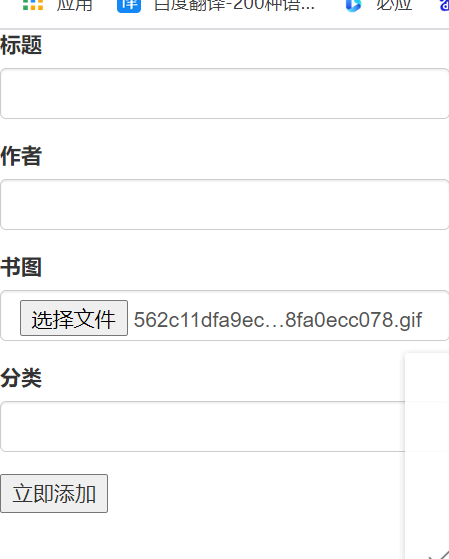
//添加视图HTML代码
<!doctype html>

<html lang="en">

<head>

    <meta charset="UTF-8">

    <meta name="viewport"

          content="width=device-width, user-scalable=no, initial-scale=1.0, maximum-scale=1.0, minimum-scale=1.0">

    <meta http-equiv="X-UA-Compatible" content="ie=edge">

    <title>添加页面</title>

    <link rel="stylesheet" href="http://apps.bdimg.com/libs/bootstrap/3.3.0/css/bootstrap.min.css">

</head>

<body>

<form action="/mou/insert" method="post" enctype="multipart/form-data" style="width: 300px;">

    @csrf

    <div class="form-group">

        <label for="name">标题</label>

        <input type="text" class="form-control" name="title"  >

    </div>

    <div class="form-group">

        <label for="name">作者</label>

        <input type="text" class="form-control" name="author"  >

    </div>

    <div class="form-group">

        <label for="name">书图</label>

        <input type="file" class="form-control" name="img"  >

    </div>

    <div class="form-group">

        <label for="name">分类</label>

        <input type="text" class="form-control" name="type" >

    </div>

    <input type="submit" value="立即添加">

</form>

</body>

</html>
//处理添加入库,数据库展示,删除,修改以及静态化详情控制器代码
<?php

namespace App\Http\Controllers;

use App\models\mouModel;

use Illuminate\Http\Request;

use QL\QueryList;

class MouController extends Controller

{

    //

    public function store()

    {

        //采集的地址

        $url = 'https://www.hongxiu.com/search?kw=%E5%8E%86%E5%8F%B2';

        $content = file_get_contents($url);

        $range = '.book-mid-info';

        $rules = [

            'title' => ['h4', 'text'],

            'author' => ['p[class=author]', 'text'],

            'img' => ['img', 'src'],

            'type' => ['a[target=_blank]', 'text']

        ];

        $data = QueryList::html($content)

            ->range($range)

            ->rules($rules)

            ->queryData();

        foreach ($data as $k => $v) {

            $path = 'http:' . $v['img'];

            $file = file_get_contents($path);

            $filename = './book/' . md5($k) . '.jpg';

            file_put_contents($filename, $file);

        }

        $res = mouModel::store($data);

        if ($res) {

            echo "<font color='red'>采集成功</font>";

            header('refresh:2,url=/mou/list');

        } else {

            echo "<font color='red'>采集失败</font>";

            header('refresh:2,url=/mou/list');

        }

    }

//图书添加页面

    public function add()

    {

        return view('mou.mouadd');

    }


//图书入库

    public function insert(Request $request)

    {

//        接受参数

        $params = $request->except('_token');

        //处理图片

        $path = '/' . $request->file('img')->store('img');

        $params['img'] = $path;

//        进行添加入库

        $res = mouModel::store($params);

        if ($res) {

            echo "<font color='red'>添加成功</font>";

            header('refresh:2,url=/mou/list');

        } else {

            echo "<font color='red'>添加失败</font>";

            header('refresh:2,url=/mou/add');

        }

    }

//展示

    public function list(Request $request)

    {

        $word=$request->input('word');

        $data = mouModel::list($word);

        return view('mou.moulist', compact('data','word'));

    }

//删除

    public function del($id)

    {

//        这里可进行验证id不可以为空,是不是纯数字

        $res = mouModel::del($id);

        if ($res) {

            echo "<font color='red'>删除成功</font>";

            header('refresh:2,url=/mou/list');

        } else {

            echo "<font color='red'>删除失败</font>";

            header('refresh:2,url=/mou/list');

        }

    }

//详情展示

    public function updataone($id)

    {

        //        这里可进行验证id不可以为空,是不是纯数字

        $data = mouModel::updataone($id);

        return view('mou.mouupdataone', compact('data'));

    }

//修改

    public function updata(Request $request)

    {

        $params = $request->all();

        $res = mouModel::updata($params);

        if ($res) {

            echo "<font color='red'>修改成功</font>";

            header('refresh:2,url=/mou/list');

        } else {

            echo "<font color='red'>修改失败</font>";

            header('refresh:2,url=/mou/list');

        }

    }

    //静态化详情

    public function listone($id)

    {

        $filrname = "./book/" . md5($id) . ".html";

        if (file_exists($filrname)) {

            echo file_get_contents($filrname);

        } else {

            $data = mouModel::listone($id);

            $html = view('mou.moulistone', compact('data'));

            file_put_contents($filrname, $html);

            return $html;

        }

    }

}
//处理添加入库,数据库展示,删除,修改以及静态化详情模型代码
<?php

namespace App\models;

use Illuminate\Database\Eloquent\Model;

use Illuminate\Database\Eloquent\SoftDeletes;

class mouModel extends Model

{

    //软删除

    use SoftDeletes;

//定义数据表

    protected $table = 'mou';

//    定义主键id

    public $primaryKey = 'id';

//    设置时间戳为关

    public $timestamps = false;

//添加入库的模型代码

    public static function store($param)

    {

        return self::insert($param);

    }

    //展示

    public static function list($word)

    {

        return self::where('title','like',"%$word%")->paginate(5);

    }

    //删除

    public static function del($id)

    {

        return self::find($id)->delete();

    }

    //修改展示页面

    public static function updataone($id)

    {

        return self::find($id);

    }

    //修改

    public static function updata($params)

    {

        $obj = self::find($params['updata_id']);

        $obj->title = $params['title'];

        $obj->author = $params['author'];

        $obj->img = $params['new_img'];

        $obj->type = $params['type'];

        return $obj->save();

    }

    //详情展示

    public static function listone($id){

        return self::find($id);

    }

}
//修改HTML代码:
<!doctype html>

<html lang="en">

<head>

    <meta charset="UTF-8">

    <meta name="viewport"

          content="width=device-width, user-scalable=no, initial-scale=1.0, maximum-scale=1.0, minimum-scale=1.0">

    <meta http-equiv="X-UA-Compatible" content="ie=edge">

    <title>修改页面</title>

    <link rel="stylesheet" href="http://apps.bdimg.com/libs/bootstrap/3.3.0/css/bootstrap.min.css">

</head>

<body>

<form action="/mou/updata" method="post" style="width: 300px;">

    @csrf

    <div class="form-group">

        <label for="name">标题</label>

        <input type="text" class="form-control" name="title" value="{{$data['title']}}" >

    </div>

    <div class="form-group">

        <label for="name">作者</label>

        <input type="text" class="form-control" name="author" value="{{$data['author']}}" >

    </div>

    <div class="form-group">

        <label for="name">书图</label>

        <img src="{{$data['img']}}" alt="无法显示">

        <input type="file" value="new_img" name="new_img" >

    </div>

    <div class="form-group">

        <label for="name">分类</label>

        <input type="text" class="form-control" name="type" value="{{$data['type']}}">

    </div>

{{--    隐藏的id,传至控制器--}}

    <input type="hidden" value="{{$data['id']}}" name="updata_id">

    <input type="submit" value="立即修改">

</form>

</body>

</html>
laravel 框架简易增删改查的更多相关文章
- tp框架的增删改查
首先,我们来看一下tp框架里面的查询方法: 查询有很多种,代码如下: <?php namespace Admin\Controller; use Think\Controller; class ...
- Yii2.0高级框架数据库增删改查的一些操作(转)
yii2.0框架是PHP开发的一个比较高效率的框架,集合了作者的大量心血,下面通过用户为例给大家详解yii2.0高级框架数据库增删改查的一些操作 --------------------------- ...
- Yii2.0高级框架数据库增删改查的一些操作
yii2.0框架是PHP开发的一个比较高效率的框架,集合了作者的大量心血,下面通过用户为例给大家详解yii2.0高级框架数据库增删改查的一些操作 --------------------------- ...
- Entity - 使用EF框架进行增删改查 - 模型先行
模型先行:先创建数据库实体模型,然后再进行数据库的增删改查. 基本步骤是不变的,可参照 <Entity - 使用EF框架进行增删改查 - 数据库先行> 其中的不同是,在创建数据库实体模型的 ...
- ssm 框架实现增删改查CRUD操作(Spring + SpringMVC + Mybatis 实现增删改查)
ssm 框架实现增删改查 SpringBoot 项目整合 一.项目准备 1.1 ssm 框架环境搭建 1.2 项目结构图如下 1.3 数据表结构图如下 1.4 运行结果 二.项目实现 1. Emplo ...
- FoxOne---一个快速高效的BS框架--生成增删改查
FoxOne---一个快速高效的BS框架--(1) FoxOne---一个快速高效的BS框架--(2) FoxOne---一个快速高效的BS框架--(3) FoxOne---一个快速高效的BS框架-- ...
- laravel orm进行增删改查
https://laravelacademy.org/post/9699.html 建议用DB门面直接操作数据库,因为ORM性能低.数据查询上面,ORM不会比DB差的,就比如with,是用了sql最基 ...
- 【项目笔记】完成一个基于SSM框架的增删改查的模块后总结的问题
最近为了准备新工作重新摸出了SSM框架,同时从0学习了JQuery,终于用一周做完了一个包括增删改查的模块(主要是属性太多了,其中一个类50+,复制粘贴耗时). 从中特意记下了几个遇到的问题,总结一下 ...
- MybatisMapper 映射框架(增删改查 原始模式)
//增删改查 package TestDemo; import java.io.IOException; import java.io.InputStream; import java.util.Da ...
随机推荐
- STL priority_queue 优先队列 小记
今天做题发现一个很有趣的地方,竟然还是头一次发现,唉,还是太菜了. 做图论用STL里的priority_queue去优化prim,由于特殊需求,我需要记录生成树中是用的哪些边. 于是,我定义的优先队列 ...
- Vuex 状态管理的工作原理
Vuex 状态管理的工作原理 为什么要使用 Vuex 当我们使用 Vue.js 来开发一个单页应用时,经常会遇到一些组件间共享的数据或状态,或是需要通过 props 深层传递的一些数据.在应用规模较小 ...
- js图片预览代码
<!DOCTYPE html PUBLIC "-//W3C//DTD XHTML 1.0 Transitional//EN" "http://www.w3.org/ ...
- js实现网页中英文翻译
1,html 2,metrics.js 3,需要 http://www.microsoftTranslator.com/ajax/v3/WidgetV3.ashx?siteData=ueOIGRSKk ...
- 一键部署mysql 无修改直接cp 执行 100% 有效
一键部署mysql 无修改直接cp 执行 100% 有效 将安装包拖至/opt目录下,编一个脚本文件,然后source执行脚本,等脚本执行完成, 即可使用mysql -u root -p点击 ...
- 配置docker的DNS
方式一:在宿主机的 /etc/docker/daemon.json 文件中增加以下内容来设置全部容器的 DNS: { "dns" : [ "114.114.114.114 ...
- Ubuntu18修改系统时间
1. 运行 tzselect 依次选择 Asia -> China -> Beijing Time 2. 复制文件到 /etc 下 sudo cp /usr/share/zoneinfo/ ...
- Spring5源码解析系列一——IoC容器核心类图
基本概念梳理 IoC(Inversion of Control,控制反转)就是把原来代码里需要实现的对象创建.依赖,反转给容器来帮忙实现.我们需要创建一个容器,同时需要一种描述来让容器知道要创建的对象 ...
- interface中setup_time和hold_time
interface中的setup_time和hold_time input:约束input信号提前T时间采样,然后在时钟沿更新到input信号上. output:约束output信号,在时钟沿T时间后 ...
- ORACLE-创建用户和表空间
/*分为四步 *//*第1步:创建临时表空间 */create temporary tablespace user_temp tempfile 'D:\oracle\oradata\Oracle9i\ ...