
ubuntu下ntp时间同步
1. 首先安装ntp服务(ubuntu 16.02)
在linux的root用户下执行以下命
sudo apt-get install ntp
(如果不是ubuntu系统则执行 yum install ntp –y)
2. 修改ntp配置文件(server)
我们需要在linux集群中找到一台作为ntp服务器的server,其他机器则为ntp的client,因此,在server服务器上修改一下配置文件
执行
退出保存,重启ntp服务
执行 service ntp restart
vim /etc/ntp.conf:
#linux自带的时间同步,需要注释掉

#pool 0.ubuntu.pool.ntp.org iburst

#pool 1.ubuntu.pool.ntp.org iburst

#pool 2.ubuntu.pool.ntp.org iburst

#pool 3.ubuntu.pool.ntp.org iburst

# Use Ubuntu's ntp server as a fallback.

#pool ntp.ubuntu.com

# Local users may interrogate the ntp server more closely.

restrict 127.0.0.1

restrict ::1

#因为是内网,所以用本地时间做为服务器时间,注意这里不是127.0.0.1

server 127.127.1.0

fudge 127.127.1.0 stratum 8

#开放192.168.8.0 整个网段,即在这个网段的所有机器都可以使用 214 作为时间同步服务端

restrict 192.168.0.0 mask 255.255.255.0 nomodify notrap
3. 修改ntp配置文件(client)
同样的server端已经配置好了,client的配置相对简单
执行 sudo vim /etc/ntp.conf:
#linux自带的时间同步,需要注释掉

#pool 0.ubuntu.pool.ntp.org iburst

#pool 1.ubuntu.pool.ntp.org iburst

#pool 2.ubuntu.pool.ntp.org iburst

#pool 3.ubuntu.pool.ntp.org iburst

# Use Ubuntu's ntp server as a fallback.

#pool ntp.ubuntu.com

# Local users may interrogate the ntp server more closely.

restrict 127.0.0.1

restrict ::1

#增加214作为时间服务器即可

server 192.168.0.214

# Needed for adding pool entries

restrict source notrap nomodify noquery
退出保存,重启ntp服务
执行 sudo service ntp restart
4. 查看ntp服务是否配置完成
在ntp sever上执行 ntpq -p
在ntp client上执行 ntpq –p
即完成ntp服务的配置
5. ntp服务的相关命令
service ntpstart 启动
service ntp stop停止
service ntprestart 重新启动
ubuntu更改时区(东八区)

tzselect
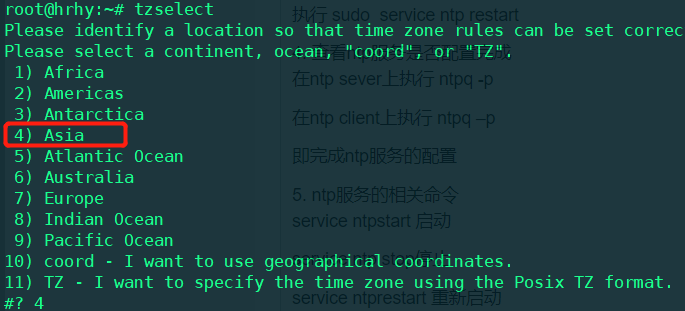
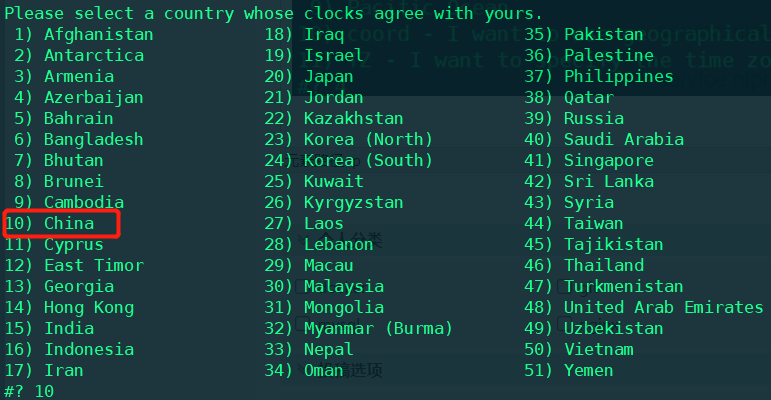
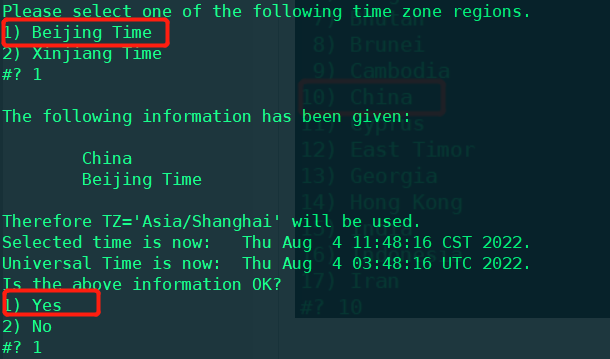
ln -sf /usr/share/zoneinfo/Asia/Shanghai /etc/localtime
ubuntu下ntp时间同步的更多相关文章
- ubuntu下配置时间同步NTP
1参考文献: 1.鸟哥的Linux私房菜:第十五章.时间服务器: NTP 服务器(强烈建议看完) 2.http://www.crsay.com/wiki/wiki.php/server/centos/ ...
- 关于linux下ntp时间同步服务的安装与配置
1.安装ntp服务,要使用时间同步.那么服务端与客户端都需要使用如下命令安装NTP软件包 [root@ ~]# yum install ntp -y 2.如果只是作为客户端的话,配置则可以非常简单,编 ...
- Linux下ntp时间同步
在root用户下执行 先安装同步时间软件,每台机器执行 yum install -y ntp 然后执行以下命令: crontab -e */10 * * * * /usr/sbin/ntpdate - ...
- Linux下 ntp 时间同步服务ntpd 出现 the NTP socket is in use, exiting 解决
[root@EPDDB log]# [root@EPDDB log]# ntpdate 10.154.8.200 6 Sep 09:35:09 ntpdate[30210]: the NTP sock ...
- ntp时间同步服务器
[root@localhost ~]# ntpdate time.nist.gov 虚拟机时间不对 自动同步 sudo ntpdate asia.pool.ntp.org 要是同步后时间还是不 ...
- Linux集群环境下NTP服务器时间同步
NTP介绍 NTP(Network Time Protocol,网络时间协议)是用来使网络中的各个计算机时间同步的一种协议.它的用途是把计算机的时钟同步到世界协调时UTC(Universal Time ...
- linux ntp时间同步
linux ntp时间同步 一.搭建时间同步服务器1.编译安装ntp serverrpm -qa | grep ntp若没有找到,则说明没有安装ntp包,从光盘上找到ntp包,使用rpm -Uvh n ...
- Linux下ntpdate时间同步
Linux下ntpdate时间同步 Ntp服务器配置(暂略,以后整理) 时间同步方法 同步命令 # ntpdate ntp服务器域名或IP 例:# nt ...
- cloudstack安装篇3-SELinux配置、NTP时间同步、配置ClouStack软件库
一.SELinux配置 为了让CloudStack正常工作,我们必须将SELinux设置为permissive.需要在当前系统运行状态下和启动后都能够生效,进行以下配置. 在系统运行状态下的将SELi ...
- Windows2012R2 NTP时间同步
Windows2012R2 NTP时间同步 Windows2012R2里没有了internet时间,需要使用另外的方式去做时间同步 下面分两个情况 两个情况,两个情况都需要用修改组策略的方式来做 情况 ...
随机推荐
- 2.4.rpx单位有内置的视图容器组件
所有的视图组件,包括view.swiper等,本身不显示任何可视化元素.它们的用途都是为了包裹其他真正显示的组件. # view 视图容器. 它类似于传统html中的div,用于包裹各种元素内容. 如 ...
- CMAKE添加库
1.因为pthread不是C标准库,需要链接 2.在CMakeLists.txt里添加: FIND_PACKAGE(Threads REQUIRED) TARGET_LINK_LIBRARIES($ ...
- Zstack救急实战记录
起了这么个标题很容易引起歧义,先说明:是Zstack云架构帮我救急,而不是Zstack系统出了问题被救.具体容我慢慢道来: 使用Docker搭建EPICS的IOC记录 去年暑假时在一台工控机上裸装ce ...
- dotnet 缓存
Net 内置内存缓存 asp.net 中是有缓存的实现:HttpContext.Cache,缓存的数据是放到 Web 服务器的进程 内存里. 在控制台.WinForm.子线程.SignalR 等不支持 ...
- [POI2011]MET-Meteors 解题报告
语言系统紊乱了 QAQ 这道题感觉不是很难鸭 qwq. 先只考虑一个国家,怎么做?很显然,就直接二分一下就行了.判定答案可以维护一个差分数组,然后最后对它做一个前缀和,再求一下这个国家的流行数量就好了 ...
- Qt-FFmpeg开发-视频播放【软解码】(1)
Qt-FFmpeg开发-视频播放[软解码] 目录 Qt-FFmpeg开发-视频播放[软解码] 1.概述 2.实现效果 3.FFmpeg软解码流程 4.主要代码 6.完整源代码 更多精彩内容 个人内容分 ...
- No.2.1
字体图标( 目的:使用字体图标技巧实现网页中简洁的图标效果) 字体图标展示的是图标,本质是字体,处理简单的.颜色单一的图片 优点:灵活性:灵活的修改样式,例如:尺寸,颜色等 轻量级:体积小,渲染快,降 ...
- 关于centos8yum源失效问题
[CentOS8遇到错误]Error: Failed to download metadata for repo 'powertools'... 原因: CentOS Linux 8 已于 2021 ...
- P5318 【深基18.例3】查找文献题解(链式前向星)
P5318 [深基18.例3]查找文献题解 用head记录这一起点的最后一条边, next记录这一起点的上一条边. 注意要按照参考文献的倒叙排序(要按顺序看,而链式前向星是逆着来的,也就是为什么最简单 ...
- 周练7(ssti)
{7*7} ->49 -> smarty {{7*'7'}} -> 49 -> twig {{7*'7'}} -> 7777777 -> jinjia2 1. [B ...