
TensorFlow:使用inception-v3实现各种图像识别
程序来自博客:
# https://www.cnblogs.com/felixwang2/p/9190740.html
上面这个博客是一些列的,所以可以从前往后逐一练习。
 # https://www.cnblogs.com/felixwang2/p/9190740.html

 # TensorFlow(十五):使用inception-v3实现各种图像识别

 import tensorflow as tf

 import os

 import numpy as np

 import re

 from PIL import Image

 import matplotlib.pyplot as plt

 class NodeLookup(object):

     def __init__(self):

         label_lookup_path = 'inception_model/imagenet_2012_challenge_label_map_proto.pbtxt'

         uid_lookup_path = 'inception_model/imagenet_synset_to_human_label_map.txt'

         self.node_lookup = self.load(label_lookup_path, uid_lookup_path)

     def load(self, label_lookup_path, uid_lookup_path):

         # 加载分类字符串n********对应分类名称的文件

         proto_as_ascii_lines = tf.gfile.GFile(uid_lookup_path).readlines()

         uid_to_human = {}

         #一行一行读取数据

         for line in proto_as_ascii_lines :

             #去掉换行符

             line=line.strip('\n')

             #按照'\t'分割

             parsed_items = line.split('\t')

             #获取分类编号

             uid = parsed_items[0]

             #获取分类名称

             human_string = parsed_items[1]

             #保存编号字符串n********与分类名称映射关系

             uid_to_human[uid] = human_string

         # 加载分类字符串n********对应分类编号1-1000的文件

         proto_as_ascii = tf.gfile.GFile(label_lookup_path).readlines()

         node_id_to_uid = {}

         for line in proto_as_ascii:

             if line.startswith('  target_class:'):

                 #获取分类编号1-1000

                 target_class = int(line.split(': ')[1])

             if line.startswith('  target_class_string:'):

                 #获取编号字符串n********

                 target_class_string = line.split(': ')[1]

                 #保存分类编号1-1000与编号字符串n********映射关系

                 node_id_to_uid[target_class] = target_class_string[1:-2]

         #建立分类编号1-1000对应分类名称的映射关系

         node_id_to_name = {}

         for key, val in node_id_to_uid.items():

             #获取分类名称

             name = uid_to_human[val]

             #建立分类编号1-1000到分类名称的映射关系

             node_id_to_name[key] = name

         return node_id_to_name

     #传入分类编号1-1000返回分类名称

     def id_to_string(self, node_id):

         if node_id not in self.node_lookup:

             return ''

         return self.node_lookup[node_id]

 #创建一个图来存放google训练好的模型

 with tf.gfile.FastGFile('inception_model/classify_image_graph_def.pb', 'rb') as f:

     graph_def = tf.GraphDef()

     graph_def.ParseFromString(f.read())

     tf.import_graph_def(graph_def, name='')

 gpu_options = tf.GPUOptions(allow_growth=True)

 with tf.Session(config=tf.ConfigProto(gpu_options=gpu_options)) as sess:

     softmax_tensor = sess.graph.get_tensor_by_name('softmax:0')

     #遍历目录,如果images下没有图片,则没有任何识别

     for root,dirs,files in os.walk('images/'):

         for file in files:

             #载入图片

             image_data = tf.gfile.FastGFile(os.path.join(root,file), 'rb').read()

             predictions = sess.run(softmax_tensor,{'DecodeJpeg/contents:0': image_data})#图片格式是jpg格式

             predictions = np.squeeze(predictions)#把结果转为1维数据

             #打印图片路径及名称

             image_path = os.path.join(root,file)

             print(image_path)

             #显示图片

             img=Image.open(image_path)

             plt.imshow(img)

             plt.axis('off')

             plt.show()

             #排序

             top_k = predictions.argsort()[-5:][::-1]

             node_lookup = NodeLookup()

             for node_id in top_k:

                 #获取分类名称

                 human_string = node_lookup.id_to_string(node_id)

                 #获取该分类的置信度

                 score = predictions[node_id]

                 print('%s (score = %.5f)' % (human_string, score))

             print()
测试几张图,与结果分别贴到下面,根据程序需要,你自己需要在程序所在目录下建立一个images的文件夹,然后将图片放进去。
在上一个联系中,下载google的inception模型时顺带下载了一张大熊猫的图片,我就复制到新建的images文件夹下,然后随便从网上下载了两张图,一张时荷花的,一张是水葱的。
运行程序结果:
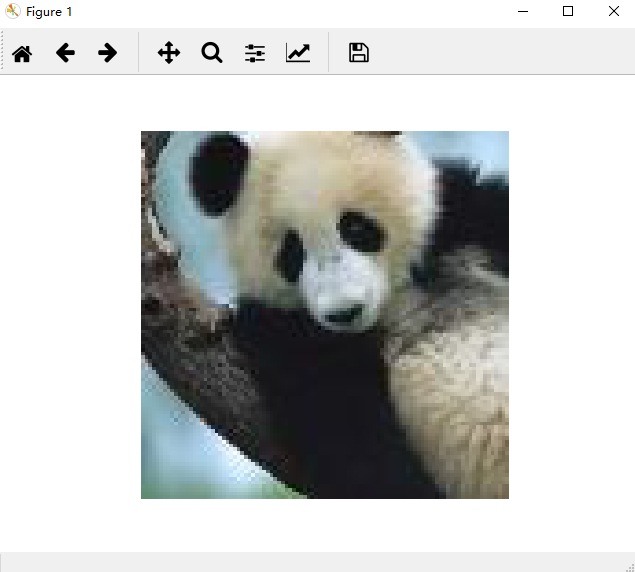
显示一张大熊猫,关闭,显示预测结果:
images/cropped_panda.jpg

giant panda, panda, panda bear, coon bear, Ailuropoda melanoleuca (score = 0.89107)

indri, indris, Indri indri, Indri brevicaudatus (score = 0.00779)

lesser panda, red panda, panda, bear cat, cat bear, Ailurus fulgens (score = 0.00296)

custard apple (score = 0.00147)

earthstar (score = 0.00117)
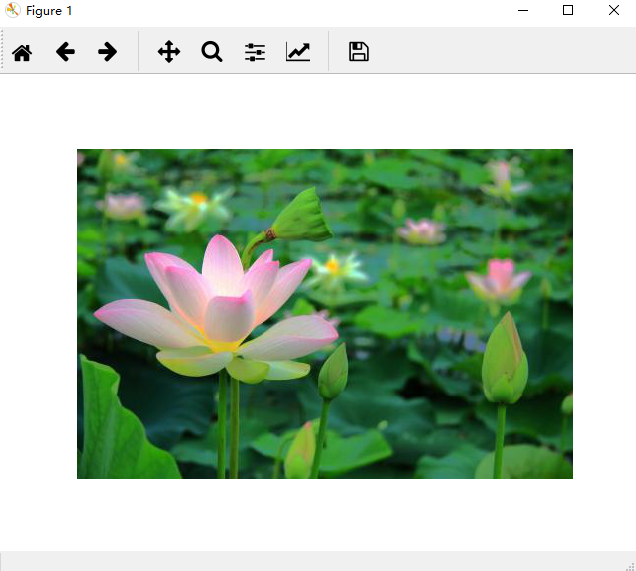
接着显示一张荷花,关闭显示预测结果:
images/Lotus.jpg

daisy (score = 0.52279)

sulphur butterfly, sulfur butterfly (score = 0.07167)

pot, flowerpot (score = 0.04293)

cabbage butterfly (score = 0.02629)

bee (score = 0.01437)
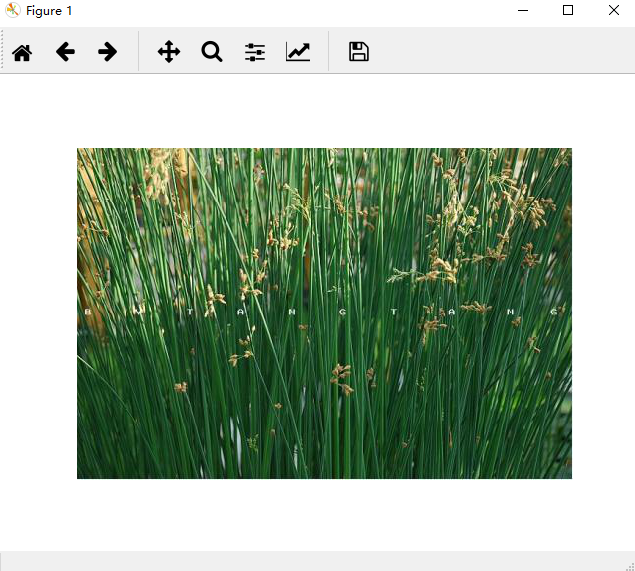
再接着显示一张水葱,关闭显示预测结果:
images/water_onion.jpg

lakeside, lakeshore (score = 0.32870)

corn (score = 0.19709)

ear, spike, capitulum (score = 0.15878)

yellow lady's slipper, yellow lady-slipper, Cypripedium calceolus, Cypripedium parviflorum (score = 0.01670)

hay (score = 0.01296)
从预测结果来看,大熊猫识别准确率很高;荷花居然预测成雏菊;水葱预测成湖边。看来后两个对象都没有训练好。
TensorFlow:使用inception-v3实现各种图像识别的更多相关文章
- Inception V3 的 tensorflow 实现
tensorflow 官方给出的实现:models/inception_v3.py at master · tensorflow/models · GitHub 1. 模型结构 首先来看 Incept ...
- 源码分析——迁移学习Inception V3网络重训练实现图片分类
1. 前言 近些年来,随着以卷积神经网络(CNN)为代表的深度学习在图像识别领域的突破,越来越多的图像识别算法不断涌现.在去年,我们初步成功尝试了图像识别在测试领域的应用:将网站样式错乱问题.无线领域 ...
- 1、VGG16 2、VGG19 3、ResNet50 4、Inception V3 5、Xception介绍——迁移学习
ResNet, AlexNet, VGG, Inception: 理解各种各样的CNN架构 本文翻译自ResNet, AlexNet, VGG, Inception: Understanding va ...
- 微调Inception V3网络-对Satellite分类
目录 1. 流程概述 2. 准备数据集 2.1 Satellite数据集介绍 3. Inception V3网络 4. 训练 4.1 基于Keras微调Inception V3网络 4.2 Keras ...
- 脸型分类-Face shape classification using Inception v3
本文链接:https://blog.csdn.net/u011961856/article/details/77984667函数解析github 代码:https://github.com/adoni ...
- 网络结构解读之inception系列四:Inception V3
网络结构解读之inception系列四:Inception V3 Inception V3根据前面两篇结构的经验和新设计的结构的实验,总结了一套可借鉴的网络结构设计的原则.理解这些原则的背后隐藏的 ...
- 从GoogLeNet至Inception v3
从GoogLeNet至Inception v3 一.CNN发展纵览 我们先来看一张图片: 1985年,Rumelhart和Hinton等人提出了后向传播(Back Propagation,BP)算法( ...
- 经典分类CNN模型系列其五:Inception v2与Inception v3
经典分类CNN模型系列其五:Inception v2与Inception v3 介绍 Inception v2与Inception v3被作者放在了一篇paper里面,因此我们也作为一篇blog来对其 ...
- TensorFlow学习笔记(四)图像识别与卷积神经网络
一.卷积神经网络简介 卷积神经网络(Convolutional Neural Network,CNN)是一种前馈神经网络,它的人工神经元可以响应一部分覆盖范围内的周围单元,对于大型图像处理有出色表现. ...
随机推荐
- 题解【洛谷P3958】[NOIP2017]奶酪
题面 题解 我们考虑使用一个并查集维护空洞之间的关系. 如果两个空洞能相互到达,那么它们的祖先也是相同的. 枚举从哪一个空洞开始,能否到达奶酪的上表面. 如果能到达就输出Yes,否则输出No. 注意开 ...
- JAVA 注解教程(二)元注解
简介 元注解是可以注解到注解上的注解,或者说元注解是一种基本注解,但是它能够应用到其它的注解上面 元注解有 @Retention.@Documented.@Target.@Inherited.@Rep ...
- Python之旅的开始day1
Python有哪些种类: JPython.IronPython.JavaScriptPython.RubyPython.CPython(即将开始学习种类,最为常见的种类).pypy pypy:这是用C ...
- crowdfunding项目03——mapper映射错误
org.springframework.beans.factory.UnsatisfiedDependencyException: Error creating bean with name 'TAd ...
- python之路之生成器和的迭代器
生成器的基本原理 生成器实现xrange 迭代器
- codeforces Codeforces Round #597 (Div. 2) D. Shichikuji and Power Grid
#include<bits/stdc++.h> using namespace std ; int n; struct City { int id; long long x,y; //坐标 ...
- JAVA Feign
Feign 是一种声明式.模板化的 HTTP客户端 . 在Spring Cloud中使用 Feign, 我们可以做到使用HTTP请求远程服务时能与调用本地方法一样的编码体验,开发者完全感知不到这是远程 ...
- window cmd下常用操作
创建文件夹 mkdir 创建空文件 type nul>文件名 进入目录 cd 进入分区 分区名 引入文件 当前文件: ./文件名 或 直接文件名 上一级目录文件及上一级目录下子文件:../文件名 ...
- centos useradd 命令详解
useradd 命令 Usage: useradd [options] LOGIN useradd -D useradd -D [options] Options: -b, --base-dir BA ...
- TP5.1 分页(带参数传递)
不带参数: $rs = Db::name('admin')->order(['id'=>'desc'])->paginate(1); 带参数传递: $rs=Db::name('adm ...