
WPF 自适应布局控件
    public class KDLayoutGroup : Grid

    {

        public double LabelWidth { get; set; }

        public double GetLabelWidth()

        {

            return LabelWidth;

        }

        public void SetLabelWidth(double value)

        {

            if (this.Parent is KDLayoutControl)

            {

                double w = (this.Parent as KDLayoutControl).GetLableWidth();

                if (w < value)

                {

                    (this.Parent as KDLayoutControl).SetLabelWidth(value);

                }

                for (int i = ; i < Children.Count; i++)

                {

                    SetBatchLabelWidth(Children[i], value);

                }

            }

        }

        protected override void OnRenderSizeChanged(SizeChangedInfo sizeInfo)

        {

            if (Children.Count == this.ColumnDefinitions.Count)

                return;

            for (int i = ; i < Children.Count; i++)

            {

                var column = new ColumnDefinition();

                //column.Width = new GridLength(0,GridUnitType.Auto);

                this.ColumnDefinitions.Add(column);

                Children[i].SetValue(Grid.ColumnProperty, i);

                SetBatchLabelWidthOther(Children[i]);

            }

            base.OnRenderSizeChanged(sizeInfo);

        }

        private void SetBatchLabelWidth(UIElement el, double value)

        {

            if (el is KDLayoutItem)

            {

                double width = (el as KDLayoutItem).GetLabelWidht();

                if (width < value)

                {

                    (el as KDLayoutItem).SetLabelWidht(value);

                }

            }

            else

            {

                if (el is Panel)

                {

                    var cs = (el as Panel).Children;

                    for (int i = ; i < cs.Count; i++)

                    {

                        SetBatchLabelWidth(cs[i], value);

                    }

                }

            }

        }

        private void SetBatchLabelWidthOther(UIElement el)

        {

            if (el is KDLayoutItem)

            {

                double width = (el as KDLayoutItem).GetLabelWidht();

                if (width > LabelWidth)

                {

                    LabelWidth = width;

                    SetLabelWidth(width);

                }

            }

            else

            {

                if (el is Panel)

                {

                    var cs = (el as Panel).Children;

                    for (int i = ; i < cs.Count; i++)

                    {

                        SetBatchLabelWidthOther(cs[i]);

                    }

                }

            }

        }

    }
 public class KDLayoutControl : StackPanel

    {

        public double LabelWidth { get; set; }

        public double GetLableWidth()

        {

            return LabelWidth;

        }

        public void SetLabelWidth(double value)

        {

            LabelWidth = value;

            for (int i = ; i < Children.Count; i++)

            {

                if ((Children[i] as KDLayoutGroup).GetLabelWidth() < LabelWidth)

                {

                    (Children[i] as KDLayoutGroup).SetLabelWidth(LabelWidth);

                }

            }

        }

        protected override void OnRenderSizeChanged(SizeChangedInfo sizeInfo)

        {

            for (int i = ; i < Children.Count; i++)

            {

                if ((Children[i] as KDLayoutGroup).GetLabelWidth() > LabelWidth)

                {

                    LabelWidth = (Children[i] as KDLayoutGroup).GetLabelWidth();

                }

            }

            SetLabelWidth(LabelWidth);

            base.OnRenderSizeChanged(sizeInfo);

        }

    }
<UserControl x:Class="PHMES.UI.Base.KDLayoutItem"

             xmlns="http://schemas.microsoft.com/winfx/2006/xaml/presentation"

             xmlns:x="http://schemas.microsoft.com/winfx/2006/xaml"

             xmlns:mc="http://schemas.openxmlformats.org/markup-compatibility/2006"

             xmlns:d="http://schemas.microsoft.com/expression/blend/2008"

             xmlns:local="clr-namespace:PHMES.UI.Base"

             mc:Ignorable="d"

             d:DesignHeight="450" d:DesignWidth="800">

    <UserControl.Template>

        <ControlTemplate TargetType="local:KDLayoutItem">

            <DockPanel>

                <Label  x:Name="lbl" VerticalAlignment="Center"  VerticalContentAlignment="Center" Content="{TemplateBinding Label}"  />

                <ContentPresenter/>

            </DockPanel>

        </ControlTemplate>

    </UserControl.Template>

</UserControl>
 public partial class KDLayoutItem : UserControl

    {

        public KDLayoutItem()

        {

            InitializeComponent();

        }

        public object Label

        {

            get { return (object)GetValue(LabelProperty); }

            set

            {

                SetValue(LabelProperty, value);

            }

        }

        // Using a DependencyProperty as the backing store for Label.  This enables animation, styling, binding, etc...

        public static readonly DependencyProperty LabelProperty =

            DependencyProperty.Register("Label", typeof(object), typeof(KDLayoutItem), new PropertyMetadata(null));

        public double GetLabelWidht()

        {

            return (this.Template.FindName("lbl",this) as Label).ActualWidth;

        }

        public void SetLabelWidht(double width)

        {

            (this.Template.FindName("lbl", this) as Label).SetValue(WidthProperty,width);

        }

    }
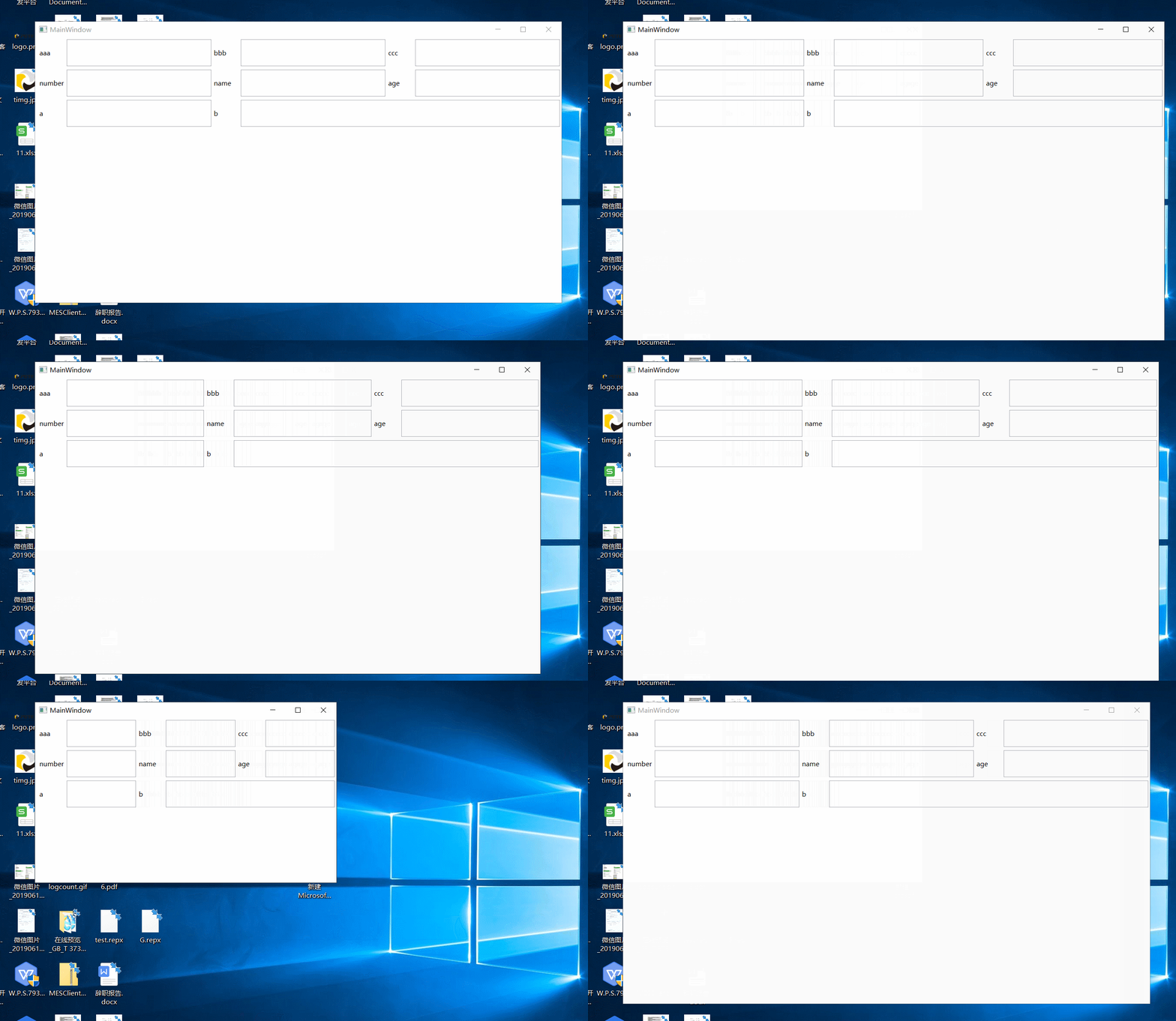
功能类似dev的layoutcontrol,layoutgroup,layoutitem.
用法如下:
<Window x:Class="AutoWidthTest.MainWindow"

        xmlns="http://schemas.microsoft.com/winfx/2006/xaml/presentation"

        xmlns:x="http://schemas.microsoft.com/winfx/2006/xaml"

        xmlns:d="http://schemas.microsoft.com/expression/blend/2008"

        xmlns:mc="http://schemas.openxmlformats.org/markup-compatibility/2006"

        xmlns:local="clr-namespace:AutoWidthTest"

        mc:Ignorable="d"

        Title="MainWindow" Height="450" Width="800">

    <local:KDLayoutControl>

        <local:KDLayoutGroup Height="50" VerticalAlignment="Top"  Margin="3">

            <local:KDLayoutItem Label="aaa">

                <TextBox />

            </local:KDLayoutItem>

            <local:KDLayoutItem Label="bbb">

                <TextBox />

            </local:KDLayoutItem>

            <local:KDLayoutItem Label="ccc">

                <TextBox />

            </local:KDLayoutItem>

        </local:KDLayoutGroup>

        <local:KDLayoutGroup Height="50" VerticalAlignment="Top"  Margin="3">

            <local:KDLayoutItem Label="number">

                <TextBox />

            </local:KDLayoutItem>

            <local:KDLayoutItem Label="name">

                <TextBox />

            </local:KDLayoutItem>

            <local:KDLayoutItem Label="age">

                <TextBox />

            </local:KDLayoutItem>

        </local:KDLayoutGroup>

        <local:KDLayoutGroup Height="50" VerticalAlignment="Top" Margin="3">

            <Grid>

                <Grid.ColumnDefinitions>

                    <ColumnDefinition/>

                    <ColumnDefinition/>

                    <ColumnDefinition/>

                </Grid.ColumnDefinitions>

                <local:KDLayoutItem Label="a">

                    <TextBox />

                </local:KDLayoutItem>

                <local:KDLayoutItem Label="b" Grid.Column="1" Grid.ColumnSpan="2">

                    <TextBox />

                </local:KDLayoutItem>

            </Grid>

        </local:KDLayoutGroup>

    </local:KDLayoutControl>

</Window>
不管label字段有多长,KDLayoutControl会设置容器内所有的label长度一致。
WPF 自适应布局控件的更多相关文章
- 【WPF】布局控件总结
<Canvas>:画布,默认不会自动裁减超出内容,即溢出的内容会显示在Canvas外面,这是因为默认 ClipToBounds="False":可设置ClipToBou ...
- WPF布局控件与子控件的HorizontalAlignment/VerticalAlignment属性之间的关系
WPF布局控件与子控件的HorizontalAlignment/VerticalAlignment属性之间的关系: 1.Canvas/WrapPanel控件: 其子控件的HorizontalAlign ...
- WPF自学入门(二)WPF-XAML布局控件
上一篇介绍了xaml基本知识,我们已经知道了WPF简单的语法.那么接下来,我们要认识一下WPF的布局容器.布局容器可以使控件按照分类显示,我们一起来看看WPF里面可以使用哪些布局容器用来布局. 在WP ...
- WPF布局控件常用属性介绍
WPF布局控件常用属性介绍 其它 | 作者:慧都控件网 | 2011-04-06 13:41:57| 阅读 0次 有用(0) 评论(0) 概述:WPF布局控件都是派生自System.Windows ...
- wpf布局控件总结
首先要认识到wpf所有的布局控件都继承自Panel类,Panel类又继承自其他类.继承关系如下: 一.StackPanel布局面板 1.该面板在单行或者单列中以堆栈的形式放置其子元素. 默认情况下,S ...
- 布局控件Grid
XAML概述 Silverlight的控件绘制是由XAML语言进行支持的.什么是XAML语言? 简单的说,XAML(Extensible Application Markup Language )是一 ...
- Expression Blend实例中文教程(3) - 布局控件快速入门Grid
上一篇对Blend 3开发界面进行了快速入门介绍,本篇将基于Blend 3介绍Silverlight控件.对于微软开发工具熟悉的朋友,相信您很快就熟悉Blend的开发界面和控件. XAML概述 Sil ...
- WPF中Ribbon控件的使用
这篇博客将分享如何在WPF程序中使用Ribbon控件.Ribbon可以很大的提高软件的便捷性. 上面截图使Outlook 2010的界面,在Home标签页中,将所属的Menu都平铺的布局,非常容易的可 ...
- 在WPF程序中将控件所呈现的内容保存成图像(转载)
在WPF程序中将控件所呈现的内容保存成图像 转自:http://www.cnblogs.com/TianFang/archive/2012/10/07/2714140.html 有的时候,我们需要将控 ...
随机推荐
- P1736 创意吃鱼法 /// DP
题目大意: https://www.luogu.org/problemnew/show/P1736 题解 dplr[][] 当前点左边(副对角线时为右边)有多少个连续的0 dpup[][] 当前点上边 ...
- Spoj-DISUBSTR - Distinct Substrings~New Distinct Substrings SPOJ - SUBST1~(后缀数组求解子串个数)
Spoj-DISUBSTR - Distinct Substrings New Distinct Substrings SPOJ - SUBST1 我是根据kuangbin的后缀数组专题来的 这两题题 ...
- 使用CEfSharp之旅(7)CEFSharp 拦截 http 请求 websocket 内容
原文:使用CEfSharp之旅(7)CEFSharp 拦截 http 请求 websocket 内容 版权声明:本文为博主原创文章,未经博主允许不得转载.可点击关注博主 ,不明白的进群19106581 ...
- 任意文件读取漏洞常用payload合集
直接整理到github上了,https://github.com/tdifg/payloads 其他payload以后不定期更新
- Android开发 处理拍照完成后的照片角度
private void initImageAngle(){ Bitmap imageBitmap = BitmapFactory.decodeFile(FilePathSession.getFace ...
- postgresql数据库安装后的pgadmin4切换中文
如图所示
- mybatis接口映射
通过sqlSession.getMapper();方法获取映射的接口及方法 sqlSession调用Configuration的getMapper方法,方法中使用了mapperRegistry.get ...
- 19-11-05-Night
我就是不行. ZJ: 好像是因为郁闷了才咕掉的…… 33 Miemeng 30 00:01:34 40 00:01:46 0 00:01:22 70 00:01:46 不记得当时怎么想的 T1只会暴力 ...
- vue2 + koa2全栈部署
1.首先打包前端上传 修改config下的index.js 代理地址为服务器IP index: path.resolve(__dirname, '../dist/index.html'), asset ...
- Frame用navigate导航到新页面后导航条隐藏的方法
设置Frame的NavigationUIVisibility="Hidden"