
Spring Boot 容器选择 Undertow 而不是 Tomcat Spring Boot 内嵌容器Unde
Spring Boot 内嵌容器Undertow参数设置
配置项:

# 设置IO线程数, 它主要执行非阻塞的任务,它们会负责多个连接, 默认设置每个CPU核心一个线程
# 不要设置过大,如果过大,启动项目会报错:打开文件数过多
server.undertow.io-threads=16阻塞任务线程池, 当执行类似servlet请求阻塞IO操作, undertow会从这个线程池中取得线程
它的值设置取决于系统线程执行任务的阻塞系数,默认值是IO线程数*8
server.undertow.worker-threads=256以下的配置会影响buffer,这些buffer会用于服务器连接的IO操作,有点类似netty的池化内存管理
每块buffer的空间大小,越小的空间被利用越充分,不要设置太大,以免影响其他应用,合适即可
server.undertow.buffer-size=1024每个区分配的buffer数量 , 所以pool的大小是buffer-size * buffers-per-region
server.undertow.buffers-per-region=1024是否分配的直接内存(NIO直接分配的堆外内存)
server.undertow.direct-buffers=true
来看看源代码:
https://github.com/undertow-io/undertow/blob/master/core/src/main/java/io/undertow/Undertow.java
ioThreads = Math.max(Runtime.getRuntime().availableProcessors(), 2);

workerThreads = ioThreads * 8;

//smaller than 64mb of ram we use 512b buffers


if (maxMemory < 64 * 1024 * 1024) {


//use 512b buffers


directBuffers = false;


bufferSize = 512;


} else if (maxMemory < 128 * 1024 * 1024) {


//use 1k buffers


directBuffers = true;


bufferSize = 1024;


} else {


//use 16k buffers for best performance


//as 16k is generally the max amount of data that can be sent in a single write() call


directBuffers = true;


bufferSize = 1024 * 16 - 20; //the 20 is to allow some space for protocol headers, see UNDERTOW-1209


}
很显然,Undertow认为它的运用场景是在IO密集型的系统应用中,并且认为多核机器是一个比较容易满足的点,Undertow初始化假想应用的阻塞系数在0.8~0.9之间,所以阻塞线程数直接乘了个8,当然,如果对应用较精确的估测阻塞系数,可以配置上去。
Spring Boot内嵌容器支持Tomcat、Jetty、Undertow。为什么选择Undertow?
这里有一篇文章,时间 2017年1月26日发布的:
Tomcat vs. Jetty vs. Undertow: Comparison of Spring Boot Embedded Servlet Containers
1. Setup Spring Boot Application
We will use Maven to setup a new project in Eclipse with the appropriate dependencies. We will use the starter parent for this example but the dependencies in a production application will likely be altered to streamline, optimize or customize.
1.1 Setup Spring Boot Dependencies
The default embedded servlet container is Tomcat. This version of Spring Web 1.4.3 brings in Tomcat version 8.5.6.
pom.xml
<parent>

   <groupId>org.springframework.boot</groupId>

   <artifactId>spring-boot-starter-parent</artifactId>

   <version>1.4.3.RELEASE</version>

</parent>

<dependencies>


<!-- TOMCAT -->


<dependency>


<groupId>org.springframework.boot</groupId>


<artifactId>spring-boot-starter-web</artifactId>


</dependency>


</dependencies>
1.2 Setup Spring Boot Main Application and Controllers
To setup the Spring Boot application you include the @SpringBootApplication annotation in your Main class. The @SpringBootApplication annotation brings in @SpringBootConfiguration, @EnableAutoConfiguration and @ComponentScanannotations.
Application.java
@SpringBootApplication

@ConfigurationProperties

public class Application {

public static void main(String[] args) {

   SpringApplication.run(Application.class, args);

}
You may choose to eliminate this annotation and add the @SpringBootConfiguration alone or to another class that allows you to customize the configuration. The @ComponentScan will scan your application for items like the @Controller you will need to setup a RESTful service. The following controller will return a simple “Hello World” string from a HTTP GET request. We have also included in the bundled example another endpoint mapping that returns a complex object type.
SampleController.java
@Controller

public class SampleController {

@Autowired


private ResourceLoader resourceLoader;

@RequestMapping("/")


@ResponseBody


public String home() {


return "Hello World!";


}
1.3 Key Configuration Parameters
The default properties for all the embedded servlet containers are the same. Some of the most important properties to consider are the properties for configuring startup information like ports and application name, TSL, access logs, compression and many more.
For example, to configure SSL add the following to key value pairs to the application.properties.
application.properties
server.port=8443

server.ssl.key-store=classpath:keystore.jks

server.ssl.key-store-password=secret

server.ssl.key-password=another-secret
1.4 How to Find Additional Parameters
To explore the parameters for Spring boot applications you can add the Spring actuator dependency and the @ConfigurationProperties annotation to your Main class. You then visit the /configprops endpoint on your application to get a list of the available properties.
Application.java
@SpringBootApplication

@ConfigurationProperties

public class Application {
pom.xml
<dependency>

   <groupId>org.springframework.boot</groupId>

   <artifactId>spring-boot-starter-actuator</artifactId>

</dependency>
1.5 Change version of Embedded Servlet Containers
The embedded servlet container versions are defined in the following parent dependency from the pom. You can change the version of the embedded servlet container by explicitly including the dependency and identifying a new version in the pom. We will show you how in the examples below.
pom.xml
<dependency>

   <groupId>org.springframework.boot</groupId>

   <artifactId>spring-boot-dependencies</artifactId>

   <version>1.3.7.RELEASE</version>

</dependency>
2. Tomcat
As Tomcat is the default embedded servlet container there is nothing you need to do to the default implementation to use Tomcat. You can change the version of Tomcat you are using or change properties in the pom.xml or application.properties files.
2.2 Change Version of Tomcat
pom.xml
<properties>

   <tomcat.version>8.5.6</tomcat.version></properties>

<dependency>

   <groupId>org.apache.tomcat.embed</groupId>

   <artifactId>tomcat-embed-core</artifactId>

   <version>${tomcat.version}</version>

</dependency>

<dependency>

   <groupId>org.apache.tomcat.embed</groupId>

   <artifactId>tomcat-embed-el</artifactId>

   <version>${tomcat.version}</version>

</dependency>

<dependency>

   <groupId>org.apache.tomcat.embed</groupId>

   <artifactId>tomcat-embed-websocket</artifactId>

   <version>${tomcat.version}</version>

</dependency>
3. Jetty
To change the embedded servlet container to Jetty you need to edit the pom file to remove the Tomcat dependency and add Jetty.
3.1 Change to Jetty (version 9.3.14)
pom.xml
<dependency>

   <groupId>org.springframework.boot</groupId>

   <artifactId>spring-boot-starter-web</artifactId>

   <exclusions>

      <exclusion>

         <groupId>org.springframework.boot</groupId>

         <artifactId>spring-boot-starter-tomcat</artifactId>

      </exclusion>

   </exclusions>

</dependency>

<dependency>

   <groupId>org.springframework.boot</groupId>

   <artifactId>spring-boot-starter-jetty</artifactId>

</dependency>
4. Undertow
To change the embedded servlet container to Undertow you need to edit the pom file to remove the Tomcat dependency and add Undertow.
4.1 Change to Undertow (version 1.3.24 final)
Notice the undertow version included in the spring boot starter is incorrect, referring to 1.3.25. You’ll need to change it to 1.3.24.Final for this to work at the time of this article.
pom.xml
<dependency>

   <groupId>org.springframework.boot</groupId>

   <artifactId>spring-boot-starter-web</artifactId>

   <exclusions>

      <exclusion>

         <groupId>org.springframework.boot</groupId>

         <artifactId>spring-boot-starter-tomcat</artifactId>

      </exclusion>

   </exclusions>

</dependency>

<dependency>

   <groupId>org.springframework.boot</groupId>

   <artifactId>spring-boot-starter-undertow</artifactId>

</dependency>

<dependency>

   <groupId>io.undertow</groupId>

   <artifactId>undertow-core</artifactId>

   <version>1.3.24.Final</version>

</dependency>

<dependency>

   <groupId>io.undertow</groupId>

   <artifactId>undertow-servlet</artifactId>

   <version>1.3.24.Final</version>

</dependency>
5. Performance and Load
In this example, we will analyze both the peformance of HTTP requests and the memory footprint at startup of all three embedded servlet containers. We used JMeter to measure performance by simulating load and JVisualVM to look at the memory footprint.
5.1 Measure Performance
In this example, we will analyze both the peformance of simple RESTFul GET requests that return a string and more complex GET requests that return complex JSON objects. JMeter is the tool used to measure the performance of the the three different types of containers. The key to setting up this test was establishing thread groups with the appropriate load, a counter to dynamically update the input to the API and report viewers to display or aggregate the results. For the simple string examples, we used a thread group with 1000 threads that would loop 3 times through the sequence. It also used a ramp up time of 10 seconds. For the complex object examples, we used the same parameters but did not loop.
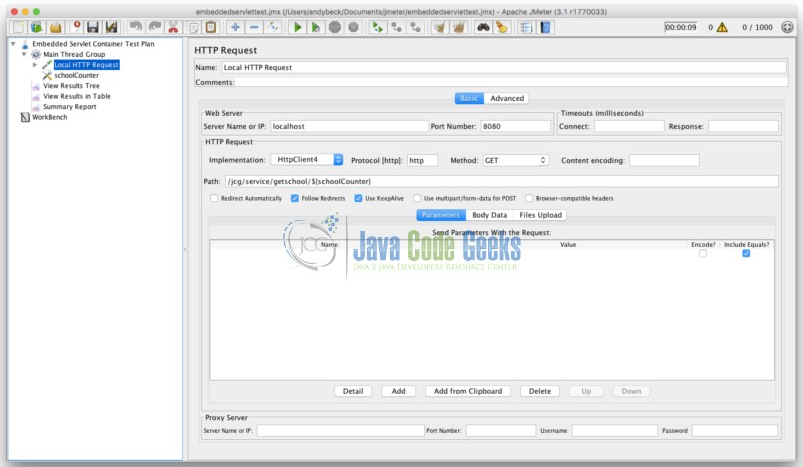
JMeter Tomcat Thread Group
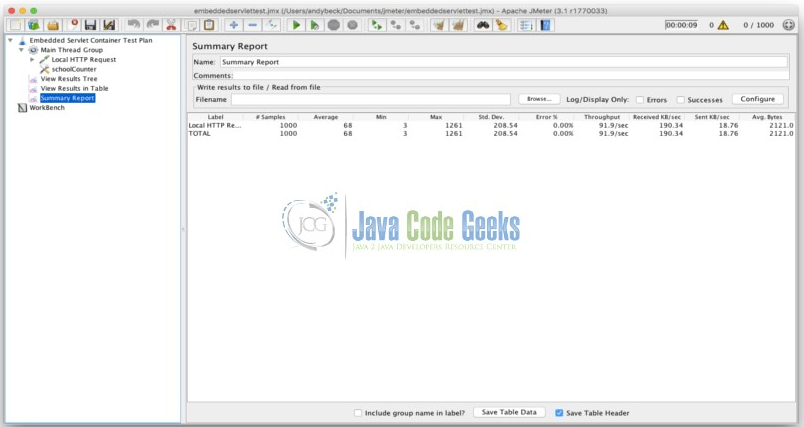
JMeter Tomcat Summary Report
5.1.1 Tomcat
5.1.1.1 Simple String
| Label | # Samples | Average | Min | Max | Std. Dev. | Error % | Throughput | Received KB/sec | Sent KB/sec | Avg. Bytes |
|---|---|---|---|---|---|---|---|---|---|---|
| Startup | 3000 | 7 | 1 | 549 | 35.78374361 | 0 | 293.8583603 | 55.95935572 | 55.67238466 | 195 |
| Others | 3000 | 1 | 0 | 45 | 1.359661682 | 0 | 287.8802418 | 54.82094449 | 54.53981144 | 195 |
| Others | 3000 | 1 | 0 | 24 | 1.155032275 | 0 | 292.1129503 | 55.62697785 | 55.3417113 | 195 |
5.1.1.2 Complex Object with Dynamic Data
| Label | # Samples | Average | Min | Max | Std. Dev. | Error % | Throughput | Received KB/sec | Sent KB/sec | Avg. Bytes |
|---|---|---|---|---|---|---|---|---|---|---|
| Startup | 1000 | 114 | 3 | 1601 | 322.8671905 | 0 | 97.68486861 | 202.3335999 | 19.93763432 | 2121 |
| Others | 1000 | 3 | 2 | 17 | 1.328216473 | 0 | 97.88566954 | 202.7495167 | 19.9786181 | 2121 |
| Others | 1000 | 2 | 1 | 16 | 1.110529603 | 0 | 98.52216749 | 204.0678879 | 20.10852833 | 2121 |
| Others | 1000 | 2 | 1 | 21 | 1.344498419 | 0 | 98.53187506 | 204.0879951 | 20.11050966 | 2121 |
5.1.2 Jetty
5.1.2.1 Simple Object
| Label | # Samples | Average | Min | Max | Std. Dev. | Error % | Throughput | Received KB/sec | Sent KB/sec | Avg. Bytes |
|---|---|---|---|---|---|---|---|---|---|---|
| Startup | 3000 | 7 | 0 | 561 | 40.13705065 | 0 | 291.5168594 | 56.0828333 | 55.22878 | 197 |
| Others | 3000 | 1 | 0 | 21 | 1.058925031 | 0 | 293.5995302 | 56.48350338 | 55.6233485 | 197 |
| Others | 3000 | 1 | 0 | 21 | 0.926034317 | 0 | 294.3485086 | 56.62759395 | 55.7652448 | 197 |
5.1.2.2 Complex Object with Dynamic Data
| Label | # Samples | Average | Min | Max | Std. Dev. | Error % | Throughput | Received KB/sec | Sent KB/sec | Avg. Bytes |
|---|---|---|---|---|---|---|---|---|---|---|
| Startup | 1000 | 110 | 3 | 1397 | 278.7961107 | 0 | 98.13542689 | 203.3626717 | 19.93375859 | 2122 |
| Others | 1000 | 3 | 2 | 20 | 1.500210319 | 0 | 98.48335631 | 204.0836739 | 20.00443175 | 2122 |
| Others | 1000 | 3 | 2 | 45 | 2.729377218 | 0 | 98.29942003 | 203.7025091 | 19.96706969 | 2122 |
5.1.3 Undertow
5.1.3.1 Simple Object
| Label | # Samples | Average | Min | Max | Std. Dev. | Error % | Throughput | Received KB/sec | Sent KB/sec | Avg. Bytes |
|---|---|---|---|---|---|---|---|---|---|---|
| Startup | 3000 | 6 | 0 | 451 | 31.6188702 | 0 | 295.6830278 | 63.81440346 | 56.01807363 | 221 |
| Others | 3000 | 1 | 0 | 22 | 1.255447862 | 0 | 292.7400468 | 63.17924839 | 55.46051669 | 221 |
| Others | 3000 | 1 | 0 | 18 | 1.559477975 | 0 | 294.3773918 | 63.53262069 | 55.77071681 | 221 |
5.1.3.2 Complex Object with Dynamic Data
| Label | # Samples | Average | Min | Max | Std. Dev. | Error % | Throughput | Received KB/sec | Sent KB/sec | Avg. Bytes |
|---|---|---|---|---|---|---|---|---|---|---|
| Startup | 1000 | 70 | 3 | 1114 | 197.1333241 | 0 | 97.059109 | 203.3969361 | 19.62044201 | 2145.893 |
| Startup | 1000 | 42 | 3 | 852 | 132.6443576 | 0 | 98.02960494 | 205.6324135 | 20.00799554 | 2148 |
| Others | 1000 | 3 | 2 | 19 | 1.293570253 | 0 | 98.55129595 | 206.6305004 | 20.01823199 | 2147 |
| Others | 1000 | 2 | 2 | 27 | 1.659250132 | 0 | 98.74592673 | 207.0385788 | 20.05776637 | 2147 |
| Others | 1000 | 2 | 1 | 17 | 1.260904041 | 0 | 98.28975821 | 206.0821395 | 19.96510714 | 2147 |
5.2 Measure Memory
To measure the memory of each embedded servlet container we looked at the memory usage on startup. JVisualVM is a tool provided with the Java Development Kit for visualizing the memory and footprint of java applications. We used this tool to show the initial startup impact of each of the three embedded servlet containers. The heap size and thread counts are key in analyzing this initial footprint. The ten threads that are common to all three containers include: JMX server connection timeout, RMI Scheduler, RMI TCP Connection (2), RMI TCP Accept, Attach Listener, DestroyJavaVM, Signal Dispatcher, Finalizer and Reference Handler.
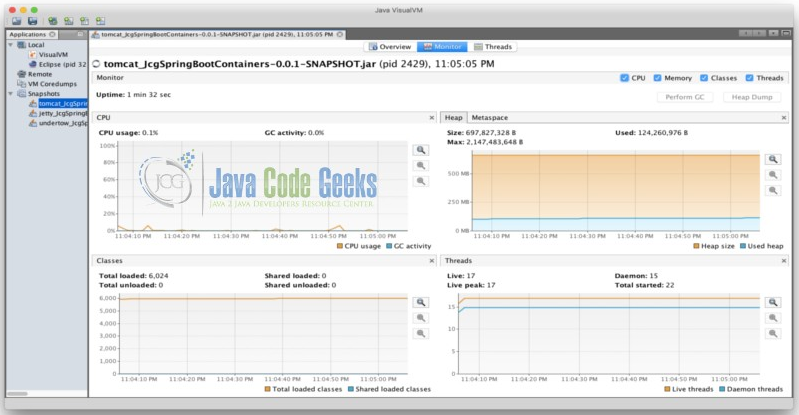
JVisualVM Report
5.2.2 Tomcat
Heap Size: 697,827,328 B
Used: 124,260,976 B
Max: 2,147,483,648 B
Threads: 17 Live, 22 Started
5.2.3 Jetty
Heap Size: 628,621,312 B
Used: 311,476,776 B
Max: 2,147,483,648 B
Threads: 19 Live, 22 Started
5.2.4 Undertow
Heap Size: 630,718,464 B
Used: 114,599,536 B
Max: 2,147,483,648 B
Threads: 17 Live, 20 Started
6. 对比
6.1 性能
压测结果:从上面的6张压力测试报告中,可以看到3个容器在相同的用例及并发请求下,Undertow稍微比Tomcat和Jetty好一点。
资源消耗:JETY启动时内存占用最大,使用311 MB。Tomcat和Undertow的初始脚印相似,在120 MB左右,Undertow出现在114 MB的最低水平。响应头中的关键差异在于默认情况下默认情况下包括HTTP持久连接。该头将在支持持久连接的客户端中使用,以通过重用连接细节来优化性能。
6.1.1 Tomcat Response Headers
Content-Type →application/json;charset=UTF-8

Date →Mon, 09 Jan 2017 02:23:26 GMT

Transfer-Encoding →chunked

X-Application-Context →JcgSpringBootContainers:# Application index.
6.1.2 Jetty Response Headers
Content-Type →application/json;charset=UTF-8

Date →Mon, 09 Jan 2017 02:29:21 GMT

Transfer-Encoding →chunked

X-Application-Context →JcgSpringBootContainers:# Application index.
6.1.3 Undertow Response Headers
Connection →keep-alive

Content-Type →application/json;charset=UTF-8

Date →Mon, 09 Jan 2017 02:20:25 GMT

Transfer-Encoding →chunked

X-Application-Context →JcgSpringBootContainers:# Application index.
7. 结论
这些数字表明Undertow在性能和内存使用方面是最好的。令人鼓舞的是,Undertow 正在接受最新的能力,并默认为持久的连接。这些数字并不表示在这个例子中使用的负载有显著的性能差异,但我想它们会缩放,如果性能是最重要的因素,则Undertow 是应用程序的正确匹配。认为一个组织可能因为熟悉它的能力而喜欢嵌入的servlet容器也是合理的。很多时候默认设置将不得不改变,因为应用程序要求包括性能、内存使用和功能。
=========================分割线=================================================================================
在Spring Boot中使用 Undertow 而不是 Tomcat
1、Maven示例:
<dependency>

    <groupId>org.springframework.boot</groupId>

    <artifactId>spring-boot-starter-web</artifactId>

    <exclusions>

        <exclusion>

            <groupId>org.springframework.boot</groupId>

            <artifactId>spring-boot-starter-tomcat</artifactId>

        </exclusion>

    </exclusions>

</dependency>

<dependency>

    <groupId>org.springframework.boot</groupId>

    <artifactId>spring-boot-starter-undertow</artifactId>

</dependency>
2、配置Undertow,application.yml示例:
server.undertow.accesslog.dir= # Undertow access log directory.

server.undertow.accesslog.enabled=false # Enable access log.

server.undertow.accesslog.pattern=common # Format pattern for access logs.

server.undertow.accesslog.prefix=access_log. # Log file name prefix.

server.undertow.accesslog.rotate=true # Enable access log rotation.

server.undertow.accesslog.suffix=log # Log file name suffix.

server.undertow.buffer-size= # Size of each buffer in bytes.

server.undertow.buffers-per-region= # Number of buffer per region.

server.undertow.direct-buffers= # Allocate buffers outside the Java heap.

server.undertow.io-threads= # Number of I/O threads to create for the worker.

server.undertow.max-http-post-size=0 # Maximum size in bytes of the HTTP post content.

server.undertow.worker-threads= # Number of worker threads.
3、使用 Undertow 监听多个端口示例:
@Bean
public UndertowEmbeddedServletContainerFactory embeddedServletContainerFactory() {
UndertowEmbeddedServletContainerFactory factory = new UndertowEmbeddedServletContainerFactory();
factory.addBuilderCustomizers(new UndertowBuilderCustomizer() {@Override
</span><span style="color: #0000ff;">public</span> <span style="color: #0000ff;">void</span><span style="color: #000000;"> customize(Builder builder) {
builder.addHttpListener(</span>8080, "0.0.0.0"<span style="color: #000000;">);
} });
</span><span style="color: #0000ff;">return</span><span style="color: #000000;"> factory;
}
原文地址:https://www.cnblogs.com/duanxz/p/9337022.html
Spring Boot 容器选择 Undertow 而不是 Tomcat Spring Boot 内嵌容器Unde的更多相关文章
- Spring Boot 容器选择 Undertow 而不是 Tomcat
Spring Boot 内嵌容器Undertow参数设置 配置项: # 设置IO线程数, 它主要执行非阻塞的任务,它们会负责多个连接, 默认设置每个CPU核心一个线程 # 不要设置过大,如果过大,启动 ...
- Spring Boot 内嵌容器 Tomcat / Undertow / Jetty 优雅停机实现
Spring Boot 内嵌容器 Tomcat / Undertow / Jetty 优雅停机实现 Anoyi 精讲JAVA 精讲JAVA 微信号 toooooooozi 功能介绍 讲解java深层次 ...
- Spring Boot项目的内嵌容器
一.关于容器 刚才开始使用spring boot的开发者会有种很直观的感觉,servlet容器“不见了”.之前开发web项目,都是把程序写完后部署到servlet容器(比如Tomcat),但是使用sp ...
- 【Spring Boot】内嵌容器
Spring Boot内嵌容器支持Tomcat.Jetty.Undertow. tomcat容器 spring boot 的web应用开发必须使用spring-boot-starter-web,其默认 ...
- Spring Boot 揭秘与实战(五) 服务器篇 - 内嵌的服务器 Tomcat剖析
文章目录 1. 内嵌的 Tomcat,一个Jar包运行 2. 如何定制内嵌 Tomcat3. War 包部署的使用细节 2.1. 设置内嵌Tomcat的端口 2.2. 设置内嵌Tomcat的最大线程数 ...
- SpringBoot 内嵌容器的比较
Spring Boot内嵌容器支持Tomcat.Jetty.Undertow.为什么选择Undertow? 这里有一篇文章,时间 2017年1月26日发布的: 参考 Tomcat vs. Jetty ...
- SpringBoot项目启动不走内嵌容器
一.问题 springboot项目java -jar启动不走内嵌容器,如下图,可以看到是直接走系统环境变量里配置的tomcat容器了 二.分析 我的pom.xml文件关键依赖: <depende ...
- 使用外部容器运行spring-boot项目:不使用spring-boot内置容器让spring-boot项目运行在外部tomcat容器中
前言:本项目基于maven构建 spring-boot项目可以快速构建web应用,其内置的tomcat容器也十分方便我们的测试运行: spring-boot项目需要部署在外部容器中的时候,spring ...
- spring-boot开发:使用内嵌容器进行快速开发及测试
一.简述一下spring-boot微框架 1.spring-boot微框架是什么? 大家都知道,在使用spring框架进行应用开发时需要很多*.xml的初始化配置文件,而springBoot就是用来简 ...
随机推荐
- C#winform datagridview单元格的单击处理
首先看看效果图: 需求:要求是的在datagridview里面绑定数据后,可以任意点击想要点击的某列的单元格进行改变数据.需要在datagridview里面写3个事件 1.RowPrePaint事件: ...
- 三种方法实现MNIST 手写数字识别
MNIST数据集下载: import tensorflow as tf from tensorflow.examples.tutorials.mnist import input_data mnist ...
- [kuangbin带你飞]专题一 简单搜索 - A - 棋盘问题
#include<iostream> #include<cstdio> #include<string> #include<vector> #inclu ...
- Cocos2d-x通过Jni实现C++与Java相互调用
在cocos2dx项目中与运营平台(java sdk)对接时使用了JNI. 通过C++调用Java 在JniUtil.h文件中如下实现: #ifndef _JNIUTIL_H_ #define _JN ...
- <转>http协议 文件下载原理详解
最近研究了一下关于文件下载的相关内容,觉得还是写些东西记下来比较好.起初只是想研究研究,但后来发现写个可重用性比较高的模块还是很有必要的,我想这也是大多数开发人员的习惯吧. 对于HTTP协议,向服务器 ...
- 【案例】鼠标按下,DIV跟随移动
<!DOCTYPE html> <html lang="en"> <head> <meta charset="UTF-8&quo ...
- [JZOJ5232] 【NOIP2017模拟A组模拟8.5】带权排序
题目 题目大意 有一个数列AAA,数列上的每个数都是在[li,ri][l_i,r_i][li,ri]范围内随机的数. 将这个数列进行稳定排序,得到每个位置在排序后的排名pip_ipi. f(A) ...
- Java实现RSA加密
末尾贴上代码↓↓↓↓↓↓↓↓↓↓↓↓ 1.原理 2.实现过程 3. 公式 4.举例 p=13, q=11 , (p,q互质) N=p*q=143 L=(p-1)*(q-1)=120 E=7 ...
- Java驼峰和下划线互相转化
直接上代码 : package com.utils; public class ChangeChar { public static final char UNDERLINE = '_'; publi ...
- QQ交流群