
popupwindow展示
样式:
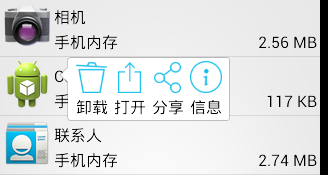
layout:
popup_appinfo.xml
 <?xml version="1.0" encoding="utf-8"?>

 <LinearLayout xmlns:android="http://schemas.android.com/apk/res/android"

     android:layout_width="wrap_content"

     android:layout_height="wrap_content"

     android:background="@drawable/pop_bg"

     android:orientation="horizontal" >

     <TextView

         android:id="@+id/tv_uninstall"

         android:layout_width="wrap_content"

         android:layout_height="wrap_content"

         android:layout_margin="3dp"

         android:drawablePadding="3dp"

         android:drawableTop="@drawable/ic_uninstall"

         android:text="卸载"

         android:textColor="@color/black"

         android:textSize="16sp" />

     <TextView

         android:id="@+id/tv_open"

         android:layout_width="wrap_content"

         android:layout_height="wrap_content"

         android:layout_margin="3dp"

         android:drawablePadding="3dp"

         android:drawableTop="@drawable/ic_open"

         android:text="打开"

         android:textColor="@color/black"

         android:textSize="16sp" />

     <TextView

         android:id="@+id/tv_share"

         android:layout_width="wrap_content"

         android:layout_height="wrap_content"

         android:layout_margin="3dp"

         android:drawablePadding="3dp"

         android:drawableTop="@drawable/ic_share"

         android:text="分享"

         android:textColor="@color/black"

         android:textSize="16sp" />

     <TextView

         android:id="@+id/tv_info"

         android:layout_width="wrap_content"

         android:layout_height="wrap_content"

         android:layout_margin="3dp"

         android:drawablePadding="3dp"

         android:drawableTop="@drawable/ic_info"

         android:text="信息"

         android:textColor="@color/black"

         android:textSize="16sp" />

 </LinearLayout>
anim:
popup_enter.xml
 <?xml version="1.0" encoding="utf-8"?>

 <set xmlns:android="http://schemas.android.com/apk/res/android"

     android:shareInterpolator="false" >

     <translate

         android:duration="400"

         android:fromXDelta="100%p"

         android:interpolator="@android:interpolator/overshoot"

         android:toXDelta="0" />

     <alpha

         android:duration="400"

         android:fromAlpha="0.2"

         android:toAlpha="1.0" />

 </set>
popup_exit.xml
 <?xml version="1.0" encoding="utf-8"?>

 <set xmlns:android="http://schemas.android.com/apk/res/android"

     android:shareInterpolator="false" >

     <translate

         android:duration="400"

         android:fromXDelta="0"

         android:interpolator="@android:interpolator/anticipate"

         android:toXDelta="50%p" />

     <alpha

         android:duration="400"

         android:fromAlpha="1.0"

         android:toAlpha="0" />

 </set>
code:
Activity.java
......
     //显示popupwindow

     protected void showPopup(View itemView) {

         if (mPopupWindow == null) {//只需要初始化一次弹窗

             //初始化弹窗布局

             View view = View.inflate(this, R.layout.popup_appinfo, null);

             //设置按钮点击事件

             TextView tvUninstall = (TextView) view

                     .findViewById(R.id.tv_uninstall);

             TextView tvOpen = (TextView) view.findViewById(R.id.tv_open);

             TextView tvShare = (TextView) view.findViewById(R.id.tv_share);

             TextView tvInfo = (TextView) view.findViewById(R.id.tv_info);

             tvUninstall.setOnClickListener(this);

             tvOpen.setOnClickListener(this);

             tvShare.setOnClickListener(this);

             tvInfo.setOnClickListener(this);

             //初始化弹窗对象

             ////参1:布局; 参2,3:宽高; 参4:获取焦点

             mPopupWindow = new PopupWindow(view,

                     WindowManager.LayoutParams.WRAP_CONTENT,

                     WindowManager.LayoutParams.WRAP_CONTENT, true);

             //设置背景;只有设置了背景,点击窗口外侧和返回键,弹窗才会消失

             mPopupWindow.setBackgroundDrawable(new ColorDrawable());

             //设置动画样式

             mPopupWindow.setAnimationStyle(R.style.PopupAnim);

         }

         //显示在item正下方, 然后向上偏移一个item的高度

         mPopupWindow.showAsDropDown(itemView, 60, -itemView.getHeight());

     }
......
//弹窗消失
mPopupWindow.dismiss();
......
popupwindow展示的更多相关文章
- android模仿58筛选下拉框(PopupWindow实现)
前言:前几天用58同城APP找房子的时候,看到筛选下拉框蛮不错的,然后也有很多朋友需要实现这个功能,于是从网上下载了一个demo,在他的基础上进行修改,花了几个小时对他的代码进行修改,重构,封装.把一 ...
- PopupWindow 的常用api封装
对PopupWindow常用API的简单封装,几行代码就搞定PopupWindow弹窗,使用Builder模式,链式调用,像使用AlertDialog 一样 封装通用PopupWindow,Custo ...
- Android仿qq聊天记录长按删除功能效果
最近项目在做IM即时通讯开发,在删除聊天列表的时候跟删除聊天详细信息的时候,产品经理想要跟ios一样,在当前选中行上方弹出一个删除窗口.于是先从网上找demo,找了一个发现是Dialog做的,我感觉没 ...
- Android PopupWindow Dialog 关于 is your activity running 崩溃详解
Android PopupWindow Dialog 关于 is your activity running 崩溃详解 [TOC] 起因 对于 PopupWindow Dialog 需要 Activi ...
- Android PopupWindow怎么合理控制弹出位置(showAtLocation)
说到PopupWindow,应该都会有种熟悉的感觉,使用起来也很简单 // 一个自定义的布局,作为显示的内容 Context context = null; // 真实环境中要赋值 int layou ...
- PopupWindow的使用
如图是效果图 2种常用PopupWindow的使用 下载地址:http://download.csdn.net/detail/qq_29774291/9683258 第一个展示一个下拉的Lis ...
- Android项目实战(十七):QQ空间实现(二)—— 分享功能 / 弹出PopupWindow
这是一张QQ空间说说详情的截图. 分析: .点击右上角三个点的图标,在界面底部弹出一个区域,这个区域有一些按钮提供给我们操作 .当该区域出现的时候,详情界面便灰了,也说成透明度变化了 .当任意选了一个 ...
- 使用PopupWindow
PopupWindow可以用来实现弹出任意位置的菜单,比Context Menu和Option Menu灵活性更高.Android中弹出一个PopupWindow基本有两个方法: 1 2 //Disp ...
- Android - PopupWindow
PopupWindow就是一个可以显示在当前界面上的浮动容器,它可以用来显示任意一个View,同时还可以指定显示的位置. 下面写一个显示下拉的例子: PopupWindow mpopupWindow; ...
随机推荐
- 谈谈基于OAuth 2.0的第三方认证 [下篇]
从安全的角度来讲,<中篇>介绍的Implicit类型的Authorization Grant存在这样的两个问题:其一,授权服务器没有对客户端应用进行认证,因为获取Access Token的 ...
- EntityFramework之你不知道的那些事(七)
前言 前面一系列几乎都是循序渐进式的进行叙述,似乎脚步走得太快了,于是我开始歇一歇去追寻一些我所不太了解的细枝末节,在此过程中也屡次碰壁,但是唯有如此才能更好的成长,不是吗!希望此文对你亦有帮助. 属 ...
- geotrellis使用(二十一)自动导入数据
目录 前言 整体介绍 前台界面 后台控制 总结 一.前言 之前Geotrellis数据导入集群采用的是命令行的方式,即通过命令行提交spark任务来ingest数据,待数据导入完毕再启动 ...
- IE6下的png透明图片的背景定位
在IE6下PNG透明图片做背景,无法使用background-position进行定位.但是可以使用margin和绝对定位来进行. 另外,由于IE6下的 :hover 只对<a>支持,对其 ...
- hibernate笔记--单向一对多映射方法
上一篇讲的是单向多对一的表关系,与单向一对多的关系正好相反,如下图所示关系: ,可以看出年级表和学生表是一对多的关系,一条年级信息对应多条学生信息,在hibernate中成为单向的一对多的映射关系,应 ...
- c# 生成SHA1加密字符串
从网上找到的一种加密代码: var enstr ="abcdefg"; var strRes = Encoding.Default.GetBytes(enstr); HashAlg ...
- httpHandlers与Http处理程序
ASP.NET HTTP 处理程序是响应对 ASP.NET Web 应用程序的请求而运行的过程(通常称为"终结点").最常用的处理程序是处理 .aspx 文件的 ASP.NET 页 ...
- combox
通过combox控件本身的item添加了选项后,该控件在启动后SelectedIndex默认值是-1,所以最好是在窗体加载的时候初始化城SelectedIndex=0 另外如果是窗体加载时item从数 ...
- 基于CkEditor实现.net在线开发之路(1)
我以前的公司使用office sharepoint designer为界面设计器,嵌套各种自定义控件,进行各种管理软件,工作流的开发,遇到比较复杂的逻辑,则采用本地写类库,生成DLL上传到服务器,通过 ...
- 使用AOP+Annotation实现操作日志记录
先创建注解 OperInfo @Target({ElementType.TYPE, ElementType.METHOD}) @Retention(RetentionPolicy.RUNTIME) @ ...