
popupwindow展示
样式:
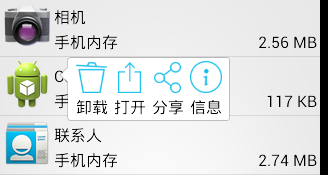
layout:
popup_appinfo.xml
 <?xml version="1.0" encoding="utf-8"?>

 <LinearLayout xmlns:android="http://schemas.android.com/apk/res/android"

     android:layout_width="wrap_content"

     android:layout_height="wrap_content"

     android:background="@drawable/pop_bg"

     android:orientation="horizontal" >

     <TextView

         android:id="@+id/tv_uninstall"

         android:layout_width="wrap_content"

         android:layout_height="wrap_content"

         android:layout_margin="3dp"

         android:drawablePadding="3dp"

         android:drawableTop="@drawable/ic_uninstall"

         android:text="卸载"

         android:textColor="@color/black"

         android:textSize="16sp" />

     <TextView

         android:id="@+id/tv_open"

         android:layout_width="wrap_content"

         android:layout_height="wrap_content"

         android:layout_margin="3dp"

         android:drawablePadding="3dp"

         android:drawableTop="@drawable/ic_open"

         android:text="打开"

         android:textColor="@color/black"

         android:textSize="16sp" />

     <TextView

         android:id="@+id/tv_share"

         android:layout_width="wrap_content"

         android:layout_height="wrap_content"

         android:layout_margin="3dp"

         android:drawablePadding="3dp"

         android:drawableTop="@drawable/ic_share"

         android:text="分享"

         android:textColor="@color/black"

         android:textSize="16sp" />

     <TextView

         android:id="@+id/tv_info"

         android:layout_width="wrap_content"

         android:layout_height="wrap_content"

         android:layout_margin="3dp"

         android:drawablePadding="3dp"

         android:drawableTop="@drawable/ic_info"

         android:text="信息"

         android:textColor="@color/black"

         android:textSize="16sp" />

 </LinearLayout>
anim:
popup_enter.xml
 <?xml version="1.0" encoding="utf-8"?>

 <set xmlns:android="http://schemas.android.com/apk/res/android"

     android:shareInterpolator="false" >

     <translate

         android:duration="400"

         android:fromXDelta="100%p"

         android:interpolator="@android:interpolator/overshoot"

         android:toXDelta="0" />

     <alpha

         android:duration="400"

         android:fromAlpha="0.2"

         android:toAlpha="1.0" />

 </set>
popup_exit.xml
 <?xml version="1.0" encoding="utf-8"?>

 <set xmlns:android="http://schemas.android.com/apk/res/android"

     android:shareInterpolator="false" >

     <translate

         android:duration="400"

         android:fromXDelta="0"

         android:interpolator="@android:interpolator/anticipate"

         android:toXDelta="50%p" />

     <alpha

         android:duration="400"

         android:fromAlpha="1.0"

         android:toAlpha="0" />

 </set>
code:
Activity.java
......
     //显示popupwindow

     protected void showPopup(View itemView) {

         if (mPopupWindow == null) {//只需要初始化一次弹窗

             //初始化弹窗布局

             View view = View.inflate(this, R.layout.popup_appinfo, null);

             //设置按钮点击事件

             TextView tvUninstall = (TextView) view

                     .findViewById(R.id.tv_uninstall);

             TextView tvOpen = (TextView) view.findViewById(R.id.tv_open);

             TextView tvShare = (TextView) view.findViewById(R.id.tv_share);

             TextView tvInfo = (TextView) view.findViewById(R.id.tv_info);

             tvUninstall.setOnClickListener(this);

             tvOpen.setOnClickListener(this);

             tvShare.setOnClickListener(this);

             tvInfo.setOnClickListener(this);

             //初始化弹窗对象

             ////参1:布局; 参2,3:宽高; 参4:获取焦点

             mPopupWindow = new PopupWindow(view,

                     WindowManager.LayoutParams.WRAP_CONTENT,

                     WindowManager.LayoutParams.WRAP_CONTENT, true);

             //设置背景;只有设置了背景,点击窗口外侧和返回键,弹窗才会消失

             mPopupWindow.setBackgroundDrawable(new ColorDrawable());

             //设置动画样式

             mPopupWindow.setAnimationStyle(R.style.PopupAnim);

         }

         //显示在item正下方, 然后向上偏移一个item的高度

         mPopupWindow.showAsDropDown(itemView, 60, -itemView.getHeight());

     }
......
//弹窗消失
mPopupWindow.dismiss();
......
popupwindow展示的更多相关文章
- android模仿58筛选下拉框(PopupWindow实现)
前言:前几天用58同城APP找房子的时候,看到筛选下拉框蛮不错的,然后也有很多朋友需要实现这个功能,于是从网上下载了一个demo,在他的基础上进行修改,花了几个小时对他的代码进行修改,重构,封装.把一 ...
- PopupWindow 的常用api封装
对PopupWindow常用API的简单封装,几行代码就搞定PopupWindow弹窗,使用Builder模式,链式调用,像使用AlertDialog 一样 封装通用PopupWindow,Custo ...
- Android仿qq聊天记录长按删除功能效果
最近项目在做IM即时通讯开发,在删除聊天列表的时候跟删除聊天详细信息的时候,产品经理想要跟ios一样,在当前选中行上方弹出一个删除窗口.于是先从网上找demo,找了一个发现是Dialog做的,我感觉没 ...
- Android PopupWindow Dialog 关于 is your activity running 崩溃详解
Android PopupWindow Dialog 关于 is your activity running 崩溃详解 [TOC] 起因 对于 PopupWindow Dialog 需要 Activi ...
- Android PopupWindow怎么合理控制弹出位置(showAtLocation)
说到PopupWindow,应该都会有种熟悉的感觉,使用起来也很简单 // 一个自定义的布局,作为显示的内容 Context context = null; // 真实环境中要赋值 int layou ...
- PopupWindow的使用
如图是效果图 2种常用PopupWindow的使用 下载地址:http://download.csdn.net/detail/qq_29774291/9683258 第一个展示一个下拉的Lis ...
- Android项目实战(十七):QQ空间实现(二)—— 分享功能 / 弹出PopupWindow
这是一张QQ空间说说详情的截图. 分析: .点击右上角三个点的图标,在界面底部弹出一个区域,这个区域有一些按钮提供给我们操作 .当该区域出现的时候,详情界面便灰了,也说成透明度变化了 .当任意选了一个 ...
- 使用PopupWindow
PopupWindow可以用来实现弹出任意位置的菜单,比Context Menu和Option Menu灵活性更高.Android中弹出一个PopupWindow基本有两个方法: 1 2 //Disp ...
- Android - PopupWindow
PopupWindow就是一个可以显示在当前界面上的浮动容器,它可以用来显示任意一个View,同时还可以指定显示的位置. 下面写一个显示下拉的例子: PopupWindow mpopupWindow; ...
随机推荐
- 如何搭建NTP服务
最近,在搭建Oracle RAC过程中,需要用到DNS和NTP,其中,DNS用于域名.IP管理,NTP用于时间同步.其实,很久以前搭建过这两种服务,但技术,本质上,符合“用进废退”的客观规律.用得越频 ...
- EF Code First 一对多、多对多关联,如何加载子集合?
应用场景 先简单描述一下标题的意思:使用 EF Code First 映射配置 Entity 之间的关系,可能是一对多关系,也可能是多对多关系,那如何加载 Entity 下关联的 ICollectio ...
- 改变word的语言字典
改变word的语言字典 上周末看论坛有人提出否有方法用代码改变word的语言字典,因为默认的语言会影响现用语言输入的拼写器和其他校对工具.我们的Spire.doc正好支持,正好闲来无事所以我用西班牙语 ...
- Linux添加用户(user)到用户组(group)
将一个用户添加到用户组中,千万不能直接用: usermod -G groupA 这样做会使你离开其他用户组,仅仅做为 这个用户组 groupA 的成员. 应该用 加上 -a 选项: usermod - ...
- canvas实现拖动页面时显示窗口视频
简介 当前主流的视频网站目前有不少新鲜好玩的功能,最明显的莫过于小视频的显示--当视频不在当前视口范围 时,会在右下角用一个小窗口来显示当前的视频,而且可以拖拽. 今晚心血来潮,起了动手试试的念头.我 ...
- 1Z0-053 争议题目解析700
1Z0-053 争议题目解析700 考试科目:1Z0-053 题库版本:V13.02 题库中原题为: 700.Which two statements are true about a duplica ...
- Chrome开发者工具详解(5)-Application、Security、Audits面板
Chrome开发者工具详解(5)-Application.Security.Audits面板 这篇文章是Chrome开发者工具详解这一系列的最后一篇,介绍DevTools最后的三个面板功能-Appli ...
- PgwSlideshow-基于Jquery的图片轮播插件
0 PgwSlideshow简介 PgwSlideshow是一款基于Jquery的图片轮播插件,基本布局分为上下结构,上方为大图轮播区域,用户可自定义图片轮播切换的间隔时间,也可以通过单击左右方向按键 ...
- ASP.NET Core开发-后台任务利器Hangfire使用
ASP.NET Core开发系列之后台任务利器Hangfire 使用. Hangfire 是一款强大的.NET开源后台任务利器,无需Windows服务/任务计划程序. 可以使用于ASP.NET 应用也 ...
- 比较牛X的互联网公司都有哪些作死的行为
以下为近乎家的小近吐血整理: 1流氓行为 臭表碾说的就是你们! 百度 还有这种伪造网页弹窗: 360 不经同意,也不弹窗提醒,直接给我们安装推广软件.比较典型的是 腾讯 腾讯一直走在行业最前端,买 ...