
android中常用的布局管理器(二)
接上篇博客
(3)LinearLayout 线性布局管理器
线性布局管理器是将放入其中的组件按照垂直或水平方向来布局,每一行或每一列只能放一个组件,并且不会换行,当组件排列到窗体的边缘后,后面的组件就不会显示出来。
常用属性:
常用属性:
android:orientation(horizontal 水平,vertical 垂直)
android:gravity(对齐方式) 设置组件的对齐位置
android:layout_witdth(宽) (默认为0,当输入一个大于0 的数字时,每个组件对父容器的剩余空间进行分割)
android:layout_height(高)
android:id
android:background(背景)
案列:
android:orientation="horizontal" 水平线性管理器
<?xml version="1.0" encoding="utf-8"?>

<LinearLayout xmlns:android="http://schemas.android.com/apk/res/android"

    xmlns:app="http://schemas.android.com/apk/res-auto"

    xmlns:tools="http://schemas.android.com/tools"

    android:layout_width="match_parent"

    android:layout_height="match_parent"

    android:orientation="horizontal"

    tools:context=".MainActivity">

    <Button

        android:layout_width="wrap_content"

        android:layout_height="wrap_content"

        android:text="按钮1"

        />

    <Button

        android:layout_width="wrap_content"

        android:layout_height="wrap_content"

        android:text="按钮2"

         />

    <Button

        android:layout_width="wrap_content"

        android:layout_height="wrap_content"

        android:text="按钮3"

         />

    <Button

        android:layout_width="wrap_content"

        android:layout_height="wrap_content"

        android:text="按钮4" />

    <Button

        android:layout_width="wrap_content"

        android:layout_height="wrap_content"

        android:text="按钮5" />

</>

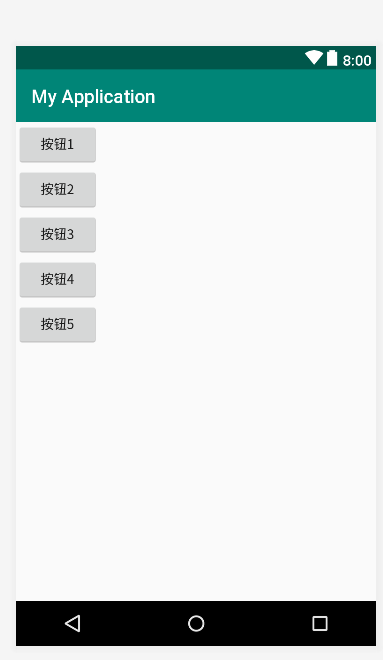
android:orientation="vertical" 垂直水平管理器
<?xml version="1.0" encoding="utf-8"?>

<LinearLayout xmlns:android="http://schemas.android.com/apk/res/android"

    xmlns:app="http://schemas.android.com/apk/res-auto"

    xmlns:tools="http://schemas.android.com/tools"

    android:layout_width="match_parent"

    android:layout_height="match_parent"

    android:orientation="vertical"

    tools:context=".MainActivity">

    <Button

        android:layout_width="wrap_content"

        android:layout_height="wrap_content"

        android:text="按钮1"

        />

    <Button

        android:layout_width="wrap_content"

        android:layout_height="wrap_content"

        android:text="按钮2"

         />

    <Button

        android:layout_width="wrap_content"

        android:layout_height="wrap_content"

        android:text="按钮3"

         />

    <Button

        android:layout_width="wrap_content"

        android:layout_height="wrap_content"

        android:text="按钮4" />

    <Button

        android:layout_width="wrap_content"

        android:layout_height="wrap_content"

        android:text="按钮5" />

</>
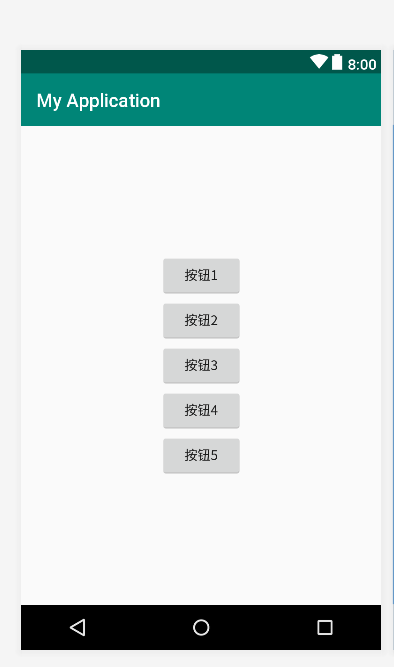
android:gravity="center" 设置组件的对其你方式
<?xml version="1.0" encoding="utf-8"?>

<LinearLayout xmlns:android="http://schemas.android.com/apk/res/android"

    xmlns:app="http://schemas.android.com/apk/res-auto"

    xmlns:tools="http://schemas.android.com/tools"

    android:layout_width="match_parent"

    android:layout_height="match_parent"

    android:orientation="vertical"

    android:gravity="center"

    tools:context=".MainActivity">

    <Button

        android:layout_width="wrap_content"

        android:layout_height="wrap_content"

        android:text="按钮1"

        />

    <Button

        android:layout_width="wrap_content"

        android:layout_height="wrap_content"

        android:text="按钮2"

         />

    <Button

        android:layout_width="wrap_content"

        android:layout_height="wrap_content"

        android:text="按钮3"

         />

    <Button

        android:layout_width="wrap_content"

        android:layout_height="wrap_content"

        android:text="按钮4" />

    <Button

        android:layout_width="wrap_content"

        android:layout_height="wrap_content"

        android:text="按钮5" />

</>
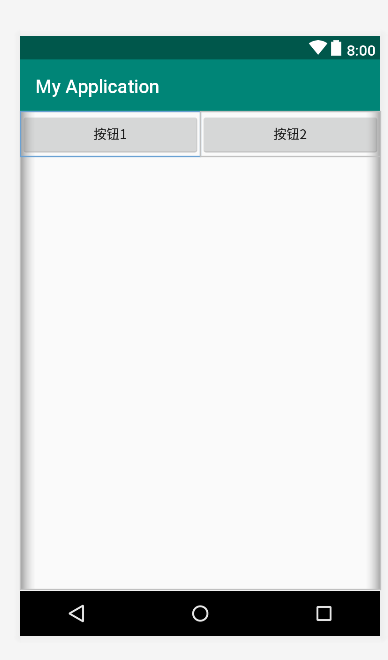
android:layout_weight="1"
<?xml version="1.0" encoding="utf-8"?>

<LinearLayout xmlns:android="http://schemas.android.com/apk/res/android"

    xmlns:app="http://schemas.android.com/apk/res-auto"

    xmlns:tools="http://schemas.android.com/tools"

    android:layout_width="match_parent"

    android:layout_height="match_parent"

    android:orientation="horizontal"

    tools:context=".MainActivity">

    <Button

        android:layout_width="wrap_content"

        android:layout_height="wrap_content"

        android:text="按钮1"

        android:layout_weight="1"

        />

    <Button

        android:layout_width="wrap_content"

        android:layout_height="wrap_content"

        android:text="按钮2"

        android:layout_weight="1"

         />

</>
(4)FrameLayout 帧布局管理器
帧布局(FrameLayout)在屏幕上开辟了一块区域,在这块区域中可以添加多个子控件,但是所有的子控件都会被对齐到屏幕的左上角。帧布局的大小由其下属子控件中尺寸最大的那个子控 件来控制。如果子控件的大小都一样,同一时刻只能看到最上面的子控件,其他的则被其遮挡(在进行选项卡设计时会用到帧布局)。
注意:在FrameLayout中,子控件是通过栈来绘制的,所以后添加的子控件会被绘制在上层。
FrameLayout继承自ViewGroup类,除了继承自父类的属性和方法,FrameLayout类中也包含了自己特有的一些属性和方法,见下表:
| 属性名称 | 对应方法 | 描述 |
| android:foreground | setForeground(Drawable) | 设置绘制在所有子控件之上的内容 |
| android:foregroundGravity | setForegroundGravity(int) | 设置绘制在所有子控件之上内容的gravity属性 |
android中常用的布局管理器(二)的更多相关文章
- android中常用的布局管理器
Android中的几种常用的布局,主要介绍内容有: View视图 RelativeLayout 相对布局管理器 LinearLayout 线性布局管理器 FrameLayout ...
- Android UI组件:布局管理器
为了更好的管理Android应用的用户界面中的组件,Android提供了布局管理器.通过使用布局管理器,Android应用的图形用户界面具有良好的平台无关性.通常,推荐使用布局管理器来管理组件的分布. ...
- Android开发5:布局管理器2(表格布局TableLayout)
版本:Android4.3 API18 学习整理:liuxinming 概念 TableLayout继承了LinearLayout,因此它的本质依然是线性布局管理器. 表格布局采 ...
- Android学习笔记(10).布局管理器
布局管理器的几个类都是ViewGroup派生的,用于管理组件的分布和大小,使用布局管理器能够非常好地解决屏幕适配问题. 布局管理器本身也是一个UI组件,布局管理器能够相互嵌套使用,以下是布局管理器的类 ...
- Android中常用的布局
一般分为5大类. Android中所有的空间第一字母都是大写 1.线性布局 LinearLayout 2.相对布局 RelativeLayout 3.帧布局--分层显示 FrameLayout 4. ...
- Android 中常用的布局
一.线性布局----LinearLayout horizontal 水平 <?xml version="1.0" encoding="utf-8"?& ...
- 四种方式写按钮点击事件和Android 中常用的布局
1.匿名内部类的方式 2.创建一个类实现onClickListener,实现onClick方法,设置控件点击时传一个类的对象 3.让当前类实现onClickListener,设置控件点击事件时传递一个 ...
- 【java】浅析java组件中的布局管理器
这篇博文笔者介绍一下java组件中,常用的布局管理器.java组件中的布局方式有好几十种,所有的这些布局管理器都实现了java.awt.LayoutManager接口.接下来笔者介绍一下常用的5种布局 ...
- Android 布局管理器
为了更好地管理Android应用程序的用户界面组件,Android它提供了一个布局管理.通过使用布局管理,Android具有良好的平台无关的图形用户界面应用程序. 平时,推荐布局管理器来管理分布式组件 ...
随机推荐
- List容器排序方法的使用
今天在做任务的时候需要对已经存到list容器里的对象数组进行排序,需要根据 其中的一个属性进行排序,最初是根据一个利用冒泡排序的算法进行处理的后来上网查了一下对于list容器进行排序时有自带的方法.所 ...
- python学习--quote()函数
屏蔽特殊的字符.比如如果url里面的空格!url里面是不允许出现空格的. 在 Python2.x 中的用法是:urllib.quote(text)Python3.x 中是urllib.parse.qu ...
- [terminal]终端仿真程序
char * szCommAry[COMM_NUM]={ //屏幕属性命令,23 "\x1b[12h",//禁止本端回显,键盘数据仅送给主机 "\x1b[12l" ...
- (三)Mybatis类型转换器,接口传参类型,一对一,一对多查询resultMap配置
Mybatis类型转换器 首先明白什么时候用到它,当数据库的字段类型和java字段类型无法默认匹配时候进行转换,比如现在数据库类型是INTEGER,而java当中类型是Boolean,true表示1, ...
- Java线程核心基础(上)
Java线程核心基础(上) 一.实现多线程 根据Oracle官方文档,目前推荐的创建线程方法主要有两种,分别是继承Thread类和实现Runnable接口.通过阅读Thread类源码,可以发现二者不同 ...
- oracle怎么建立本地连接
sqlplus连接oracle数据库(连接本地oracle数据库和连接远程的oracle数据库) 虽然我们现在平时都是使用PLSQL Developer这个软件工具了,但是我们还是要了解sqlplus ...
- 08-SpringMVC02
今日知识 1. 文件上传 2. ResponseBody和RequestBody 3. SpringMVC多视图 4. 静态资源的处理 文件上传 1. 导包,(commom.io , commons- ...
- 论文《A Generative Entity-Mention Model for Linking Entities with Knowledge Base》
A Generative Entity-Mention Model for Linking Entities with Knowledge Base 一.主要方法 提出了一种生成概率模型,叫做en ...
- python 处理10000个txt,每个文件夹里面放1000个。
fileNumberInDiretory = 1000 title_list = getChongFuTitle(cursor) DiretoryNums = math.ceil(len(title_ ...
- FastDFS 原理介绍
1 功能简介 FastDFS是一个开源的轻量级分布式文件系统,它对文件进行管理,功能包括:文件存储.文件同步.文件访问(文件上传.文件下载)等,解决了大容量存储和负载均衡的问题.特别适 ...