
js 引入Vue.js实现vue效果
拆分组件为单个js见:https://www.jianshu.com/p/2f0335818ceb
效果
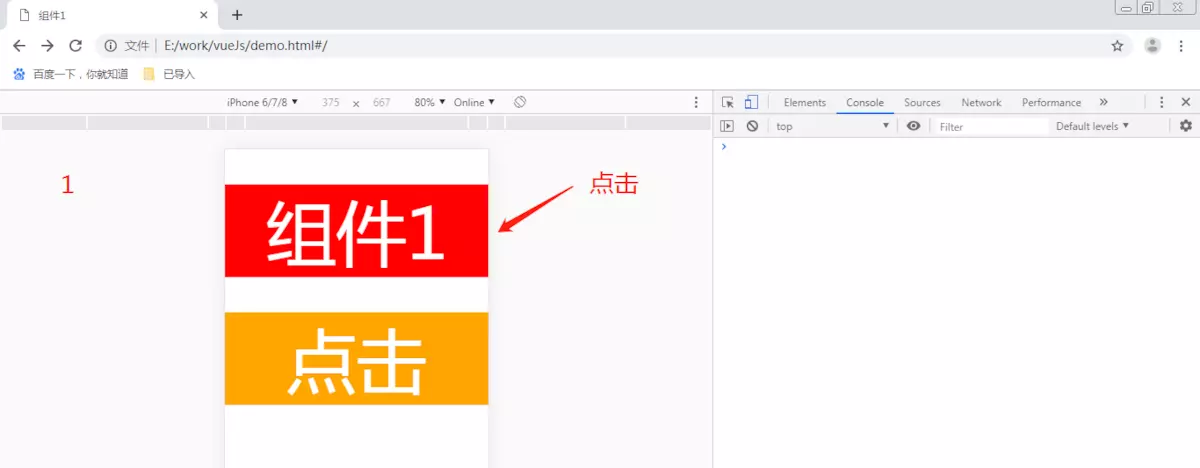
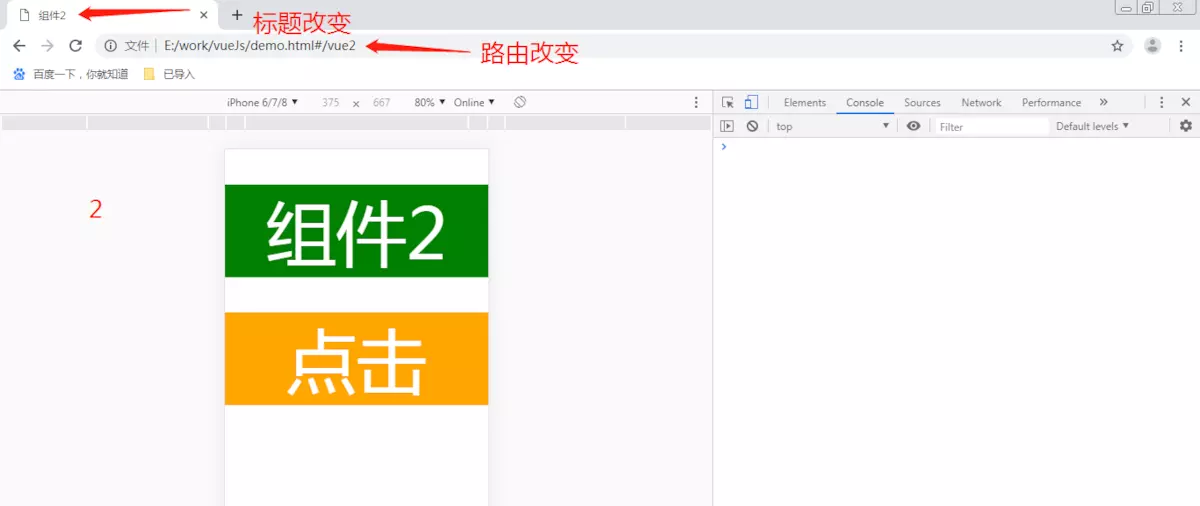


html
<!DOCTYPE html>

<html>

    <head>

        <meta charset="UTF-8">

        <meta name="viewport" content="width=device-width, initial-scale=1.0, maximum-scale=1.0, user-scalable=0">

        <title>js引入vue.js实现vue</title>

        <link rel="stylesheet" href="css/1.css">

        <script src="js/jquery.js"></script>

        <script>

            function htmlFont(standardWid) {

                var explorer = navigator.userAgent,

                    html = document

                    .getElementsByTagName('html')[0];

                standardWid = (typeof standardWid == 'number') ? standardWid : 375;

                if (explorer.indexOf("Opera") >= 0) {

                    winwid = screen.width;

                } else {

                    winwid = html.offsetWidth;

                }

                if (winwid > 750) {

                    fosi = 200;

                } else {

                    winwid = winwid > standardWid * 2 ? standardWid * 2 : winwid;

                    fosi = winwid / standardWid * 100;

                }

                html.style.fontSize = fosi + 'px';

            }

            htmlFont();

        </script>

        <script src="https://cdn.staticfile.org/vue/2.4.2/vue.min.js"></script>

        <script src="https://cdn.staticfile.org/vue-router/2.7.0/vue-router.min.js"></script>

        <script src="js/1.js"></script>

    </head>

    <body>

        <div id="app" v-cloak>

            <transition :name="transitionName">

                <keep-alive>

                    <router-view class="child-view" v-if="$route.meta.keepAlive"></router-view>

                </keep-alive>

            </transition>

            <transition :name="transitionName">

                <router-view class="child-view" v-if="!$route.meta.keepAlive"></router-view>

            </transition>

        </div>

    </body>

</html>
js
'use strict';

$(document).ready(function() {

    // 0. 如果使用模块化机制编程,導入Vue和VueRouter,要调用 Vue.use(VueRouter)

    Vue.use(VueRouter);

    // 1. 定义(路由)组件。

    // 可以从其他文件 import 进来

    Vue.prototype.$fun1 = function() { //全局函数1

        console.log('fun1');

    };

    var Vue1 = Vue.extend({

        data() {

            return {}

        },

        computed: {},

        methods: {

            toVue2: function() {

                this.$router.push({

                    name: 'Vue2'

                })

            }

        },

        template: "<div class='d-vue1'><p class='redBc' @click='toVue2'>组件1</p>" +

            "<p class='orangeBc' @click='$fun1'>点击</p></div>"

    })

    Vue.component(Vue1)

    const Vue2 = Vue.extend({

        template: "<div class='d-vue2'><p class='greenBc'>组件2</p>" +

            "<p class='orangeBc' @click='$fun1'>点击</p></div>"

    })

    Vue.component(Vue2)

    // 2. 定义路由

    // 每个路由应该映射一个组件。 其中"component" 可以是

    // 通过 Vue.extend() 创建的组件构造器,

    // 或者,只是一个组件配置对象。

    const routes = [{

            path: '/',

            component: Vue1

        },

        {

            path: '/vue2',

            component: Vue2

        }

    ]

    // 3. 创建 router 实例,然后传 `routes` 配置

    const router = new VueRouter({

        routes: [{

                path: '/',

                name: 'Vue1',

                meta: {

                    index: 0,

                    keepAlive: true,

                    title: '组件1'

                },

                component: Vue1

            },

            {

                path: '/vue2',

                name: 'Vue2',

                meta: {

                    index: 1,

                    keepAlive: false,

                    title: '组件2'

                },

                component: Vue2

            }

        ]

    })

    router.beforeEach((to, from, next) => {

        const toDepth = to.meta.index;

        const fromDepth = from.meta.index;

        if (to.meta.title) {

            document.title = to.meta.title;

        }

        if (toDepth < fromDepth) { //返回

            from.meta.keepAlive = false;

            to.meta.keepAlive = true; //相当于缓存

        }

        next()

    })

    // 4. 创建和挂载根实例。

    // 记得要通过 router 配置参数注入路由,

    // 从而让整个应用都有路由功能

    const app = new Vue({

        el: '#app',

        data: {

            transitionName: ''

        },

        watch: {

            $route(to, from) {

                if (to.meta.index > from.meta.index) {

                    this.transitionName = 'slide-left';

                } else {

                    this.transitionName = 'slide-right';

                }

            }

        },

        router

    }).$mount('#app')

})
css
.child-view {

    position: absolute;

    width: 100%;

    transition: all .5s cubic-bezier(.55, 0, .1, 1);

}

.slide-left-enter,

.slide-right-leave-active {

    opacity: 0;

    -webkit-transform: translate(50px, 0);

    transform: translate(50px, 0);

}

.slide-left-leave-active,

.slide-right-enter {

    opacity: 0;

    -webkit-transform: translate(-50px, 0);

    transform: translate(-50px, 0);

}

body,

div,

p {

    margin: 0;

    padding: 0;

    color: #fff;

    text-align: center;

    font-weight: 500 !important;

}

[v-cloak] {

    display: none

}

p {

    margin-top: .5rem;

}

.redBc {

    background-color: red;

}

.orangeBc {

    background-color: orange;

}

.greenBc {

    background-color: green;

}
若需请求接口,html增加引入:
<script src="https://cdn.staticfile.org/axios/0.18.0/axios.min.js"></script>
使用:
function getData(){

       var param1 = {

           param: {

                  id:'1',

                     sex:'male'

                }

       }

        axios.get( "url", {params: param1}).then(function (res) { //url为请求接口, 当请求需要参数为JSON数据时

        // axios.get( "url?param2="+"XXX").then(function (res) {  //当请求参数无需用JSON时,param2为请求需要参数

                if (res.status == 200 && res.data.result == 0) {

                 var _data = res.data.message;

            }else{}

        })

        .catch(function (error) {

             console.log(error);

         });

}
js 引入Vue.js实现vue效果的更多相关文章
- 如何在其他js 引入main.js 中 vue 的实例?
1.原因解析 经测试发现,代码先执行了 index.js >> main.js >> Home.vue scr/api/index.js src/main.js src/co ...
- Vue.js 引入外部js方法
1.外部文件config.js 第一种写法 //常量的定义 const config = { baseurl:'http://172.16.114.5:8088/MGT2' } //函数的定义 fun ...
- js引入,js变量和运算符等
页面级的js不管写在页面的哪里都可以 企业项目开发要求:结构(html),样式(css),行为(js)相分离 不要既写外部js,又写内部js:如果两个都写,则外部js生效 声明多个变量时,每个变量之间 ...
- 第10章-Vue.js 项目实战
一.本节内容 掌握项目环境中路由的配置方法 ***** 熟练掌握编写单文件组件的编写 *** 能够使用swiper.js进行轮播图组件的封装 能够使用axios进行数据请求 二.webpack项目的目 ...
- 【实战】Vue全家桶(vue + axios + vue-router + vuex)搭建移动端H5项目
使用Vue全家桶开发移动端页面. 本博文默认已安装node.js. github链接 一.准备工作 安装vue npm install vue 安装脚手架vue-cli npm install -g ...
- vue引入swiper vue使用swiper vue脚手架使用swiper /引入js文件/引入css文件
vue引入swiper vue使用swiper vue脚手架使用swiper /引入js文件/引入css文件 ------------------------------------------- ...
- Vue.js实现tab切换效果
利用Vue实现简易tab切换效果 1.1 在我们平时浏览网站的时候,经常看到的特效有图片轮播.导航子菜单的隐藏.tab标签的切换等等.这段时间学习了vue后,开始要写出一些简单的特效. 1.2 实现思 ...
- js 仿微信投诉—引入vue.js,拆分组件为单个js
效果 页面目录 index.html <!DOCTYPE html > <html> <head> <meta charset="UTF-8&quo ...
- vue.js引入
开始学习vue.js,引入vue.vue.js一定要在head里面引入,实际开发中我们可能在body中引入,但是可能存在抖屏现象. 为了避免出现抖屏现象,我们引入vue.js或者jquery.js 最 ...
随机推荐
- mysql 存储过程学习 汇总
存储过程框架 DEMILITER $$ -- 重定义符 DROP PROCEDURE IF EXISTS store_procedure$$ -- 如果存在此名的存储过程,先删除 CREATE PRO ...
- Jupyter NoteBook输出的图表太小看不清怎么办?
如果使用的是matplotlib绘图,可以通过以下命令更改图片的大小: %matplotlib linline 如果是 plt.figure(figsize=(5,3)) #其中(5, 3)用于控制图 ...
- Redis中取出值,转成对象
import com.fasterxml.jackson.databind.ObjectMapper; //转成companyEntity CompanyEntity company = mapper ...
- HDU5377
题意:给sum,m组询问,每组x,y求\(x^t=y\mod p,p|sum\),p是素数,求最小的t 题解:先处理sum的所有质因子p,求出p的原根rt,\(rt^a=x\mod p,rt^b=y\ ...
- Kmeans算法实现
下面的demo是根据kmeans算法原理实现的demo,使用到的数据是kmeans.txt 1.658985 4.285136 -3.453687 3.424321 4.838138 -1.15153 ...
- VS开发工具的常用插件
转 http://www.spersky.com/post/vsPlugins.html 我目前主要用的是Hide Main Page——公司配给的电脑屏幕分辨率好小,还是1366*768的,去掉头可 ...
- 2018-2019-2 20175323 实验一《Java开发环境的熟悉》实验报告
java开发环境的熟悉-1 java开发环境的熟悉-2 下载IDEA和破解的过程我参考了https://blog.csdn.net/shengshengshiwo/article/details/79 ...
- KVM桥接网络
1.什么是桥接网络 桥接网络:是指直接连接物理网络 桥接与NAT的区别:NAT是通过共享主机ip的方式进行上网,在你本地局域网内,别人是无法看到的:而桥接网络,是虚拟机通过dhcp的方式获取一个ip地 ...
- Censored! POJ - 1625 AC自动机+大数DP
题意: 给出一n种字符的字典,有p个禁用的单词, 问能组成多少个不同的长度为m的合法字符串.(m<=50) 题解: 是不是个我们之前做的题目非常非常像,题意都一样. 直接将上次写的AC自动机+矩 ...
- Hibernate的Hello World!
一.创建Java工程,新建Lib文件夹,加入Hibernate和数据库(如MySql.Oracle.SqlServer等)的Jar包 二.创建 hibernate.cfg.xml 文件,并配置,配置项 ...