
iOS工作笔记(十三)
1.automaticallyAdjustsScrollViewInsets的使用
这是UIViewController的属性,设置为YES就是根据status bar,navigation bar,tabbar 的高度来自动调整scrollview的insert,设置为NO的话,就不会动态调整。默认为YES
self.automaticallyAdjustsScrollViewInsets = NO;
这个可以用来处理scrollview不能滑动到顶的问题,或者是tableview被导航栏遮住的情况
2.自定义导航栏返回按钮
如conA跳往conB,那么在conB的viewDidLoad中可以添加
-(void)createNav{

    UIButton *navLeft = [UIButton buttonWithType:UIButtonTypeCustom];

    navLeft.size = CGSizeMake(, );

    [navLeft setImage:[UIImage imageNamed:@"top_icon_back"] forState:UIControlStateNormal];

    [navLeft addTarget:self action:@selector(clickTheBackBtn) forControlEvents:UIControlEventTouchUpInside];

    self.navigationItem.leftBarButtonItem = [[UIBarButtonItem alloc] initWithCustomView:navLeft];

}
-(void)clickTheBackBtn{

    [self.navigationController popViewControllerAnimated:YES];

}
如若conB为webview的控制器,那么点击返回按钮事件可以这样写
-(void)clickTheBackBtn{

    if ([self.webView canGoBack]) {

        [self.webView goBack];

    } else {

        [self.navigationController popViewControllerAnimated:YES];

    }

}
效果为

比系统自带的返回按钮看着简约
3.改变自定义uitableviewcell的背景色和字体颜色,这里是自定义的cell,而不是系统默认的
可以设置一个selectedSequenceIndex来定义被点击的cell的位置,然后在cellForRowAtIndexPath中比较判断
if (indexPath.row == _selectedProvinceIndex) {

    cell.backgroundColor = [UIColor colorWithHexString:@"#f9f9f9"];

    cell.contentLab.textColor = [UIColor colorWithHexString:@"#2cc851"];

} else {

    cell.backgroundColor = [UIColor colorWithHexString:@"#f1f1f1"];

    cell.contentLab.textColor = [UIColor colorWithHexString:@"#666666"];

}
4.ios加载启动页时隐藏导航栏,只需在info.plist中添加
Status bar is initially hidden 并设置为YES
5.转场push与present混用
有三个控制器A,B,C,带有导航栏。从A跳往B用present方式,从B跳往C用push方式。有两种实现方式:
①使用present主要是想要present的转场效果,若用push,那么可以使用转场动画来实现,前边已提过。
优点:从B跳往C直接push即可,很方便。
缺点:但用带动画的push实现的仿present效果不是很好,界面不是直接从底部升到顶部,还带有其它效果。
②利用系统自带的present,但在present是重新定义一个新的UINavigationController,将B作为rootController。这适合一些数据联系不是很紧密的控制器之间。
优点:转场效果很平滑,符合要求
缺点:只能在当前的导航控制器间切换。
conA *A = [[conA alloc]init];

UINavigationController *nav = [[UINavigationController alloc]initWithRootViewController:A];

[self presentViewController:nav animated:YES completion:nil];
6.UITableView跳到指定位置
NSIndexPath *provinceIndexPath = [NSIndexPath indexPathForRow:_selectedProvinceIndex inSection:];

[self.firstTableview scrollToRowAtIndexPath:provinceIndexPath atScrollPosition:UITableViewScrollPositionMiddle animated:NO];
7.设置statusbar背景颜色
CGFloat searchBarY = self.prefersStatusBarHidden ? :;

UIView *statusBarView = [[UIView alloc]initWithFrame:CGRectMake(, , kScreenWidth, searchBarY)];

statusBarView.backgroundColor = [UIColor colorWithHexString:@"#34d35a"];

[self.view addSubview:statusBarView];
8.修改UITableView的headView和footerView的背景色
//footer背景色

- (void)tableView:(UITableView *)tableView willDisplayFooterView:(UIView *)view forSection:(NSInteger)section {

    view.tintColor = [UIColor whiteColor];

}
//header背景色

-(void)tableView:(UITableView *)tableView willDisplayHeaderView:(UIView *)view forSection:(NSInteger)section{

    view.tintColor = [UIColor whiteColor];

}
这样设置是无效的
-(void)viewDidLoad{

    _tableView.tableHeaderView.backgroundColor = [UIColor clearColor];

}
9.对图片设置圆角
当图片只有几张时,可以用图层来设置。
CGFloat imgWH = ;

UIImageView *imageView = [[UIImageView alloc]initWithFrame:CGRectMake(, , imgWH, imgWH)];

imageView.image = [UIImage imageNamed:@"head"];

imageView.layer.cornerRadius = imgWH/;

imageView.layer.masksToBounds = YES;
但涉及到大量图片时,用图层的方法缺点就显现出来了,此时会有卡顿现象。可以用绘图的方式解决,对UIIamage添加分类即可。
-(UIImage *)cutRoundImage{

    UIGraphicsBeginImageContextWithOptions(self.size, NO, 0.0);

    // 获取上下文

    CGContextRef ctr = UIGraphicsGetCurrentContext();

    // 设置圆形

    CGRect rect = CGRectMake(, , self.size.width, self.size.height);

    CGContextAddEllipseInRect(ctr, rect);

    // 裁剪

    CGContextClip(ctr);

    // 将图片画上去

    [self drawInRect:rect];

    UIImage *image = UIGraphicsGetImageFromCurrentImageContext();

    UIGraphicsEndImageContext();

    return image;

}
10.对UIView指定位置设置圆角
如有需求只对UIButton的右上角设置为圆角,那么可以用蒙版mask来做
UIButton *btn = [UIButton buttonWithType:UIButtonTypeCustom];

btn.frame = CGRectMake(, , , );

[btn setTitle:@"下一页" forState:UIControlStateNormal];

btn.backgroundColor = [UIColor brownColor];

//设置蒙版

CGRect rect = CGRectMake(, , , );

CGSize radio = CGSizeMake(, );//圆角尺寸

UIRectCorner corner = UIRectCornerBottomRight|UIRectCornerTopRight;//圆角位置

UIBezierPath *path = [UIBezierPath bezierPathWithRoundedRect:rect byRoundingCorners:corner cornerRadii:radio];

CAShapeLayer *masklayer = [[CAShapeLayer alloc]init];//创建shapelayer

masklayer.frame = btn.bounds;

masklayer.path = path.CGPath;//设置路径

btn.layer.mask = masklayer;
效果为

11.设置透明的导航栏
首先想到用alpha=0来解决,但这样没效果
self.navigationController.navigationBar.alpha = ;

可以这样来,这样左右标题都还在
//给navigationbar设置一个空的背景图片,即可实现透明,并且左右标题都在

[self.navigationController.navigationBar setBackgroundImage:[UIImage new] forBarMetrics:UIBarMetricsDefault];
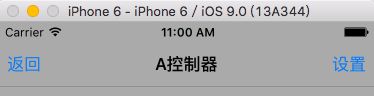
但下边还有条线,可以通过如下处理
self.navigationController.navigationBar.shadowImage = [UIImage new];
最终效果为

都是通过设置空的背景图片来实现。
iOS工作笔记(十三)的更多相关文章
- iOS工作笔记(十五)
1.使用MJRefresh上拉加载的小细节 MJRefreshBackGifFooter *footer = [MJRefreshBackGifFooter footerWithRefreshingB ...
- iOS工作笔记(十四)
1.scrollview的frame指的是其可视范围,contentSize指的是其滚动范围,分别是在水平方向和竖直方向上的 所以要让scrollview在水平方向不能滚动,那么需要如下设置 _scr ...
- iOS 学习笔记 十三 (2015.04.15)采用第三方库,实现ios录音转为amr
1.第三方开源库地址 https://github.com/guange2015/ios-amr 2.参考博客地址 http://blog.csdn.net/windsoul85/article/de ...
- iOS学习笔记-精华整理
iOS学习笔记总结整理 一.内存管理情况 1- autorelease,当用户的代码在持续运行时,自动释放池是不会被销毁的,这段时间内用户可以安全地使用自动释放的对象.当用户的代码运行告一段 落,开始 ...
- iOS学习笔记总结整理
来源:http://mobile.51cto.com/iphone-386851_all.htm 学习IOS开发这对于一个初学者来说,是一件非常挠头的事情.其实学习IOS开发无外乎平时的积累与总结.下 ...
- IOS科研IOS开发笔记学习基础知识
这篇文章是我的IOS学习笔记,他们是知识的基础,在这里,根据记录的查询后的条款. 1,UIScrollView能完毕滚动的功能. 示比例如以下: UIScrollView *tableScrollVi ...
- 《C++游戏开发》笔记十三 平滑过渡的战争迷雾(一) 原理:Warcraft3地形拼接算法
本系列文章由七十一雾央编写,转载请注明出处. http://blog.csdn.net/u011371356/article/details/9611887 作者:七十一雾央 新浪微博:http:/ ...
- iOS回顾笔记( 01 )
html,body,div,span,applet,object,iframe,h1,h2,h3,h4,h5,h6,p,blockquote,pre,a,abbr,acronym,address,bi ...
- iOS回顾笔记(07) -- UITableView的使用和性能优化
iOS回顾笔记(07) -- UITableView的使用和性能优化 如果问iOS中最重要的最常用的UI控件是什么,我觉得UITableView当之无愧!似乎所有常规APP都使用到了UITableVi ...
随机推荐
- JQuery AJAX 解析获得的JSON数据
下面的解析的Json是一个二级循环. <!DOCTYPE html> <html> <head> <script src="https://code ...
- require.js+backbone.js基本使用
一.菜单{ //银行卡基础信息维护 rsId: 'menu.param.cardbin', iconCls: 'icon-double-angle-right', name: menusLang._( ...
- WeX5学习笔记-建立项目且从SVN获取版本
UI2项目(app项目)建立步骤: 1.从网上获得WeX5_V3.1.1.zip 文件,在某盘根目录下,创建一个文件,起名尽量短小,因开发包里的文件目录层次很深,有时会报路径长度超出范围的提示,如创建 ...
- Spring @Service生成bean名称的规则
今天碰到一个问题,写了一个@Service的bean,类名大致为:BKYInfoServcie.java dubbo export服务的配置: <dubbo:service interface= ...
- .NET使用一般处理程序生成验证码
运行的效果图: HTML的代码: <head> <script type="text/javascript"> function changeCode() ...
- oracle 利用flashback将备库激活为read wirte(10g 及上)
oracle 利用flashback将备库激活为read wirte(10g 及上) 环境: OS: CENTOS 6.5 X64 DB: ORACLE 10.2.0.5 主库操作: SQL> ...
- MSSQL导入导出数据
/******* 导出到excel */ EXEC master..xp_cmdshell 'bcp SettleDB.dbo.shanghu out c:\temp1.xls -c -q -S&qu ...
- Appium for Mac 环境准备篇
之前写过一篇Appium for windows的文章,因为是09年的T400,启动Android模拟器的时候死机三次,那就公司申请台Macbook air吧,15寸的Macbook Pro实在太重了 ...
- RedHat5--yun源无法使用问题解决
YUM是Redhat Linux在线安装更新及软件的工具,但是这是RHEL5的收费功能,如果没有购买Redhat的服务时不能使用RHEL5的更新源的,会提示注册. 由于CentOS是从Redhat演化 ...
- C语言初始化——bss段初始化、跃入C、C与汇编
1.bss段初始化 变量 存放位置 初始化的全局变量 数据段 局部变量 栈 malloc函数分配的 堆 未初始的全局变量 bss段 说明:全局变量在未赋初值时,会被保留到bss段. 测试: #incl ...