
Magento添加一个下拉登陆菜单Create Magento Dropdown Login in a few minutes
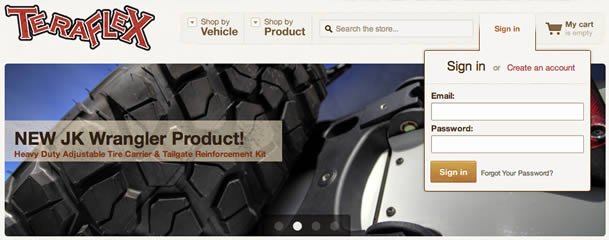
Dropdown login forms are not a feature many online stores use, but in some cases they could be quite useful UX feature. In this tutorial, I will explain how to create such a dropdown in a few minutes!
并不是每一个站都用下拉登陆菜单,但对某些时候确实非常实用。这次我们就来体验一下如何给Magento制作一个下拉登陆菜单。
Let’s open app/design/frontend/base/default/layout/customer.xml and just add the line that’s highlighted.
打开上述文件app/design/frontend/base/default/layout/customer.xml ,添加高两部分代码。
<customer_logged_out>

    <!---<reference name="right">

        <block type="customer/form_login" name="customer_form_mini_login" before="-" template="customer/form/mini.login.phtml"/>

    </reference>-->

    <reference name="top.links">

        <action method="addLink" translate="label title" module="customer"><label>Log In</label><url helper="customer/getLoginUrl"/><title>Log In</title><prepare/><urlParams/><position>100</position></action>

        <block type="core/template" name="customer_form_mini_login" before="-" template="customer/form/mini.login.phtml"/>

    </reference>

    <remove name="reorder"></remove>

</customer_logged_out>
Open app/design/frontend/base/default/template/customer/form/mini.login.phtml as well and place the code below instead.
打开 app/design/frontend/base/default/template/customer/form/mini.login.phtml ,用下面代码替代。
<style>

    #dropdown

    {

        position: absolute;

        top: 70px;

        right: 20px;

        visibility: hidden;

        float:right;

    }

    .last:hover #dropdown

    {

        visibility: visible;

    }

</style>

<div class="block block-login" id="dropdown">

    <div class="block-title">

        <strong><span><?php echo $this->__('Login') ?></span></strong>

    </div>

    <form action="<?php echo $this->getUrl('customer/account/loginPost') ?>" method="post">

        <?php echo $this->getBlockHtml('formkey'); ?>

        <div class="block-content">

            <label for="mini-login"><?php echo $this->__('Email:') ?></label><input type="text" name="login[username]" id="mini-login" class="input-text" />

            <label for="mini-password"><?php echo $this->__('Password:') ?></label><input type="password" name="login[password]" id="mini-password" class="input-text" />

            <div class="actions">

                <button type="submit" class="button"><span><span><?php echo $this->__('Login') ?></span></span></button>

            </div>

        </div>

    </form>

</div>
And that’s it! Your login form should appear when hovering over ‘Log In‘ link in the top menu:
Ok,现在去看看你的登录框吧,鼠标滑过Login,就出现了。
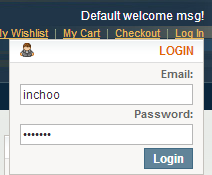
The important thing to note here is that we’re using Magento’s default mini.login.phtml with slight modifications for it to work on homepage.
We’re also using core/template block instead of customer/form_login. The reason for this is that the latter sets the page title to ‘Customer login‘ on all pages it’s being displayed on.
As a downside to using different block, we now can’t use methods of the customer/form_login block. That is why we’re using $this->getUrl(‘customer/account/loginPost’) as a form action instead of $this->getPostActionUrl().
It’s also important that you have a form key present, otherwise your form won’t get processed.
<?php echo $this->getBlockHtml('formkey'); ?>
And all that’s left is to have your frontend developer (you?) make the dropdown pretty
Magento添加一个下拉登陆菜单Create Magento Dropdown Login in a few minutes的更多相关文章
- 在Ueditor的内容区添加一个下拉选框改变事件
<script>html='';html=html+` <select name="" onchange='this.appendChild(document.g ...
- 为下拉式菜单(DropDownList)添加第一个选项
很多方法可以为为下拉式菜单(DropDownList)添加第一个选项,下面是Insus.NET小结了几个方法,仅供参考: Html code: <body> <form id= ...
- 何使用CSS写出一个下拉菜单。
导航菜单是每个网站所必备的功能,也是每个学习制作网站的朋友所必须接触的,如何用css样式制作一个简单漂亮的二级下拉菜单呢? 下面为大家分享一下我的经验 方法步骤: 第一步 : 首页我们打开Subli ...
- 原生Js_实现简单的下拉折叠菜单(添加弹出动画效果)
用javascript实现简单的下拉折叠菜单效果 实现步骤 (a)获得各操作的dom对象: (b)在所有菜单按钮对象上添加单击事件: (c)设置所有菜单按钮样式为空,并将当前按钮的样式设置为“acti ...
- iOS开发笔记13:顶部标签式导航栏及下拉分类菜单
当内容及分类较多时,往往采用顶部标签式导航栏,例如网易新闻客户端的顶部分类导航,最近刚好有这样的应用场景,参考网络上一些demo,实现了这种导航效果,记录一些要点. 效果图(由于视频转GIF掉帧,滑动 ...
- MDNavBarView下拉导航菜单(仿美团导航下拉菜单)
说到下拉导航菜单这个东西用得还真不少,细心算一下做开发以来这样的菜单已经写了第三次了,但基本都是不能复用.感觉特累人.不经意看到同事写一个类似的下拉菜单,但他引用了开源库仿大众菜单的库,大致看了一下, ...
- Jquery垂直下拉二级菜单
自己做了一个基于Jquery 的垂直下拉二级菜单功能,直接看图: Html的代码如下: <!DOCTYPE html> <html> <head> <meta ...
- 一款jQuery立体感动态下拉导航菜单特效
一款jQuery立体感动态下拉导航菜单特效,鼠标经过,在菜单栏上方下拉出一个背景图片,效果十分不错的一款jquery特效. 对IE6都是兼容的,希望大家好好研究研究. 适用浏览器:IE6.IE7.IE ...
- html基础——下拉式菜单
一个网站能否让用户容易使用该网站往往是由菜单栏体现出来,因为它为网页的大多数页面提供功能入口.一个轻轻的点击以后,即可显示出菜单项,将网站的大部分页面和功能显示出来让用户清楚了解从而用户节约一定的时间 ...
随机推荐
- [Cocos2d-x For WP8]Particle粒子系统
在游戏中,经常要实现一些真实的效果,这些效果(如,火焰,雪花等)都是由大量微粒组合而形成的.为了在游戏中实现这种效果,我们必须引进粒子系统,粒子系统中需要包括四个部分:粒子对象,运动规律,随机性,粒子 ...
- NOIP201103瑞士轮
试题描述 [背景]在双人对决的竞技性比赛,如乒乓球.羽毛球.国际象棋中,最常见的赛制是淘汰赛和循环赛.前者的特点是比赛场数少,每场都紧张刺激,但偶然性较高.后者的特点是较为公平,偶然性较低,但比赛过程 ...
- css 框架——base.css,作用是重设浏览器默认样式和提供通用原子类。自己留存
今天发下我自己的 css 框架——base.css,作用是重设浏览器默认样式和提供通用原子类. @charset "utf-8"; /*! * @名称:base.css * @功能 ...
- eWebeditor编辑器上传图片的设置程序
protected void Button1_Click(object sender, EventArgs e) { if (this.uploadfile.PostedFile.FileName.E ...
- html5文章 -- 应用HTML5 开发手机APP
因为HTML5暂时无法短期内在PC普及,主要方向在使用高端浏览器的高端移动设备,所以可以用作开发Android系统的App.但只有Android2.2以上.iOS3.2以上均支持HTML5,两大平台有 ...
- SVN的学习和安装
SVN分为服务器版本和客户端版本 服务器:VISUALSVN SERVER https://www.visualsvn.com/server/download/ 安装和配置(都很简单,只要不断的下一步 ...
- IOS第六天(3:scrollView 图片轮播器)
IOS第六天(3:scrollView 图片轮播器) #import "HMViewController.h" #define kImageCount 5 @interface H ...
- Servlet编程-步步为营
[环境]eclipse j2ee;Tomcat 7.0; [模型1] package com.zhiqi; import ...; public class TestServlet extends H ...
- node系列:琐碎备忘
cmd 全局与本地路径 查看:默认 查看本地路径:npm config get cache,默认和nodejs安装目录同一目录 查看全局路径:npm config get prefix,默认c盘app ...
- [IT新应用]如何部署CITRIX 虚拟桌面
1.搭建AD,并部署dhcp. 2.安装ddc服务器,加入域.这台服务器就是用来发布后端服务器或者WIN7的PC给用户使用.相当于调度. 3.安装windows server或者win7,用于发布给用 ...