
Android SnapHelper
转载请注明出处:http://blog.csdn.net/crazy1235/article/details/53386286
SnapHelper 是 Android Support Library reversion 24.2.0 新增加的API。
SnapHelper 的应用
SnapHelper 是RecyclerView的一个辅助工具类。
它实现了RecyclerView.onFlingListener接口。而RecyclerView.onFlingListener 是一个用来响应用户手势滑动的接口。
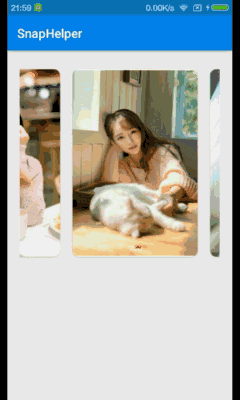
SnapHelper是一个抽象类,官方提供了一个LinearSnapHelper子类,可以实现类似ViewPager的滚动效果,滑动结束之后让某个item停留在中间位置。

效果类似于Google Play主界面中item的滚动效果。
LinearSnapHelper的使用很简单,只需要调用 attachToRecyclerView(xxx) ,绑定上一个RecyclerView即可。
上一张自己的效果图:
LinearSnapHelper 源码分析
下面来分析一下 LinearSnapHelper
先从 attachToRecyclerView() 入手。
public void attachToRecyclerView(@Nullable RecyclerView recyclerView)

            throws IllegalStateException {

        if (mRecyclerView == recyclerView) {

            return; // nothing to do

        }

        if (mRecyclerView != null) {

            destroyCallbacks();

        }

        mRecyclerView = recyclerView;

        if (mRecyclerView != null) {

            setupCallbacks();

            mGravityScroller = new Scroller(mRecyclerView.getContext(),

                    new DecelerateInterpolator());

            snapToTargetExistingView();

        }

    }
destoryCallback() 作用在于取消之前的RecyclerView的监听接口。
/**

 * Called when the instance of a {@link RecyclerView} is detached.

 */

    private void destroyCallbacks() {

        mRecyclerView.removeOnScrollListener(mScrollListener);

        mRecyclerView.setOnFlingListener(null);

    }
setupCallbacks() – 设置监听器
/**

     * Called when an instance of a {@link RecyclerView} is attached.

     */

    private void setupCallbacks() throws IllegalStateException {

        if (mRecyclerView.getOnFlingListener() != null) {

            throw new IllegalStateException("An instance of OnFlingListener already set.");

        }

        mRecyclerView.addOnScrollListener(mScrollListener);

        mRecyclerView.setOnFlingListener(this);

    }
此时可以看到,如果当前RecyclerView已经设置了OnFlingListener,会抛出一个 状态异常 。
snapToTargetExistingView()
/**

 * 找到居中显示的view,计算它的位置,调用smoothScrollBy使其居中

 */

void snapToTargetExistingView() {

        if (mRecyclerView == null) {

            return;

        }

        LayoutManager layoutManager = mRecyclerView.getLayoutManager();

        if (layoutManager == null) {

            return;

        }

        View snapView = findSnapView(layoutManager);

        if (snapView == null) {

            return;

        }

        // 计算目标View需要移动的距离

        int[] snapDistance = calculateDistanceToFinalSnap(layoutManager, snapView);

        if (snapDistance[] !=  || snapDistance[] != ) {

            mRecyclerView.smoothScrollBy(snapDistance[], snapDistance[]);

        }

    }
该方法中显示调用 findSnapView() 找到目标View(需要居中显示的View),然后调用 calculateDistanceToFinalSnap() 来计算该目标View需要移动的距离。这两个方法均需要LinearSnapHelper重写。
SnapHelper.Java 中有三个抽象函数需要LinearSnapHelper 重写。
/**

 * 找到那个“snapView”

 */

public abstract View findSnapView(LayoutManager layoutManager);
/**

 * 计算targetView需要移动的距离

 * 该方法返回一个二维数组,分别表示X轴、Y轴方向上需要修正的偏移量

 */

public abstract int[] calculateDistanceToFinalSnap(@NonNull LayoutManager layoutManager,

            @NonNull View targetView);
/**

 * 根据速度找到将要滑到的position

 */

public abstract int findTargetSnapPosition(LayoutManager layoutManager, int velocityX,

            int velocityY);
在setupCallbacks() 方法中可以看到对RecyclerView 设置了 OnScrollListener 和 OnFlingListener 两个监听器。
查看SnapHelper可以发现
// Handles the snap on scroll case.

    private final RecyclerView.OnScrollListener mScrollListener =

            new RecyclerView.OnScrollListener() {

                boolean mScrolled = false;

                @Override

                public void onScrollStateChanged(RecyclerView recyclerView, int newState) {

                    super.onScrollStateChanged(recyclerView, newState);

                    if (newState == RecyclerView.SCROLL_STATE_IDLE && mScrolled) {

                        mScrolled = false;

                        snapToTargetExistingView();

                    }

                }

                public void onScrolled(RecyclerView recyclerView, int dx, int dy) {

                    if (dx !=  || dy != ) {

                        mScrolled = true;

                    }

                }

            };

    @Override

    public boolean onFling(int velocityX, int velocityY) {

        LayoutManager layoutManager = mRecyclerView.getLayoutManager();

        if (layoutManager == null) {

            return false;

        }

        RecyclerView.Adapter adapter = mRecyclerView.getAdapter();

        if (adapter == null) {

            return false;

        }

        int minFlingVelocity = mRecyclerView.getMinFlingVelocity();

        return (Math.abs(velocityY) > minFlingVelocity || Math.abs(velocityX) > minFlingVelocity)

                && snapFromFling(layoutManager, velocityX, velocityY);

    }
当滚动结束是,会调用 snapToTargetExistingView() 方法。
而当手指滑动触发onFling() 函数时,会根据X轴、Y轴方向上的速率加上 snapFromFling() 方法的返回值综合判断。
看一下 snapFromFling()
/**

     * Helper method to facilitate for snapping triggered by a fling.

     *

     * @param layoutManager The {@link LayoutManager} associated with the attached

     *                      {@link RecyclerView}.

     * @param velocityX     Fling velocity on the horizontal axis.

     * @param velocityY     Fling velocity on the vertical axis.

     *

     * @return true if it is handled, false otherwise.

     */

    private boolean snapFromFling(@NonNull LayoutManager layoutManager, int velocityX,

            int velocityY) {

        if (!(layoutManager instanceof ScrollVectorProvider)) {

            return false;

        }

        // 创建SmoothScroll对象

        RecyclerView.SmoothScroller smoothScroller = createSnapScroller(layoutManager);

        if (smoothScroller == null) {

            return false;

        }

        int targetPosition = findTargetSnapPosition(layoutManager, velocityX, velocityY);

        if (targetPosition == RecyclerView.NO_POSITION) {

            return false;

        }

        smoothScroller.setTargetPosition(targetPosition);

        layoutManager.startSmoothScroll(smoothScroller);

        return true;

    }
接下来看LinearSnapHelper.java 复写的三个方法
@Override

    public int findTargetSnapPosition(RecyclerView.LayoutManager layoutManager, int velocityX,

            int velocityY) {

        if (!(layoutManager instanceof RecyclerView.SmoothScroller.ScrollVectorProvider)) {

            return RecyclerView.NO_POSITION;

        }

        final int itemCount = layoutManager.getItemCount();

        if (itemCount == ) {

            return RecyclerView.NO_POSITION;

        }

        // 重点在findSnapView()

        final View currentView = findSnapView(layoutManager);

        if (currentView == null) {

            return RecyclerView.NO_POSITION;

        }

        final int currentPosition = layoutManager.getPosition(currentView);

        if (currentPosition == RecyclerView.NO_POSITION) {

            return RecyclerView.NO_POSITION;

        }

        // ...省略若干代码

        return targetPos;

    }
省略的若干代码主要是根据手势滑动的速率计算目标item的位置。具体算法不用多研究。
可以看到方法内部又调用了 findSnapView() ;
@Override

    public View findSnapView(RecyclerView.LayoutManager layoutManager) {

        if (layoutManager.canScrollVertically()) {

            return findCenterView(layoutManager, getVerticalHelper(layoutManager));

        } else if (layoutManager.canScrollHorizontally()) {

            return findCenterView(layoutManager, getHorizontalHelper(layoutManager));

        }

        return null;

    }
这里根据LayoutManager的方向做个判断,进而调用 findCenterView() 方法。
/**

     * 返回距离父容器中间位置最近的子View

     */

    @Nullable

    private View findCenterView(RecyclerView.LayoutManager layoutManager,

            OrientationHelper helper) {

        int childCount = layoutManager.getChildCount();

        if (childCount == ) {

            return null;

        }

        View closestChild = null;

        final int center; // 中间位值

        if (layoutManager.getClipToPadding()) {

            center = helper.getStartAfterPadding() + helper.getTotalSpace() / ;

        } else {

            center = helper.getEnd() / ;

        }

        int absClosest = Integer.MAX_VALUE;

        for (int i = ; i < childCount; i++) {  // 循环判断子View中间位值距离父容器中间位值的差值

            final View child = layoutManager.getChildAt(i);

            int childCenter = helper.getDecoratedStart(child) +

                    (helper.getDecoratedMeasurement(child) / );

            int absDistance = Math.abs(childCenter - center);

            /** if child center is closer than previous closest, set it as closest  **/

            if (absDistance < absClosest) {

                absClosest = absDistance;

                closestChild = child;

            }

        }

        return closestChild; // 返回距离父容器中间位置最近的子View

    }
然后来看 calculateDistanceToFinalSnap()
@Override

    public int[] calculateDistanceToFinalSnap(

            @NonNull RecyclerView.LayoutManager layoutManager, @NonNull View targetView) {

        int[] out = new int[];

        if (layoutManager.canScrollHorizontally()) {

            out[] = distanceToCenter(layoutManager, targetView,

                    getHorizontalHelper(layoutManager));

        } else {

            out[] = ;

        }

        if (layoutManager.canScrollVertically()) {

            out[] = distanceToCenter(layoutManager, targetView,

                    getVerticalHelper(layoutManager));

        } else {

            out[] = ;

        }

        return out;

    }
定义一个二维数组,根据LayoutManager的方向来判断进行赋值。
private int distanceToCenter(@NonNull RecyclerView.LayoutManager layoutManager,

            @NonNull View targetView, OrientationHelper helper) {

        final int childCenter = helper.getDecoratedStart(targetView) +

                (helper.getDecoratedMeasurement(targetView) / );

        final int containerCenter;

        if (layoutManager.getClipToPadding()) {

            containerCenter = helper.getStartAfterPadding() + helper.getTotalSpace() / ;

        } else {

            containerCenter = helper.getEnd() / ;

        }

        return childCenter - containerCenter;

    }
该方法的目的即是 计算目标View距离父容器中间位值的差值。
至此,流程已经分析完毕。
总结如下:
有速率的滑动,会触发onScrollStateChanged() 和 onFling() 两个方法。
onScrollStateChanged() 方法内部调用 findSnapView() 找到对应的View,然后据此View在调用calculateDistanceToFinalSnap() 来计算该目标View需要移动的距离,最后通过RecyclerView.smoothScrollBy() 来移动View。
onFling() 方法内部调用 snapFromFling(), 然后在此方法内部首先创建了一个SmoothScroller 对象。接着调用 findTargetSnapPosition() 找到目标View的position,然后对smoothScroller设置该position,最后通过LayoutManager.startSmoothScroll() 开始移动View。
没有速率的滚动只会触发 onScrollStateChanged() 函数。
扩展
LinearSnapHelper 类的目的是将某个View停留在正中间,我们也可以通过这种方式来实现每次滑动结束之后将某个View停留在最左边或者最右边。
其实通过上面的分析,就会发现最主要的就是 calculateDistanceToFinalSnap 和 findSnapView 这两个函数。
在寻找目标View的时候,不像findCenterView那么简单。
以为需要考虑到最后item的边界情况。判断的不好就会出现,无论怎么滑动都会出现最后一个item无法完整显示的bug。
且看我的代码:
/**

     * 注意判断最后一个item时,应通过判断距离右侧的位置

     *

     * @param layoutManager

     * @param helper

     * @return

     */

    private View findStartView(RecyclerView.LayoutManager layoutManager, OrientationHelper helper) {

        if (!(layoutManager instanceof LinearLayoutManager)) { // only for LinearLayoutManager

            return null;

        }

        int childCount = layoutManager.getChildCount();

        if (childCount == ) {

            return null;

        }

        View closestChild = null;

        final int start = helper.getStartAfterPadding();

        int absClosest = Integer.MAX_VALUE;

        for (int i = ; i < childCount; i++) {

            final View child = layoutManager.getChildAt(i);

            int childStart = helper.getDecoratedStart(child);

            int absDistance = Math.abs(childStart - start);

            if (absDistance < absClosest) {

                absClosest = absDistance;

                closestChild = child;

            }

        }

        // 边界情况判断

        View firstVisibleChild = layoutManager.getChildAt();

        if (firstVisibleChild != closestChild) {

            return closestChild;

        }

        int firstChildStart = helper.getDecoratedStart(firstVisibleChild);

        int lastChildPos = ((LinearLayoutManager) layoutManager).findLastVisibleItemPosition();

        View lastChild = layoutManager.getChildAt(childCount - );

        int lastChildCenter = helper.getDecoratedStart(lastChild) + (helper.getDecoratedMeasurement(lastChild) / );

        boolean isEndItem = lastChildPos == layoutManager.getItemCount() - ;

        if (isEndItem && firstChildStart <  && lastChildCenter < helper.getEnd()) {

            return lastChild;

        }

        return closestChild;

    }
对于“反向的”同样要考虑边界情况。
private View findEndView(RecyclerView.LayoutManager layoutManager, OrientationHelper helper) {

        if (!(layoutManager instanceof LinearLayoutManager)) { // only for LinearLayoutManager

            return null;

        }

        int childCount = layoutManager.getChildCount();

        if (childCount == ) {

            return null;

        }

        if (((LinearLayoutManager) layoutManager).findLastCompletelyVisibleItemPosition() == ) {

            return null;

        }

        View closestChild = null;

        final int end = helper.getEndAfterPadding();

        int absClosest = Integer.MAX_VALUE;

        for (int i = ; i < childCount; i++) {

            final View child = layoutManager.getChildAt(i);

            int childStart = helper.getDecoratedEnd(child);

            int absDistance = Math.abs(childStart - end);

            if (absDistance < absClosest) {

                absClosest = absDistance;

                closestChild = child;

            }

        }

        // 边界情况判断

        View lastVisibleChild = layoutManager.getChildAt(childCount - );

        if (lastVisibleChild != closestChild) {

            return closestChild;

        }

        if (layoutManager.getPosition(closestChild) == ((LinearLayoutManager) layoutManager).findLastCompletelyVisibleItemPosition()) {

            return closestChild;

        }

        View firstChild = layoutManager.getChildAt();

        int firstChildStart = helper.getDecoratedStart(firstChild);

        int firstChildPos = ((LinearLayoutManager) layoutManager).findFirstVisibleItemPosition();

        boolean isFirstItem = firstChildPos == ;

        int firstChildCenter = helper.getDecoratedStart(firstChild) + (helper.getDecoratedMeasurement(firstChild) / );

        if (isFirstItem && firstChildStart <  && firstChildCenter > helper.getStartAfterPadding()) {

            return firstChild;

        }

        return closestChild;

    }
果图如下:


完整代码,请移步:JackSnapHelper.java
Android SnapHelper的更多相关文章
- Android 使用RecyclerView SnapHelper详解
简介 RecyclerView在24.2.0版本中新增了SnapHelper这个辅助类,用于辅助RecyclerView在滚动结束时将Item对齐到某个位置.特别是列表横向滑动时,很多时候不会让列表滑 ...
- Android Weekly Notes Issue #219
Android Weekly Issue #219 August 21st, 2016 Android Weekly Issue #219 ARTICLES & TUTORIALS Andro ...
- Android开源项目库汇总
最近做了一个Android开源项目库汇总,里面集合了OpenDigg 上的优质的Android开源项目库,方便移动开发人员便捷的找到自己需要的项目工具等,感兴趣的可以到GitHub上给个star. 抽 ...
- GitHub上受欢迎的Android UI Library
GitHub上受欢迎的Android UI Library 内容 抽屉菜单 ListView WebView SwitchButton 按钮 点赞按钮 进度条 TabLayout 图标 下拉刷新 Vi ...
- [Android Pro] AndroidX重构和映射
原文地址:https://developer.android.com/topic/libraries/support-library/refactor https://blog.csdn.net/ch ...
- Android UI相关开源项目库汇总
最近做了一个Android UI相关开源项目库汇总,里面集合了OpenDigg 上的优质的Android开源项目库,方便移动开发人员便捷的找到自己需要的项目工具等,感兴趣的可以到GitHub上给个st ...
- 掘金 Android 文章精选合集
掘金 Android 文章精选合集 掘金官方 关注 2017.07.10 16:42* 字数 175276 阅读 50053评论 13喜欢 669 用两张图告诉你,为什么你的 App 会卡顿? - A ...
- GitHub 上受欢迎的 Android UI Library 整理二
通知 https://github.com/Tapadoo/Alerter ★2528 - 克服Toast和Snackbar的限制https://github.com/wenmingvs/Notify ...
- 最新最全的 Android 开源项目合集
原文链接:https://github.com/opendigg/awesome-github-android-ui 在 Github 上做了一个很新的 Android 开发相关开源项目汇总,涉及到 ...
随机推荐
- 发生了COMException 异常来自 HRESULT:0x80040228
异常信息: 发生了COMException 异常来自 HRESULT:0x80040228 原因解决方法:窗体中忘记放LicenseControl控件.,加上LicenseControl即可
- cookie 用户第一次访问时执行
<script type="text/javascript" src="/js/jquery.Cookies.js"></script> ...
- TinyMCE在线编辑器使用方法初探
首先,下载TinyMCE包,地址:http://www.tinymce.com/ 然后将下载后的包解压,放置到一个文件夹下,创建一个html文件,并在其中书写如下代码: <!DOCTYPE ht ...
- Powershell变量的类型
Powershell 默认支持的.NET类型如下: [order], [pscustomobject], [array], [bool], [byte], [char], [datetime], ...
- [ZZ] Adventures with Gamma-Correct Rendering
http://renderwonk.com/blog/index.php/archive/adventures-with-gamma-correct-rendering/ Adventures wit ...
- SVN 树冲突的解决方法(Ubuntu 环境)
今天在 服务器上(Ubuntu) svn up 更新的时候,出现了 SVN 树冲突 root@futongdai:~# cd /home/wwwroot/newcrm.ofim.com/ root@f ...
- PHP 下载导出中文名的文件的编码注意事项
我的页面全部都为utf-8 在代码中我的文件名是中文名. 在创建文件时,就要将utf-8转码成gbk(用以支持中文) $file = iconv('utf-8',"gbk",$fi ...
- MYSQL导入导出.sql文件
MYSQL导入导出.sql文件 一.MYSQL的命令行模式的设置:桌面->我的电脑->属性->环境变量->新建->PATH=“:path\mysql\bin;”其中p ...
- word 使用宏批量设置表格
Sub ChangeTable() Application.Browser.Target = wdBrowseTable To ActiveDocument.Tables.Count ActiveDo ...
- php 文件和表单内容一起上传
<?php $filename = $_POST['filename']; $explain = $_POST['explain']; $upfile = $_FILES['upfile']; ...