
vagrant在windows下的安装和配置
记录一下安装和配置过程中的一些坑
步骤一
分别下载vagrant和VirtualBox,我这里下载的是vagrant_1.9.1.msi 和 VirtualBox-5.1.14-112924-Win.exe
步骤二
这两个东东安装好之后,我在e盘创建了一个myvagrant目录,作为工程目录,进入该目录,进行添加box
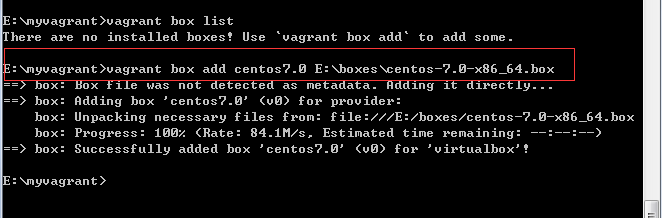
其中centos7.0是自定义的box的名字,后面是本地box的路径
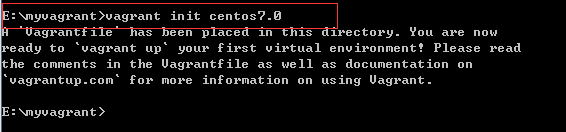
添加完后 vagrant init cento7.0然后就会在myvagrant目录下生成一个vagrantfile文件

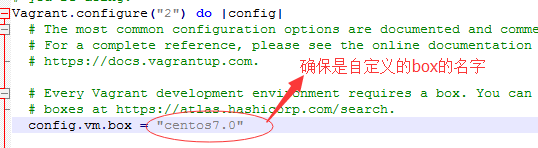
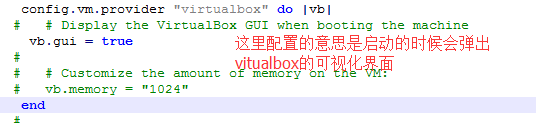
然后打开这个文件,修改一下这里
=================================================
配置好后,输入vagrant up
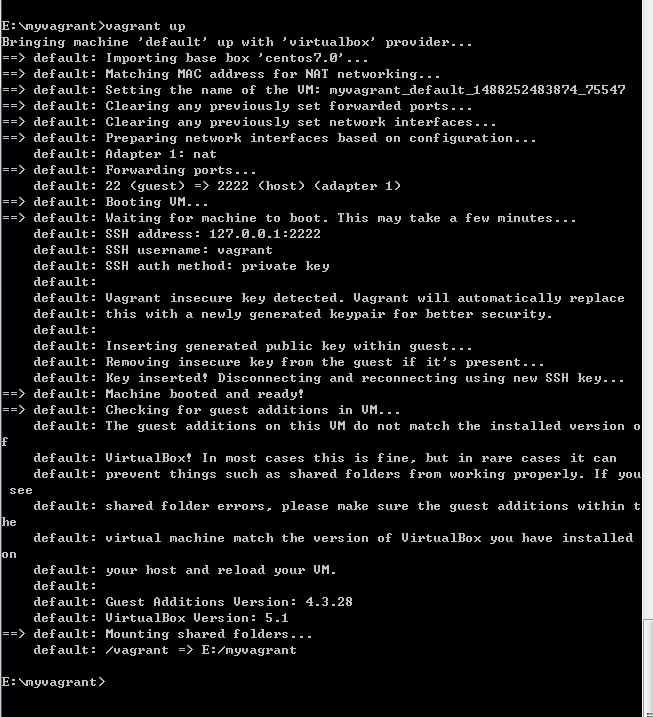
这样就启动成功了。
坑一:
就是在vagrant up的时候出现如下错误
If the provider you're using has a GUI that comes with it,
it is often helpful to open that and watch the machine, since the
GUI often has more helpful error messages than Vagrant can retrieve.
For example, if you're using VirtualBox, run `vagrant up` while the
VirtualBox GUI is open.
The primary issue for this error is that the provider you're using
is not properly configured. This is very rarely a Vagrant issue.
然后在stackoverflow看了答案,跟着改了还是无果,最后我卸载掉原来安装好的virtualbox,然后去官网下载最新的virtualbox,版本是VirtualBox-5.1.14-112924-Win.exe
然后在vagrant up的时候这个错误就消失了,virtualbox版本的原因
坑二:
If you're using a custom box, make sure that networking is properly

working and you're able to connect to the machine. It is a common

problem that networking isn't setup properly in these boxes.

Verify that authentication configurations are also setup properly,

as well.

If the box appears to be booting properly, you may want to increase

the timeout ("config.vm.boot_timeout") value.

因为配置的时候开启了调用virtualbox可视化界面,所以出现这个提示的时候,virtualbox那也会弹出一个警告
VT-x/AMD-V硬件加速在您的系统中不可用。您的64-位虚拟机将无法检测到 64-位处理器,从而无法启动。

在网上找到解决办法是重启按f2进入bios设置,然后开启虚拟化支持,然后保存,重新启动,这个时候再用vagrant up就成功了。
vagrant在windows下的安装和配置的更多相关文章
- vagrant在windows下的安装和配置(一)
记录一下安装和配置过程中的一些坑步骤一分别下载vagrant和VirtualBox,我这里下载的是vagrant_1.9.1.msi 和 VirtualBox-5.1.14-112924-Win.ex ...
- vagrant在windows下的安装和配置(二)
在(一)中安装和配置好后 框框中的信息是登录vagrant up后的系统用的 我这里登录用的是xshell-----下载一个xshell然后安装 打开xshell 按确定之后生成一个新的会话,然后登录 ...
- Windows下pry安装和配置
Windows下pry安装和配置 pry是一个增强型的交互式命令行工具,比irb强大. 有自动完成功能,自动缩进,有颜色.有更强大的调试功能. pry 安装很简单. 在终端输入: gem instal ...
- windows下redis安装和配置
windows下redis安装和配置 redis介绍 Redis是一个开源,高级的键值存储和一个适用的解决方案,用于构建高性能,可扩展的Web应用程序. Redis有三个主要特点,使它优越于其它键值数 ...
- solr在windows下的安装及配置
solr在windows下的安装及配置 首先,solr是基于Java开发的,所以使用的话需要先进行java环境的配置,在Java环境配置好之后就可以去http://www.apache.org/dyn ...
- Lua在Windows下的安装、配置、运行
Lua在Windows下的安装.配置.运行 本文链接:https://blog.csdn.net/ChinarCSDN/article/details/78667262 展开 # Windows下安装 ...
- windows下手动安装和配置xamarin
安装xamarin xamarin官方给出了两种安装方式,自动安装和手动安装. 自动安装比较简单,到http://xamarin.com/download下载xamarininstaller.exe ...
- QT在windows下的安装与配置
先了解Qt: Qt一直以来,分为商业.开源两个版本,商业版本为用户提供了二级制的动态库,直接安装既可以使用,但是需要花钱购买license,而开源版本则遵守GPL协议,提供了源码,用户需要自行编译,才 ...
- windows下nginx安装、配置与使用(转载)
目前国内各大门户网站已经部署了Nginx,如新浪.网易.腾讯等:国内几个重要的视频分享网站也部署了Nginx,如六房间.酷6等.新近发现Nginx 技术在国内日趋火热,越来越多的网站开始部署Nginx ...
随机推荐
- tinyxml2使用
项目中遇到一个问题,C/C++需要与JAVA通信,JAVA方已经使用了XML序列化传输.本可以考虑JSON/GOOGLE PROTOCOL BUFFER的,但为了使JAVA方不做过多改动,坚持使用XM ...
- Python数据结构——栈的链表实现
自定义链表实现栈的数据结构,代码如下: class Stack: def __init__(self): self._first = None def push(self,item): self._f ...
- 《DSP using MATLAB》Problem 6.24
代码: %% ++++++++++++++++++++++++++++++++++++++++++++++++++++++++++++++++++++++++++++++++ %% Output In ...
- nginx常用参数设置
1)隐藏nginx header 版本号 使用curl -I http://www.10.0.3.46 会发现server那里显示版本号 在nginx.conf的http里添加参数server_tok ...
- SAS常用函数
SAS常用函数 一.数学函数 ABS(x) 求x的绝对值. MAX(x1,x2,…,xn) 求所有自变量中的最大一个. MIN(x1,x2,…,xn) 求所有自变量中的最小一个. MOD(x,y) ...
- mysql-sql语言参考
字段去重查询 select distinct style from music 批量修改某字段 update music set style = "ost" where styl ...
- day4 大纲笔记
01 上周内容回顾 int bool str int <---> str: i1 = 100 str(i1) s1 = '10' int(s1) 字符串必须是数字组成. int <- ...
- ORACLE 12C 之集群日志位置变化
如果你还是使用 oracle 11g RAC 的目录结构方式寻找集群的日志,你会发现目录中所有的日志都是空的.actdb21:/oracle/app/12.2.0/grid/log/actdb21(+ ...
- Netty 学习资料
Netty 学习资料 Netty 学习资料 链接网址 说明 Netty 4.x 用户指南 http://wiki.jikexueyuan.com/project/netty-4-user-guide/ ...
- secureCRT关闭连接自动关闭tomcat服务
下午遇到一个神奇的问题: secureCRT登陆某个服务器,用shell脚本启动./catalina.sh start,打开日志tail -f catalina.out,此时 手动关闭连接窗口,导致t ...