
Android之RadioButton多行
RadioGroup设置orientation="vertical"竖向单列显示
RadioGroup设置orientation="horizontal"横向单行显示
如何实现多行多列RadioButton呢?
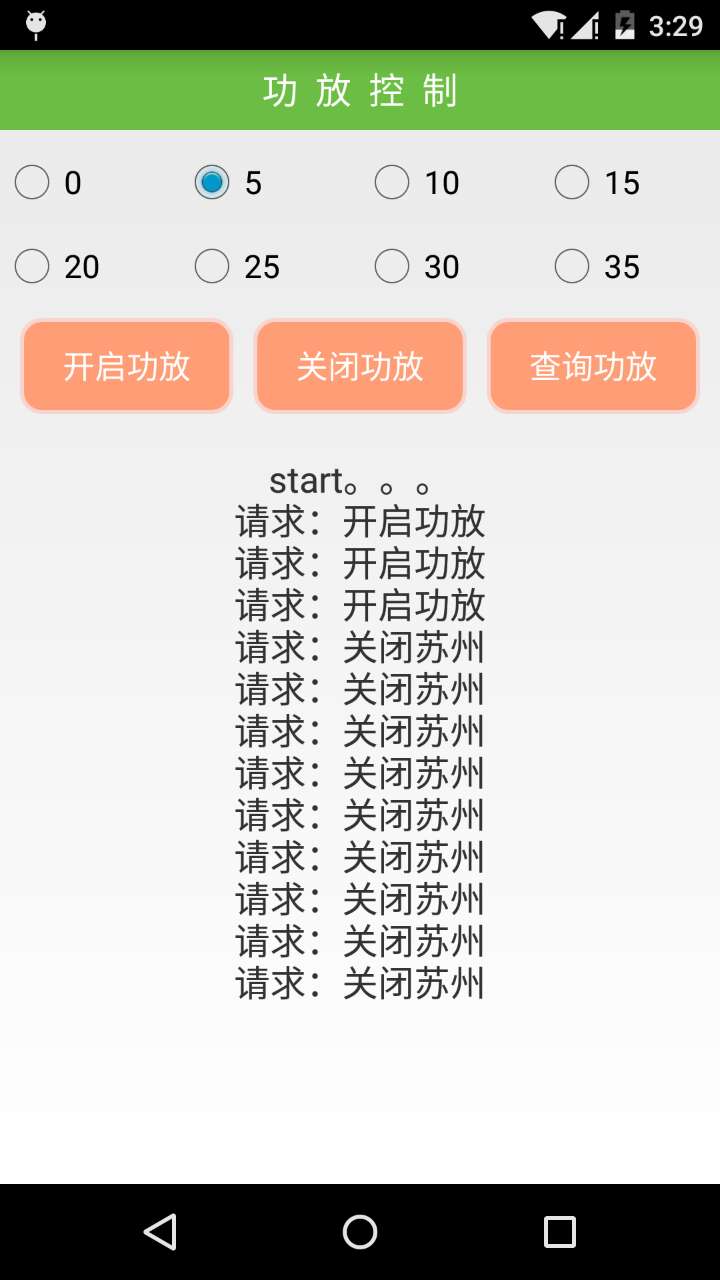
step1:重写RadioGroup类
package com.hz.w504_sing_common;

import java.util.ArrayList;

import android.content.Context;

import android.content.res.TypedArray;

import android.util.AttributeSet;

import android.view.View;

import android.view.ViewGroup;

import android.widget.CompoundButton;

import android.widget.LinearLayout;

import android.widget.RadioButton;

/** 可以放多种布局控件,能找到radiobutton */

public class FlowRadioGroup extends LinearLayout {

    // holds the checked id; the selection is empty by default

    private int mCheckedId = -;

    // tracks children radio buttons checked state

    private CompoundButton.OnCheckedChangeListener mChildOnCheckedChangeListener;

    // when true, mOnCheckedChangeListener discards events

    private boolean mProtectFromCheckedChange = false;

    private OnCheckedChangeListener mOnCheckedChangeListener;

    private PassThroughHierarchyChangeListener mPassThroughListener;

    // 存放当前的radioButton

    private ArrayList<RadioButton> radioButtons;

    public FlowRadioGroup(Context context) {

        super(context);

        setOrientation(VERTICAL);

        init();

    }

    public FlowRadioGroup(Context context, AttributeSet attrs) {

        super(context, attrs);

        init();

    }

    private void init() {

        mChildOnCheckedChangeListener = new CheckedStateTracker();

        mPassThroughListener = new PassThroughHierarchyChangeListener();

        super.setOnHierarchyChangeListener(mPassThroughListener);

        radioButtons = new ArrayList<RadioButton>();

    }

    @Override

    public void setOnHierarchyChangeListener(OnHierarchyChangeListener listener) {

        // the user listener is delegated to our pass-through listener

        mPassThroughListener.mOnHierarchyChangeListener = listener;

    }

    @Override

    protected void onFinishInflate() {

        super.onFinishInflate();

        // checks the appropriate radio button as requested in the XML file

        if (mCheckedId != -) {

            mProtectFromCheckedChange = true;

            setCheckedStateForView(mCheckedId, true);

            mProtectFromCheckedChange = false;

            setCheckedId(mCheckedId);

        }

    }

    @Override

    public void addView(View child, int index, ViewGroup.LayoutParams params) {

        if (child instanceof RadioButton) {

            final RadioButton button = (RadioButton) child;

            radioButtons.add(button);

            if (button.isChecked()) {

                mProtectFromCheckedChange = true;

                if (mCheckedId != -) {

                    setCheckedStateForView(mCheckedId, false);

                }

                mProtectFromCheckedChange = false;

                setCheckedId(button.getId());

            }

        } else if (child instanceof ViewGroup) {// 如果是复合控件

            // 遍历复合控件

            ViewGroup vg = ((ViewGroup) child);

            setCheckedView(vg);

        }

        super.addView(child, index, params);

    }

    /** 查找复合控件并设置radiobutton */

    private void setCheckedView(ViewGroup vg) {

        int len = vg.getChildCount();

        for (int i = ; i < len; i++) {

            if (vg.getChildAt(i) instanceof RadioButton) {// 如果找到了,就设置check状态

                final RadioButton button = (RadioButton) vg.getChildAt(i);

                // 添加到容器

                radioButtons.add(button);

                if (button.isChecked()) {

                    mProtectFromCheckedChange = true;

                    if (mCheckedId != -) {

                        setCheckedStateForView(mCheckedId, false);

                    }

                    mProtectFromCheckedChange = false;

                    setCheckedId(button.getId());

                }

            } else if (vg.getChildAt(i) instanceof ViewGroup) {// 迭代查找并设置

                ViewGroup childVg = (ViewGroup) vg.getChildAt(i);

                setCheckedView(childVg);

            }

        }

    }

    /** 查找复合控件并设置id */

    private void setCheckedId(ViewGroup vg) {

        int len = vg.getChildCount();

        for (int i = ; i < len; i++) {

            if (vg.getChildAt(i) instanceof RadioButton) {// 如果找到了,就设置check状态

                final RadioButton button = (RadioButton) vg.getChildAt(i);

                int id = button.getId();

                // generates an id if it's missing

                if (id == View.NO_ID) {

                    id = button.hashCode();

                    button.setId(id);

                }

                button.setOnCheckedChangeListener(mChildOnCheckedChangeListener);

            } else if (vg.getChildAt(i) instanceof ViewGroup) {// 迭代查找并设置

                ViewGroup childVg = (ViewGroup) vg.getChildAt(i);

                setCheckedId(childVg);

            }

        }

    }

    /** 查找radioButton控件 */

    public RadioButton findRadioButton(ViewGroup group) {

        RadioButton resBtn = null;

        int len = group.getChildCount();

        for (int i = ; i < len; i++) {

            if (group.getChildAt(i) instanceof RadioButton) {

                resBtn = (RadioButton) group.getChildAt(i);

            } else if (group.getChildAt(i) instanceof ViewGroup) {

                resBtn = findRadioButton((ViewGroup) group.getChildAt(i));

                findRadioButton((ViewGroup) group.getChildAt(i));

                break;

            }

        }

        return resBtn;

    }

    /** 返回当前radiobutton控件的count */

    public int getRadioButtonCount() {

        return radioButtons.size();

    }

    /** 返回当前index的radio */

    public RadioButton getRadioButton(int index) {

        return radioButtons.get(index);

    }

    /**

     * <p>

     * Sets the selection to the radio button whose identifier is passed in

     * parameter. Using -1 as the selection identifier clears the selection;

     * such an operation is equivalent to invoking {@link #clearCheck()}.

     * </p>

     *

     * @param id

     *            the unique id of the radio button to select in this group

     *

     * @see #getCheckedRadioButtonId()

     * @see #clearCheck()

     */

    public void check(int id) {

        // don't even bother

        if (id != - && (id == mCheckedId)) {

            return;

        }

        if (mCheckedId != -) {

            setCheckedStateForView(mCheckedId, false);

        }

        if (id != -) {

            setCheckedStateForView(id, true);

        }

        setCheckedId(id);

    }

    private void setCheckedId(int id) {

        mCheckedId = id;

        if (mOnCheckedChangeListener != null) {

            mOnCheckedChangeListener.onCheckedChanged(this, mCheckedId);

        }

    }

    private void setCheckedStateForView(int viewId, boolean checked) {

        View checkedView = findViewById(viewId);

        if (checkedView != null && checkedView instanceof RadioButton) {

            ((RadioButton) checkedView).setChecked(checked);

        }

    }

    /**

     * <p>

     * Returns the identifier of the selected radio button in this group. Upon

     * empty selection, the returned value is -1.

     * </p>

     *

     * @return the unique id of the selected radio button in this group

     *

     * @see #check(int)

     * @see #clearCheck()

     */

    public int getCheckedRadioButtonId() {

        return mCheckedId;

    }

    /**

     * <p>

     * Clears the selection. When the selection is cleared, no radio button in

     * this group is selected and {@link #getCheckedRadioButtonId()} returns

     * null.

     * </p>

     *

     * @see #check(int)

     * @see #getCheckedRadioButtonId()

     */

    public void clearCheck() {

        check(-);

    }

    /**

     * <p>

     * Register a callback to be invoked when the checked radio button changes

     * in this group.

     * </p>

     *

     * @param listener

     *            the callback to call on checked state change

     */

    public void setOnCheckedChangeListener(OnCheckedChangeListener listener) {

        mOnCheckedChangeListener = listener;

    }

    /**

     * {@inheritDoc}

     */

    @Override

    public LayoutParams generateLayoutParams(AttributeSet attrs) {

        return new FlowRadioGroup.LayoutParams(getContext(), attrs);

    }

    /**

     * {@inheritDoc}

     */

    @Override

    protected boolean checkLayoutParams(ViewGroup.LayoutParams p) {

        return p instanceof FlowRadioGroup.LayoutParams;

    }

    @Override

    protected LinearLayout.LayoutParams generateDefaultLayoutParams() {

        return new LayoutParams(LayoutParams.WRAP_CONTENT,

                LayoutParams.WRAP_CONTENT);

    }

    /**

     * <p>

     * This set of layout parameters defaults the width and the height of the

     * children to {@link #WRAP_CONTENT} when they are not specified in the XML

     * file. Otherwise, this class ussed the value read from the XML file.

     * </p>

     *

     * <p>

     * See {@link android.R.styleable#LinearLayout_Layout LinearLayout

     * Attributes} for a list of all child view attributes that this class

     * supports.

     * </p>

     *

     */

    public static class LayoutParams extends LinearLayout.LayoutParams {

        /**

         * {@inheritDoc}

         */

        public LayoutParams(Context c, AttributeSet attrs) {

            super(c, attrs);

        }

        /**

         * {@inheritDoc}

         */

        public LayoutParams(int w, int h) {

            super(w, h);

        }

        /**

         * {@inheritDoc}

         */

        public LayoutParams(int w, int h, float initWeight) {

            super(w, h, initWeight);

        }

        /**

         * {@inheritDoc}

         */

        public LayoutParams(ViewGroup.LayoutParams p) {

            super(p);

        }

        /**

         * {@inheritDoc}

         */

        public LayoutParams(MarginLayoutParams source) {

            super(source);

        }

        /**

         * <p>

         * Fixes the child's width to

         * {@link android.view.ViewGroup.LayoutParams#WRAP_CONTENT} and the

         * child's height to

         * {@link android.view.ViewGroup.LayoutParams#WRAP_CONTENT} when not

         * specified in the XML file.

         * </p>

         *

         * @param a

         *            the styled attributes set

         * @param widthAttr

         *            the width attribute to fetch

         * @param heightAttr

         *            the height attribute to fetch

         */

        @Override

        protected void setBaseAttributes(TypedArray a, int widthAttr,

                int heightAttr) {

            if (a.hasValue(widthAttr)) {

                width = a.getLayoutDimension(widthAttr, "layout_width");

            } else {

                width = WRAP_CONTENT;

            }

            if (a.hasValue(heightAttr)) {

                height = a.getLayoutDimension(heightAttr, "layout_height");

            } else {

                height = WRAP_CONTENT;

            }

        }

    }

    /**

     * <p>

     * Interface definition for a callback to be invoked when the checked radio

     * button changed in this group.

     * </p>

     */

    public interface OnCheckedChangeListener {

        /**

         * <p>

         * Called when the checked radio button has changed. When the selection

         * is cleared, checkedId is -1.

         * </p>

         *

         * @param group

         *            the group in which the checked radio button has changed

         * @param checkedId

         *            the unique identifier of the newly checked radio button

         */

        public void onCheckedChanged(FlowRadioGroup group, int checkedId);

    }

    private class CheckedStateTracker implements

            CompoundButton.OnCheckedChangeListener {

        public void onCheckedChanged(CompoundButton buttonView,

                boolean isChecked) {

            // prevents from infinite recursion

            if (mProtectFromCheckedChange) {

                return;

            }

            mProtectFromCheckedChange = true;

            if (mCheckedId != -) {

                setCheckedStateForView(mCheckedId, false);

            }

            mProtectFromCheckedChange = false;

            int id = buttonView.getId();

            setCheckedId(id);

        }

    }

    /**

     * <p>

     * A pass-through listener acts upon the events and dispatches them to

     * another listener. This allows the table layout to set its own internal

     * hierarchy change listener without preventing the user to setup his.

     * </p>

     */

    private class PassThroughHierarchyChangeListener implements

            ViewGroup.OnHierarchyChangeListener {

        private ViewGroup.OnHierarchyChangeListener mOnHierarchyChangeListener;

        public void onChildViewAdded(View parent, View child) {

            if (parent == FlowRadioGroup.this && child instanceof RadioButton) {

                int id = child.getId();

                // generates an id if it's missing

                if (id == View.NO_ID) {

                    id = child.hashCode();

                    child.setId(id);

                }

                ((RadioButton) child)

                        .setOnCheckedChangeListener(mChildOnCheckedChangeListener);

            } else if (parent == FlowRadioGroup.this

                    && child instanceof ViewGroup) {// 如果是复合控件

                // 查找并设置id

                setCheckedId((ViewGroup) child);

            }

            if (mOnHierarchyChangeListener != null) {

                mOnHierarchyChangeListener.onChildViewAdded(parent, child);

            }

        }

        public void onChildViewRemoved(View parent, View child) {

            if (parent == FlowRadioGroup.this && child instanceof RadioButton) {

                ((RadioButton) child).setOnCheckedChangeListener(null);

            } else if (parent == FlowRadioGroup.this

                    && child instanceof ViewGroup) {

                findRadioButton((ViewGroup) child).setOnCheckedChangeListener(

                        null);

            }

            if (mOnHierarchyChangeListener != null) {

                mOnHierarchyChangeListener.onChildViewRemoved(parent, child);

            }

        }

    }

}
FlowRadioGroup
step2:引用FlowRadioGroup结合LinearLayout布局
<com.hz.w504_sing_common.FlowRadioGroup

        android:id="@+id/radioGroup"

        android:layout_width="fill_parent"

        android:layout_height="wrap_content"

        android:orientation="vertical"  >

        <LinearLayout

            android:layout_marginTop="10dip"

            android:layout_width="match_parent"

            android:layout_height="match_parent"

            android:orientation="horizontal" >

                <RadioButton

                    android:layout_width="0dip"

                    android:layout_weight=""

                    android:layout_height="wrap_content"

                    android:text="" />

                <RadioButton

                    android:layout_width="0dip"

                    android:layout_weight=""

                    android:layout_height="wrap_content"

                    android:text="" />

                <RadioButton

                    android:layout_width="0dip"

                    android:layout_weight=""

                    android:layout_height="wrap_content"

                    android:text="" />

                <RadioButton

                    android:layout_width="0dip"

                    android:layout_weight=""

                    android:layout_height="wrap_content"

                    android:text="" />

        </LinearLayout>

        <LinearLayout

            android:layout_marginTop="10dip"

            android:layout_width="match_parent"

            android:layout_height="match_parent"

            android:orientation="horizontal" >

            <RadioButton

                android:layout_width="0dip"

                android:layout_weight=""

                android:layout_height="wrap_content"

                android:text="" />

            <RadioButton

                android:layout_width="0dip"

                android:layout_weight=""

                android:layout_height="wrap_content"

                android:text="" />

            <RadioButton

                android:layout_width="0dip"

                android:layout_weight=""

                android:layout_height="wrap_content"

                android:text="" />

            <RadioButton

                android:layout_width="0dip"

                android:layout_weight=""

                android:layout_height="wrap_content"

                android:text="" />

        </LinearLayout>

    </com.hz.w504_sing_common.FlowRadioGroup>
布局
哦了
Android之RadioButton多行的更多相关文章
- android.widget.RadioButton 单选按钮(转)
大家好,我们今天这一节要介绍的是RadioGroup 的组事件.RadioGroup 可将各自不同的RadioButton ,设限于同一个Radio 按钮组,同一个RadioGroup 组里的按钮,只 ...
- Android 自定义RadioButton的样式
Android 自定义RadioButton的样式 我们知道Android控件里的button,listview可以用xml的样式自定义成自己希望的漂亮样式. 最近用到RadioButton,利用xm ...
- Android 自定义RadioButton实现
由于使用小米系统MIUI运行是RadioButton样式跟google Android API自定义的不一样,则我们可以定义任何想要的东东.没有做不到,只有想不到 Android 自定义RadioBu ...
- Android 单选按钮(RadioButton)和复选框(CheckBox)的使用
1.RadioButton (1)介绍 (2)单选按钮点击事件的用法 (3)RadioButton与RadioGroup配合使用实现单选题功能 (4)xml布局及使用 <?xml version ...
- Android 自定义 radiobutton
<RadioButton android:id="@+id/radiobutton_pay_method" android:layout_width="30dp&q ...
- Android studio 显示代码行号 设置
首先我们打开我们的Android Studio. 这时会弹出setting页面,我们选择show line numbers然后点击确定按钮. 此时我们就可以看到代码左侧显示出行号了 我们可 ...
- Android开发--RadioButton的应用
1.简介 RadioButton为单选按钮,当一个按钮被选中后,点击其他按钮无法使上一个按钮变为未选中状态.RadioGroup是可以容纳多个RadioButton的容器, 通过使用RadioGrou ...
- android自定义radiobutton样式文字颜色随选中状态而改变
主要是写一个 color selector 在res/建一个文件夹取名color res/color/color_radiobutton.xml <selector xmlns:android= ...
- Android Developers:在命令行构建和运行
使用Ant构建脚本构建你的应用程序有两种方式:一种用于测试/调试你的引用程序—debug模式—另一种用于构建你最终发布的包-release模式.无论你使用哪种方式构建你的应用程序,它必须在安装在模拟器 ...
随机推荐
- iOS UI布局-回到顶部
回到顶部,是比较常用的一个效果 核心代码 在ViewDidLoad中,添加回到顶部按钮 计算偏移量,如果当前显示的内容全部向上隐藏掉,则显示“回到顶部”按钮 // // ViewController. ...
- cocos2dx 3.x版本搭建Mac环境工程(创建一个新的C++工程)百分百可行
首先第一篇,想学cocos2dx第一步就是搭建环境,第一步搭建不了环境,创建不了工程那一切都是扯淡. 说到mac下安装cocos2d-x想到的模式就是xcode+cocos2d-x.因为我本身就是一个 ...
- 3.十分钟搞定Vue搭建
Vue推荐开发环境 Node.js 6.2.0.npm 3.8.9.webpack 1.13.vue-cli 2.5.1.webstrom2016 现在开始安装环境 安装nodejs 可以在终端里下载 ...
- vue中使用base64和md5
1.在项目根目录下安装 cnpm install --save js-base64 cnpm install --save js-md5 2.在项目文件中引入 import md5 from 'js- ...
- c#中枚举类型的定义与使用
介绍枚举是一个指定的常数,其基础类型可以是除 Char 外的任何整型.如果没有显式声明基础类型,则使用 Int32.编程语言通常提供语法来声明由一组已命名的常数和它们的值组成的枚举.定义默认基数从O开 ...
- big and little endian
总是容易搞混big endian 和 little endian,但是找到一篇文章,其解释让人耳目一新. 文章链接:http://www.cs.umd.edu/class/sum2003/cmsc31 ...
- <4>Lua表
lua表 1: lua没有数组,但是表可以代替数组的功能(数组部分与非数组部分); 开始的, 1, 2, 3 ...称连续的索引; b.Lua表的连续索引的长度(数组部分); #表的名字; --数组 ...
- SQLAllocHandle
函数定义: 顾名思义,该函数就是用来分配句柄的,句柄类型参考参数详解. SQLRETURN SQLAllocHandle( SQLSMALLINT HandleType, SQLHANDLE ...
- Lua用table模拟二维数组
local array = {}; , , , , } , , , , } local row3 = {"I", "love", "lua" ...
- Vue系列之 => 钩子函数生命周期
<!DOCTYPE html> <html lang="en"> <head> <meta charset="UTF-8&quo ...