
Android之RadioButton多行
RadioGroup设置orientation="vertical"竖向单列显示
RadioGroup设置orientation="horizontal"横向单行显示
如何实现多行多列RadioButton呢?
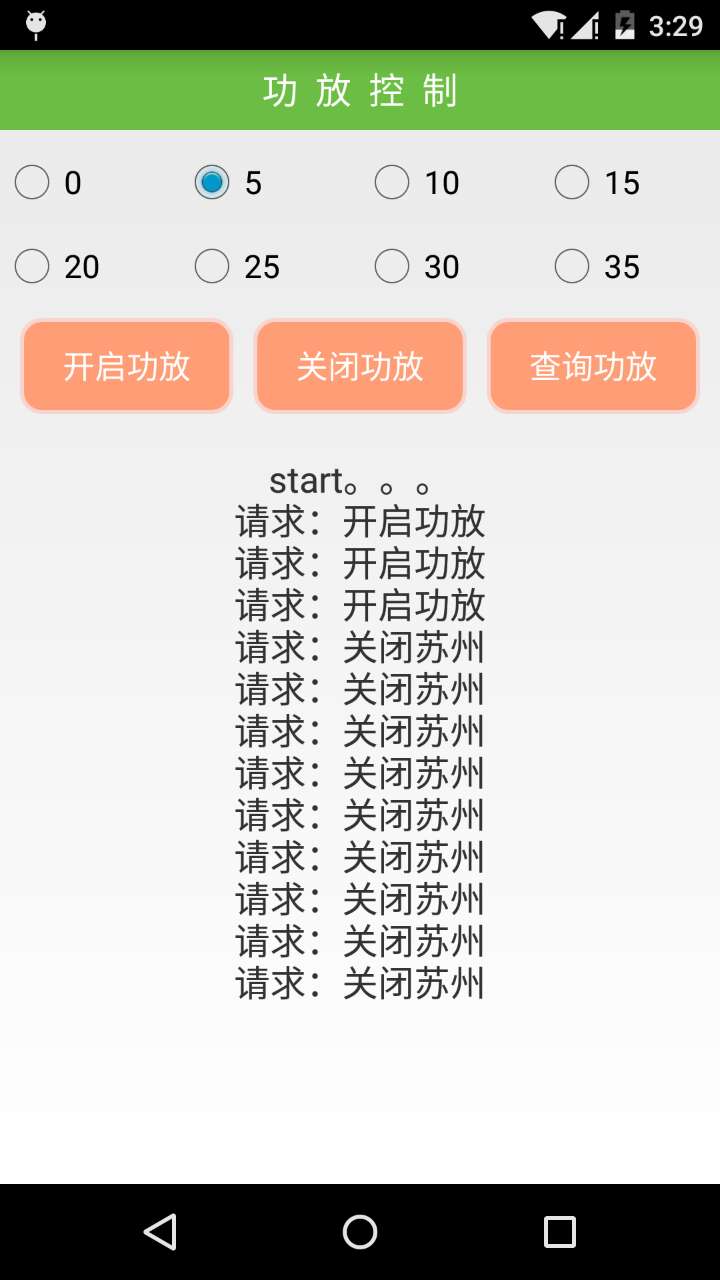
step1:重写RadioGroup类
package com.hz.w504_sing_common;

import java.util.ArrayList;

import android.content.Context;

import android.content.res.TypedArray;

import android.util.AttributeSet;

import android.view.View;

import android.view.ViewGroup;

import android.widget.CompoundButton;

import android.widget.LinearLayout;

import android.widget.RadioButton;

/** 可以放多种布局控件,能找到radiobutton */

public class FlowRadioGroup extends LinearLayout {

    // holds the checked id; the selection is empty by default

    private int mCheckedId = -;

    // tracks children radio buttons checked state

    private CompoundButton.OnCheckedChangeListener mChildOnCheckedChangeListener;

    // when true, mOnCheckedChangeListener discards events

    private boolean mProtectFromCheckedChange = false;

    private OnCheckedChangeListener mOnCheckedChangeListener;

    private PassThroughHierarchyChangeListener mPassThroughListener;

    // 存放当前的radioButton

    private ArrayList<RadioButton> radioButtons;

    public FlowRadioGroup(Context context) {

        super(context);

        setOrientation(VERTICAL);

        init();

    }

    public FlowRadioGroup(Context context, AttributeSet attrs) {

        super(context, attrs);

        init();

    }

    private void init() {

        mChildOnCheckedChangeListener = new CheckedStateTracker();

        mPassThroughListener = new PassThroughHierarchyChangeListener();

        super.setOnHierarchyChangeListener(mPassThroughListener);

        radioButtons = new ArrayList<RadioButton>();

    }

    @Override

    public void setOnHierarchyChangeListener(OnHierarchyChangeListener listener) {

        // the user listener is delegated to our pass-through listener

        mPassThroughListener.mOnHierarchyChangeListener = listener;

    }

    @Override

    protected void onFinishInflate() {

        super.onFinishInflate();

        // checks the appropriate radio button as requested in the XML file

        if (mCheckedId != -) {

            mProtectFromCheckedChange = true;

            setCheckedStateForView(mCheckedId, true);

            mProtectFromCheckedChange = false;

            setCheckedId(mCheckedId);

        }

    }

    @Override

    public void addView(View child, int index, ViewGroup.LayoutParams params) {

        if (child instanceof RadioButton) {

            final RadioButton button = (RadioButton) child;

            radioButtons.add(button);

            if (button.isChecked()) {

                mProtectFromCheckedChange = true;

                if (mCheckedId != -) {

                    setCheckedStateForView(mCheckedId, false);

                }

                mProtectFromCheckedChange = false;

                setCheckedId(button.getId());

            }

        } else if (child instanceof ViewGroup) {// 如果是复合控件

            // 遍历复合控件

            ViewGroup vg = ((ViewGroup) child);

            setCheckedView(vg);

        }

        super.addView(child, index, params);

    }

    /** 查找复合控件并设置radiobutton */

    private void setCheckedView(ViewGroup vg) {

        int len = vg.getChildCount();

        for (int i = ; i < len; i++) {

            if (vg.getChildAt(i) instanceof RadioButton) {// 如果找到了,就设置check状态

                final RadioButton button = (RadioButton) vg.getChildAt(i);

                // 添加到容器

                radioButtons.add(button);

                if (button.isChecked()) {

                    mProtectFromCheckedChange = true;

                    if (mCheckedId != -) {

                        setCheckedStateForView(mCheckedId, false);

                    }

                    mProtectFromCheckedChange = false;

                    setCheckedId(button.getId());

                }

            } else if (vg.getChildAt(i) instanceof ViewGroup) {// 迭代查找并设置

                ViewGroup childVg = (ViewGroup) vg.getChildAt(i);

                setCheckedView(childVg);

            }

        }

    }

    /** 查找复合控件并设置id */

    private void setCheckedId(ViewGroup vg) {

        int len = vg.getChildCount();

        for (int i = ; i < len; i++) {

            if (vg.getChildAt(i) instanceof RadioButton) {// 如果找到了,就设置check状态

                final RadioButton button = (RadioButton) vg.getChildAt(i);

                int id = button.getId();

                // generates an id if it's missing

                if (id == View.NO_ID) {

                    id = button.hashCode();

                    button.setId(id);

                }

                button.setOnCheckedChangeListener(mChildOnCheckedChangeListener);

            } else if (vg.getChildAt(i) instanceof ViewGroup) {// 迭代查找并设置

                ViewGroup childVg = (ViewGroup) vg.getChildAt(i);

                setCheckedId(childVg);

            }

        }

    }

    /** 查找radioButton控件 */

    public RadioButton findRadioButton(ViewGroup group) {

        RadioButton resBtn = null;

        int len = group.getChildCount();

        for (int i = ; i < len; i++) {

            if (group.getChildAt(i) instanceof RadioButton) {

                resBtn = (RadioButton) group.getChildAt(i);

            } else if (group.getChildAt(i) instanceof ViewGroup) {

                resBtn = findRadioButton((ViewGroup) group.getChildAt(i));

                findRadioButton((ViewGroup) group.getChildAt(i));

                break;

            }

        }

        return resBtn;

    }

    /** 返回当前radiobutton控件的count */

    public int getRadioButtonCount() {

        return radioButtons.size();

    }

    /** 返回当前index的radio */

    public RadioButton getRadioButton(int index) {

        return radioButtons.get(index);

    }

    /**

     * <p>

     * Sets the selection to the radio button whose identifier is passed in

     * parameter. Using -1 as the selection identifier clears the selection;

     * such an operation is equivalent to invoking {@link #clearCheck()}.

     * </p>

     *

     * @param id

     *            the unique id of the radio button to select in this group

     *

     * @see #getCheckedRadioButtonId()

     * @see #clearCheck()

     */

    public void check(int id) {

        // don't even bother

        if (id != - && (id == mCheckedId)) {

            return;

        }

        if (mCheckedId != -) {

            setCheckedStateForView(mCheckedId, false);

        }

        if (id != -) {

            setCheckedStateForView(id, true);

        }

        setCheckedId(id);

    }

    private void setCheckedId(int id) {

        mCheckedId = id;

        if (mOnCheckedChangeListener != null) {

            mOnCheckedChangeListener.onCheckedChanged(this, mCheckedId);

        }

    }

    private void setCheckedStateForView(int viewId, boolean checked) {

        View checkedView = findViewById(viewId);

        if (checkedView != null && checkedView instanceof RadioButton) {

            ((RadioButton) checkedView).setChecked(checked);

        }

    }

    /**

     * <p>

     * Returns the identifier of the selected radio button in this group. Upon

     * empty selection, the returned value is -1.

     * </p>

     *

     * @return the unique id of the selected radio button in this group

     *

     * @see #check(int)

     * @see #clearCheck()

     */

    public int getCheckedRadioButtonId() {

        return mCheckedId;

    }

    /**

     * <p>

     * Clears the selection. When the selection is cleared, no radio button in

     * this group is selected and {@link #getCheckedRadioButtonId()} returns

     * null.

     * </p>

     *

     * @see #check(int)

     * @see #getCheckedRadioButtonId()

     */

    public void clearCheck() {

        check(-);

    }

    /**

     * <p>

     * Register a callback to be invoked when the checked radio button changes

     * in this group.

     * </p>

     *

     * @param listener

     *            the callback to call on checked state change

     */

    public void setOnCheckedChangeListener(OnCheckedChangeListener listener) {

        mOnCheckedChangeListener = listener;

    }

    /**

     * {@inheritDoc}

     */

    @Override

    public LayoutParams generateLayoutParams(AttributeSet attrs) {

        return new FlowRadioGroup.LayoutParams(getContext(), attrs);

    }

    /**

     * {@inheritDoc}

     */

    @Override

    protected boolean checkLayoutParams(ViewGroup.LayoutParams p) {

        return p instanceof FlowRadioGroup.LayoutParams;

    }

    @Override

    protected LinearLayout.LayoutParams generateDefaultLayoutParams() {

        return new LayoutParams(LayoutParams.WRAP_CONTENT,

                LayoutParams.WRAP_CONTENT);

    }

    /**

     * <p>

     * This set of layout parameters defaults the width and the height of the

     * children to {@link #WRAP_CONTENT} when they are not specified in the XML

     * file. Otherwise, this class ussed the value read from the XML file.

     * </p>

     *

     * <p>

     * See {@link android.R.styleable#LinearLayout_Layout LinearLayout

     * Attributes} for a list of all child view attributes that this class

     * supports.

     * </p>

     *

     */

    public static class LayoutParams extends LinearLayout.LayoutParams {

        /**

         * {@inheritDoc}

         */

        public LayoutParams(Context c, AttributeSet attrs) {

            super(c, attrs);

        }

        /**

         * {@inheritDoc}

         */

        public LayoutParams(int w, int h) {

            super(w, h);

        }

        /**

         * {@inheritDoc}

         */

        public LayoutParams(int w, int h, float initWeight) {

            super(w, h, initWeight);

        }

        /**

         * {@inheritDoc}

         */

        public LayoutParams(ViewGroup.LayoutParams p) {

            super(p);

        }

        /**

         * {@inheritDoc}

         */

        public LayoutParams(MarginLayoutParams source) {

            super(source);

        }

        /**

         * <p>

         * Fixes the child's width to

         * {@link android.view.ViewGroup.LayoutParams#WRAP_CONTENT} and the

         * child's height to

         * {@link android.view.ViewGroup.LayoutParams#WRAP_CONTENT} when not

         * specified in the XML file.

         * </p>

         *

         * @param a

         *            the styled attributes set

         * @param widthAttr

         *            the width attribute to fetch

         * @param heightAttr

         *            the height attribute to fetch

         */

        @Override

        protected void setBaseAttributes(TypedArray a, int widthAttr,

                int heightAttr) {

            if (a.hasValue(widthAttr)) {

                width = a.getLayoutDimension(widthAttr, "layout_width");

            } else {

                width = WRAP_CONTENT;

            }

            if (a.hasValue(heightAttr)) {

                height = a.getLayoutDimension(heightAttr, "layout_height");

            } else {

                height = WRAP_CONTENT;

            }

        }

    }

    /**

     * <p>

     * Interface definition for a callback to be invoked when the checked radio

     * button changed in this group.

     * </p>

     */

    public interface OnCheckedChangeListener {

        /**

         * <p>

         * Called when the checked radio button has changed. When the selection

         * is cleared, checkedId is -1.

         * </p>

         *

         * @param group

         *            the group in which the checked radio button has changed

         * @param checkedId

         *            the unique identifier of the newly checked radio button

         */

        public void onCheckedChanged(FlowRadioGroup group, int checkedId);

    }

    private class CheckedStateTracker implements

            CompoundButton.OnCheckedChangeListener {

        public void onCheckedChanged(CompoundButton buttonView,

                boolean isChecked) {

            // prevents from infinite recursion

            if (mProtectFromCheckedChange) {

                return;

            }

            mProtectFromCheckedChange = true;

            if (mCheckedId != -) {

                setCheckedStateForView(mCheckedId, false);

            }

            mProtectFromCheckedChange = false;

            int id = buttonView.getId();

            setCheckedId(id);

        }

    }

    /**

     * <p>

     * A pass-through listener acts upon the events and dispatches them to

     * another listener. This allows the table layout to set its own internal

     * hierarchy change listener without preventing the user to setup his.

     * </p>

     */

    private class PassThroughHierarchyChangeListener implements

            ViewGroup.OnHierarchyChangeListener {

        private ViewGroup.OnHierarchyChangeListener mOnHierarchyChangeListener;

        public void onChildViewAdded(View parent, View child) {

            if (parent == FlowRadioGroup.this && child instanceof RadioButton) {

                int id = child.getId();

                // generates an id if it's missing

                if (id == View.NO_ID) {

                    id = child.hashCode();

                    child.setId(id);

                }

                ((RadioButton) child)

                        .setOnCheckedChangeListener(mChildOnCheckedChangeListener);

            } else if (parent == FlowRadioGroup.this

                    && child instanceof ViewGroup) {// 如果是复合控件

                // 查找并设置id

                setCheckedId((ViewGroup) child);

            }

            if (mOnHierarchyChangeListener != null) {

                mOnHierarchyChangeListener.onChildViewAdded(parent, child);

            }

        }

        public void onChildViewRemoved(View parent, View child) {

            if (parent == FlowRadioGroup.this && child instanceof RadioButton) {

                ((RadioButton) child).setOnCheckedChangeListener(null);

            } else if (parent == FlowRadioGroup.this

                    && child instanceof ViewGroup) {

                findRadioButton((ViewGroup) child).setOnCheckedChangeListener(

                        null);

            }

            if (mOnHierarchyChangeListener != null) {

                mOnHierarchyChangeListener.onChildViewRemoved(parent, child);

            }

        }

    }

}
FlowRadioGroup
step2:引用FlowRadioGroup结合LinearLayout布局
<com.hz.w504_sing_common.FlowRadioGroup

        android:id="@+id/radioGroup"

        android:layout_width="fill_parent"

        android:layout_height="wrap_content"

        android:orientation="vertical"  >

        <LinearLayout

            android:layout_marginTop="10dip"

            android:layout_width="match_parent"

            android:layout_height="match_parent"

            android:orientation="horizontal" >

                <RadioButton

                    android:layout_width="0dip"

                    android:layout_weight=""

                    android:layout_height="wrap_content"

                    android:text="" />

                <RadioButton

                    android:layout_width="0dip"

                    android:layout_weight=""

                    android:layout_height="wrap_content"

                    android:text="" />

                <RadioButton

                    android:layout_width="0dip"

                    android:layout_weight=""

                    android:layout_height="wrap_content"

                    android:text="" />

                <RadioButton

                    android:layout_width="0dip"

                    android:layout_weight=""

                    android:layout_height="wrap_content"

                    android:text="" />

        </LinearLayout>

        <LinearLayout

            android:layout_marginTop="10dip"

            android:layout_width="match_parent"

            android:layout_height="match_parent"

            android:orientation="horizontal" >

            <RadioButton

                android:layout_width="0dip"

                android:layout_weight=""

                android:layout_height="wrap_content"

                android:text="" />

            <RadioButton

                android:layout_width="0dip"

                android:layout_weight=""

                android:layout_height="wrap_content"

                android:text="" />

            <RadioButton

                android:layout_width="0dip"

                android:layout_weight=""

                android:layout_height="wrap_content"

                android:text="" />

            <RadioButton

                android:layout_width="0dip"

                android:layout_weight=""

                android:layout_height="wrap_content"

                android:text="" />

        </LinearLayout>

    </com.hz.w504_sing_common.FlowRadioGroup>
布局
哦了
Android之RadioButton多行的更多相关文章
- android.widget.RadioButton 单选按钮(转)
大家好,我们今天这一节要介绍的是RadioGroup 的组事件.RadioGroup 可将各自不同的RadioButton ,设限于同一个Radio 按钮组,同一个RadioGroup 组里的按钮,只 ...
- Android 自定义RadioButton的样式
Android 自定义RadioButton的样式 我们知道Android控件里的button,listview可以用xml的样式自定义成自己希望的漂亮样式. 最近用到RadioButton,利用xm ...
- Android 自定义RadioButton实现
由于使用小米系统MIUI运行是RadioButton样式跟google Android API自定义的不一样,则我们可以定义任何想要的东东.没有做不到,只有想不到 Android 自定义RadioBu ...
- Android 单选按钮(RadioButton)和复选框(CheckBox)的使用
1.RadioButton (1)介绍 (2)单选按钮点击事件的用法 (3)RadioButton与RadioGroup配合使用实现单选题功能 (4)xml布局及使用 <?xml version ...
- Android 自定义 radiobutton
<RadioButton android:id="@+id/radiobutton_pay_method" android:layout_width="30dp&q ...
- Android studio 显示代码行号 设置
首先我们打开我们的Android Studio. 这时会弹出setting页面,我们选择show line numbers然后点击确定按钮. 此时我们就可以看到代码左侧显示出行号了 我们可 ...
- Android开发--RadioButton的应用
1.简介 RadioButton为单选按钮,当一个按钮被选中后,点击其他按钮无法使上一个按钮变为未选中状态.RadioGroup是可以容纳多个RadioButton的容器, 通过使用RadioGrou ...
- android自定义radiobutton样式文字颜色随选中状态而改变
主要是写一个 color selector 在res/建一个文件夹取名color res/color/color_radiobutton.xml <selector xmlns:android= ...
- Android Developers:在命令行构建和运行
使用Ant构建脚本构建你的应用程序有两种方式:一种用于测试/调试你的引用程序—debug模式—另一种用于构建你最终发布的包-release模式.无论你使用哪种方式构建你的应用程序,它必须在安装在模拟器 ...
随机推荐
- mysql 命令一套
MySQL mysql -h主机地址 -u用户名 -p用户密码 首先打开DOS窗口,然后进入目录mysql\bin,再键入命令mysql -u root -p,回车后提示你输密码.注意用户名前可以有 ...
- java生成随机六位数的验证码&随机生成十位数ValidCode码,用于邮件的验证&检查是不是符合为合法的中国的手机号码
package com.demo.test1; import java.security.NoSuchAlgorithmException; import java.security.SecureRa ...
- C# mongodb中内嵌文档数组条件查询
样例数据: { "_id" : "1064621564857", "cNo" : "1064621564857 ...
- arm trustzone
arm的trustzone并不涉及到具体的crypto算法,只是实现: 1) 敏感信息的安全存储: 2) 控制bus和debug的安全访问,保证信息不被泄露: trustzone是system_lev ...
- HDU 6298
Problem Description Given an integer n, Chiaki would like to find three positive integers x, y and z ...
- c++引用和指针的彻底理解
★ 相同点: 1. 都是地址的概念: 指针指向一块内存,它的内容是所指内存的地址:引用是某块内存的别名. ★ 区别: 1. 指针是一个实体,而引用仅是个别名: 2. 引用使用时无需解引用(*),指 ...
- css解决无论页面长短footer永远置底
<!DOCTYPE html PUBLIC "-//W3C//DTD XHTML 1.0 Transitional//EN" "http://www.w3.org/ ...
- sitecore系统教程之架构概述
Sitecore体验数据库(xDB)从实时大数据存储库中的所有通道源收集所有客户交互.它连接交互数据,为每个客户创建全面,统一的视图,并使营销人员可以使用数据来管理客户的实时体验. xDB架构非常灵活 ...
- 如何用新安装的jdk替换掉Linux系统默认jdk
版主写的非常棒: http://blog.csdn.net/u011364306/article/details/48375653
- 大数据和hadoop的一些基础知识
一.前言 大数据这个概念不用我提大家也听过很多了,前几年各种公开论坛.会议等场合言必及大数据,说出来显得很时髦似的.有意思的是最近拥有这个待遇的名词是“人工智能/AI”,当然这是后话. 众所周知,大数 ...