
一分钟学会 ConstraintLayout 之从属性角度理解布局
ConstraintLayout
在 Android 开发中,我们通常是手写布局,很少会用拖动来写布局,虽然 ConstraintLayout 在 I/O 上以拖动来展现了各种功能,我估计在以后开发中,程序员还是习惯手撸代码。
我自己试着拖着用了一下,用得不是很明白 ,而且用起来效果不是很好。
那么
直接上手撸了一下~~~
其实很简单

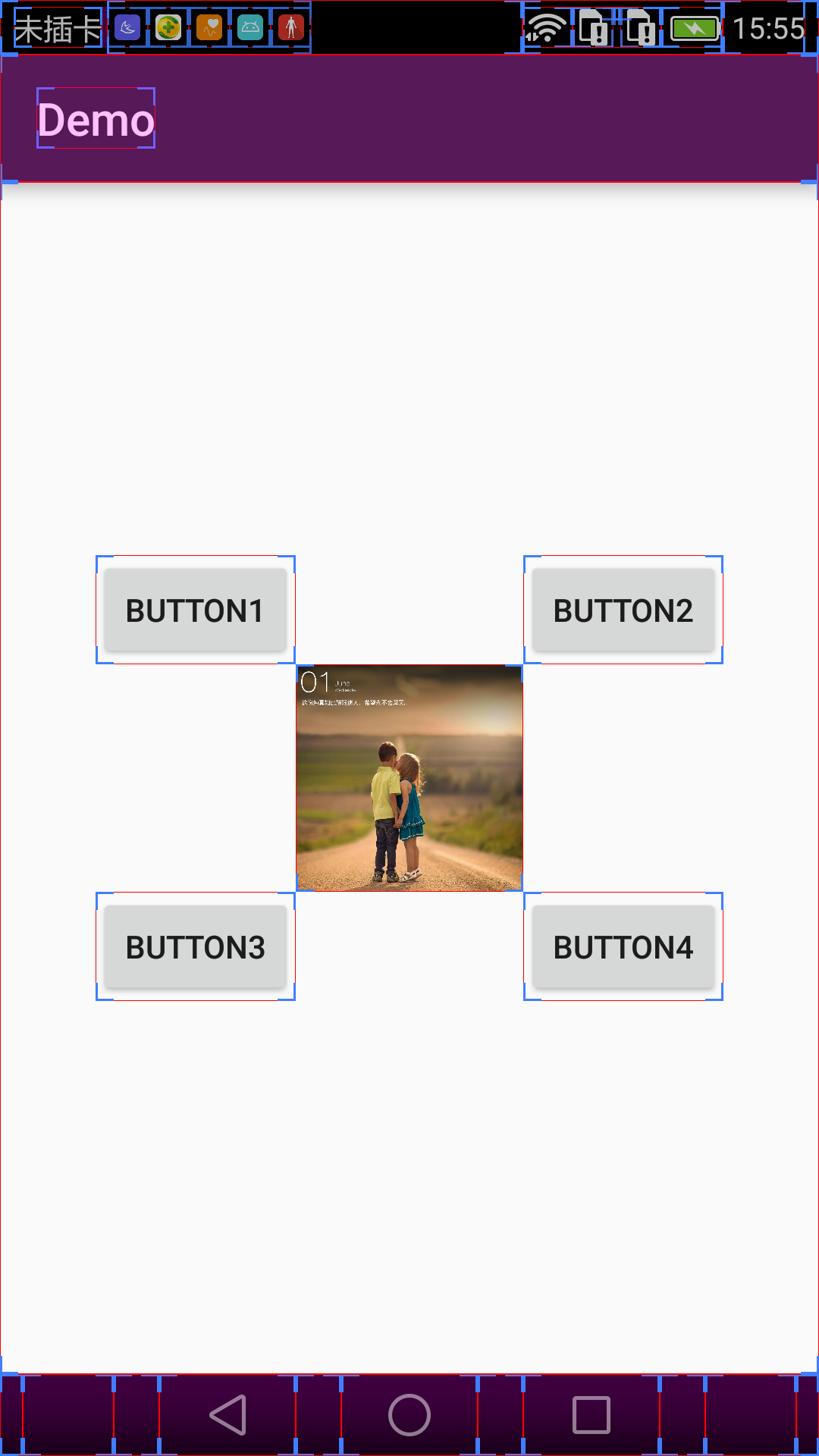
Button1:app:layout_constraintBottom_toTopOf="@id/iv_head"
我们把这个属性拆开来看, constraintBottom 指的本身的底部,即 Button1 的顶部, toTopOf 是指 ImageView 的顶部,那么这句话的意思就是
Aligns the bottom of the desired view to the top of another.(官方原文)
翻译一下就是 Button1 的底部要和 ImageView 的顶部对齐
Button1 app:layout_constraintRight_toLeftOf="@id/iv_head"
根据上面的规则我们就知道 Button1 的右边要和 ImageView 的左边对齐。
其实很简单就是说两个 View 的某个方位要对齐
没了,就这么简单,其它属性可以举一反三,它比 RelativeLayout 控制起来更加得以就手。
- layout_constraintTop_toTopOf — Align the top of the desired view to the top of another.
- layout_constraintTop_toBottomOf — Align the top of the desired view to the bottom of another.
- layout_constraintBottom_toTopOf — Align the bottom of the desired view to the top of another.
- layout_constraintBottom_toBottomOf — Align the bottom of the desired view to the bottom of another.
- layout_constraintLeft_toTopOf — Align the left of the desired view to the top of another.
- layout_constraintLeft_toBottomOf — Align the left of the desired view to the bottom of another.
- layout_constraintLeft_toLeftOf — Align the left of the desired view to the left of another.
- layout_constraintLeft_toRightOf — Align the left of the desired view to the right of another.
- layout_constraintRight_toTopOf — Align the right of the desired view to the top of another.
- layout_constraintRight_toBottomOf — Align the right of the desired view to the bottom of another.
- layout_constraintRight_toLeftOf — Align the right of the desired view to the left of another.
- layout_constraintRight_toRightOf — Align the right of the desired view to the right of another.
- If desired, attributes supporting start and end are also available in place of left and right alignment.
到此,你已经掌握了一大半的 ConstraintLayout 知识点
还有其它的一些属性
app:layout_constraintStart_toEndOf
意思就是 Button 的开始部分(从左往右看,开始部分就是 Button 的左边)与 ImageView 的右边是对齐的。
app:layout_constraintStart_toStartOf
这个就是说 Button 的左边与 ImageView 的左边是对齐的
不知道为什么上面已经出的属性能够满足布局需要了,为什么还要再出 start 和 end 的。
原文:
一分钟学会 ConstraintLayout
 |
1
jianqiu 2016-06-24 10:04:21 +08:00 start 和 end 都是针对某些国家习惯从右到左布局的..保持这种兼容性
|

一分钟学会 ConstraintLayout 之从属性角度理解布局的更多相关文章
- 一分钟学会ConstraintLayout(转载)
原文地址:https://www.v2ex.com/t/287863 最近更新了Android Studio,突然发现xml中的布局已经变成了ConstraintLayout,于是搜了一篇文章看一下 ...
- PHP学习过程_Symfony_(3)_整理_十分钟学会Symfony
这篇文章主要介绍了Symfony学习十分钟入门教程,详细介绍了Symfony的安装配置,项目初始化,建立Bundle,设计实体,添加约束,增删改查等基本操作技巧,需要的朋友可以参考下 (此文章已被多人 ...
- 30 分钟学会 Flex 布局
30 分钟学会 Flex 布局 有酒 617 人赞同了该文章 为什么我要写这一篇关于 Flex 布局的教程? 因为它十分简单灵活,区区简单几行代码就可以实现各种页面的的布局,以前我在学习页面布局的 ...
- 三分钟学会@Autowired@Qualifier@Primary注解
三分钟学会@Autowired@Qualifier@Primary注解 2018.10.08 20:24 154浏览 今天主要简单的跟大家介绍一下spring自动装配相关的@Autowired,@Qu ...
- 5分钟学会使用Less预编译器
5分钟学会使用Less预编译器 Less是什么? LESS CSS是一种动态样式语言,属于CSS预处理语言的一种,它使用类似CSS的语法为CSS赋予了动态语言的特性,如变量.继承.运算.函数等,更方便 ...
- 【grunt第二弹】30分钟学会使用grunt打包前端代码(02)
前言 上一篇博客,我们简单的介绍了grunt的使用,一些基础点没能覆盖,我们今天有必要看看一些基础知识 [grunt第一弹]30分钟学会使用grunt打包前端代码 配置任务/grunt.initCon ...
- 《量化投资:以MATLAB为工具》连载(2)基础篇-N分钟学会MATLAB(中)
http://www.matlabsky.com/thread-43937-1-1.html <量化投资:以MATLAB为工具>连载(3)基础篇-N分钟学会MATLAB(下) ...
- 《量化投资:以MATLAB为工具》连载(1)基础篇-N分钟学会MATLAB(上)
http://blog.sina.com.cn/s/blog_4cf8aad30102uylf.html <量化投资:以MATLAB为工具>连载(1)基础篇-N分钟学会MATLAB(上) ...
- [分享] 史上最简单的封装教程,五分钟学会封装系统(以封装Windows 7为例)
[分享] 史上最简单的封装教程,五分钟学会封装系统(以封装Windows 7为例) 踏雁寻花 发表于 2015-8-23 23:31:28 https://www.itsk.com/thread-35 ...
随机推荐
- java面试题08
1.short s1 = 1; s1 = s1 + 1;有什么错? short s1 = 1; s1 += 1;有什么错? short s1 = 1; s1 = s1 + 1;编译时错误.对于shor ...
- python(八):反射
反射机制是通过python3内置的hasattr.getattr.setattr来实现的.即根据变量名的字符串形式来获取变量名的属性或方法. 一.通过反射查看已知对象的属性和方法 getattr(ob ...
- flask第十一篇——自定义url转换器
首先和大家说一下flask的组成,flask其实是werkzeug(路由和http处理)+SQLAlchemy(数据库)+Jinja2(模板)组成的,今天我们要看到的东西就是`werkzeug`里面的 ...
- flask第八篇——url_for【1】
我们已经知道,知道了url就可以找到对应的视图函数,那么现在问题来了,如果我们知道了视图函数,要怎么找到url呢?这时候我们就需要url_for函数了. # coding: utf-8 from fl ...
- 【spring源码学习】spring集成orm数据框架
[一]简易的数据源配置 (1)配置文件 <!--springJdbcTemplemate数据操作配置信息 --> <bean id="driver" class= ...
- BZOJ5369 [Pkusc2018]最大前缀和
题意 小C是一个算法竞赛爱好者,有一天小C遇到了一个非常难的问题:求一个序列的最大子段和. 但是小C并不会做这个题,于是小C决定把序列随机打乱,然后取序列的最大前缀和作为答案. 小C是一个非常有自知之 ...
- UI异常
为什么chaneTab调用后,这个Tab都消失了? 因为li和table都用同一个ID所以,其中有一个步骤是清空表:$("#XXid").remove,连带着把那个li(tab)也 ...
- ecmall公告挂件分析(转)--此挂件写法已有更新的写法。
ecmall的首页,基本上都是由挂件的形式实现的.ecmall所有的挂件程序,都在external\widgets文件下面.ecmall首页公告的插件,就是notice目录里面. 分析里面文件,con ...
- win10下安装并启动zookeeper
下载直接到zk的官网(zookeeper.apache.org)即可,点击右边的Releases,在Download下再点Download进入镜像下载页面,在给出的链接列表里选择一个镜像地址,进去后选 ...
- 在同一服务器使用git分支建立线上 和 测试 项目
分支分配文件夹后 sourcetree 创建分支与合并 https://blog.csdn.net/qq_34975710/article/details/74469068 线上分支master 测试 ...