
Webservice学习
参考博客1: http://www.cnblogs.com/lzhp/archive/2013/01/13/2858559.html
参考博客2:http://blog.csdn.net/shileimohan/article/details/8070590
参考博客3:http://www.cnblogs.com/annabook/p/4821542.html
建立WebService步骤:
1.首先新建一个Web项目
2.右键添加服务引用... 或者右键新建 Web服务(ASMX)
3.调用方法
1).通过引用直接调用
引用完成后,你找一个以Client结束的文件,在里面的main方法中会有个service对象,现在你就可以直接用这个对象了
例如:
YJ_WebServiceSoapClient web = new RYJ_WebServiceSoapClient();
web.addition(num1, num2);
2).通过代码调用
这里我有一个webservice服务建立好了,如图
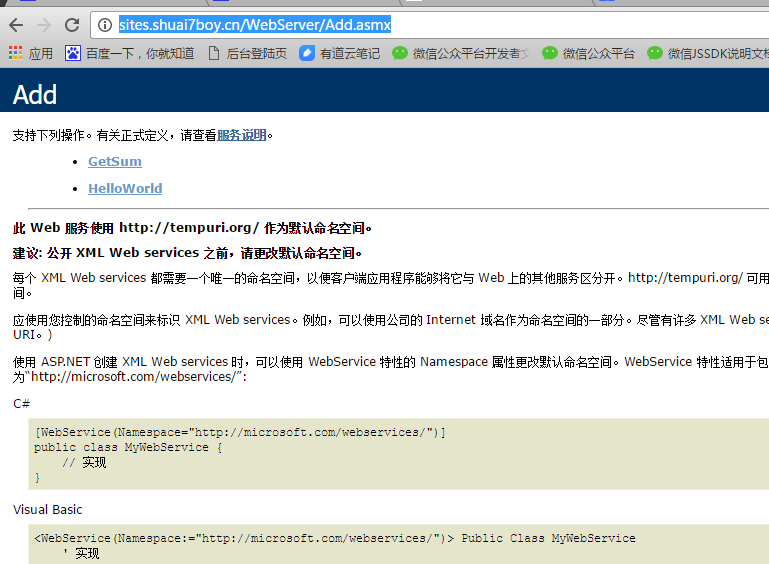
接下来就演示下对此webserver提供的求和方法的调用,求和大致结构如下(有两个参数n1,n2。GetSum是方法名)

好了,接下来就用控制台演示了;
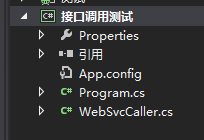
Program.cs代码
using System;

using System.Collections;

using System.Collections.Generic;

using System.Linq;

using System.Text;

using System.Threading.Tasks;

namespace 接口调用测试

{

    class Program

    {

        static void Main(string[] args)

        {

            Hashtable pars = new Hashtable();

            string sumapi = System.Configuration.ConfigurationManager.AppSettings["SumApi"].ToString();

            pars["n1"] = 5;

            pars["n2"] = 7;

            var doc = WebSvcCaller.QuerySoapWebService(sumapi, "GetSum", pars);

            string sum = doc.SelectSingleNode("root").InnerText;

            Console.WriteLine(sum);

            Console.ReadKey();

        }

    }

}
App.config
 <appSettings>

    <add key="SumApi" value="http://sites.shuai7boy.cn/WebServer/Add.asmx"/>

  </appSettings>
WebSvcCaller.cs helper类
using System;

using System.Collections;

using System.Collections.Generic;

using System.IO;

using System.Linq;

using System.Net;

using System.Text;

using System.Web;

using System.Xml;

using System.Xml.Serialization;

namespace 接口调用测试

{

    /**/

    /// <summary>

    ///  利用WebRequest/WebResponse进行WebService调用的类,By 同济黄正 http://hz932.ys168.com 2008-3-19

    /// </summary>

    public class WebSvcCaller

    {

        //<webServices>

        //  <protocols>

        //    <add name="HttpGet"/>

        //    <add name="HttpPost"/>

        //  </protocols>

        //</webServices>

        private static Hashtable _xmlNamespaces = new Hashtable();//缓存xmlNamespace,避免重复调用GetNamespace

        /**/

        /// <summary>

        /// 需要WebService支持Post调用

        /// </summary>

        public static XmlDocument QueryPostWebService(String URL, String MethodName, Hashtable Pars)

        {

            HttpWebRequest request = (HttpWebRequest)HttpWebRequest.Create(URL + "/" + MethodName);

            request.Method = "POST";

            request.ContentType = "application/x-www-form-urlencoded";

            SetWebRequest(request);

            byte[] data = EncodePars(Pars);

            WriteRequestData(request, data);

            return ReadXmlResponse(request.GetResponse());

        }

        /**/

        /// <summary>

        /// 需要WebService支持Get调用

        /// </summary>

        public static XmlDocument QueryGetWebService(String URL, String MethodName, Hashtable Pars)

        {

            HttpWebRequest request = (HttpWebRequest)HttpWebRequest.Create(URL + "/" + MethodName + "?" + ParsToString(Pars));

            request.Method = "GET";

            request.ContentType = "application/x-www-form-urlencoded";

            SetWebRequest(request);

            return ReadXmlResponse(request.GetResponse());

        }

        /**/

        /// <summary>

        /// 通用WebService调用(Soap),参数Pars为String类型的参数名、参数值

        /// </summary>

        public static XmlDocument QuerySoapWebService(String URL, String MethodName, Hashtable Pars)

        {

            if (_xmlNamespaces.ContainsKey(URL))

            {

                return QuerySoapWebService(URL, MethodName, Pars, _xmlNamespaces[URL].ToString());

            }

            else

            {

                return QuerySoapWebService(URL, MethodName, Pars, GetNamespace(URL));

            }

        }

        private static XmlDocument QuerySoapWebService(String URL, String MethodName, Hashtable Pars, string XmlNs)

        {    //By 同济黄正 http://hz932.ys168.com 2008-3-19

            _xmlNamespaces[URL] = XmlNs;//加入缓存,提高效率

            HttpWebRequest request = (HttpWebRequest)HttpWebRequest.Create(URL);

            request.Method = "POST";

            request.ContentType = "text/xml; charset=utf-8";

            request.Headers.Add("SOAPAction", "\"" + XmlNs + (XmlNs.EndsWith("/") ? "" : "/") + MethodName + "\"");

            SetWebRequest(request);

            byte[] data = EncodeParsToSoap(Pars, XmlNs, MethodName);

            WriteRequestData(request, data);

            XmlDocument doc = new XmlDocument(), doc2 = new XmlDocument();

            doc = ReadXmlResponse(request.GetResponse());

            XmlNamespaceManager mgr = new XmlNamespaceManager(doc.NameTable);

            mgr.AddNamespace("soap", "http://schemas.xmlsoap.org/soap/envelope/");

            String RetXml = doc.SelectSingleNode("//soap:Body/*/*", mgr).InnerXml;

            doc2.LoadXml("<root>" + RetXml + "</root>");

            AddDelaration(doc2);

            return doc2;

        }

        private static string GetNamespace(String URL)

        {

            HttpWebRequest request = (HttpWebRequest)WebRequest.Create(URL + "?WSDL");

            SetWebRequest(request);

            WebResponse response = request.GetResponse();

            StreamReader sr = new StreamReader(response.GetResponseStream(), Encoding.UTF8);

            XmlDocument doc = new XmlDocument();

            doc.LoadXml(sr.ReadToEnd());

            sr.Close();

            return doc.SelectSingleNode("//@targetNamespace").Value;

        }

        private static byte[] EncodeParsToSoap(Hashtable Pars, String XmlNs, String MethodName)

        {

            XmlDocument doc = new XmlDocument();

            doc.LoadXml("<soap:Envelope xmlns:xsi=\"http://www.w3.org/2001/XMLSchema-instance\" xmlns:xsd=\"http://www.w3.org/2001/XMLSchema\" xmlns:soap=\"http://schemas.xmlsoap.org/soap/envelope/\"></soap:Envelope>");

            AddDelaration(doc);

            XmlElement soapBody = doc.CreateElement("soap", "Body", "http://schemas.xmlsoap.org/soap/envelope/");

            XmlElement soapMethod = doc.CreateElement(MethodName);

            soapMethod.SetAttribute("xmlns", XmlNs);

            foreach (string k in Pars.Keys)

            {

                XmlElement soapPar = doc.CreateElement(k);

                soapPar.InnerXml = ObjectToSoapXml(Pars[k]);

                soapMethod.AppendChild(soapPar);

            }

            soapBody.AppendChild(soapMethod);

            doc.DocumentElement.AppendChild(soapBody);

            return Encoding.UTF8.GetBytes(doc.OuterXml);

        }

        private static string ObjectToSoapXml(object o)

        {

            XmlSerializer mySerializer = new XmlSerializer(o.GetType());

            MemoryStream ms = new MemoryStream();

            mySerializer.Serialize(ms, o);

            XmlDocument doc = new XmlDocument();

            doc.LoadXml(Encoding.UTF8.GetString(ms.ToArray()));

            if (doc.DocumentElement != null)

            {

                return doc.DocumentElement.InnerXml;

            }

            else

            {

                return o.ToString();

            }

        }

        private static void SetWebRequest(HttpWebRequest request)

        {

            request.Credentials = CredentialCache.DefaultCredentials;

            request.Timeout = ;

        }

        private static void WriteRequestData(HttpWebRequest request, byte[] data)

        {

            request.ContentLength = data.Length;

            Stream writer = request.GetRequestStream();

            writer.Write(data, , data.Length);

            writer.Close();

        }

        private static byte[] EncodePars(Hashtable Pars)

        {

            return Encoding.UTF8.GetBytes(ParsToString(Pars));

        }

        private static String ParsToString(Hashtable Pars)

        {

            StringBuilder sb = new StringBuilder();

            foreach (string k in Pars.Keys)

            {

                if (sb.Length > )

                {

                    sb.Append("&");

                }

                sb.Append(HttpUtility.UrlEncode(k) + "=" + HttpUtility.UrlEncode(Pars[k].ToString()));

            }

            return sb.ToString();

        }

        private static XmlDocument ReadXmlResponse(WebResponse response)

        {

            StreamReader sr = new StreamReader(response.GetResponseStream(), Encoding.UTF8);

            String retXml = sr.ReadToEnd();

            sr.Close();

            XmlDocument doc = new XmlDocument();

            doc.LoadXml(retXml);

            return doc;

        }

        private static void AddDelaration(XmlDocument doc)

        {

            XmlDeclaration decl = doc.CreateXmlDeclaration("1.0", "utf-8", null);

            doc.InsertBefore(decl, doc.DocumentElement);

        }

    }

}
运行看下,求和结果如下:

zj。。。
Webservice学习的更多相关文章
- webService学习之路(三):springMVC集成CXF后调用已知的wsdl接口
webService学习之路一:讲解了通过传统方式怎么发布及调用webservice webService学习之路二:讲解了SpringMVC和CXF的集成及快速发布webservice 本篇文章将讲 ...
- [未完成]WebService学习第一天学习笔记
[未完成]WebService学习第一天学习笔记[未完成]WebService学习第一天学习笔记
- WebService学习笔记系列(二)
soap(简单对象访问协议),它是在http基础之上传递xml格式数据的协议.soap协议分为两个版本,soap1.1和soap1.2. 在学习webservice时我们有一个必备工具叫做tcpmon ...
- webservice学习01:wsdl文档结构
webservice学习01:wsdl文档结构 wsdl文档结构 WSDL文档示例 <wsdl:definitions xmlns:xsd="http://www.w3.org/200 ...
- WebService学习总结(转)
原文地址: WebService学习总结(一)——WebService的相关概念 WebService学习总结(二)——WebService相关概念介绍 WebService学习总结(三)——使用JD ...
- 关于wcf,webservice,webapi或者其他服务或者接口有什么区别 WCF、WebAPI、WebService之间的区别 【转载】HTTP和SOAP完全就是两个不同的协议 WebService学习总结(一)——WebService的相关概念
wcf,webservice采用的是rpc协议,这个协议很复杂,所以每次要传递.要校验的内容也很复杂,别看我们用的很简单,但实际是frame帮我们做掉了rpc生成.解析的事情webapi遵循是rest ...
- WebService学习之旅(三)JAX-WS与Spring整合发布WebService
Spring本身就提供了对JAX-WS的支持,有兴趣的读者可以研究下Spring的Spring-WS项目,项目地址: http://docs.spring.io/spring-ws/sites/1.5 ...
- Java WebService学习笔记 - Axis进阶(二)
上一篇 Java WebService学习笔记 - Axis(一) 前一篇博文中简单介绍了Axis的使用方法,这篇将介绍一些Axis的一些高级特性 Axis中Handler的使用 Handler ...
- Java WebService学习笔记 - Axis(一)
WebService 简介 实际开发中,很多系统都是基于历史遗留系统进行开发,有时,这些系统基于不同的语言,如C,C++,C#,java,PHP等等.为了实现历史系统的再利用,或向外部程序暴露调用接口 ...
- WebService学习总结(六)--CXF 与Spring结合+tomcat发布
该项目在上文 WebService学习总结(四)--基于CXF的服务端开发 的基础上修改为spring上发布的webservice接口 1.新建web project 工程 2.导入spring ...
随机推荐
- 《PHP开发APP接口》笔记
PHP开发APP接口 [TOC] 课程地址 imooc PHP开发APP接口 学习要点 APP接口简介 封装通信接口方法 核心技术 APP接口实例 服务器端 -> 数据库|缓存 -> 调用 ...
- Linux下ejabberd开机自启(CentOS)
废话少说,Linux下开机自启动Ejabberd步骤如下: 1.从ejabberd安装目录的bin目录拷贝ejabberd.init到/etc/init.d/ejabberd下 [root@imser ...
- Oracle Dataguard的原理与基本配置
最近集团在做灾备方案,用于Oracle的高可用性,在不影响主库性能的前提下,我们选择使用DG的"最大性能"模式. DG是Oracle数据库自带的数据同步功能,其基本原理是将日志 ...
- C 运算符优先级
优先级 运算符 名称或含义 使用形式 结合方向 说明 1 [] 数组下标 数组名[常量表达式] 左到右 () 圆括号 (表达式)/函数名(形参表) . 成员选择(对象) 对象.成员名 -& ...
- jQuery入门第二天&&&正则表达式完结篇——仿smarty引擎的制作
hi 周一完全的不在状态...中午还去观战,没有睡觉的我,晚上的smarty不知道能不能做完,加油吧 1.jQuery ---过滤性选择器(二)--- --[attribute=value]属性选择器 ...
- 【CSS】使用CSS选择器(第二部分)
1. 使用结构性伪类选择器 使用结构性伪类选择器能够根据元素在文档中的位置选择元素.这类选择器都有一个冒号字符前缀(:),例如 :empty .它们可以单独使用,也可以跟其他选择器组合使用,如: p: ...
- java 24 - 3 GUI之添加按钮
需求:把按钮添加到窗体,并对按钮添加一个点击事件. A:创建窗体对象 B:创建按钮对象 C:把按钮添加到窗体 D:窗体显示 注意:这里对按钮添加点击事件,同样使用监听器. 但是,这里的按钮是组件,所以 ...
- Android使用Java Mail API发送邮件
最近在考虑为已经有的一个应用程序增加一个用户反馈的功能,用户可以通过反馈功能将用户的意见和建议.程序出现的问题以一种更符合用户习惯的方式反馈回来.网上也有一些实现好的反馈程序的服务,包括bug的提交. ...
- 关于button和form提交的一些问题
1.form 中type 为submit 和button的区别 submit是button的一个特例,也是button的一种,它把提交这个动作自动集成了. 如果表单在点击提交按钮后需要用JS进行处理( ...
- js原生碰撞检测
<!doctype html> <html> <head> <meta charset="utf-8"> <title> ...