
Elasticsearch: Indexing SQL databases. The easy way
Elasticsearchis a great search engine, flexible, fast and fun. So how can I get started with it? This post will go through how to get contents from a SQL database into Elasticsearch.
Elasticsearch has a set of pluggable services called rivers. A river runs inside an Elasticsearch node, and imports content into the index. There are rivers for twitter, redis, files, and of course, SQL databases. The river-jdbc plugin connects to SQL databases using JDBC adapters. In this post we will use PostgreSQL, since it is freely available, and populate it with some contents that also are freely available.
So let’s get started
- Download and install Elasticsearch
- Start elasticsearch by running bin/elasticsearch from the installation folder
- Install the river-jdbc plugin for Elasticsearch version 1.00RC
1./bin/plugin -install river-jdbc -url <em><a href="http://bit.ly/1dKqNJy">http://bit.ly/1dKqNJy</a> </em>
- Download the PostgreSQL JDBC jar file and copy into the plugins/river-jdbc folder. You should probably get the latest version which is for JDBC 41
- Install PostgreSQL http://www.postgresql.org/download/
- Import the booktown database. Download the sql file from booktown database
- Restart Elasticsearch
- Start PostgreSQL
By this time you should have Elasticsearch and PostgreSQL running, and river-jdbc ready to use.
Now we need to put some contents into the database, using psql, the PostgreSQL command line tool.
|
1
|
psql -U postgres -f booktown.sql
|
To execute commands to Elasticsearch we will use an online service which functions as a mixture of Gist, the code snippet sharing service and Sense, a Google Chrome plugin developer console for Elasticsearch. The service is hosted by http://qbox.io, who provide hosted Elasticsearch services.
Check that everything was correctly installed by opening a browser tohttp://sense.qbox.io/gist/8361346733fceefd7f364f0ae1ebe7efa856779e
Select the top most line in the left-hand pane, press CTRL+Enter on your keyboard. You may also click on the little triangle that appears to the right, if you are more of a mouse click kind of person.
You should now see a status message, showing the version of Elasticsearch, node name and such.
Now let’s stop fiddling around the porridge and create a river for our database:
|
1
2
3
4
5
6
7
8
9
10
11
12
13
|
curl -XPUT "http://localhost:9200/_river/mybooks/_meta" -d'
{
"type": "jdbc",
"jdbc": {
"driver": "org.postgresql.Driver",
"url": "jdbc:postgresql://localhost:5432/booktown",
"user": "postgres",
"password": "postgres",
"index": "booktown",
"type": "books",
"sql": "select * from authors"
}
}'
|
This will create a “one-shot” river that connects to PostgreSQL on Elasticsearch startup, and pulls the contents from the authors table into the booktown index. The index parameter controls what index the data will be put into, and the type parameter decides the type in the Elasticsearch index. To verify the river was correctly uploaded execute
|
1
|
GET /_river/mybooks/_meta
|
Restart Elasticsearch, and watch the log for status messages from river-jdbc. Connection problems, SQL errors or other problems should appear in the log . If everything went OK, you should see something like …SimpleRiverMouth] bulk [1] success [19 items]
Time has come to check out what we got.
|
1
|
GET /booktown/_search
|
You should now see all the contents from the authors table. The number of items reported under “hits” -> “total” are the same as what we just saw in the log: 19.
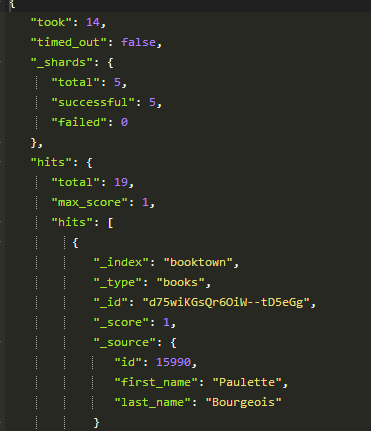
But looking more closely at the data, we can see that the _id field has been auto-assigned with some random values. This means that the next time we run the river, all the contents will be re-added.
Luckily, river-jdbc support somespecially labeled fields, that let us control how the contents should be indexed.
Reading up on the docs, we change the SQL definition in our river to
|
1
2
|
select id as _id, first_name,
last_name from authors
|
We need to start afresh and scrap the index we just created:
|
1
|
DELETE /booktown
|
Restart Elasticsearch. Now you should see a meaningful id in your data.
At this time we could start toying around with queries, mappings and analyzers. But, that’s not much fun with this little content. We need to join in some tables and get some more interesting data. We can join in the books table, and get all the books for all authors.
|
1
2
3
|
SELECT authors.id as _id, authors.last_name, authors.first_name,
books.id, books.title, books.subject_id
FROM public.authors left join public.books on books.author_id = authors.id
|
Delete the index, restart Elasticsearch and examine the data. Now you see that we only get one book per author. Executing the SQL statement in pgadmin returns 22 rows, while in Elasticsearch we get 19. This is on account of the _id field, on each attempt to index an existing record with the same _id as a new one, it will be overwritten.
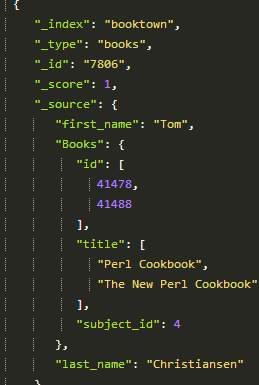
River-jdbc supports Structured objects, which allows us to create arbitrarily structured JSON documents simply by using SQL aliases. The _id column is used for identity, structured objects will be appended to existing data. This is perhaps best shown by an example:
|
1
2
3
4
|
SELECT authors.id as _id, authors.last_name, authors.first_name,
books.id as \"Books.id\", books.title as \"Books.title\",
books.subject_id as \"Books.subject_id\"
FROM public.authors left join public.books on books.author_id = authors.id order by authors.id
|
Again, delete the index, restart Elasticsearch, wait a few seconds before you search, and you will find structured data in the search results.
Now we have seen that it is quite easy to get data into Elasticsearch using river-jdbc. We have also seen how it can handle updates. That gets us quite far. Unfortunately, it doesn’t handle deletions. If a record is deleted from the database, it will not automatically be deleted from the index. There have been some attempts to create support for it, but in the latest release it has been completely dropped.
This is due to the river plugin system having some serious problems, and it will perhaps be deprecated some time after the 1.0 release, at least not actively promoted as “the way”. (see the “semi-offical statement” at Linkedin Elasticsearch group). While it is extremely easy to use rivers to get data, there are a lot of problems in having a data integration process running in the same space as Elasticsearch itself. Architecturally, it is perhaps more correct to leave the search engine to itself, and build integrations systems on the side.
Among the recommended alternatives are:
>Use an ETL tool like Talend
>Create your own script
>Edit the source application to send updates to Elasticsearch
Jörg Prante, who is the man behind river-jdbc, recently started creating a replacement calledGatherer.
It is a gathering framework plugin for fetching and indexing data to Elasticsearch, with scalable components.
Anyway, we have data in our index! Rivers may have their problems when used on a large scale, but you would be hard pressed to find anything easier to get started with. Getting data into the index easily is essential when exploring ideas and concepts, creating POCs or just fooling around.
This post has run out of space, but perhaps we can look at some interesting queries next time?
Elasticsearch: Indexing SQL databases. The easy way的更多相关文章
- [Android 开发教程(1)]-- Saving Data in SQL Databases
Saving data to a database is ideal for repeating or structured data, such as contact information. Th ...
- ElasticSearch安装SQL插件
ElasticSearch安装SQL插件下载地址(中国大佬开发的,膜拜ing):https://github.com/NLPchina/elasticsearch-sql 1.记得选择和自己Elast ...
- 十四、.net core(.NET 6)搭建ElasticSearch(ES)系列之给ElasticSearch添加SQL插件和浏览器插件
给ES添加SQL插件的方法: 下载SQL插件地址:https://github.com/NLPchina/elasticsearch-sql 当前最新的是7.12版本,我的ES是7.13版本,暂且将 ...
- Android学习笔记——保存数据到SQL数据库中(Saving Data in SQL Databases)
知识点: 1.使用SQL Helper创建数据库 2.数据的增删查改(PRDU:Put.Read.Delete.Update) 背景知识: 上篇文章学习了保存文件,今天学习的是保存数据到SQL数据库中 ...
- 安装支持elasticsearch使用sql查询插件
一.ElasticSearch-SQL介绍 ElasticSearch-SQL(后续简称es-sql)是ElasticSearch的一个插件,提供了es 的类sql查询的相关接口.支持绝大多数的sql ...
- Exam 70-762 Developing SQL Databases
这个考试还是很有用的,教了很多有用的东西,不错,虽然考试需要很多钱,不过值的尝试.虽然用了sql server 这么多年但是对于事务.多并发的优化还是处于小学生的水平,通过这次考试争取让自己提一个档次 ...
- 使用Hive或Impala执行SQL语句,对存储在Elasticsearch中的数据操作(二)
CSSDesk body { background-color: #2574b0; } /*! zybuluo */ article,aside,details,figcaption,figure,f ...
- 使用Hive或Impala执行SQL语句,对存储在Elasticsearch中的数据操作
http://www.cnblogs.com/wgp13x/p/4934521.html 内容一样,样式好的版本. 使用Hive或Impala执行SQL语句,对存储在Elasticsearch中的数据 ...
- Spark SQL大数据处理并写入Elasticsearch
SparkSQL(Spark用于处理结构化数据的模块) 通过SparkSQL导入的数据可以来自MySQL数据库.Json数据.Csv数据等,通过load这些数据可以对其做一系列计算 下面通过程序代码来 ...
随机推荐
- 洛谷10月月赛Round.1| P3400 仓鼠窝[单调栈]
题目描述 萌萌哒的Created equal是一只小仓鼠,小仓鼠自然有仓鼠窝啦. 仓鼠窝是一个由n*m个格子组成的行数为n.列数为m的矩阵.小仓鼠现在想要知道,这个矩阵中有多少个子矩阵!(实际上就是有 ...
- 《深入.NET平台和C# 编程》内部测试 笔试题
1:在C#中,关于文件操作相关的类说法正确的是(AB) <选择二项> A:FileInfo类提供了用于操作文件的实例方法 B:File类提供了用于操作文件的静态方法 C:Directory ...
- PHP的文件操作常用函数
PHP文件操作 1 获得文件名:basename - 返回路径中的文件名部分 给出一个包含有指向一个文件的全路径的字符串,本函数返回基本的文件名.如果文件名是以 suffix 结束的,那这一部分也会被 ...
- jprofiler安装图解
环境: 1.sun jdk1.6.0 2.jprofiler_windows_6_0_2.exe 安装 1. jdk, 安装略... 2. jprofiler安装 一路next 到Enter lice ...
- CTF中那些脑洞大开的加密(1)
0x01 目录 各种文本加密 Shell 1 2 3 4 5 6 7 8 9 10 11 12 换位加密: 1.栅栏密码(Rail-fence Cipher) ...
- MySQL注射的过滤绕过技巧[1]
SQL注射的绕过技巧较多,此文仅做一些简单的总结. 前文已经提到,最好利用的注射点: 支持Union 可报错 支持多行执行.可执行系统命令.可HTTP Request等额外有利条件 若非以上类型,则可 ...
- canvas时钟
<!DOCTYPE html> <html lang="en"> <head> <meta charset="UTF-8&quo ...
- PAT 1027. 打印沙漏(20)
本题要求你写个程序把给定的符号打印成沙漏的形状.例如给定17个"*",要求按下列格式打印 ***** *** * *** ***** 所谓"沙漏形状",是指每行 ...
- 3098: Hash Killer II
3098: Hash Killer II Time Limit: 5 Sec Memory Limit: 128 MBSec Special JudgeSubmit: 1219 Solved: ...
- MVC3.0 上传图片并生成缩略图
转自:http://mikelai.blog.163.com/blog/static/18411126620118771732675/ Controller: public ActionResult ...