
简单记录在Visual Studio 2013中创建ASP.NET Web API 2
在很多跨平台的应用中就需要Web API ,比如android与数据库的交互。
Create a Web API Project
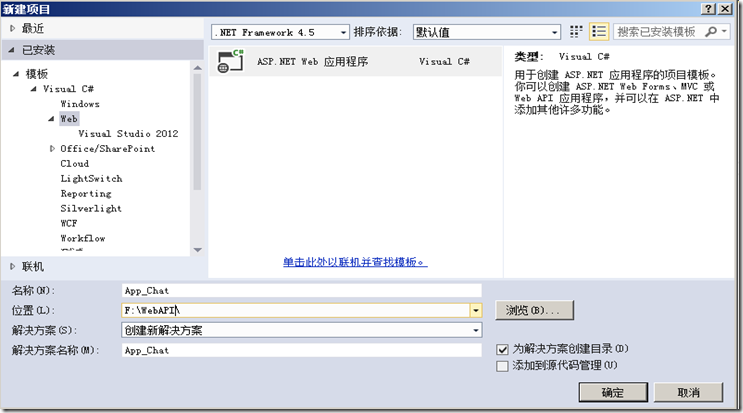
选择新建项目下的模板下的Visual C#节点下的Web节点,在模板列表下选择ASP.NET Web 应用程序,并命名为ChatApp就可以了。
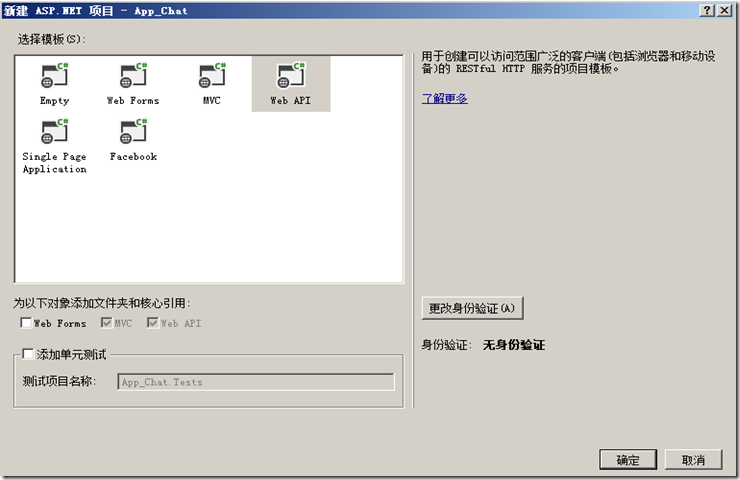
在新建ASP.NET项目下选择Web API 点击确定就可以了。
Adding a Model
在解决方案下新建一个Model
//新建Model User

namespace APP_Chat.Models

{

    public class User

    {

        public string UID { get; set; }

        public string LoginName { get; set; }

        public string Name { get; set; }

        public string Pwd { get; set; }

        public DateTime CreateTime { get; set; }

    }

}
//新建Model ResponseLoginState

namespace APP_Chat.Models

{

    public class ResponseLoginState

    {

        public User user { get; set; }

        public int state { get; set; }

        public string msg { get; set; }
    }

}
// 新建Model RequestLogin

namespace APP_Chat.Models

{

    public class RequestLogin

    {

        public string LoginName { get; set; }

        public string Pwd { get; set; }

    }

}
.csharpcode, .csharpcode pre
{
font-size: small;
color: black;
font-family: consolas, "Courier New", courier, monospace;
background-color: #ffffff;
/*white-space: pre;*/
}
.csharpcode pre { margin: 0em; }
.csharpcode .rem { color: #008000; }
.csharpcode .kwrd { color: #0000ff; }
.csharpcode .str { color: #006080; }
.csharpcode .op { color: #0000c0; }
.csharpcode .preproc { color: #cc6633; }
.csharpcode .asp { background-color: #ffff00; }
.csharpcode .html { color: #800000; }
.csharpcode .attr { color: #ff0000; }
.csharpcode .alt
{
background-color: #f4f4f4;
width: 100%;
margin: 0em;
}
.csharpcode .lnum { color: #606060; }
.csharpcode, .csharpcode pre
{
font-size: small;
color: black;
font-family: consolas, "Courier New", courier, monospace;
background-color: #ffffff;
/*white-space: pre;*/
}
.csharpcode pre { margin: 0em; }
.csharpcode .rem { color: #008000; }
.csharpcode .kwrd { color: #0000ff; }
.csharpcode .str { color: #006080; }
.csharpcode .op { color: #0000c0; }
.csharpcode .preproc { color: #cc6633; }
.csharpcode .asp { background-color: #ffff00; }
.csharpcode .html { color: #800000; }
.csharpcode .attr { color: #ff0000; }
.csharpcode .alt
{
background-color: #f4f4f4;
width: 100%;
margin: 0em;
}
.csharpcode .lnum { color: #606060; }
.csharpcode, .csharpcode pre
{
font-size: small;
color: black;
font-family: consolas, "Courier New", courier, monospace;
background-color: #ffffff;
/*white-space: pre;*/
}
.csharpcode pre { margin: 0em; }
.csharpcode .rem { color: #008000; }
.csharpcode .kwrd { color: #0000ff; }
.csharpcode .str { color: #006080; }
.csharpcode .op { color: #0000c0; }
.csharpcode .preproc { color: #cc6633; }
.csharpcode .asp { background-color: #ffff00; }
.csharpcode .html { color: #800000; }
.csharpcode .attr { color: #ff0000; }
.csharpcode .alt
{
background-color: #f4f4f4;
width: 100%;
margin: 0em;
}
.csharpcode .lnum { color: #606060; }
.csharpcode, .csharpcode pre
{
font-size: small;
color: black;
font-family: consolas, "Courier New", courier, monospace;
background-color: #ffffff;
/*white-space: pre;*/
}
.csharpcode pre { margin: 0em; }
.csharpcode .rem { color: #008000; }
.csharpcode .kwrd { color: #0000ff; }
.csharpcode .str { color: #006080; }
.csharpcode .op { color: #0000c0; }
.csharpcode .preproc { color: #cc6633; }
.csharpcode .asp { background-color: #ffff00; }
.csharpcode .html { color: #800000; }
.csharpcode .attr { color: #ff0000; }
.csharpcode .alt
{
background-color: #f4f4f4;
width: 100%;
margin: 0em;
}
.csharpcode .lnum { color: #606060; }
Adding a Controller
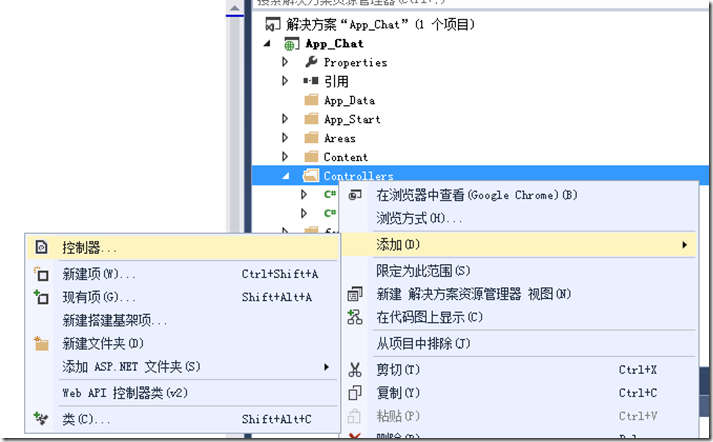
在解决方案下新建一个控制器
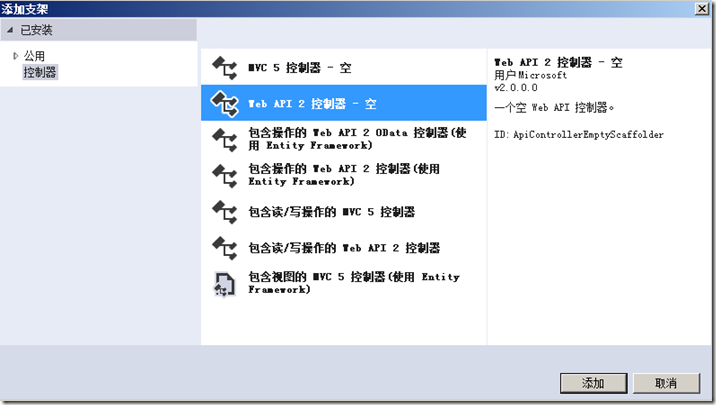
选择一个空的模板即可
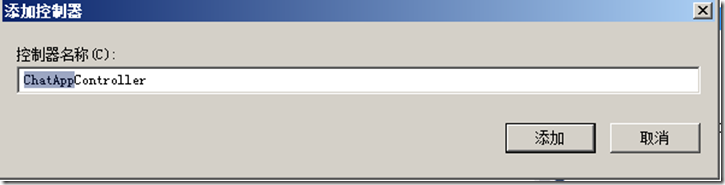
下面就添加控制器的名称(Controller命名是有规范的,不能更改后面的Controller部分也不能在后门添加字符,不然都会导致最后无法访问到这个Controller像这个Controller就是通过/api/ChatApp/访问的,当然默认是Get的请求方式)
namespace APP_Chat.Controllers

{

    public class ChatAppController : ApiController

    {

        /// <summary>

        /// 用户登录

        /// </summary>

        /// <param name="user">用户的登录名 - LoginName,密码 - Pwd</param>

        /// <returns>登录成功则返回用户的信息,和state=1</returns>   [HttpPost] http 请求方式

        [HttpPost]
        public ResponseLoginState Login(RequestLogin user)

        {

            if (string.IsNullOrWhiteSpace(user.LoginName))

                return new ResponseLoginState() { state = 0, msg = "参数错误,LoginName未传出!" };

            if (string.IsNullOrWhiteSpace(user.Pwd))

                return new ResponseLoginState() { state = 0, msg = "参数错误,Name未传出!" };

            #region

            using (var conn = new System.Data.OracleClient.OracleConnection(OracleHelper.ConnString))

            {

                conn.Open();

                var command = conn.CreateCommand();

                command.Parameters.Clear();

                command.Parameters.Add(new OracleParameter(":loginName", user.LoginName));

                command.Parameters.Add(new OracleParameter(":pwd", user.Pwd));

                command.CommandText = "select * from APP_ChatUser where loginname=:loginName and pwd=:pwd";

                var reader = command.ExecuteReader();

                User loginuser = new User();

                try

                {

                    reader.Read();

                    loginuser.UID = reader["USERID"].ToString();

                    loginuser.LoginName = reader["LOGINNAME"].ToString();

                    loginuser.Name = reader["NAME"].ToString();

                    loginuser.Pwd = reader["PWD"].ToString();

                    loginuser.CreateTime = Convert.ToDateTime(reader["CreateTime"]);

                    return new ResponseLoginState() { state = 1, msg = "success", user = loginuser };

                }

                catch (Exception ex)

                {

                    return new ResponseLoginState() { state = 0, msg = ex.Message, user = null };

                }

            }

            #endregion

        }

   }

}
通过访问api/ChatApp/Login就可以访问WebApi了
JavaScript来检测WebApi
<!DOCTYPE html>

<html xmlns="http://www.w3.org/1999/xhtml">

<head>

<meta http-equiv="Content-Type" content="text/html; charset=utf-8"/>

    <title></title>

    <script src="Scripts/jquery-1.10.2.min.js"></script>

    <script>

        var user;

        function login() {

            $.ajax({

                url: '/api/ChatApp/Login',

                type: 'POST',

                dataType:'JSON',

                data: { LoginName: 'zhangsan', Pwd: '123' },

                success: function (data) {

                    if (typeof (data) != 'object')

                        data = JSON.parse(data);

                    user = data.Data.User;

                    alert(JSON.stringify(data));

                }

            });

        }

    </script>

</head>

<body>

    <input type="button" value="登录" onclick="login()" />

</body>

</html>
如果有不清楚,可以参照下面的这个网址学习http://www.asp.net/web-api/overview/getting-started-with-aspnet-web-api/tutorial-your-first-web-api
简单记录在Visual Studio 2013中创建ASP.NET Web API 2的更多相关文章
- 在 Visual Studio 2013 中创建 ASP.NET Web 项目(0):专题导航 [持续更新中]
写在前面的话 随着 Visual Studio 2013 的正式推出,ASP.NET 和 Visual Studio Web 开发工具 也发布了各自的最新版本. 新版本在构建 One ASP.NET ...
- 在 Visual Studio 2013 中创建 ASP.NET Web 项目(1):概述 - 创建 Web 应用程序项目
注:本文是“在 Visual Studio 2013 中创建 ASP.NET Web 项目”专题的一部分,详情参见 专题导航 . 预备知识 本专题适用于 Visual Studio 2013 及以上版 ...
- 【转载】在 Visual Studio 2012 中创建 ASP.Net Web Service
在 Visual Studio 2012 中创建 ASP.Net Web Service,步骤非常简单.如下: 第一步:创建一个“ASP.Net Empty Web Application”项目 创建 ...
- Visual Studio 2010中创建ASP.Net Web Service
转自:http://blog.csdn.net/xinyaping/article/details/7331375 很多人在论坛里说,在Visual Studio 2010中不能创建“ASP.Net ...
- 在 Visual Studio 2010 中创建 ASP.Net Web Service
第一步:创建一个“ASP.Net Empty Web Application”项目 第二步:在项目中添加“Web Service”新项目 第一步之后,Visual Studio 2010会创建一个仅含 ...
- (转)在 Visual Studio 2010 中创建 ASP.Net Web Service
很多人在论坛里说,在Visual Studio 2010中不能创建“ASP.Net Web Service”这种project了,下面跟帖者云云,有的说这是因为微软已经将Web Service整合进W ...
- Visual Studio 2013 无法创建MVC项目,系统找不到指定的文件.(Exception from HRESULT:08x0070002)
在Visual Studio 2013中创建新MVC项目,(PS:现在创建个MVC项目,差点都找不到在哪,汗!-) 确定后提示,系统找不到指定的文件.(Exception from HRESULT:0 ...
- 在ASP.NET MVC5 及 Visual Studio 2013 中为Identity账户系统配置数据库链接及Code-First数据库迁移
在ASP.NET MVC5 及 Visual Studio 2013 中为Identity账户系统配置数据库链接及Code-First数据库迁移 最近发布的ASP.NET MVC 5 及Visual ...
- 在Visual Studio 2013 中使用C++单元测试
本文主要介绍在Visual Studio 2013中对代码进行单元测试的方法,包含了两方面的内容:对已有的Dll文件进行单元测试,以及对已有的源文件进行单元测试. 1. VS2013对DLL文件的单元 ...
随机推荐
- Silverlight动画之 Animation Easing
使用Animation Easing函数可以创造出更具有动感的动画.对比下面两个动画. 普通线性动画: <Storyboard x:Name="growStoryboard" ...
- 仿美团外卖,饿了吗 两个ListView联动,左边点击切换右边,右边滑动切换左边
先上效果图: 实现思路: 1.先说右边标题: 首先,右边的数据源集合中的Javabean中含有三个属性name,type,title,而每个条目中会默认含有一个标题. 如果这是第一个条目,就让标题显示 ...
- 使用 ODBC .NET 提供程序和 Visual C# .NET 执行 SQL 参数化存储过程
http://support2.microsoft.com/kb/310130/zh-cn 此分步指导文章描述如何使用 ODBC .NET 托管提供程序和 Visual C# .Net 调用参数化 S ...
- [Android Pro] 网络流量安全测试工具Nogotofail
reference to : http://www.freebuf.com/tools/50324.html 从严重的HeartBleed漏洞到苹果的gotofail 漏洞,再到最近的SSL v3 P ...
- 创建Oracle10g ASM数据库
概述 在真正的海量数据库环境中,DBA可能会花费很多的时间来作磁盘管理,比如一个表空间将占满整个磁盘,DBA就需要再添加一块磁盘到操作系统中,然后再在新的磁盘上创建新的数据文件,如果是单个磁 ...
- EasyUI中控件汉化问题
--BY ZYZ 我在使用EasyUI的过程中,遇到了控件无汉化的情况,如下图. 这么多洋文看着觉得挺烦的.时间居然是月日年格式的,这样可不行,得改. 重写控件代码?别,那能是我这种低级代码C-V客能 ...
- Swift - 让程序挂起后,能在后台继续运行任务
1,程序的挂起和退出 由于iOS设备资源有限.当用户点击了home键,或者另一个应用程序启动了.那么原先那个程序便进入后台被挂起,不是退出,只是停止执行代码,同时它的内存被锁定.当应用程序恢复时,它会 ...
- iOS - 富文本AttributedString
最近项目中用到了图文混排,所以就研究了一下iOS中的富文本,打算把研究的结果分享一下,也是对自己学习的一个总结. 在iOS中或者Mac OS X中怎样才能将一个字符串绘制到屏幕上呢? ...
- JQ AJAX
用AJAX方法不刷新网页使用下拉列表连接数据库 <!DOCTYPE html PUBLIC "-//W3C//DTD XHTML 1.0 Transitional//EN" ...
- JDBC 精度
http://www.cnblogs.com/tobecrazy/p/3390021.html http://www.cnblogs.com/kerrycode/p/4034231.html http ...