
OpenSSL - RSA非对称加密实现
非对称加密:即两端使用一对不同的密钥进行加密。
在非对称加密中,需要两对密钥,公钥和私钥。
公钥个私钥属于对立关系,一把加密后,只有另一把才可以进行解密。
- 公钥数据加密
数字证书内包含了公钥,在进行会话连接时,双方交换各自的公钥,保留自己的私钥。进行数据传输时,利用对方的公钥进行数据加密。加密后的数据只有对方的私钥才能进行解密。
- 私钥数字签名
私钥进行数据加密,所有人用公钥都能解密数据,但是加密后的数据却唯有私钥能生成。可以用于消息来源验证。将数据用私钥加密并明文告诉用户密文内容,用户进行公钥解密比较确认数据来源可靠。
在非对称加密算法中有RSA、Elgamal、背包算法、Rabin、D-H、ECC(椭圆曲线加密算法)等。
其中RSA加密最为广泛利用,毫不夸张地说,只要有计算机网络的地方,就有RSA算法。
其原理为数论中一个公认的定论:两个大素数相乘非常容易,但是这个数要分解成二个质数的积,非常困难。
根据已经披露的文献,目前被破解的最长RSA密钥是768个二进制位。也就是说,长度超过768位的密钥,还无法破解(至少没人公开宣布)。因此可以认为,1024位的RSA密钥基本安全,2048位的密钥极其安全。
具体RSA加密算法在计算机网络中的运用方式和原理可以查看:OpenSSL - 网络安全之数据加密和数字证书
如何利用openssl命令行来生成证书和密钥可查看:OpenSSL - 利用OpenSSL自签证书和CA颁发证书
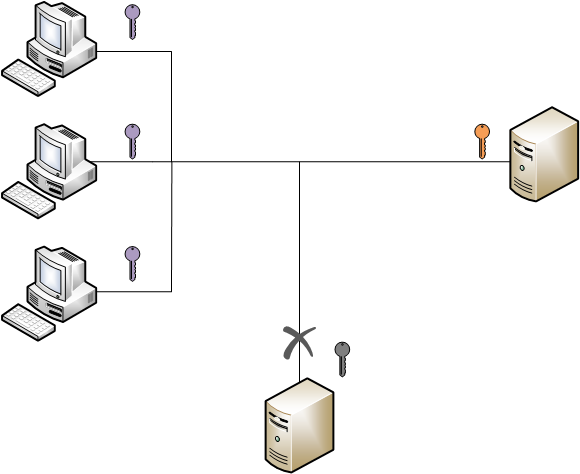
在使用OpenSSL进行RSA加密算法时,流程与上述理论流程保持一致。
- 生成密钥或读取密钥
- 根据需要选择签名还是加密
- 使用公钥进行数据加密
- 使用私钥进行数字签名
- 数据通过网络进行安全传输
- 对端进行解密获取明文
下面是OpenSSL的RSA加密算法对数据进行加密解密过程实现:
 #include <iostream>

 #include <fstream>

 #include <openssl/bn.h>

 #include <openssl/rsa.h>

 #include <openssl/pem.h>

 #define DATA_BUFF_LENTH 1024

 #define RSA_BIT 1024

 using namespace std;

 class File

 {

 public:

     File(string strFilePath):m_strFilePath(strFilePath){};

     ~File(){};

     bool open(_Ios_Openmode opreator);

     void close();

     void read(char* buff,int length);

 private:

     fstream m_file;

     string m_strFilePath;

 };

 bool File::open(_Ios_Openmode opreator)

 {

     m_file.open(m_strFilePath.c_str(),opreator);

     if (m_file.fail())   //打开失败

     {

         cout<<"open file failure!"<<endl;

         return false;

     }

     return true;

 }

 void File::close()

 {

     m_file.close();

 }

 void File::read(char* buff,int length)

 {

     m_file.read(buff,length);

 }

 class RSAKey

 {

 public:

     RSAKey(int rsabit,int bignum);

     ~RSAKey();

     void UsePrivateRSAKeyDecode(char* dsc,char* src);   //加密解密操作

     void UsePublicRSAKeyEncode(char* dsc,char* src);

     void printPublicKey();  //打印秘钥操作

     void printPrivateKey();

     void exportPrivateKey(string fileName); //导出秘钥操作

     void exportPublicKey(string fileName);

     /*

     We can also output the key into an encrypted PEM file.

     And the APIs is easy to use.

     PEM_write_bio_RSAPrivateKey

     PEM_write_bio_RSAPublicKey

     PEM_read_bio_RSAPrivateKey

     PEM_read_bio_RSAPublicKey

     */

     void importPrivateKey(string fileName); //导入秘钥操作,也可利用上述API通过证书导入秘钥,证书命令行生成和颁发签证

     void importPublicKey(string fileName);

 private:

     BIGNUM* m_bigNum;

     RSA* m_rsa;

     int m_rsa_bit;

     RSA* m_pubKey;

     RSA* m_privateKey;

 };

 RSAKey::RSAKey(int rsabit,int bignum)

 {

     m_rsa_bit = rsabit;

     m_rsa = RSA_new();

     m_pubKey = RSA_new();

     m_privateKey = RSA_new();

     m_bigNum = BN_new();

     BN_set_word(m_bigNum,bignum);   //设置大数

     RSA_generate_key_ex(m_rsa,m_rsa_bit,m_bigNum,NULL); //生成密钥

 }

 RSAKey::~RSAKey()

 {

     RSA_free(m_rsa);

     RSA_free(m_pubKey);

     RSA_free(m_privateKey);

     BN_free(m_bigNum);

 }

 void RSAKey::UsePrivateRSAKeyDecode(char* dsc,char* src)

 {

     int rsa_len = RSA_size(m_privateKey);

     RSA_private_decrypt(rsa_len,(unsigned char *)src,(unsigned char*)dsc,m_privateKey,RSA_NO_PADDING);

 }

 void RSAKey::UsePublicRSAKeyEncode(char* dsc,char* src)

 {

     int rsa_len = RSA_size(m_pubKey);

     RSA_public_encrypt(rsa_len, (unsigned char *)src,(unsigned char*)dsc,m_pubKey, RSA_NO_PADDING);

 }

 void RSAKey::printPublicKey()

 {

     RSA_print_fp(stdout,m_pubKey,);

 }

 void RSAKey::printPrivateKey()

 {

     RSA_print_fp(stdout,m_privateKey,);

 }

 void RSAKey::exportPrivateKey(string fileName)

 {

     FILE *ifile;

     ifile = fopen(fileName.c_str(),"w");

     PEM_write_RSAPrivateKey(ifile,m_rsa, NULL, NULL, , NULL, NULL);

     fclose(ifile);

 }

 void RSAKey::exportPublicKey(string fileName)

 {

     FILE *ifile;

     ifile = fopen(fileName.c_str(),"w");

     PEM_write_RSAPublicKey(ifile,m_rsa);

     fclose(ifile);

 }

 void RSAKey::importPrivateKey(string fileName)

 {

     FILE *ifile;

     ifile = fopen(fileName.c_str(),"r");

     m_privateKey = PEM_read_RSAPrivateKey(ifile, NULL, NULL, NULL);

 }

 void RSAKey::importPublicKey(string fileName)

 {

     FILE *ifile;

     ifile = fopen(fileName.c_str(),"r");

     m_pubKey = PEM_read_RSAPublicKey(ifile,NULL,NULL,NULL);

 }

 int main(int arc,char *arv[])

 {

     RSAKey rsa(RSA_BIT,RSA_F4);

     rsa.exportPrivateKey("private.key");    // 导出密钥

     rsa.exportPublicKey("public.key");

     string strFilePath = arv[];

     File ifile(strFilePath.c_str());

     ifile.open(ios::in);

     char DataBuff[DATA_BUFF_LENTH];

     ifile.read(DataBuff,DATA_BUFF_LENTH);   //读文件内容

     ifile.close();

     rsa.importPublicKey("public.key");  //导入公钥

     rsa.importPrivateKey("private.key");    //导入秘钥

     rsa.printPrivateKey();  //打印秘钥信息

     rsa.printPublicKey();   //打印公钥信息

     cout<<"-----------------------------------"<<endl;

     cout<<"source :"<<DataBuff<<endl;   //源数据

     cout<<"-----------------------------------"<<endl;

     char enData[DATA_BUFF_LENTH];

     rsa.UsePublicRSAKeyEncode(enData,DataBuff);

     cout<<"-----------------------------------"<<endl;

     cout<<"encode :"<<enData<<endl;     //加密数据

     cout<<"-----------------------------------"<<endl;

     char deData[DATA_BUFF_LENTH];

     rsa.UsePrivateRSAKeyDecode(deData,enData);

     cout<<"-----------------------------------"<<endl;

     cout<<"decode :"<<deData<<endl;     //解密数据

     cout<<"-----------------------------------"<<endl;

     return ;

 }
scons编译脚本如下:
Program('pubkey','rsa_genkey.cpp',LIBS = ['ssl','crypto'])
执行可执行文件,输入文件路径,即可查看到经过RSA加密后的数据内容和解密后的内容。
从证书中提取公钥加密与上述代码类似,替换相应API即可。
tips:本来把这篇OpenSSL的RSA加密算法和代码写好点的,但是由于最近时间越来越紧张。后续有机会在扩充吧。代码部分很多地方没有做异常判段和处理,只是保证了正常功能。
由于后面参与公司新的后台服务器架构开发,将会使用到RabbitMQ中间件,后续将不定期慢速更新RabbitMQ及后台架构设计相关博客,欢迎关注!
OpenSSL - RSA非对称加密实现的更多相关文章
- CryptoAPI与openssl RSA非对称加密解密(PKCS1 PADDING)交互
(以下代码中都只做测试用,有些地方没有释放内存...这个自己解决下) 1.RSA非对称的,首先提供一个供测试用的证书和私钥的数据 1)pem格式的证书和私钥(公私钥是对应的)的base64编码 voi ...
- 支付宝开发(一)-认识php openssl RSA 非对称加密实现
获取支付宝公钥 本地服务器生成私钥和公钥 运用php中openssl相关函数加密解密验证身份 以下是php中openssl相关函数实现的验证,来自php官方demo //需要签名的数据 $data = ...
- RSA非对称加密 php的openssl实现
<?php /** * 使用openssl实现非对称加密 * @since 2010-07-08 */ class Rsa { /** * private key */ private $_pr ...
- RSA 非对称加密,私钥转码为pkcs8 错误总结
RSA 非对称加密,私钥转码为pkcs8 错误总结 最近在和某上市公司对接金融方面的业务时,关于RSA对接过程中遇到了一个坑,特来分享下解决方案. 该上市公司简称为A公司,我们简称为B公司.A-B两家 ...
- Atitit RSA非对称加密原理与解决方案
Atitit RSA非对称加密原理与解决方案 1.1. 一.一点历史 1 1.2. 八.加密和解密 2 1.3. 二.基于RSA的消息传递机制 3 1.4. 基于rsa的授权验证机器码 4 1.5. ...
- RSA非对称加密Java实现
原文 加密基础方法类 import java.security.MessageDigest; import sun.misc.BASE64Decoder; import sun.misc.BASE64 ...
- 前端js,后台python实现RSA非对称加密
先熟悉使用 在后台使用RSA实现秘钥生产,加密,解密; # -*- encoding:utf-8 -*- import base64 from Crypto import Random from Cr ...
- 前后端数据加密传输 RSA非对称加密
任务需求:要求登陆时将密码加密之后再进行传输到后端. 经过半天查询摸索折腾,于是有了如下成果: 加密方式:RSA非对称加密.实现方式:公钥加密,私钥解密.研究进度:javascript与java端皆已 ...
- php RSA非对称加密 的实现
基本概念 加密的意义 加密的意义在于数据的传输过程中,即使被第三方获取到传输的数据,第三方也不能获取到数据的具体含义. 加密方式分为对称加密和非对称加密 什么是对称加密? 对称加密只使用一个秘钥,加密 ...
随机推荐
- JAVA基础知识之JDBC——ResultSet的滚动和更新(statement的额外参数)
ResultSet不仅可以内存中的一张二维表一样保存statement执行SQL的结果集,还能通过结果集修改DB的数据.ResultSetMetaData则可以用来获得ResultSet对象的相关信息 ...
- 红字差评系列1.第K小数
[题目分析] 二分答案?smg,我太弱了 //不开longlong wa到挺了 #include <cstdio> #include <cstring> #include &l ...
- CSS3的chapter3
CSS的常用样式分为几大类: 字体样式(font,color, text-decoration ,text-shadow) 元素样式(width,height,margin,padding,opaci ...
- 15.Linux安装DHCP服务为虚拟机分配IP
参考博客:http://www.jb51.net/article/31607.htm $ rpm -ql dhcp #检查是否安装dhcp $ yum -y install dhcp* ...
- BZOJ 3229: [Sdoi2008]石子合并
3229: [Sdoi2008]石子合并 时间限制: 3 Sec 内存限制: 128 MB提交: 497 解决: 240[提交][][] 题目描述 在一个操场上摆放着一排N堆石子.现要将石子有次序 ...
- Oracle PL/SQL实战代码下载
最近在学习PL/SQL编程,算是一个进阶吧,书没带光盘,所以按照书中的地址去下载样例,无法下载,到图灵官网找到了源代码下载地址,无法下载的留邮箱,我发给大家 下载地址: http://www.itur ...
- easyui-panel 滚动条禁用
div id="p" class="easyui-panel" title="title" style="padding:10px ...
- 插件框架(Plugin Framework)
HOW TO MAKE PLUGIN FRAMEWORK 插件系统构建 Dissect Eclipse Plugin Framework
- 如何正确的将J2ee项目部署到Tomcat
如何正确的将J2ee项目部署到Tomcat 1.打开配置文件(我的如下:C:\Program Files\Apache Software Foundation\Tomcat 7.0\conf\serv ...
- Spring Boot工程发布到Docker
先聊聊闲话 搞过企业级的application运维的同仁肯定深有感触,每个application的功能交叉错杂,数据交换就让人焦头烂额(当然这和顶层业务设计有关系), 几十个application发布 ...