
mybatis 三剑客 之 generator
简介
简单来说, 可以根据数据库生成一定的java代码。但是负载的逻辑还得自己实现。
就酱
参考连接
http://mybatis.org/generator/ 官网信息
https://www.imooc.com/article/306421 相关的配置信息
https://zhuanlan.zhihu.com/p/133269734 全部的三剑客
生成文件的目录
可以再generator里面进行配置。
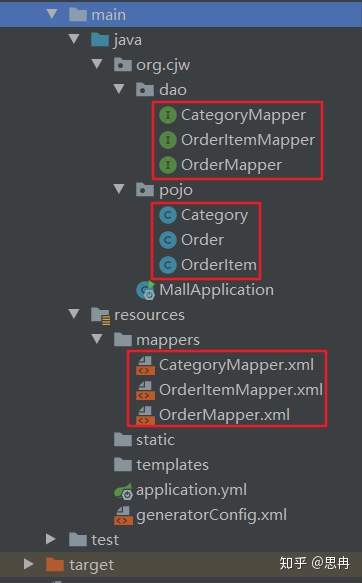
maven
配置
pom.xml
<build>

    <finalName>mmall</finalName>

    <plugins>

      <plugin>

        <groupId>org.mybatis.generator</groupId>

        <artifactId>mybatis-generator-maven-plugin</artifactId>

        <version>1.3.2</version>

        <configuration>

<!--如果不配置configurationFile,默认为 resources/generatorConfig.xml-->

          <verbose>true</verbose>

          <overwrite>true</overwrite>

        </configuration>

      </plugin>

    </plugins>

  </build>
TIPS
会读取 文件resources/generatorConfig.xml 进行加载。
generatorConfig.xml
<?xml version="1.0" encoding="UTF-8"?>

<!DOCTYPE generatorConfiguration

        PUBLIC "-//mybatis.org//DTD MyBatis Generator Configuration 1.0//EN"

        "http://mybatis.org/dtd/mybatis-generator-config_1_0.dtd">

<generatorConfiguration>

    <!--导入属性配置-->

    <properties resource="datasource.properties"></properties>

    <!--指定特定数据库的jdbc驱动jar包的位置, db 配置再datasource.properties文件中进行了配置-->

    <classPathEntry location="${db.driverLocation}"/>

    <context id="default" targetRuntime="MyBatis3">

        <!-- optional,旨在创建class时,对注释进行控制 -->

        <commentGenerator>

            <property name="suppressDate" value="true"/>

            <property name="suppressAllComments" value="true"/>

        </commentGenerator>

        <!--jdbc的数据库连接 -->

        <jdbcConnection

                driverClass="${db.driverClassName}"

                connectionURL="${db.url}"

                userId="${db.username}"

                password="${db.password}">

        </jdbcConnection>

        <!-- 非必需,类型处理器,在数据库类型和java类型之间的转换控制-->

        <javaTypeResolver>

            <property name="forceBigDecimals" value="false"/>

        </javaTypeResolver>

        <!-- Model模型生成器,用来生成含有主键key的类,记录类 以及查询Example类

            targetPackage     指定生成的model生成所在的包名

            targetProject     指定在该项目下所在的路径

        -->

        <!--<javaModelGenerator targetPackage="com.mmall.pojo" targetProject=".\src\main\java">-->

        <javaModelGenerator targetPackage="com.mmall.pojo" targetProject="./src/main/java">

            <!-- 是否允许子包,即targetPackage.schemaName.tableName -->

            <property name="enableSubPackages" value="false"/>

            <!-- 是否对model添加 构造函数 -->

            <property name="constructorBased" value="true"/>

            <!-- 是否对类CHAR类型的列的数据进行trim操作 -->

            <property name="trimStrings" value="true"/>

            <!-- 建立的Model对象是否 不可改变  即生成的Model对象不会有 setter方法,只有构造方法 -->

            <property name="immutable" value="false"/>

        </javaModelGenerator>

        <!--mapper映射文件生成所在的目录 为每一个数据库的表生成对应的SqlMap文件 -->

        <!--<sqlMapGenerator targetPackage="mappers" targetProject=".\src\main\resources">-->

        <sqlMapGenerator targetPackage="mappers" targetProject="./src/main/resources">

            <property name="enableSubPackages" value="false"/>

        </sqlMapGenerator>

        <!-- 客户端代码,生成易于使用的针对Model对象和XML配置文件 的代码

                type="ANNOTATEDMAPPER",生成Java Model 和基于注解的Mapper对象

                type="MIXEDMAPPER",生成基于注解的Java Model 和相应的Mapper对象

                type="XMLMAPPER",生成SQLMap XML文件和独立的Mapper接口

        -->

        <!-- targetPackage:mapper接口dao生成的位置 -->

        <!--<javaClientGenerator type="XMLMAPPER" targetPackage="com.mmall.dao" targetProject=".\src\main\java">-->

        <javaClientGenerator type="XMLMAPPER" targetPackage="com.mmall.dao" targetProject="./src/main/java">

            <!-- enableSubPackages:是否让schema作为包的后缀 -->

            <property name="enableSubPackages" value="false" />

        </javaClientGenerator>

        <table tableName="mmall_shipping" domainObjectName="Shipping" enableCountByExample="false" enableUpdateByExample="false" enableDeleteByExample="false" enableSelectByExample="false" selectByExampleQueryId="false"></table>

        <table tableName="mmall_cart" domainObjectName="Cart" enableCountByExample="false" enableUpdateByExample="false" enableDeleteByExample="false" enableSelectByExample="false" selectByExampleQueryId="false"></table>

        <table tableName="mmall_cart_item" domainObjectName="CartItem" enableCountByExample="false" enableUpdateByExample="false" enableDeleteByExample="false" enableSelectByExample="false" selectByExampleQueryId="false"></table>

        <table tableName="mmall_category" domainObjectName="Category" enableCountByExample="false" enableUpdateByExample="false" enableDeleteByExample="false" enableSelectByExample="false" selectByExampleQueryId="false"></table>

        <table tableName="mmall_order" domainObjectName="Order" enableCountByExample="false" enableUpdateByExample="false" enableDeleteByExample="false" enableSelectByExample="false" selectByExampleQueryId="false"></table>

        <table tableName="mmall_order_item" domainObjectName="OrderItem" enableCountByExample="false" enableUpdateByExample="false" enableDeleteByExample="false" enableSelectByExample="false" selectByExampleQueryId="false"></table>

        <table tableName="mmall_pay_info" domainObjectName="PayInfo" enableCountByExample="false" enableUpdateByExample="false" enableDeleteByExample="false" enableSelectByExample="false" selectByExampleQueryId="false"></table>

        <table tableName="mmall_product" domainObjectName="Product" enableCountByExample="false" enableUpdateByExample="false" enableDeleteByExample="false" enableSelectByExample="false" selectByExampleQueryId="false">

            <columnOverride column="detail" jdbcType="VARCHAR" />

            <columnOverride column="sub_images" jdbcType="VARCHAR" />

        </table>

        <table tableName="mmall_user" domainObjectName="User" enableCountByExample="false" enableUpdateByExample="false" enableDeleteByExample="false" enableSelectByExample="false" selectByExampleQueryId="false"></table>

        <!-- geelynote mybatis插件的搭建 -->

    </context>

</generatorConfiguration>
TIPS
再mapper文件里面最好, updatetime 时间设定为, now()函数, java代码就可以不用管,直接使用数据库函数。
mybatis 三剑客 之 generator的更多相关文章
- Mybatis—三剑客之generator使用方法
三剑客之generator主要用于自动生成POJO实体类 准备素材: mybatis-generator-core-1.3.2.jar mysql-connector-java-5.1.2 ...
- Intellij IDEA 2017集成MyBatis三剑客
MyBatis三剑客指的是:MyBatis-Generate.Mybatis Plus.MyBatis-PageHelper MyBatis-Generate 使用 Mybatis Generator ...
- mybatis 三剑客 generator配置 、mybatis plugin
generator配置 1.配置pom.xml 导入mysql驱动.mybatis.mybatis-generator的依赖 <dependency> <groupId>org ...
- Java框架-MyBatis三剑客之MyBatis Generator(mybatis-generator MBG插件)详解
生成器设计思路: 连接数据库 -> 获取表结构 -> 生成文件 1 下载与安装 官网文档入口 最方便的 maven 插件使用方式 贴至pom 文件 2 新建配置文件 填充配置信息(官网示例 ...
- springboot学习随笔(四):Springboot整合mybatis(含generator自动生成代码)
这章我们将通过springboot整合mybatis来操作数据库 以下内容分为两部分,一部分主要介绍generator自动生成代码,生成model.dao层接口.dao接口对应的sql配置文件 第一部 ...
- Mybatis三剑客之mybatis-generator配置
mybatis插件在这里: 然后把generatorConfig.xml文件放在resources下: <?xml version="1.0" encoding=" ...
- Mybatis三剑客介绍
1.MyBatis generator 利用mybatis-generator自动生成代码 下载地址: https://download.csdn.net/download/qq_36625806/ ...
- 【mybatis】mybaits generator 逆向工程的使用
mybatis逆向工程官方网站:http://www.mybatis.org/generator/quickstart.html 准备xml文件.如下generator.xml全部内容 <?xm ...
- mybatis代码生成(generator工具生成代码)
generator工具生成代码 下载地址 http://pan.baidu.com/s/1bY8C0I
- 【mmall】mybatis三剑客
mybatis-generator mybatis-plugin Mybatis Plugin插件安装破解及使用:http://blog.csdn.net/u011410529/article/det ...
随机推荐
- python开发箱号批量查询关联SN号码的程序
# 需要导入的包 import tkinter as tk from tkinter import ttk, messagebox, filedialog import pyodbc import p ...
- eolinker请求预处理:配置全局环境变量后,步骤内去掉请求头信息
特别注意:需要使用全局变量或者预处理前务必阅读本链接https://www.cnblogs.com/becks/p/13713278.html 1.描述,用例配置环境变量后会在请求前自动加上域名和请求 ...
- Java 中堆和栈的区别是什么?
Java 中堆和栈的区别 Java 中的堆(Heap)和栈(Stack)是两种不同的内存区域,它们有着不同的用途和特点.以下是它们的主要区别: 1. 存储内容 堆:用于存储对象实例以及类的实例变量.所 ...
- 太喜欢啦,浏览器中的SQL神器:WhatTheDuck让CSV分析像聊天一样简单!
嗨,大家好,我是小华同学,关注我们获得"最新.最全.最优质"开源项目和高效工作学习方法 基于DuckDB的轻量级Web应用 | 完全浏览器端运行 | 零数据泄露风险 | 支持复杂S ...
- 【BUG】未能加载文件或程序集“System.Runtime.CompilerServices.Unsafe, Version=4.0.4.1, Culture=neutral, PublicKeyT
参考:无法加载文件或程序集System.Runtime.CompilerServices.Unsafe. 问题 我的环境: Visual Studio 2019 出错代码: MSBuildWorksp ...
- HUAWEI USG6505E 如何使用光电互斥口
1.display ip interface brief 2.display int g0/0/4 查看端口 是否为光电互斥口,并确定端口当前状态 Copper 电口 Fiber 光口 3.inte ...
- 理解 C# 中的各类指针
目录 前言 对象引用(Object Reference) 指针(Pointer) 指针的声明和使用 指针可以指向的位置 可以声明指针的位置 指向值类型变量的指针 指向对象引用的指针 指向 GC Hea ...
- 应用内存管理:Linux的应用与内存管理
应用程序想要使用内存,必须得找操作系统申请,那就有必要先了解下Linux内核怎么管理内存的,然后再去分析应用程序的内存管理细节. 硬件架构 现代计算机体系结构被称为Non-Uniform Memory ...
- C#中的lock
C#中的lock lock语法为: private object o = new object();//创建一个对象 public void Work() { lock(o)//锁住这个对象 { // ...
- PyPI 使用的国内源
通过几次 pip 的使用,对于默认的 pip 源的速度实在无法忍受,于是便搜集了一些国内的pip源,如下:阿里云 http://mirrors.aliyun.com/pypi/simple/中国科技大 ...