
【原创】大数据基础之Logstash(5)监控
有两种方式来监控logstash:
- api
- ui(xpack)
When you run Logstash, it automatically captures runtime metrics that you can use to monitor the health and performance of your Logstash deployment.
You can use the basic monitoring APIs provided by Logstash to retrieve these metrics. These APIs are available by default without requiring any extra configuration.
Alternatively, you can configure X-Pack monitoring to send data to a monitoring cluster.
1 api
Node Info API
The node info API retrieves information about the node.
# curl http://127.0.0.1:9600/_node?pretty

{

  "host" : "server-05",

  "version" : "6.5.4",

  "http_address" : "127.0.0.1:9600",

  "id" : "d9f6ac1d-26ab-442e-9353-c0fe3f0fe8cf",

  "name" : "server-05",

  "pipelines" : {

    "main" : {

      "workers" : 8,

      "batch_size" : 125,

      "batch_delay" : 50,

      "config_reload_automatic" : false,

      "config_reload_interval" : 3000000000,

      "dead_letter_queue_enabled" : false

    }

  },

  "os" : {

    "name" : "Linux",

    "arch" : "amd64",

    "version" : "3.10.0-957.5.1.el7.x86_64",

    "available_processors" : 8

  },

  "jvm" : {

    "pid" : 23133,

    "version" : "1.8.0_141",

    "vm_version" : "1.8.0_141",

    "vm_vendor" : "Oracle Corporation",

    "vm_name" : "Java HotSpot(TM) 64-Bit Server VM",

    "start_time_in_millis" : 1553667245630,

    "mem" : {

      "heap_init_in_bytes" : 536870912,

      "heap_max_in_bytes" : 518979584,

      "non_heap_init_in_bytes" : 2555904,

      "non_heap_max_in_bytes" : 0

    },

    "gc_collectors" : [ "ParNew", "ConcurrentMarkSweep" ]

  }

}
Plugins Info API
The plugins info API gets information about all Logstash plugins that are currently installed. This API basically returns the output of running the bin/logstash-plugin list --verbose command.
# curl http://127.0.0.1:9600/_node/plugins?pretty

{

  "host" : "server-05",

  "version" : "6.5.4",

  "http_address" : "127.0.0.1:9600",

  "id" : "d9f6ac1d-26ab-442e-9353-c0fe3f0fe8cf",

  "name" : "server-05",

  "total" : 99,

  "plugins" : [ {

    "name" : "logstash-codec-cef",

    "version" : "5.0.6"

  }, {

    "name" : "logstash-codec-collectd",

    "version" : "3.0.8"

  }, {

    "name" : "logstash-codec-dots",

    "version" : "3.0.6"

  },

...
Node Stats API
The node stats API retrieves runtime stats about Logstash.
# curl http://127.0.0.1:9600/_node/stats?pretty

{

  "host" : "server-05",

  "version" : "6.5.4",

  "http_address" : "127.0.0.1:9600",

  "id" : "d9f6ac1d-26ab-442e-9353-c0fe3f0fe8cf",

  "name" : "server-05",

  "jvm" : {

    "threads" : {

      "count" : 35,

      "peak_count" : 36

    },

    "mem" : {

      "heap_used_percent" : 50,

      "heap_committed_in_bytes" : 518979584,

      "heap_max_in_bytes" : 518979584,

      "heap_used_in_bytes" : 261155016,

      "non_heap_used_in_bytes" : 178053152,

      "non_heap_committed_in_bytes" : 218259456,

      "pools" : {

        "survivor" : {

          "peak_used_in_bytes" : 17891328,

          "used_in_bytes" : 8614928,

          "peak_max_in_bytes" : 17891328,

          "max_in_bytes" : 17891328,

          "committed_in_bytes" : 17891328

        },

        "old" : {

          "peak_used_in_bytes" : 163566944,

          "used_in_bytes" : 163566944,

          "peak_max_in_bytes" : 357957632,

          "max_in_bytes" : 357957632,

          "committed_in_bytes" : 357957632

        },

        "young" : {

          "peak_used_in_bytes" : 143130624,

          "used_in_bytes" : 88973144,

          "peak_max_in_bytes" : 143130624,

          "max_in_bytes" : 143130624,

          "committed_in_bytes" : 143130624

        }

      }

    },

    "gc" : {

      "collectors" : {

        "old" : {

          "collection_time_in_millis" : 151,

          "collection_count" : 2

        },

        "young" : {

          "collection_time_in_millis" : 11958,

          "collection_count" : 1255

        }

      }

    },

    "uptime_in_millis" : 1049304126

  },

  "process" : {

    "open_file_descriptors" : 103,

    "peak_open_file_descriptors" : 104,

    "max_file_descriptors" : 4096,

    "mem" : {

      "total_virtual_in_bytes" : 5936197632

    },

    "cpu" : {

      "total_in_millis" : 7796970,

      "percent" : 0,

      "load_average" : {

        "1m" : 0.0,

        "5m" : 0.04,

        "15m" : 0.05

      }

    }

  },

  "events" : {

    "in" : 9135,

    "filtered" : 9135,

    "out" : 9135,

    "duration_in_millis" : 11314,

    "queue_push_duration_in_millis" : 0

  },

  "pipelines" : {

    "main" : {

      "events" : {

        "duration_in_millis" : 11314,

        "in" : 9135,

        "out" : 9135,

        "filtered" : 9135,

        "queue_push_duration_in_millis" : 0

      },

      "plugins" : {

        "inputs" : [ {

          "id" : "0117e36c20fc4824ffb286255d03535acb0d462b00c0294651d48e2028315a6f",

          "events" : {

            "out" : 9135,

            "queue_push_duration_in_millis" : 0

          },

          "name" : "jdbc"

        } ],

        "filters" : [ ],

        "outputs" : [ {

          "id" : "791eb5d509a6269e6cbcbf1a8a6ffbbd12aab2924fee6e35fc70f79938534e76",

          "events" : {

            "duration_in_millis" : 10136,

            "in" : 9135,

            "out" : 9135

          },

          "name" : "kafka"

        }, {

          "id" : "3b968b786147f8809c823ca797ff6b78e60f6615794fc4716a0f52bb619bffc8",

          "events" : {

            "duration_in_millis" : 185,

            "in" : 9135,

            "out" : 9135

          },

          "name" : "stdout"

        } ]

      },

      "reloads" : {

        "last_error" : null,

        "successes" : 0,

        "last_success_timestamp" : null,

        "last_failure_timestamp" : null,

        "failures" : 0

      },

      "queue" : {

        "type" : "memory"

      }

    }

  },

  "reloads" : {

    "successes" : 0,

    "failures" : 0

  },

  "os" : {

    "cgroup" : {

      "cpuacct" : {

        "usage_nanos" : 58556486084501,

        "control_group" : "/system.slice/sshd.service"

      },

      "cpu" : {

        "cfs_quota_micros" : -1,

        "control_group" : "/system.slice/sshd.service",

        "stat" : {

          "number_of_times_throttled" : 0,

          "time_throttled_nanos" : 0,

          "number_of_elapsed_periods" : 0

        },

        "cfs_period_micros" : 100000

      }

    }

  }

}
Hot Threads API
The hot threads API gets the current hot threads for Logstash. A hot thread is a Java thread that has high CPU usage and executes for a longer than normal period of time.
# curl http://127.0.0.1:9600/_node/hot_threads?pretty

{

  "host" : "server-05",

  "version" : "6.5.4",

  "http_address" : "127.0.0.1:9600",

  "id" : "d9f6ac1d-26ab-442e-9353-c0fe3f0fe8cf",

  "name" : "server-05",

  "hot_threads" : {

    "time" : "2019-04-08T17:42:53+08:00",

    "busiest_threads" : 3,

    "threads" : [ {

      "name" : "Ruby-0-Thread-10",

      "thread_id" : 32,

      "percent_of_cpu_time" : 0.05,

      "state" : "timed_waiting",

      "path" : ":1",

      "traces" : [ "sun.misc.Unsafe.park(Native Method)", "java.util.concurrent.locks.LockSupport.parkNanos(LockSupport.java:215)", "java.util.concurrent.locks.AbstractQueuedSynchronizer$ConditionObject.awaitNanos(AbstractQueuedSynchronizer.java:2078)" ]

    }, {

      "name" : "Ruby-0-Thread-11",

      "thread_id" : 33,

      "percent_of_cpu_time" : 0.05,

      "state" : "timed_waiting",

      "path" : ":1",

      "traces" : [ "sun.misc.Unsafe.park(Native Method)", "java.util.concurrent.locks.LockSupport.parkNanos(LockSupport.java:215)", "java.util.concurrent.locks.AbstractQueuedSynchronizer$ConditionObject.awaitNanos(AbstractQueuedSynchronizer.java:2078)" ]

    }, {

      "name" : "Ruby-0-Thread-6",

      "thread_id" : 28,

      "percent_of_cpu_time" : 0.05,

      "state" : "timed_waiting",

      "path" : ":1",

      "traces" : [ "sun.misc.Unsafe.park(Native Method)", "java.util.concurrent.locks.LockSupport.parkNanos(LockSupport.java:215)", "java.util.concurrent.locks.AbstractQueuedSynchronizer$ConditionObject.awaitNanos(AbstractQueuedSynchronizer.java:2078)" ]

    } ]

  }

}
2 ui(xpack)
You can use the monitoring UI in X-Pack to view the metrics and gain insight into how your Logstash deployment is running.
Monitoring is an X-Pack feature under the Basic License and is therefore free to use.
The pipeline viewer in X-Pack offers additional visibility into the behavior and performance of complex pipeline configurations. It shows a graph representation of the overall pipeline topology, data flow, and branching logic, overlaid with important metrics, like events per second, for each plugin in the view.
配置
1)logstash
xpack.monitoring.enabled: true
xpack.monitoring.elasticsearch.hosts: ["http://es-prod-node-1:9200", "http://es-prod-node-2:9200"]
开启security或ssl会有更多配置
2)elasticsearch
xpack.monitoring.enabled: true
xpack.monitoring.collection.enabled: true
3)kibana
xpack.monitoring.enabled: true
Unlike X-Pack monitoring for Elasticsearch and Kibana, there is no xpack.monitoring.collection.enabled setting on Logstash. You must use the xpack.monitoring.enabled setting to enable and disable data collection.
kibana
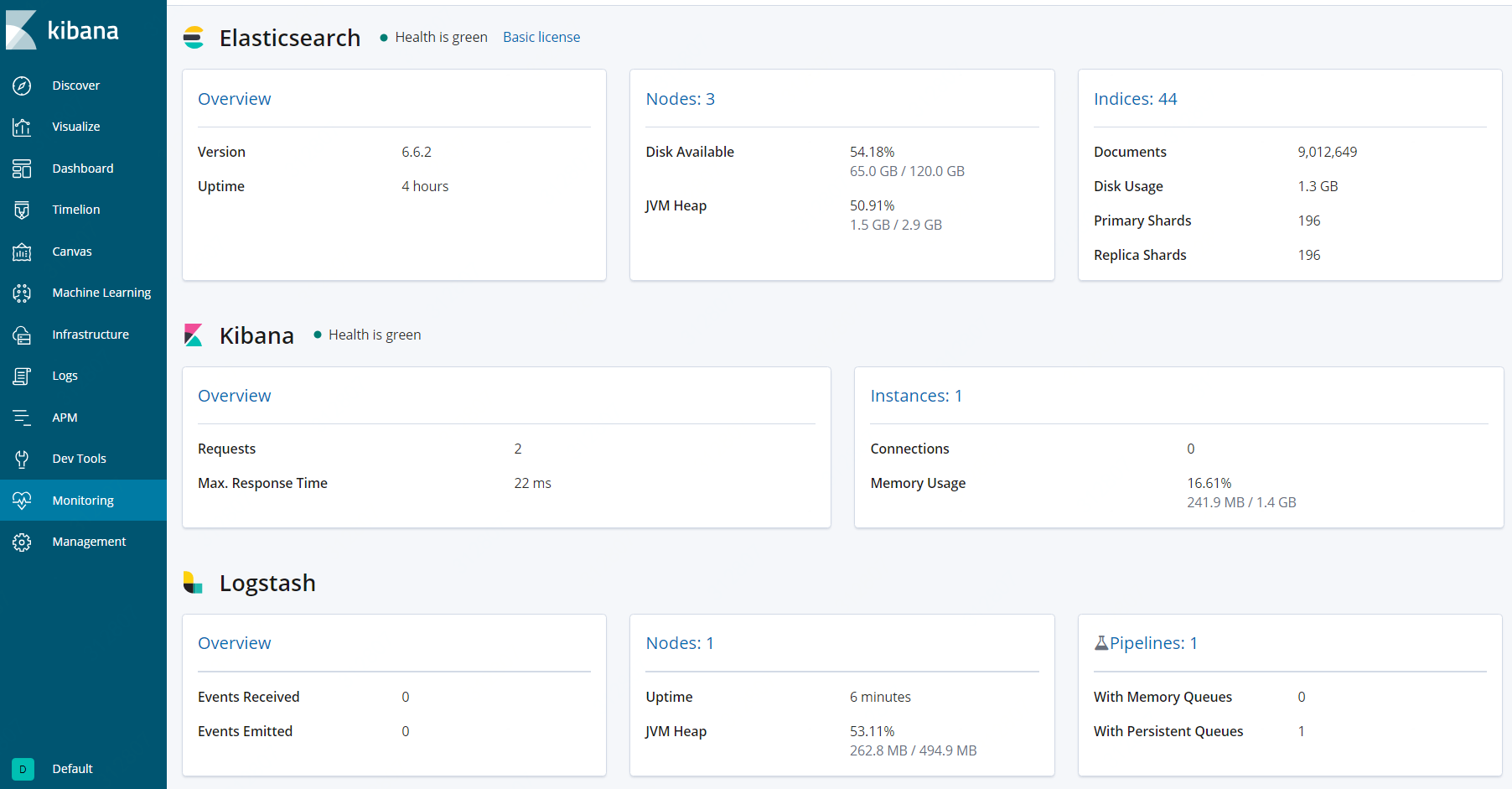
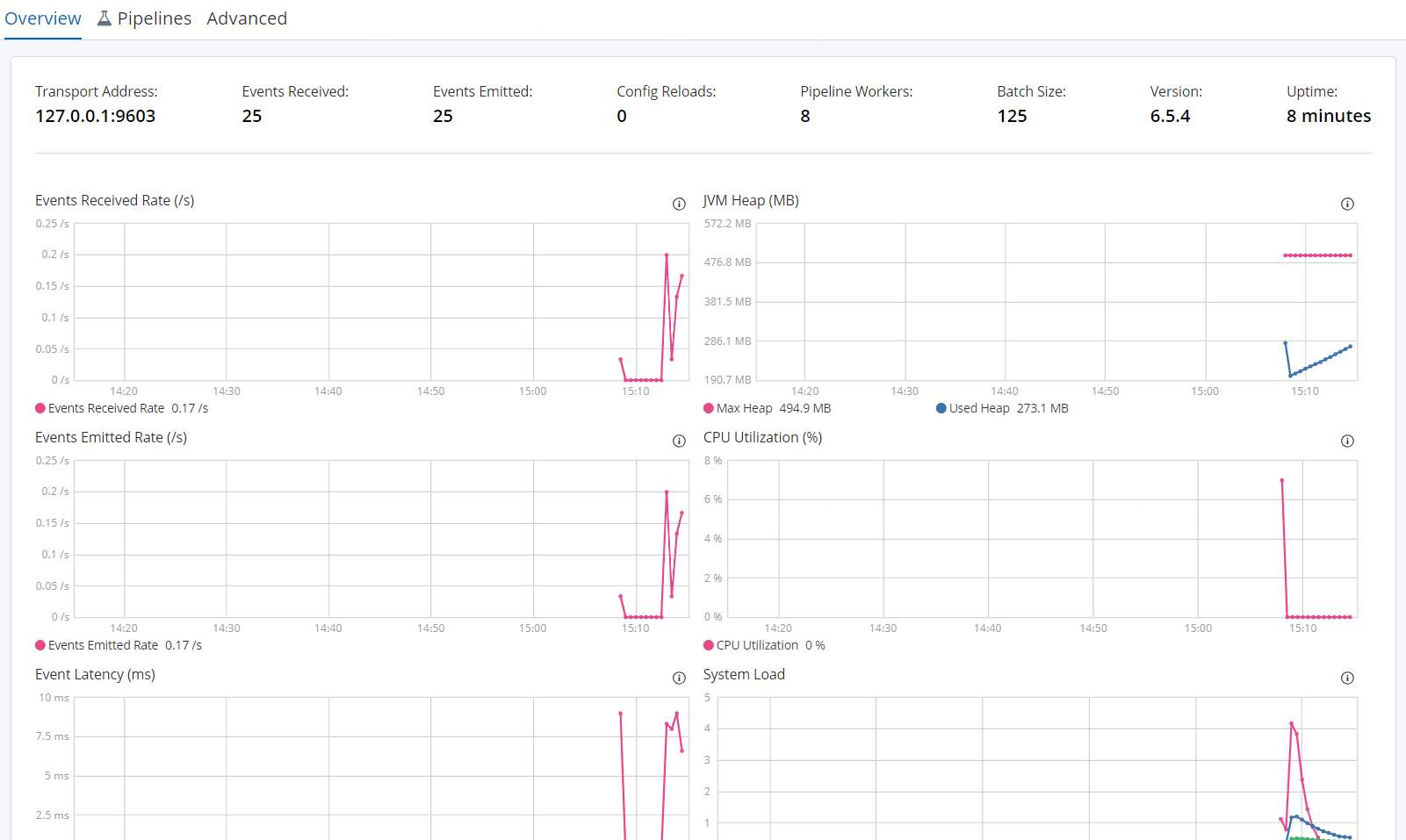
A Logstash node is considered unique based on its persistent UUID, which is written to the path.data directory when the node starts.
参考:
https://www.elastic.co/guide/en/logstash/current/monitoring-logstash.html
https://www.elastic.co/guide/en/logstash/current/monitoring.html
https://www.elastic.co/guide/en/logstash/current/configuring-logstash.html
https://www.elastic.co/guide/en/logstash/current/logstash-monitoring-ui.html
https://www.elastic.co/guide/en/elasticsearch/reference/current/monitoring-settings.html
https://www.elastic.co/guide/en/kibana/current/monitoring-settings-kb.html
【原创】大数据基础之Logstash(5)监控的更多相关文章
- 【原创】大数据基础之Logstash(4)高可用
logstash高可用体现为不丢数据(前提为服务器短时间内不可用后可恢复比如重启服务器或重启进程),具体有两个方面: 进程重启(服务器重启) 事件消息处理失败 在logstash中对应的解决方案为: ...
- 【原创】大数据基础之Logstash(1)简介、安装、使用
Logstash 6.6.2 官方:https://www.elastic.co/products/logstash 一 简介 Centralize, Transform & Stash Yo ...
- 【原创】大数据基础之Logstash(3)应用之http(in和out)
一个logstash很容易通过http打断成两个logstash实现跨服务器或者跨平台间数据同步,比如原来的流程是 logstash: nginx log -> kafka 打断成两个是 log ...
- 【原创】大数据基础之Logstash(2)应用之mysql-kafka
应用一:mysql数据增量同步到kafka 1 准备mysql测试表 mysql> create table test_sync(id int not null auto_increment, ...
- 【原创】大数据基础之Logstash(3)应用之file解析(grok/ruby/kv)
从nginx日志中进行url解析 /v1/test?param2=v2¶m3=v3&time=2019-03-18%2017%3A34%3A14->{'param1':' ...
- 【原创】大数据基础之Logstash(6)mongo input
logstash input插件之mongodb是第三方的,配置如下: input { mongodb { uri => 'mongodb://mongo_server:27017/db' pl ...
- 【原创】大数据基础之Zookeeper(2)源代码解析
核心枚举 public enum ServerState { LOOKING, FOLLOWING, LEADING, OBSERVING; } zookeeper服务器状态:刚启动LOOKING,f ...
- 【原创】大数据基础之词频统计Word Count
对文件进行词频统计,是一个大数据领域的hello word级别的应用,来看下实现有多简单: 1 Linux单机处理 egrep -o "\b[[:alpha:]]+\b" test ...
- 【原创】大数据基础之Impala(1)简介、安装、使用
impala2.12 官方:http://impala.apache.org/ 一 简介 Apache Impala is the open source, native analytic datab ...
随机推荐
- stm32矩阵键盘扫描数据通过USB发送
Keyboard.c #include "keyboard.h"#include "my_usb.h"#include " ...
- seaborn库
首先找到Anaconda Prompt命令行,下载seaborn库 ,命令 pip install seaborn 1.风格设置 import seaborn as sns import num ...
- 数据分析三剑客之numpy
Numpy 简介 数据分析三剑客:Numpy,Pandas,Matplotlib NumPy(Numerical Python) 是 Python 语言的一个扩展程序库,支持大量的维度数组与矩阵运算, ...
- Python IDLE 代码高亮主题
Python IDLE 代码高亮主题 使用方法: 打开C盘我的 C:\Documents and Settings\你的用户名.idlerc文件夹 里面会有一个 config-highlight.cf ...
- FTP设置用户名和密码
第一步新建用户: 1.电脑右键管理--> 2.本地用户和组--> 3.新建用户,设置密码成功 第二步:开启FTP服务 1.控制面板-->程序-->启用或关闭Windows功能- ...
- wiki leaks file link url
wiki leaks file link url XXX发表于2010-08-07 15:54:56 原始来源:http://www.wikileaks.org/wiki/Category:China ...
- ES6中的Array.from()函数的用法
ES6为Array增加了from函数用来将其他对象转换成数组. 当然,其他对象也是有要求,也不是所有的,可以将两种对象转换成数组. 1.部署了Iterator(迭代器)接口的对象,比如:Set,Map ...
- goroutine的意义与实现
goroutine的意义与实现 goroutine存在的意义 goroutine是用于实现GO的并发的,而不是并行.此处的并发指的是一套管理.调度.执行goroutine的过程. 并行的性能更高,可以 ...
- ElasticSearch常用操作
查看某个INDEX库某个TYPE表,某个字段的分词结果 GET /${index}/${type}/${id}/_termvectors?fields=${fields_name}http://19 ...
- python实现猜字游戏
import randomx = random.randint(0,99)while(True): num = input("please input a number\n") i ...