
【原创】大数据基础之Impala(1)简介、安装、使用
impala2.12

官方:http://impala.apache.org/
一 简介
Apache Impala is the open source, native analytic database for Apache Hadoop. Impala is shipped by Cloudera, MapR, Oracle, and Amazon.
impala是hadoop上的开源分析性数据库;C++和java语言开发;
- Do BI-style Queries on Hadoop
- Impala provides low latency and high concurrency for BI/analytic queries on Hadoop (not delivered by batch frameworks such as Apache Hive). Impala also scales linearly, even in multitenant environments.
impala支持hadoop上低延迟和高并发的查询。
- Unify Your Infrastructure
- Utilize the same file and data formats and metadata, security, and resource management frameworks as your Hadoop deployment—no redundant infrastructure or data conversion/duplication.
使用同样的文件、格式和元数据。
- Implement Quickly
- For Apache Hive users, Impala utilizes the same metadata and ODBC driver. Like Hive, Impala supports SQL, so you don't have to worry about re-inventing the implementation wheel.
对于hive用户来说,impala使用相同的元数据和driver,支持sql。

Impala provides fast, interactive SQL queries directly on your Apache Hadoop data stored in HDFS, HBase, or the Amazon Simple Storage Service (S3). In addition to using the same unified storage platform, Impala also uses the same metadata, SQL syntax (Hive SQL), ODBC driver, and user interface (Impala query UI in Hue) as Apache Hive. This provides a familiar and unified platform for real-time or batch-oriented queries.
impala直接基于hadoop数据(hdsf、hbase等)实现快速的、交互式的sql查询;impala使用与hive相同的存储平台、元数据、sql语法、driver和ui,这样实现了实时查询和批处理查询的统一;
Impala is an addition to tools available for querying big data. Impala does not replace the batch processing frameworks built on MapReduce such as Hive. Hive and other frameworks built on MapReduce are best suited for long running batch jobs, such as those involving batch processing of Extract, Transform, and Load (ETL) type jobs.
impala是一个大数据查询工具集的有力补充,impala不替换现有的批处理框架比如hive(hive通常用来执行一些ETL任务);
To avoid latency, Impala circumvents MapReduce to directly access the data through a specialized distributed query engine that is very similar to those found in commercial parallel RDBMSs. The result is order-of-magnitude faster performance than Hive, depending on the type of query and configuration.
Impala provides:
- Familiar SQL interface that data scientists and analysts already know.
- Ability to query high volumes of data ("big data") in Apache Hadoop.
- Distributed queries in a cluster environment, for convenient scaling and to make use of cost-effective commodity hardware.
- Ability to share data files between different components with no copy or export/import step; for example, to write with Pig, transform with Hive and query with Impala. Impala can read from and write to Hive tables, enabling simple data interchange using Impala for analytics on Hive-produced data.
- Single system for big data processing and analytics, so customers can avoid costly modeling and ETL just for analytics.
impala架构
The Impala server is a distributed, massively parallel processing (MPP) database engine.

1 Impala Daemon
The core Impala component is a daemon process that runs on each DataNode of the cluster, physically represented by the impalad process. It reads and writes to data files; accepts queries transmitted from the impala-shell command, Hue, JDBC, or ODBC; parallelizes the queries and distributes work across the cluster; and transmits intermediate query results back to the central coordinator node.
impala deamon(即impalad)和数据节点部署在一起,负责读写数据、响应impala-shell/Hue/JDBC请求、分布式查询、返回查询结果,部署多个;
2 Impala Statestore
The Impala component known as the statestore checks on the health of Impala daemons on all the DataNodes in a cluster, and continuously relays its findings to each of those daemons. It is physically represented by a daemon process named statestored; you only need such a process on one host in the cluster. If an Impala daemon goes offline due to hardware failure, network error, software issue, or other reason, the statestore informs all the other Impala daemons so that future queries can avoid making requests to the unreachable node.
impala statestore检查和记录impala deamon服务器的健康情况,这样查询时可以踢掉不健康的节点,只需要部署1个。
3 Impala Catalog Service
The Impala component known as the catalog service relays the metadata changes from Impala SQL statements to all the Impala daemons in a cluster. It is physically represented by a daemon process named catalogd; you only need such a process on one host in the cluster. Because the requests are passed through the statestore daemon, it makes sense to run the statestored and catalogd services on the same host.
impala catalog负责元数据,只需要1个。
客户端
- The impala-shell interactive command interpreter.
- The Hue web-based user interface.
- JDBC.
二 安装
安装支持3种方式:
1 Cloudera Manager安装
页面操作
2 Ambari安装
详见 https://www.cnblogs.com/barneywill/p/10290849.html
3 手工安装
1 增加repo
# cat /etc/yum.repos.d/cdh.repo
[cloudera-cdh5]
# Packages for Cloudera's Distribution for Hadoop, Version 5, on RedHat or CentOS 7 x86_64
name=Cloudera's Distribution for Hadoop, Version 5
baseurl=https://archive.cloudera.com/cdh5/redhat/7/x86_64/cdh/5/
gpgkey =https://archive.cloudera.com/cdh5/redhat/7/x86_64/cdh/RPM-GPG-KEY-cloudera
gpgcheck = 1
2 安装
# yum install impala impala-catalog impala-server impala-state-store impala-shell
也可以细分安装
catalog 安装
# yum install impala impala-catalogserver安装
# yum install impala impala-serverstatestore安装
# yum install impala impala-state-store客户端安装
# yum install impala-shell
配置文件修改catalogd和statestored的地址
# vi /etc/default/impala
IMPALA_CATALOG_SERVICE_HOST=$catalog_server
IMPALA_STATE_STORE_HOST=$state_store_serverMEM_LIMIT=20gb
MEM_LIMIT赋值格式为*gb,*g,*m,*mb,70%
注意catalogd和statestored只能部署单点,没有内置的failover机制,官方建议是必要时通过dns切换;
其他hadoop、hive、hbase等配置文件(core-site.xml、hdfs-site.xml、hive-site.xml、hbase-site.xml)放到
/etc/impala/conf/
启动命令
service impala-statestore start
service impala-catalog start
service impala-server start
注意:impala需要用到hive的元数据,2.12支持hive2及以下,不支持hive3;
通过Llama可以实现impala on yarn部署;
ps:也可以手工下载rpm安装:https://archive.cloudera.com/cdh5/redhat/7/x86_64/cdh/5/RPMS/x86_64/
impala-2.12.0+cdh5.16.1+0-1.cdh5.16.1.p0.3.el7.x86_64.rpm
impala-catalog-2.12.0+cdh5.16.1+0-1.cdh5.16.1.p0.3.el7.x86_64.rpm
impala-server-2.12.0+cdh5.16.1+0-1.cdh5.16.1.p0.3.el7.x86_64.rpm
impala-shell-2.12.0+cdh5.16.1+0-1.cdh5.16.1.p0.3.el7.x86_64.rpm
impala-state-store-2.12.0+cdh5.16.1+0-1.cdh5.16.1.p0.3.el7.x86_64.rpm
impala-udf-devel-2.12.0+cdh5.16.1+0-1.cdh5.16.1.p0.3.el7.x86_64.rpm
不过rpm安装会有很多依赖
# rpm -ivh impala-2.12.0+cdh5.16.1+0-1.cdh5.16.1.p0.3.el6.x86_64.rpm
warning: impala-2.12.0+cdh5.16.1+0-1.cdh5.16.1.p0.3.el6.x86_64.rpm: Header V4 DSA/SHA1 Signature, key ID e8f86acd: NOKEY
error: Failed dependencies:
hadoop is needed by impala-2.12.0+cdh5.16.1+0-1.cdh5.16.1.p0.3.el6.x86_64
hadoop-hdfs is needed by impala-2.12.0+cdh5.16.1+0-1.cdh5.16.1.p0.3.el6.x86_64
hadoop-yarn is needed by impala-2.12.0+cdh5.16.1+0-1.cdh5.16.1.p0.3.el6.x86_64
hadoop-mapreduce is needed by impala-2.12.0+cdh5.16.1+0-1.cdh5.16.1.p0.3.el6.x86_64
hbase is needed by impala-2.12.0+cdh5.16.1+0-1.cdh5.16.1.p0.3.el6.x86_64
hive >= 0.12.0+cdh5.1.0 is needed by impala-2.12.0+cdh5.16.1+0-1.cdh5.16.1.p0.3.el6.x86_64
zookeeper is needed by impala-2.12.0+cdh5.16.1+0-1.cdh5.16.1.p0.3.el6.x86_64
hadoop-libhdfs is needed by impala-2.12.0+cdh5.16.1+0-1.cdh5.16.1.p0.3.el6.x86_64
avro-libs is needed by impala-2.12.0+cdh5.16.1+0-1.cdh5.16.1.p0.3.el6.x86_64
parquet is needed by impala-2.12.0+cdh5.16.1+0-1.cdh5.16.1.p0.3.el6.x86_64
sentry >= 1.3.0+cdh5.1.0 is needed by impala-2.12.0+cdh5.16.1+0-1.cdh5.16.1.p0.3.el6.x86_64
sentry is needed by impala-2.12.0+cdh5.16.1+0-1.cdh5.16.1.p0.3.el6.x86_64
libhdfs.so.0.0.0()(64bit) is needed by impala-2.12.0+cdh5.16.1+0-1.cdh5.16.1.p0.3.el6.x86_64
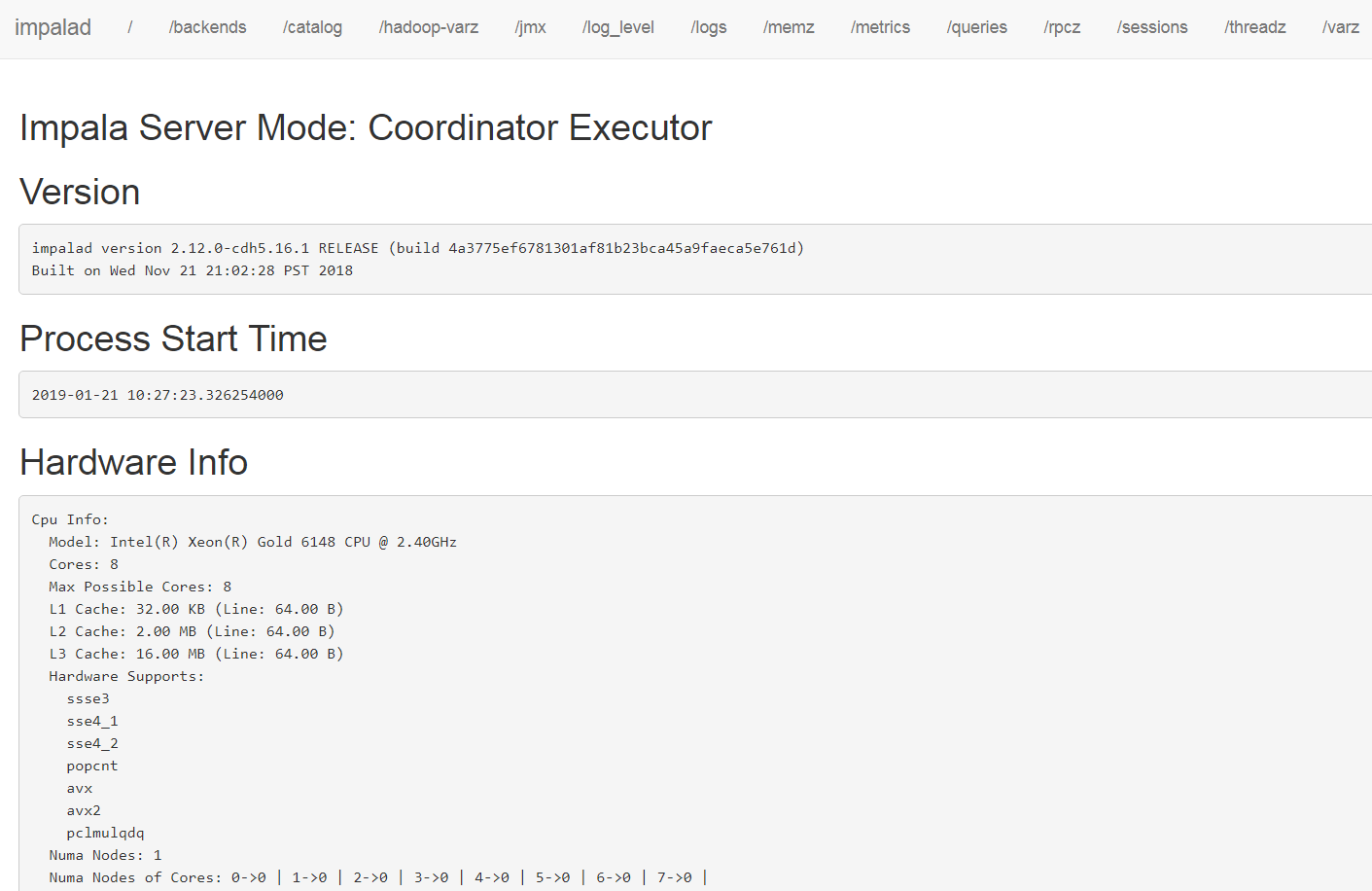
impala server页面
三 使用
impala-server有两个端口
port:21000, for impala-shell and ODBC driver 1.2.
port:21050, for JDBC and for ODBC driver 2.
1 impala-shell
使用impala-shell
$ impala-shell -i $impala_server:21000
Starting Impala Shell without Kerberos authentication
Connected to $impala_server:21000
Server version: impalad version 2.12.0-cdh5.16.1 RELEASE (build 4a3775ef6781301af81b23bca45a9faeca5e761d)
***********************************************************************************
Welcome to the Impala shell.
(Impala Shell v2.12.0-cdh5.16.1 (4a3775e) built on Wed Nov 21 21:02:28 PST 2018)When you set a query option it lasts for the duration of the Impala shell session.
***********************************************************************************
[$impala_server:21000] >
连接成功之后像hive一样使用;
2 beeline(jdbc)
需要先下载impala driver
下载
# wget https://downloads.cloudera.com/connectors/impala_jdbc_2.6.4.1005.zip
# unzip impala_jdbc_2.6.4.1005.zip
# cd ClouderaImpalaJDBC-2.6.4.1005
# unzip ClouderaImpalaJDBC4-2.6.4.1005.zip
beeline连接
1
# beeline -u jdbc:hive2://$impala_server:21050
2
# export HIVE_AUX_JARS_PATH=/path/to/ClouderaImpalaJDBC-2.6.4.1005/ImpalaJDBC4.jar
# beeline -d com.cloudera.impala.jdbc4.Driver -u jdbc:impala://$impala_server:21050
Connecting to jdbc:impala://$impala_server:21050
Connected to: Impala (version 2.12.0-cdh5.16.1)
Driver: ImpalaJDBC (version 02.06.04.1005)
Error: [Cloudera][JDBC](11975) Unsupported transaction isolation level: 4. (state=HY000,code=11975)
Beeline version 3.1.0.3.1.0.0-78 by Apache Hive
0: jdbc:impala://$impala_server:21050> show databases;
注意这里有个Error但是不影响使用;
查询sql之后,通过summary查看刚才的查询统计
[localhost:21000] > summary;
+--------------+--------+----------+----------+---------+------------+----------+---------------+---------------+
| Operator | #Hosts | Avg Time | Max Time | #Rows | Est. #Rows | Peak Mem | Est. Peak Mem | Detail |
+--------------+--------+----------+----------+---------+------------+----------+---------------+---------------+
| 06:AGGREGATE | 1 | 230.00ms | 230.00ms | 1 | 1 | 16.00 KB | -1 B | FINALIZE |
| 05:EXCHANGE | 1 | 43.44us | 43.44us | 1 | 1 | 0 B | -1 B | UNPARTITIONED |
| 02:AGGREGATE | 1 | 227.14ms | 227.14ms | 1 | 1 | 12.00 KB | 10.00 MB | |
| 04:AGGREGATE | 1 | 126.27ms | 126.27ms | 150.00K | 150.00K | 15.17 MB | 10.00 MB | |
| 03:EXCHANGE | 1 | 44.07ms | 44.07ms | 150.00K | 150.00K | 0 B | 0 B | HASH(c_name) |
| 01:AGGREGATE | 1 | 361.94ms | 361.94ms | 150.00K | 150.00K | 23.04 MB | 10.00 MB | |
| 00:SCAN HDFS | 1 | 43.64ms | 43.64ms | 150.00K | 150.00K | 24.19 MB | 64.00 MB | tpch.customer |
+--------------+--------+----------+----------+---------+------------+----------+---------------+---------------+
通过profile查看详细的查询过程
[localhost:21000] > profile;
强制刷新一个表元数据
> REFRESH [db_name.]table_name [PARTITION (key_col1=val1 [, key_col2=val2...])]
强制刷新所有元数据
> invalidate metadata
参考:
Impala: A Modern, Open-Source SQL Engine for Hadoop:http://cidrdb.org/cidr2015/Papers/CIDR15_Paper28.pdf
Apache Impala Guide:http://impala.apache.org/docs/build/impala-2.12.pdf
【原创】大数据基础之Impala(1)简介、安装、使用的更多相关文章
- 【原创】大数据基础之Impala(2)实现细节
一 架构 Impala is a massively-parallel query execution engine, which runs on hundreds of machines in ex ...
- 【原创】大数据基础之Impala(3)部分调优
1)将coordinator和executor角色分离 By default, each host in the cluster that runs the impalad daemon can ac ...
- 大数据基础环境--jdk1.8环境安装部署
1.环境说明 1.1.机器配置说明 本次集群环境为三台linux系统机器,具体信息如下: 主机名称 IP地址 操作系统 hadoop1 10.0.0.20 CentOS Linux release 7 ...
- 【原创】大数据基础之Zookeeper(2)源代码解析
核心枚举 public enum ServerState { LOOKING, FOLLOWING, LEADING, OBSERVING; } zookeeper服务器状态:刚启动LOOKING,f ...
- CentOS6安装各种大数据软件 第八章:Hive安装和配置
相关文章链接 CentOS6安装各种大数据软件 第一章:各个软件版本介绍 CentOS6安装各种大数据软件 第二章:Linux各个软件启动命令 CentOS6安装各种大数据软件 第三章:Linux基础 ...
- 大数据应用日志采集之Scribe 安装配置指南
大数据应用日志采集之Scribe 安装配置指南 大数据应用日志采集之Scribe 安装配置指南 1.概述 Scribe是Facebook开源的日志收集系统,在Facebook内部已经得到大量的应用.它 ...
- 【原创】大数据基础之Benchmark(2)TPC-DS
tpc 官方:http://www.tpc.org/ 一 简介 The TPC is a non-profit corporation founded to define transaction pr ...
- 【原创】大数据基础之词频统计Word Count
对文件进行词频统计,是一个大数据领域的hello word级别的应用,来看下实现有多简单: 1 Linux单机处理 egrep -o "\b[[:alpha:]]+\b" test ...
- 大数据基础知识:分布式计算、服务器集群[zz]
大数据中的数据量非常巨大,达到了PB级别.而且这庞大的数据之中,不仅仅包括结构化数据(如数字.符号等数据),还包括非结构化数据(如文本.图像.声音.视频等数据).这使得大数据的存储,管理和处理很难利用 ...
随机推荐
- Spring Boot JPA Entity Jackson序列化触发懒加载的解决方案
Spring Jpa这项技术在Spring 开发中经常用到. 今天在做项目用到了Entity的关联懒加载,但是在返回Json的时候,不管关联数据有没有被加载,都会触发数据序列化,而如果关联关系没有被加 ...
- HIT创业感言:只有长寿的企业才有持续价值
导语:本文将讨论医疗信息化行业中的创业和企业经营问题.笔者创立的南京都昌科技有限公司专做电子病历编辑器控件,已经有3年多,期间辛苦多年,但因为医疗信息化行业的整体发展良好,也能有所成就了,不过革命尚未 ...
- hadoop用户写入文件权限不够的问题
问题: 普通用户echo写入文件,提示权限不够. 解决方式: sudo tee test.txt <<< "要插入内容"
- Announcing Microsoft Research Open Data – Datasets by Microsoft Research now available in the cloud
The Microsoft Research Outreach team has worked extensively with the external research community to ...
- Asp.Net core 视图组件ViewComponent
视图组件 ViewComponent 最近用了一下视图组件,还挺方便的,如果遇到公共的部分,可以抽出来,写成视图组件,方便调用 先上图看一下效果:比如首页的4个画红框的地方是4个模块,有些地方可能要重 ...
- UVA 10118 Free Candies
https://vjudge.net/problem/UVA-10118 题目 桌上有4堆糖果,每堆有$N$($N\leqslant 40$)颗.有个熊孩子拿了个可以装5颗糖的篮子,开始玩无聊的装糖游 ...
- vue1.0+vue2.0实现选项卡
通常我们写tab选项卡的时候,一般都是用jq等去操作dom,给同级元素移除active类,然后,给被点击元素添加active类,用vue实现也是同样的原理,都是操作active类. 我们都知道用vue ...
- 使用Sublime Text 3进行Markdown编辑+实时预览
使用Sublime Text 3进行Markdown编辑+实时预览 安装软件包管理器 打开Sublime Text 3 同时按下 ctrl+` ,窗口底部出现一个小控制台 复制以下代码,粘贴到控制台的 ...
- 看毛片就能AC算法
KMP && ACA KMP: 吼哇! 反正网上教程满天飞,我就不写了. 发个自己写的模板 /** freopen("in.in", "r", ...
- python中logger模块的应用
logger模块是python内置的一个模块,主要用于输出运行日志,可以输出日志的等级,日志的保存路径等 具体详见博客https://www.cnblogs.com/qianyuliang/p/723 ...