
SoapUI 学习总结-02 断言
一 断言
测试指定的restful api是否正常,判断它的响应值是否符合预期标准,需要用到断言知识。在soapUI里断言使用的Groovy语言。在项目中测试起来非常简单,测试过程如下。
1,准备测试数据
以下是准备的测试数据,它是一个JSON格式的数据列表。在resources节点中,它包含3个用户消息子节点。
{

   "total": ,

   "resources":    [

            {

         "username": "test03-SD",

         "created": "",

         "uuid": "8f6cae8a24ab4d0887dd5907430075e7",

         "contractNumber": ""

      },

            {

         "username": "test02",

         "created": "",

         "name": "8bbf9fded675472aa852cf1940bc8234",

         "contractNumber": ""

      },

            {

         "username": "test01",

         "created": "",

         "name": "156b396f9b354467b5d1d1a1014b2d10"

      }

   ],

   "time": "2017年06月13日 10时25分07秒",

   "pageNum":

}
2 添加断言
在HTTP Request里添加断言,如下图所示。

然后在弹出的Add Assertion窗口,选择Script项。

3 判断total属性的值
使用Script Assertion 测试JSON 格式的列表,在Script Assertion 窗口中写入如下代码:
def booksRoot = net.sf.json.JSONSerializer.toJSON(messageExchange.responseContent);

def total = booksRoot.get("total");

assert total ==
返回结果如下:
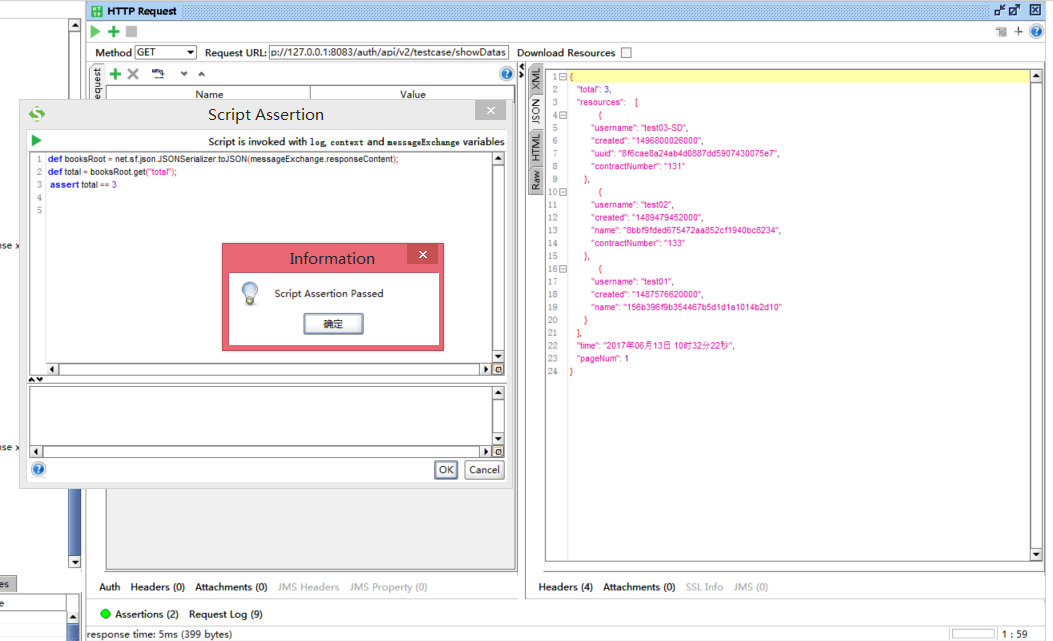
可以看到断言中total对应的值与测试值是一样的,如果故意写错,会怎么样呢?错误的断言如下:
def booksRoot = net.sf.json.JSONSerializer.toJSON(messageExchange.responseContent);

def total = booksRoot.get("total");

assert total ==
返回结果如下:
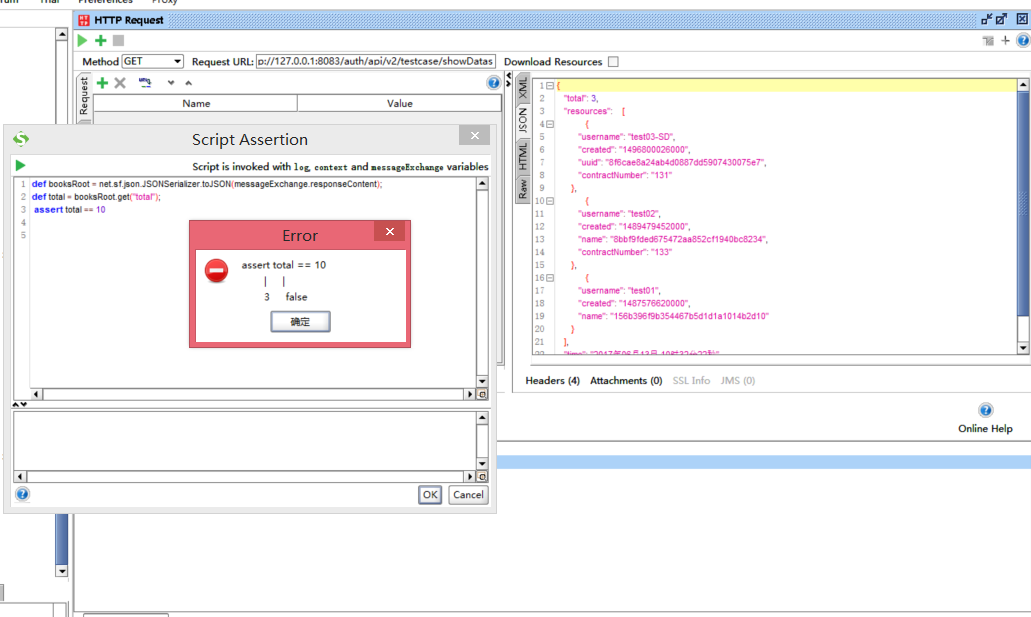
可以看到soapUI提示断言中total的判断是错误的,应该为3。
4 判断resources节点的长度
使用的断言脚本如下:
def root = net.sf.json.JSONSerializer.toJSON(messageExchange.responseContent);

def resources = root.get("resources");

assert resources.size() ==
5 判断resource第一个节点的username属性为 test03-SD
def root = net.sf.json.JSONSerializer.toJSON(messageExchange.responseContent);

def resources = root.get("resources");

assert resources[].get('username') == 'test03-SD'
二 例子
1,测试带参数的restful api
请求地址:
http://127.0.0.1:8083/auth/api/v2/user/userList?param={"user_userType":"1","startpage":"1","pagesize":"10","morgId":"e1339799-628e-11e6-9e1b-e0db55cd9154"}
请求方法: get
返回json格式数据:
[

      {

      "uuid": "053c951668a04144addc3336fc3967ad",

      "created": ,

      "username": "吉林域管理员",

      "password": null,

      "firstname": "吉林",

      "lastname": null,

      "email": "123@qq.com",

      "state": "enabled",

      "apiKey": null,

      "secretKey": null,

      "salt": "c271b448fe2bf0dacadc7680a85116bc",

      "userType": "",

      "tenantId": null,

      "sex": "",

      "location": null,

      "contractNumber": null,

      "qq": null,

      "photoPath": null,

      "incorrectLoginAttempts": ,

      "roleList": null,

      "tenantName": null,

      "morgId": "9ea8e621-628e-11e6-9e1b-e0db55cd9154",

      "morgName": "吉林分公司",

      "userMorgUuid": null,

      "uorgName": null,

      "uorgPath": null,

      "projectName": null,

      "morgPath": "//吉林分公司",

      "roleUuid": null,

      "userIds": null

   },

      {

      "uuid": "088d6cf6a9c345b2b7191fe9a8366fcb",

      "created": ,

      "username": "湖北域管理员2345",

      "password": null,

      "firstname": "",

      "lastname": null,

      "email": "1@1.cn",

      "state": "enabled",

      "apiKey": null,

      "secretKey": null,

      "salt": "a41cd19102835984efba2f03af18b619",

      "userType": "",

      "tenantId": null,

      "sex": "",

      "location": null,

      "contractNumber": null,

      "qq": null,

      "photoPath": null,

      "incorrectLoginAttempts": ,

      "roleList": null,

      "tenantName": null,

      "morgId": "9ebbe3c1-628e-11e6-9e1b-e0db55cd9154",

      "morgName": "湖北分公司",

      "userMorgUuid": null,

      "uorgName": null,

      "uorgPath": null,

      "projectName": null,

      "morgPath": "//湖北分公司",

      "roleUuid": null,

      "userIds": null

   }

]
soapUI中Http Requst配置,添加请求参数。
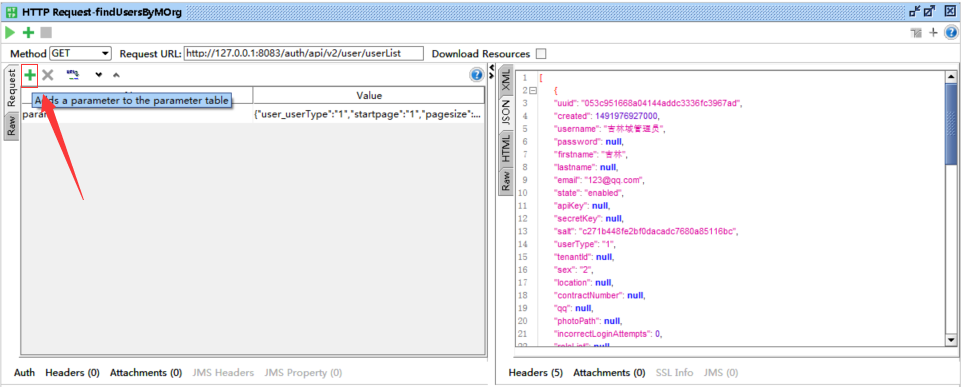
测试断言:
def root = net.sf.json.JSONSerializer.toJSON(messageExchange.responseContent);
log.info( root.size() )

assert root.size() ==
2,测试带参数的restful api
请求地址:
http://127.0.0.1:8083/auth/api/v2/role/general/morg
请求方法: post
请求数据:
{

    "uuid": "f38d750764104239a395b882e2818b6d4",

    "created": ,

    "removed": null,

    "roleName": "soapui111",

    "description": "测试岗位",

    "sourceId": null,

    "roleType": "",

    "adminType": null

}
注意: 这个JSON请求数据中的uuid值必须保证每次发送请求都是唯一的,因为这个uuid代表插入数据数据的主键,必须保证是唯一的。
soapUI HttpRequest设置
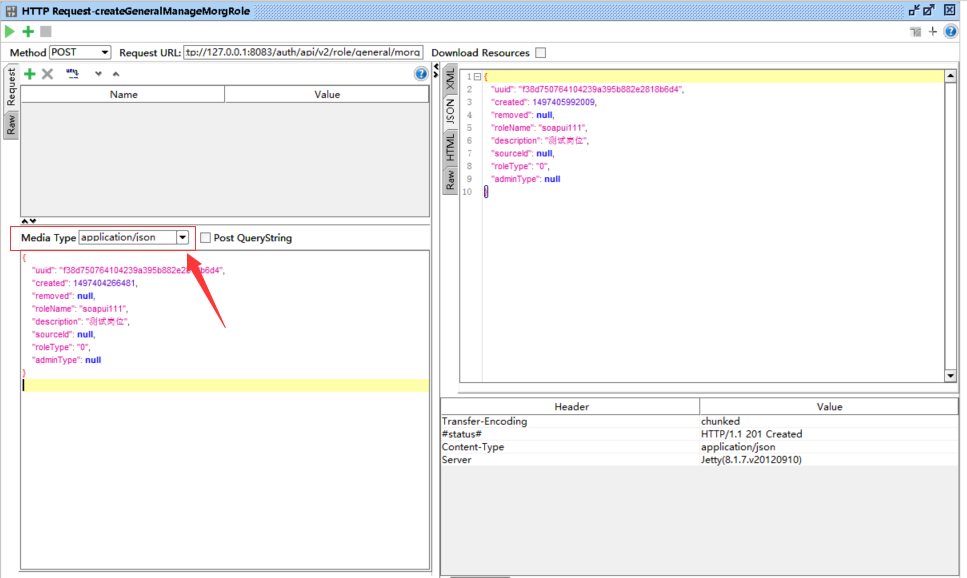
断言脚本:
httpResponseHeader = messageExchange.responseHeaders

contentType = httpResponseHeader["Content-Type"]

log.info("Content-Type: => " + contentType)

assert contentType.get() == "application/json","Content Type is not an image"
log.info(  httpResponseHeader["#status#"] )
使用场景:
适用于简单的restful请求,如果多个restful请求有关联关系,比如第一个restful请求测试添加一条数据记录,返回值有uuid,第二个restful测试删除依赖这个uuid,做删除数据测试。在这种复杂场景下,就不适用于soapUI 了。
参考资料:
https://www.soapui.org/functional-testing/validating-messages/using-script-assertions.html
https://wenku.baidu.com/view/40b3598e680203d8ce2f245e.html
http://blog.csdn.net/liuchangxin1982/article/details/50561104
SoapUI 学习总结-02 断言的更多相关文章
- soapUI学习文档(转载)
soapUI 学习文档不是前言的前言记得一个搞开发的同事突然跑来叫能不能做个WebService 性能测试,当时我就凌乱了,不淡定啊,因为我是做测试的,以前连WebService 是什么不知道,毕竟咱 ...
- 软件测试之loadrunner学习笔记-02集合点
loadrunner学习笔记-02集合点 集合点函数可以帮助我们生成有效可控的并发操作.虽然在Controller中多用户负载的Vuser是一起开始运行脚本的,但是由于计算机的串行处理机制,脚本的运行 ...
- 机器学习实战(Machine Learning in Action)学习笔记————02.k-邻近算法(KNN)
机器学习实战(Machine Learning in Action)学习笔记————02.k-邻近算法(KNN) 关键字:邻近算法(kNN: k Nearest Neighbors).python.源 ...
- OpenCV 学习笔记 02 使用opencv处理图像
1 不同色彩空间的转换 opencv 中有数百种关于不同色彩空间的转换方法,但常用的有三种色彩空间:灰度.BRG.HSV(Hue-Saturation-Value) 灰度 - 灰度色彩空间是通过去除彩 ...
- [eShopOnContainers 学习系列] - 02 - vs 2017 开发环境配置
[eShopOnContainers 学习系列] - 02 - vs 2017 开发环境配置 https://github.com/dotnet-architecture/eShopOnContain ...
- SaToken学习笔记-02
SaToken学习笔记-02 如果排版有问题,请点击:传送门 常用的登录有关的方法 - StpUtil.logout() 作用为:当前会话注销登录 调用此方法,其实做了哪些操作呢,我们来一起看一下源码 ...
- 一起学习PHP中断言函数的使用
原来一直以为断言相关的函数是 PHPUnit 这些单元测试组件提供的,在阅读手册后才发现,这个 assert() 断言函数是 PHP 本身就自带的一个函数.也就是说,我们在代码中进行简单的测试的时候是 ...
- Redis:学习笔记-02
Redis:学习笔记-02 该部分内容,参考了 bilibili 上讲解 Redis 中,观看数最多的课程 Redis最新超详细版教程通俗易懂,来自 UP主 遇见狂神说 4. 事物 Redis 事务本 ...
- soapUI学习笔记---断言的小使用
转自:http://www.cnblogs.com/duimianyoushan/p/4274791.html 以下示例在soapUI 4.5中进行.刚开始学soapUI的使用,记录下以免忘记 1.创 ...
随机推荐
- 聊聊 scala 的模式匹配
一. scala 模式匹配(pattern matching) pattern matching 可以说是 scala 中十分强大的一个语言特性,当然这不是 scala 独有的,但这不妨碍它成为 sc ...
- DSAPI多功能组件编程应用-网络相关(上)
[DSAPI.DLL下载地址] DSAPI多功能组件编程应用-网络相关,网络相关编程有很多很多,这里讲解一下封装在DSAPI中的网络相关的功能,这些都是本人简化到极点的功能了,可以在软件开发过程中节 ...
- 微信公众号页面的web页面键盘弹起问题
今天开发的过程中,遇到了一个小问题,是这样的, UI的设计稿中有个底部的按钮是相对于屏幕定位的,但是这个页面还有一个输入框:具体情况请看下图: 这就造成了当我们输入框获取焦点的时候,键盘弹起,下面的 ...
- vue生成二维码插件qrcodejs2
1.页面 <div id="qrCode" ref="qrCodeDiv"></div> 2.导入插件 import QRCode fr ...
- 把vux中的@font-face为base64格式的字体信息解码成可用的字体文件
在最近移动端项目中用到了vux,感觉用着还习惯,当把vux使用到PC端的时候出现了IE浏览器出现,这样的错误信息: CSS3114: @font-face 未能完成 OpenType 嵌入权限检查.权 ...
- Dynamics 365新功能:可编辑的网格(行内编辑)
关注本人微信和易信公众号: 微软动态CRM专家罗勇 ,回复238或者20161127可方便获取本文,同时可以在第一间得到我发布的最新的博文信息,follow me!我的网站是 www.luoyong. ...
- javaweb登陆过滤器实现
在web.xml中配置登陆过滤器: <!-- 配置登陆过滤器 --> <filter> <filter-name>loginFilter</filter-na ...
- Vysor破解助手for Linux and macOS
<Vysor Pro破解助手>提供了Windows下的Vysor破解工具,为了使用Linux及macOS同学的方便,最近整理了Linux及macOS版的Vysor破解助手. Linux版V ...
- PowerDesigner 使用教程(很具体,很实用)
原文地址为:PowerDesigner 使用教程(很具体,很实用) 1.PowerDesigner 使用教程 从今日开始,每天一部分内容,在每个工作日,争取让大家天天都有的看,每天内容不会太多. 有错 ...
- ASP.NET Zero--前端应用程序
前端应用程序 ASP.NET Zero包含可以作为您的公共网站或应用程序着陆页的起点的前端页面.首次运行项目时,您会看到主页如下所示: 这里有两页:主页和关于.这些页面的内容只是占位符和演示目的.您可 ...