
Android AVD启动报错:emulator: ERROR: x86_64 emulation currently requires hardware acceleration! Please ensure Intel HAXM is properly installed and usable.
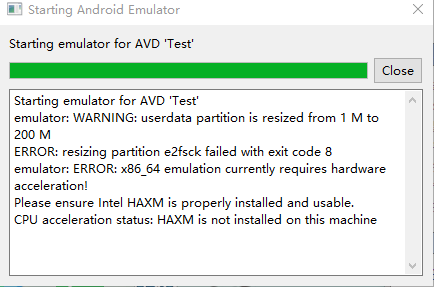
打开Android SDK manager查看安装发现HAXM在windows上无法安装
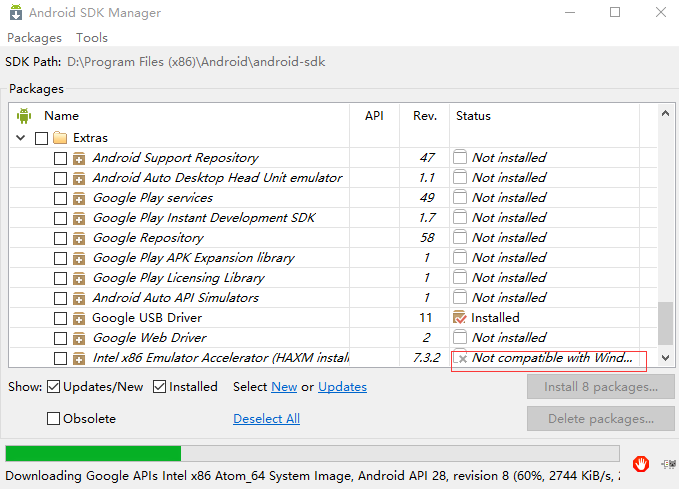
可以去 http://www.androiddevtools.cn/index.html 下载 Android SDK Extras , 然后解压 Hardware_Accelerated_Execution_Manager 到 android-sdk-windows\extras\intel 目录,再手动点击 intelhaxm-android.exe 安装。 注意这里如果安装android sdk版本为9.0暂时没有对应版本的extras包,
会报错版本需要更新: HAXM must be updated (version 1.1.1 < 6.0.1).这里可以下载intelHaxm6.0.1-windows版本:
链接:https://pan.baidu.com/s/1qindKuLqDs73nhpKCn3m2Q
提取码:nvy1
另外硬件支持方面,这里还会报错:
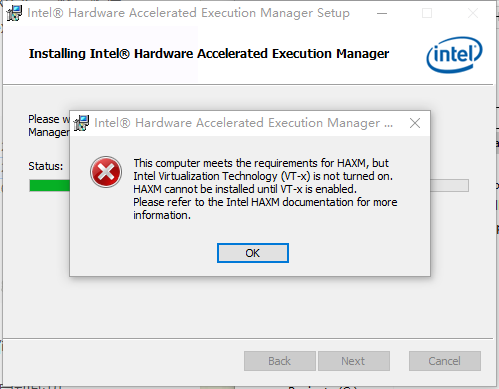
显示错误“Intel virtualization technology (vt,vt-x) is not enabled”,则进入BIOS将“Hardware Virtualization”打开。
重启Android Studio然后重新启动AVD即可。
这时又出现报错:emulator window was out of view and was recentered VCPU shutdown request
或者VCPU shutdown request
解决办法:
1.新建一个虚拟机,点击START,勾选Wipe user data(清除数据)。
2.下载HMAX_6.0.5解压后放到...\android-sdk\extras\intel\Hardware_Accelerated_Execution_Manager(先要将这个文件夹清空再考进来)重新安装HMAX
链接: https://pan.baidu.com/s/1vsHFHxXTSjqsMd5KA1g63Q
提取码: rspy

解决办法如下:
Android AVD启动报错:emulator: ERROR: x86_64 emulation currently requires hardware acceleration! Please ensure Intel HAXM is properly installed and usable.的更多相关文章
- emulator: ERROR: x86 emulation currently requires hardware acceleration!Please ensure Intel HAXM is properly installed and usable.CPU acceleration status: HAX kernel module is not installed!
Android Studio 1.0 已经放出来了,以后的Android平台开发激昂逐步从Eclipse向Android Studio迁移,为了能不落伍我也特意从Google下载了Android St ...
- 启动安卓模拟器报错 emulator: ERROR: x86_64 emulation currently requires hardware acceleration! CPU acceleration status:HAXM must be updated(version 1.1.1<6.0.1) 解决办法
启动安卓模拟器报错 emulator: ERROR: x86_64 emulation currently requires hardware acceleration! CPU accelerat ...
- Android studio 中,遇到报错:ERROR: x86_64 emulation currently requires hardware acceleration! CPU acceleration status:HAXM must be updated(version 1.1.1<6.0.1)的解决方法
在 Android SDK 的安装目录下找到intelhaxm-android.exe安装即可.忘记目录位置直接在“计算机”中搜索,如果没有,返回Android studio 的“设置”,找到 这个图 ...
- emulator: ERROR: x86 emulation currently requires hardware acceleration!
emulator: ERROR: x86 emulation currently requires hardware acceleration!Please ensure Intel is prop ...
- android ------ Emulator: error: x86 emulation currently requires hardware acceleration
我创建 Android 模拟器,运行项目时出现了一个这样的错误: 如下: emulator ERROR:x86 emulation currently requires hardware accele ...
- 运行android模拟器,emulator: ERROR: x86 emulation currently requires hardware acceleration!
运行android模拟器,emulator: ERROR: x86 emulation currently requires hardware acceleration! 问题: 运行android模 ...
- Android Studio ERROR: x86 emulation currently requires hardware acceleration!报错解决傻瓜教程~
很早之前就碰到过Android Studio模拟器无法启动的问题,今天终于尝试去解决了下,下面将我解决的方法记录下. 模拟器报错信息为: emulator: ERROR: x86 emulation ...
- andriod studio报错 Emulator: emulator: ERROR: x86 emulation currently requires hardware acceleration! Emulator: Process finished with exit code 1
安装即可,再次运行svd,成功
- Android Studio3.1.2运行模拟器出错Emulator:emulator:ERROR:x86 emulation currently requires hardware acceleration!
出错截图如下所示: 解决方法: 由于我是已经解决了这个问题,安装了Intel x86 Emulator Accelerator,所以显示后面显示的是 Installed,如果报错和我贴的图一样,就可以 ...
随机推荐
- kali的网络服务
1.启动Apache: service apache2 start 关闭: service apache2 stop 将Apache2服务添加到自动启动的程序组里: update-rc.d apach ...
- Kafka Frequently Asked Questions
This is intended to be an easy to understand FAQ on the topic of Kafka. One part is for beginners, o ...
- Clion快捷键
快捷键配置 File->Setting->Keymap->Keymaps 选择Visual Studio风格 代码提示的匹配模式 File->Setting->Edito ...
- pytorch中文文档-torch.nn常用函数-待添加-明天继续
https://pytorch.org/docs/stable/nn.html 1)卷积层 class torch.nn.Conv2d(in_channels, out_channels, kerne ...
- 华为笔记HOSTS,便于访问云端存储
# Copyright (c) - Microsoft Corp. # # This is a sample HOSTS file used by Microsoft TCP/IP for Windo ...
- Selenium 4即将发布:每个QA都应该知道的
阅读原文 Simon Stewart(Selenium的创始成员)在班加罗尔的Selenium大会议上正式确认了Selenium4.0的发布日期和一些主要更新.我们先来提前了解一下Selenium 4 ...
- 关于使用tradingview插件的一些心得
1.禁用自带的一些功能 disabled_features: [ // 开启图表功能的字符串文字 允许将用户设置保存到本地存储 'header_symbol_search', // 头部搜索 &quo ...
- linux-----docker
docker简介 Docker时Docker.Lnc公司开源的一个基于LXC技术之上搭建的Container容器引擎,源代码托管在Github上,基于Go语言并遵从Apache2.0协议开源. Doc ...
- js数组中随机选取一个数值!!
var arr = ["太阳光大","成功是优点的发挥","不要小看自己", "口说好话","手心向下是助人& ...
- Debian社区群龙无首
导读 前两天有过消息 Debian 包维护者 Michael Stapelberg 因对 Debian 社区的现状不满而宣布退出 Debian 的维护,该消息引发了人们对于 Debian 的担忧.11 ...