
mysql主从不同步处理过程分享
背景 8月7日15:58收到报障数据库出现不同步:数据库共四台,分别为10.255.70.11,10.255.70.12,10.255.70.13,10.255.70.14(ip为虚拟ip)
数据库结构为:
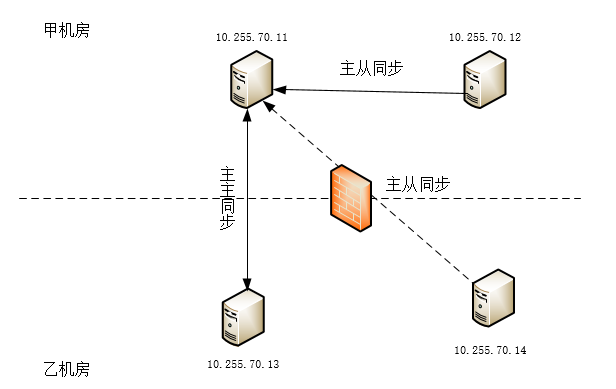
故障时不同步现为:(1)70.11和70.13之间主主不同步 ,(2)70.11和70.12之间主从不同步,(3)70.11和70.14之间主从是同步的
(1)由于my.cnf文件中有slave-skip-errors=all配置,所以在出现不同步错误时跳过,检查同步参数Slave_IO_Running: Yes/Slave_SQL_Running: Yes均为yes,实际数据是不同步的
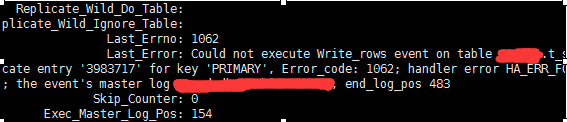
(2)70.11和70.12之间不同步,同步参数为Slave_IO_Running: NO/Slave_SQL_Running: Yes,报错1062,截图如下:
在70.12上操作如下:
mysql>stop slave ;

mysql>SET GLOBAL SQL_SLAVE_SKIP_COUNTER =

mysql>slave start
查看数据同步参数:发现已经同步

至此70.11和70.12的主从不同步问题已经解决,需要注意的是:跳过1062这个事务之后,虽然以后主从数据库是同步的,但是不同步期间的数据将不再重新同步,即:不同步期间从库的数据不完整
现在只存在70.11和70.13之间的主主数据库不同步,在此期间发现70.11的库db1数据丢失了,因为70.11和70.12,70.14的数据是同步的,所以这三个库全部数据丢失
解决办法思路如下:
(1)先将现有业务切至70.13上,将危害减少到最小
(2)首先恢复70.11的数据:查看数据库最近一次备份是当天凌晨3点半,3点半到下午15:58的数据通过binlog日志进行恢复
(3)备份70.11的数据,导入70.12/13/14的数据库,并作主主/主从同步
具体操作:
恢复8月7日凌晨3点半之前的数据:
[root@]# gunzip db1_20190807.sql.gz

[root@]# mysql -h 10.255.70.11 -uroot -p

Enter password:

Welcome to the MySQL monitor.  Commands end with ; or \g.

Your MySQL connection id is

Server version: 5.7.-log MySQL Community Server (GPL)

Copyright (c) , , Oracle and/or its affiliates. All rights reserved.

Oracle is a registered trademark of Oracle Corporation and/or its

affiliates. Other names may be trademarks of their respective

owners.

Type 'help;' or '\h' for help. Type '\c' to clear the current input statement.
mysql> show databases;
+--------------------+
| Database |
+--------------------+
| information_schema |
| mysql |
|db1 |
+--------------------+
11 rows in set (0.00 sec)
mysql> use db1;
Reading table information for completion of table and column names
You can turn off this feature to get a quicker startup with -A
Database changed, 1 warning
mysql> source db1.sql.gz;
通过binlog日志恢复凌晨3:30~~16:30之间的数据:
(1)将时间段内的binlog日志转化为mysql可识别的语句
[root@]# mysqlbinlog  --no-defaults  --database=db1 --start-datetime='2019-08-07 03:30:00' --stop-datetime='2019-08-17 16:30:00' mysql-bin. >temp20190807.sql

[root@]# ll temp20190807.sql

-rw-r--r--  root root  8月    : temp20190807.sql
(2)删除binlog日志中的drop语句
[root@]# sed -i -e '/DROP/d' temp20190807.sql
(3)数据恢复
[root@]# mysql -h 10.255.70.11 -uroot -p

Enter password:

Welcome to the MySQL monitor.  Commands end with ; or \g.

Your MySQL connection id is

Server version: 5.7.-log MySQL Community Server (GPL)

Copyright (c) , , Oracle and/or its affiliates. All rights reserved.

Oracle is a registered trademark of Oracle Corporation and/or its

affiliates. Other names may be trademarks of their respective

owners.

Type 'help;' or '\h' for help. Type '\c' to clear the current input statement.

mysql> show databases;

+--------------------+

| Database |

+--------------------+

| information_schema |

| mysql |

| db1 |

+--------------------+

 rows in set (0.00 sec)

mysql> use db1;

Reading table information for completion of table and column names

You can turn off this feature to get a quicker startup with -A

Database changed,  warning

mysql> source temp20190807.sql;
至此:70.11的数据恢复完全
接下来进行70.12和13,14的数据同步:
(1)备份70.11的数据库
[root@ ~]# mysqldump -h 10.255.70.11 -uroot -p -R ottdb1 | gzip > /tmp/db120190807.sql.gz
(2)将70.11的备份数据copy给70.12/13/14
[root@ tmp]# scp db120190807.sql.gz 10.255.70.12:/tmp/

The authenticity of host '10.255.70.12 (10.255.70.12)' can't be established.

RSA key fingerprint is aa:::d3:aa:a8:af:a3:a9:c9:6e::6b::7f:b3.

Are you sure you want to continue connecting (yes/no)? yes

Warning: Permanently added '10.255.70.12' (RSA) to the list of known hosts.

root@10.255.70.12's password:

ottdb120190807.sql.gz

[root@ tmp]# scp db120190807.sql.gz 10.255.70.13:/tmp/

The authenticity of host '10.255.70.13 (10.255.70.13)' can't be established.

RSA key fingerprint is aa:::d3:aa:a8:af:a3:a9:c9:6e::6b::7f:b3.

Are you sure you want to continue connecting (yes/no)? yes

Warning: Permanently added '10.255.70.13' (RSA) to the list of known hosts.

root@10.255.70.13's password:

ottdb120190807.sql.gz

[root@ tmp]# scp db120190807.sql.gz 10.255.70.14:/tmp/

The authenticity of host '10.255.70.14 (10.255.70.14)' can't be established.

RSA key fingerprint is aa:::d3:aa:a8:af:a3:a9:c9:6e::6b::7f:b3.

Are you sure you want to continue connecting (yes/no)? yes

Warning: Permanently added '10.255.70.14' (RSA) to the list of known hosts.

root@10.255.70.14's password:

ottdb120190807.sql.gz
(3)恢复70.12/13/14数据,以70.12为例,13和14也进行如下操作:
[root@]# mysql -h 10.255.70.12 -uroot -p

Enter password:

Welcome to the MySQL monitor.  Commands end with ; or \g.

Your MySQL connection id is

Server version: 5.7.-log MySQL Community Server (GPL)

Copyright (c) , , Oracle and/or its affiliates. All rights reserved.

Oracle is a registered trademark of Oracle Corporation and/or its

affiliates. Other names may be trademarks of their respective

owners.

Type 'help;' or '\h' for help. Type '\c' to clear the current input statement.

mysql> show databases;

+--------------------+

| Database |

+--------------------+

| information_schema |

| mysql |

| db1 |

+--------------------+

 rows in set (0.00 sec)

mysql> use db1;

Reading table information for completion of table and column names

You can turn off this feature to get a quicker startup with -A

Database changed,  warning

mysql> source db120180807.sql;
(4)记录70.11和70.13的file和position
[root@]# mysql -h 10.255.70.11 -uroot -p

Enter password:

Welcome to the MySQL monitor.  Commands end with ; or \g.

Your MySQL connection id is

Server version: 5.7.-log MySQL Community Server (GPL)

Copyright (c) , , Oracle and/or its affiliates. All rights reserved.

Oracle is a registered trademark of Oracle Corporation and/or its

affiliates. Other names may be trademarks of their respective

owners.

Type 'help;' or '\h' for help. Type '\c' to clear the current input statement.

mysql> show master status;

+------------------------+-----------+--------------+------------------+-------------------+

| File                   | Position  | Binlog_Do_DB | Binlog_Ignore_DB | Executed_Gtid_Set |

+------------------------+-----------+--------------+------------------+-------------------+

| mysql-bin.          |    db1       | mysql            |                   |

+------------------------+-----------+--------------+------------------+-------------------+

 row in set (0.00 sec)

mysql>

[root@]# mysql -h 10.255.70.13 -uroot -p

Enter password:

Welcome to the MySQL monitor.  Commands end with ; or \g.

Your MySQL connection id is

Server version: 5.7.-log MySQL Community Server (GPL)

Copyright (c) , , Oracle and/or its affiliates. All rights reserved.

Oracle is a registered trademark of Oracle Corporation and/or its

affiliates. Other names may be trademarks of their respective

owners.

Type 'help;' or '\h' for help. Type '\c' to clear the current input statement.

mysql> show master status;

+------------------------+-----------+--------------+------------------+-------------------+

| File                   | Position  | Binlog_Do_DB | Binlog_Ignore_DB | Executed_Gtid_Set |

+------------------------+-----------+--------------+------------------+-------------------+

| mysql-bin.          |    db1       | mysql            |                   |

+------------------------+-----------+--------------+------------------+-------------------+

 row in set (0.00 sec)

mysql>
(5)实现70.11和70.13之间的主主同步,具体步骤如下:
在70.11上执行:
mysql> change master to master_host='10.255.70.13',master_user='root',master_password='123456',master_log_file='mysql-bin.000055',master_log_pos=622032567;
在70.13上执行:
mysql> change master to master_host='10.255.70.11',master_user='root',master_password='',master_log_file='mysql-bin.000048',master_log_pos=;
数据库同步完成,查看数据库同步情况
[root@]# mysql -h 10.255.70.11 -uroot -p

Enter password:

Welcome to the MySQL monitor.  Commands end with ; or \g.

Your MySQL connection id is

Server version: 5.7.-log MySQL Community Server (GPL)

Copyright (c) , , Oracle and/or its affiliates. All rights reserved.

Oracle is a registered trademark of Oracle Corporation and/or its

affiliates. Other names may be trademarks of their respective

owners.

Type 'help;' or '\h' for help. Type '\c' to clear the current input statement.

mysql> show slave status\G;

*************************** . row ***************************

               Slave_IO_State: Waiting for master to send event

                  Master_Host: 10.255.70.13

                  Master_User: root

                  Master_Port:

                Connect_Retry:

              Master_Log_File: mysql-bin.

          Read_Master_Log_Pos:

               Relay_Log_File: mysq-relay-bin.

                Relay_Log_Pos:

        Relay_Master_Log_File: mysql-bin.

             Slave_IO_Running: Yes

            Slave_SQL_Running: Yes

              Replicate_Do_DB: db1

          Replicate_Ignore_DB: mysql
接下来进行70.11和70.12和14的主从同步:
在70.12和70.14上执行:
mysql> change master to master_host='10.255.70.11',master_user='root',master_password='',master_log_file='mysql-bin.000048',master_log_pos=;
查看数据库同步情况:
[root@]# mysql -h 10.255.70.12 -uroot -p

Enter password:

Welcome to the MySQL monitor.  Commands end with ; or \g.

Your MySQL connection id is

Server version: 5.7.-log MySQL Community Server (GPL)

Copyright (c) , , Oracle and/or its affiliates. All rights reserved.

Oracle is a registered trademark of Oracle Corporation and/or its

affiliates. Other names may be trademarks of their respective

owners.

Type 'help;' or '\h' for help. Type '\c' to clear the current input statement.

mysql> show slave status\G;

*************************** . row ***************************

               Slave_IO_State: Waiting for master to send event

                  Master_Host: 10.255.70.11

                  Master_User: root

                  Master_Port:

                Connect_Retry:

              Master_Log_File: mysql-bin.

          Read_Master_Log_Pos:

               Relay_Log_File: mysq-relay-bin.

                Relay_Log_Pos:

        Relay_Master_Log_File: mysql-bin.

             Slave_IO_Running: Yes

            Slave_SQL_Running: Yes

              Replicate_Do_DB: db1

          Replicate_Ignore_DB: mysql
数据库恢复完成,修改业务地址到VIP地址,此次故障解决
数据同步过程中报错处理:
Last_IO_Errno: 1236
Last_IO_Error: Got fatal error 1236 from master when reading data from binary log: 'Could not find first log file name in binary log index file'
处理方式:
flush logs;
show master status;
记下File, Position
重新进行同步
Got fatal error 1236 from master when reading data from binary log
mysql主从不同步处理过程分享的更多相关文章
- MYSQL主从库同步配置过程
MYSQL主从库同步配置过程 为了实现网站数据库的异地备份,采用了MySQL数据库主从同步配置,需要两台服务器分别作为主从库,当主库发生增删改等操作,会实时反映到从库,我的个人服务器配置如下: 主库为 ...
- MySQL主从数据库同步延迟问题解决(转)
最近在做MySQL主从数据库同步测试,发现了一些问题,其中主从同步延迟问题是其中之一,下面内容是从网上找到的一些讲解,记录下来以便自己学习: MySQL的主从同步是一个很成熟的架构,优点为:①在从服务 ...
- 配置MySQL主从双向同步
原文地址:http://www.cnblogs.com/zhongshengzhen/ 原主数据库:192.168.137.33 原从数据库:192.168.137.197 需要先阅读并操作:ht ...
- Centos 配置 Mysql 主从双向同步
配置之前,请先阅读mysql主从复制: Mysql-主从复制 原: 主从环境: 主服务器:192.168.153.130 从服务器:192.168.153.131 1.从数据库创建同步用户,将主数据 ...
- MySQL主从双向同步复制
本文介绍了mysql主从,实现mysql的双向同步复制. MySQL支持单向.异步复制,复制过程中一个服务器充当主服务器,而一个或多个其它服务器充当从服务器.主服务器将更新写入二进制日志文件,并维护日 ...
- MySQL主从双向同步
最近部署测试环境,涉及到MySQL数据库主从双向同步的部署,记录一下部署过程,正常读写都发生在主库,从库作为备选数据库(热备份),当主库发生异常,数据库自动切换到从库,这里面是怎么监控数据库异常并触发 ...
- 使用Percona Toolkit解决Mysql主从不同步问题【备忘】
由于各种原因,mysql主从架构经常会出现数据不一致的情况出现,大致归结为如下几类 1:备库写数据 2:执行non-deterministic query 3:回滚掺杂事务表和非事务表的事务 4:bi ...
- mysql 主从 重新同步
mysql 主从同步一担出了问题之后,就会导致从库上的数据和主库不一样了.所以需要生新同步数据. 1.登录主库服务器,进入mysql,命令为:mysql -uroot -ppassword 2.执行: ...
- 解决mysql 主从数据库同步不一致的方法
接着上文 配置完Mysql 主从之后,在使用中可能会出现主从同步失败的情况. mysql> show slave status\G Slave_IO_Running: Yes Slave_SQL ...
随机推荐
- IO流簡單代碼
今天測試了一下,在博客園裏HTML源碼編譯器裏寫CSS内部樣式,更新編譯后,内部樣式可用,但是會將寫的内部樣式代碼强制加上代碼注釋進行編譯,有點類似于强制注入.編譯后的效果就是在前面加入了一個空的p標 ...
- Connecting to the Network
This lesson shows you how to implement a simple application that connects to the network. It explain ...
- CMinpack使用介绍
github: https://github.com/devernay/cminpack 主页: http://devernay.github.io/cminpack/ 使用手册: http://de ...
- 个人永久性免费-Excel催化剂功能第64波-多级数据如省市区联动输入,自由配置永不失效
日常使用各大系统过程中,数据录入的规范性一般做得都很不错,本来系统的存在很大范畴就是为了数据和管理的规范性.在Excel环境中,想得到规范性的数据录入,除非是自行对数据有很深的认识,知道哪些数据是脏乱 ...
- MyBatis 中 @Param 注解的四种使用场景,最后一种经常被人忽略!
有一些小伙伴觉得 MyBatis 只有方法中存在多个参数的时候,才需要添加 @Param 注解,其实这个理解是不准确的.即使 MyBatis 方法只有一个参数,也可能会用到 @Param 注解. 但是 ...
- FAIRR
FAIRR 在进行一项工作时需要注意学习.应用和改进已有信息和成果,可参考FAIRR原则: Find existing info and result, Add to and Improve it, ...
- 【git】Github上面的开源代码怎么在本地编译运行
最近才发现Github是一个好东西,可以从上面学到很多东西,不说了,赶快写完去学习去... 1.首先你可以看看这个开源项目的README.md,一般一般这里都会有项目的使用方式以及一些注意的点 2.你 ...
- 《VR入门系列教程》之8---GearVR
高端移动虚拟现实设备---三星GearVR Oculus Rift也许是虚拟现实头显的典范,但是它还是存在许多问题.首先,它需要基于一个具有强大图形计算能力的计算机,而使用一般的笔记本.苹果A ...
- 微信小程序踩坑日记2——实时访问数据库并渲染UI
0. 引言 主要讲讲对于实时访问数据库并渲染UI我的解决方法. 一开始查到了随让小程序是单线程的,但是有一个基本上是封装的worker线程,相当于可以自己自定义(类似于Android开发里的handl ...
- module中module.exports与exports的区别(转)
转https://cnodejs.org/topic/55ccace5b25bd72150842c0a require 用来加载代码,而 exports 和 module.exports 则用来导出代 ...