
d3.js 制作简单的俄罗斯方块
d3.js是一个不错的可视化框架,同时对于操作dom也是十分方便的。今天我们使用d3.js配合es6的类来制作一个童年小游戏--俄罗斯方块。话不多说先上图片。
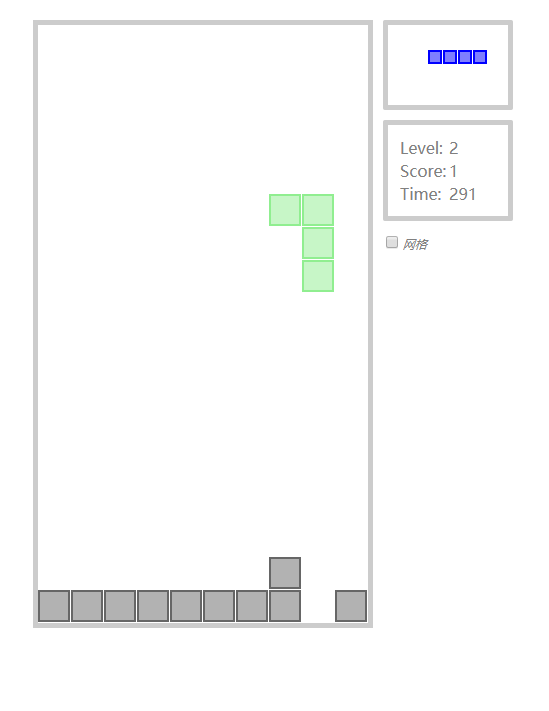
1. js tetris类
由于方法拆分的比较细所以加上了一些备注(这不是我的风格!)
const graphMap = [

    {

        name: '倒梯形',

        position: [[0,4],[1,3],[1,4],[1,5]],

        rotate: [[[0,0],[-2,0],[-1,-1],[0,-2]],[[1,0],[1,2],[0,1],[-1,0]],[[-1,0],[1,0],[0,1],[-1,2]],[[0,0],[0,-2],[1,-1],[2,0]]],

        color: '#D7DF01'

    },

    {

        name: '一字型',

        position: [[0,3],[0,4],[0,5],[0,6]],

        rotate: [[[-1,1],[0,0],[1,-1],[2,-2]],[[1,2],[0,1],[-1,0],[-2,-1]],[[2,-2],[1,-1],[0,0],[-1,1]],[[-2,-1],[-1,0],[0,1],[1,2]]],

        color: '#0000FF'

    },

    {

        name: '正方形',

        position: [[0,4],[0,5],[1,4],[1,5]],

        rotate: [[[0,0],[0,0],[0,0],[0,0]],[[0,0],[0,0],[0,0],[0,0]],[[0,0],[0,0],[0,0],[0,0]],[[0,0],[0,0],[0,0],[0,0]]],

        color: '#FF0000'

    },

    {

        name: 'Z字型',

        position: [[0,3],[0,4],[1,4],[1,5]],

        rotate: [[[0,1],[1,0],[0,-1],[1,-2]],[[1,1],[0,0],[-1,1],[-2,0]],[[1,-2],[0,-1],[1,0],[0,1]],[[-2,0],[-1,1],[0,0],[1,1]]],

        color: '#800080'

    },

    {

        name: '反Z字型',

        position: [[1,3],[1,4],[0,4],[0,5]],

        rotate: [[[-1,1],[0,0],[1,1],[2,0]],[[0,1],[-1,0],[0,-1],[-1,-2]],[[2,0],[1,1],[0,0],[-1,1]],[[-1,-2],[0,-1],[-1,0],[0,1]]],

        color: '#FFA500'

    },

    {

        name: 'L字型',

        position: [[1,3],[0,3],[0,4],[0,5]],

        rotate: [[[-1,1],[0,2],[1,1],[2,0]],[[0,1],[1,0],[0,-1],[-1,-2]],[[1,-1],[0,-2],[-1,-1],[-2,0]],[[0,-1],[-1,0],[0,1],[1,2]]],

        color: '#90EE90'

    },

    {

        name: '反L字型',

        position: [[0,3],[0,4],[0,5],[1,5]],

        rotate: [[[-1,2],[0,1],[1,0],[0,-1]],[[2,0],[1,-1],[0,-2],[-1,-1]],[[1,-2],[0,-1],[-1,0],[0,1]],[[-2,0],[-1,1],[0,2],[1,1]]],

        color: '#AEEBFF'

    }

]

class Tetris {

    constructor() {

        this._grid = [];

        this._rows = 18;

        this._cols = 10;

        this._div = 33;

        this._nextDiv = 15;

        this._duration = 1000;

        this._width = this._div * this._cols;

        this._height = this._div * this._rows;

        this._svg = null;

        this._nextSvg = null;

        this._timeout = null;

        this._time = null;

        this._showGrid = false;

        this._haveArray = [];

        this._curtArray = [];

        this._colors = '';

        this._rotateIndex = 0;

        this._rotateArray = [];

        this._fixedColor = '#666';

        this._nextNumber = 0;

        this._graphMap = graphMap;

        this._level = 1;

        this._levelLimit = [0,20,50,90,140,200,270,350,440,540,650,770,900,1040,1190,1350,1520];

        this._score = 0;

        this._timeNumber = 0;

        this.initSvg();

        this.initNextSvg();

        this.addKeyListener();

    }

    initSvg() {

        this._svg = d3.select('.svg-container')

            .append('svg')

            .attr('width', this._width)

            .attr('height', this._height)

            .attr('transform', 'translate(0, 4)')

    }

    initNextSvg() {

        this._nextSvg = d3.select('.next')

        .append('svg')

        .attr('width', 100)

        .attr('height', 60)

    }

    toggleGrid() {

        if(this._showGrid) {

            this._showGrid = false;

            d3.select('g.grid').remove();

        } else {

            this._showGrid = true;

            this._grid = this._svg.append('g')

            .attr('class', 'grid')

            this._grid.selectAll('line.row')

            .data(d3.range(this._rows))

            .enter()

            .append('line')

            .attr('class', 'row')

            .attr('x1', 0)

            .attr('y1', d => d * this._div)

            .attr('x2', this._width)

            .attr('y2', d => d * this._div)

            this._grid.selectAll('line.col')

            .data(d3.range(this._cols))

            .enter()

            .append('line')

            .attr('class', 'col')

            .attr('x1', d => d * this._div)

            .attr('y1', 0)

            .attr('x2', d => d * this._div)

            .attr('y2', this._height)

        }

    }

    addKeyListener() {

        d3.select('body').on('keydown', () => {

            switch (d3.event.keyCode) {

                case 37:

                    this.goLeft();

                break;

                case 38:

                    this.rotate();

                    break;

                case 39:

                    this.goRight();

                    break;

                case 40:

                    this.goDown();

                    break;

                case 32:

                    console.log('空格');

                    break;

                case 80:

                    console.log('暂停');

                    break;

                default:

                    break;

            }

        })

    }

    //设置运动图形 如果仍有掉落空间则继续掉落 反之调用setHaveArray

    initGraph() {

        this.renderGraph();

        this._timeout = setTimeout(() => {

            if(this.canDown()) {

                this.downArray();

                this.initGraph();

            } else {

                this.setHaveArray();

                if(!this.gameOver()) {

                    this.randomData();

                    this.nextGraphNumber();

                    this.initGraph();

                } else {

                    clearTimeout(this._time);

                    d3.select('#modal').style('top', '0px')

                }

            }

        }, this._duration * (1 - ((this._level - 1) / this._levelLimit.length) / 2))

    }

    //渲染图形

    renderGraph() {

        this._svg.selectAll('rect.active').remove();

        this._svg.selectAll('rect.active')

        .data(this._curtArray)

        .enter()

        .append('rect')

        .attr('class', 'active')

        .attr('x', d => this._div * d[1] + 1)

        .attr('y', d => this._div * d[0] + 1)

        .attr('width', this._div - 3)

        .attr('height', this._div - 3)

        .attr('stroke', this._color)

        .attr('stroke-width', 2)

        .attr('fill', this._color)

        .attr('fill-opacity', 0.5)

    }

    //设置掉落后的数组,并清除运动的图形 重置状态

    setHaveArray() {

        this._curtArray.forEach(d => this._haveArray.push(d));

        this._svg.selectAll('rect.active').attr('class', 'fixed').attr('fill', this._fixedColor).attr('fill-opacity', 0.5).attr('stroke', this._fixedColor);

        this._rotateIndex = 0;

        this.clearLines();

    }

    //检测有满列 然后消除

    clearLines() {

        let clearLinesArr = [];

        let allRowsObj = {};

        let temp = [];

        let arr = this._haveArray.map(d => d[0]);

        arr.forEach(d => {

            if(allRowsObj.hasOwnProperty(d)) {

                allRowsObj[d] ++

            } else {

                allRowsObj[d] = 1;

            }

        })

        for(var i in allRowsObj) {

            if(allRowsObj[i] == this._cols) {

                clearLinesArr.push(i)

            }

        }

        if(clearLinesArr.length != 0) {

            this.setScoreAndLevel(clearLinesArr.length);

            this._haveArray = this._haveArray.filter(a => !clearLinesArr.some(b => b == a[0]));

            this._haveArray = this._haveArray.map(d => [this.downSome(d[0],clearLinesArr), d[1]])

            this._svg.selectAll('rect.fixed').remove();

            this._svg.selectAll('rect.fixed').data(this._haveArray)

            .enter()

            .append('rect')

            .attr('class', 'fixed')

            .attr('x', d => this._div * d[1] + 1)

            .attr('y', d => this._div * d[0] + 1)

            .attr('width', this._div - 3)

            .attr('height', this._div - 3)

            .attr('stroke', this._fixedColor)

            .attr('stroke-width', 2)

            .attr('fill', this._fixedColor)

            .attr('fill-opacity', 0.5)

        }

    }

    //消除时 判断下落层数

    downSome(c, arr) {

        let num = 0;

        arr.forEach(d => {

            if(c < d) {

                num ++;

            }

        })

        return num + c;

    }

    //设置等级和分数

    setScoreAndLevel(num) {

        switch(num) {

            case 1:

                this._score = this._score + 1;

                break;

            case 2:

                this._score = this._score + 3;

                break;

            case 3:

                this._score = this._score + 6;

                break;

            case 4:

                this._score = this._score + 10;

            default:

                break;

        }

        for(var i=0; i<this._levelLimit.length; i++) {

            if(this._score <= this._levelLimit[i]) {

                this._level = i + 1;

                break;

            }

        }

        d3.select('#score').html(this._score);

        d3.select('#level').html(this._level);

    }

    //左移动

    goLeft() {

        if(this.canLeft()) {

            this.leftArray();

            this.renderGraph();

        }

    }

    //右移动

    goRight() {

        if(this.canRight()) {

            this.rightArray();

            this.renderGraph();

        }

    }

    //旋转

    rotate() {

        if(this.canRotate()) {

            this.rotateArray();

            this.renderGraph();

        }

    }

    //下移动

    goDown() {

        if(this.canDown()) {

            this.downArray();

            this.renderGraph();

        }

    }

    //下落更新数组

    downArray() {

        this._curtArray = this._curtArray.map(d => {

            return [d[0] + 1, d[1]]

        })

    }

    //左移更新数组

    leftArray() {

        this._curtArray = this._curtArray.map(d => {

            return [d[0], d[1] - 1]

        })

    }

    //右移更新数组

    rightArray() {

        this._curtArray = this._curtArray.map(d => {

            return [d[0], d[1] + 1]

        })

    }

    //旋转更新数组

    rotateArray() {

        let arr = this._rotateArray[this._rotateIndex];

        this._curtArray = this._curtArray.map((d,i) => {

            return [d[0] + arr[i][0], d[1] + arr[i][1]]

        })

        this._rotateIndex = (this._rotateIndex + 1) % 4;

    }

    //判断是否可以下落

    canDown() {

        let max = 0;

        let status = true;

        let nextArr = this._curtArray.map(d => {

            if(d[0] + 1 > max) {

                max = d[0];

            }

            return [d[0] + 1, d[1]]

        });

        nextArr.forEach(d => {

            this._haveArray.forEach(item => {

                if(item[0] == d[0] && item[1] == d[1]) {

                    status = false;

                }

            })

        })

        if(!status || max > 16) {

            return false;

        } else {

            return true;

        }

    }

    //判断是否可以左移

    canLeft() {

        let min = this._cols;

        let status = true;

        let nextArr = this._curtArray.map(d => {

            if(d[1] - 1 < min) {

                min = d[1];

            }

            return [d[0], d[1] - 1]

        })

        nextArr.forEach(d => {

            this._haveArray.forEach(item => {

                if(item[0] == d[0] && item[1] == d[1]) {

                    status = false;

                }

            })

        })

        if(!status || min <= 0) {

            return false;

        } else {

            return true;

        }

    }

    //判断是否可以右移

    canRight() {

        let max = 0;

        let status = true;

        let nextArr = this._curtArray.map(d => {

            if(d[1] + 1 > max) {

                max = d[1];

            }

            return [d[0], d[1] + 1]

        })

        nextArr.forEach(d => {

            this._haveArray.forEach(item => {

                if(item[0] == d[0] && item[1] == d[1]) {

                    status = false;

                }

            })

        })

        if(!status || max > this._cols - 2) {

            return false;

        } else {

            return true;

        }

    }

    //判断可以变形

    canRotate() {

        let max = 0;

        let min = this._cols;

        let status = true;

        let arr = this._rotateArray[this._rotateIndex];

        let nextArr = this._curtArray.map((d,i) => {

            if(d[1] + 1 > max) {

                max = d[1];

            }

            if(d[1] - 1 < min) {

                min = d[1];

            }

            return [d[0] + arr[i][0], d[1] + arr[i][1]]

        })

        if(!status || max > this._cols - 1 || min < 0) {

            return false;

        } else {

            return true;

        }

    }

    //判断游戏结束

    gameOver() {

        let status = false;

        this._haveArray.forEach(d => {

            if((d[0] == 0 && d[1] == 3) || (d[0] == 0 && d[1] == 4) || (d[0] == 0 && d[1] == 5) || (d[0] == 0 && d[1] == 6)) {

                status = true;

            }

        })

        return status;

    }

    //随机生成图形块

    randomData() {

        this._curtArray = this._graphMap[this._nextNumber].position;

        this._color = this._graphMap[this._nextNumber].color;

        this._rotateArray = this._graphMap[this._nextNumber].rotate;

    }

    //预设下一个图形展示

    nextGraphNumber() {

        let rand = [0,0,1,1,2,2,3,4,5,6];

        this._nextNumber = rand[Math.floor(Math.random() * 10000) % 10];

        this._nextSvg.selectAll('rect.ne').remove();

        this._nextSvg.selectAll('rect.ne')

            .data(this._graphMap[this._nextNumber].position)

            .enter()

            .append('rect')

            .attr('class', 'ne')

            .attr('x', d => this._nextDiv * (d[1] - 1) + 1)

            .attr('y', d => this._nextDiv * (d[0] + 1) + 1)

            .attr('width', this._nextDiv - 3)

            .attr('height', this._nextDiv - 3)

            .attr('stroke', this._graphMap[this._nextNumber].color)

            .attr('stroke-width', 2)

            .attr('fill', this._graphMap[this._nextNumber].color)

            .attr('fill-opacity', 0.5)

    }

    //初始化数据

    initData() {

        this._haveArray = [];

        this._level = 1;

        this._score = 0;

        this._timeNumber = 0;

        this._svg.selectAll('rect').remove();

        d3.select('#score').html(0);

        d3.select('#level').html(1);

        d3.select('#time').html(0);

    }

    //开始时间

    initTime() {

        this._time = setInterval(() => {

            this._timeNumber ++;

            d3.select('#time').html(this._timeNumber);

        },1000)

    }

    //开始游戏

    startGame() {

        this.initData();

        this.randomData();

        this.nextGraphNumber();

        this.initGraph();

        this.initTime();

    }

}
2. css 代码
* {

  padding:;

  margin:;

}

body {

  width: 480px;

  margin: 30px auto;

}

.svg-container {

  overflow: hidden;

  border: 5px solid rgba(0,0,0,0.2);

  width: 330px;

  position: relative;

  float: left;

}

#modal {

  position: absolute;

  top: 0px;

  background-color: white;

  border-bottom: 5px solid rgb(202,202,202);

  padding: 20px;

  width: 310px;

  text-align: center;

  z-index:;

  transition: 200ms linear;

}

#newGame {

  text-decoration: none;

  color: gray;

  font-size: 25px;

  cursor: pointer;

}

aside {

  position: relative;

  float: right;

}

aside .next {

  width: 100px;

  height: 60px;

  padding: 10px;

  border: 5px solid rgba(0,0,0,0.2);

  border-radius: 2px;

  margin-bottom: 10px;

}

aside .score {

  width: 100px;

  padding: 10px;

  border: 5px solid rgba(0,0,0,0.2);

  border-radius: 2px;

  color: gray;

}

aside .pause {

  color: gray;

  font-size: 12px;

  font-style: italic;

  padding-left: 3px;

  margin-top: 15px;

}

.row {

  stroke: lightgray;

}

.col {

  stroke: lightgray;

}
3. html代码
<!DOCTYPE html>

<html lang="en">

<head>

    <meta charset="UTF-8">

    <title>$Title$</title>

    <link rel="stylesheet" type="text/css" href="css/base.css"/>

    <script type="text/javascript" src="js/d3.v4.js"></script>

    <script type="text/javascript" src="js/base.js"></script>

</head>

<body>

    <div class="container">

        <div class="svg-container">

            <div id="modal" class="active">

                    <span id="newGame" onclick="newGame()">New Game</span>

            </div>

        </div>

        <aside>

            <div class="next"></div>

            <div class="score">

                <table>

                    <tr>

                        <td>Level:</td>

                        <td id="level"></td>

                    </tr>

                    <tr>

                        <td>Score:</td>

                        <td id="score"></td>

                    </tr>

                    <tr>

                        <td>Time:</td>

                        <td id="time"></td>

                    </tr>

                </table>

            </div>

            <div class="pause">

                <input type="checkbox" onclick="toggleGrid()"/> 网格

            </div>

        </aside>

    </div>

<script>

var tetris = new Tetris();

function toggleGrid() {

    tetris.toggleGrid()

}

function newGame() {

    document.getElementById('modal').style.top = '-100px';

    tetris.startGame()

}

</script>

</body>

</html>
想预览或者下载demo的人请移步至原文
原文地址 http://www.bettersmile.cn
d3.js 制作简单的俄罗斯方块的更多相关文章
- d3.js 制作简单的贪吃蛇
d3.js是一个不错的可视化框架,同时对于操作dom也是十分方便的.今天我们使用d3.js配合es6的类来制作一个童年小游戏–贪吃蛇.话不多说先上图片. 1. js snaker类 class Sna ...
- D3.js 制作中国地图 .net 公共基础类
D3.js 制作中国地图 from: http://d3.decembercafe.org/pages/map/index.html GeoJSON is a format for encoding ...
- js实现简单的俄罗斯方块小游戏
js实现简单的俄罗斯方块小游戏 开始 1. 创建一个宽为 200px,高为 360px 的背景容器 <!DOCTYPE html> <html lang="en" ...
- d3.js制作连线动画图和编辑器
此文章为原创文章,原文地址:https://www.cnblogs.com/eagle1098/p/11431679.html 连线动画图 编辑器 效果如上图所示.本项目使用主要d3.jsv4制作,分 ...
- d3.js制作条形时间范围选择器
此文章为原创文章,原文地址:https://www.cnblogs.com/eagle1098/p/12146688.html 效果如上图所示. 本项目使用主要d3.js v4制作,可以用来选择两年的 ...
- d3.js制作蜂巢图表带动画效果
以上是效果图,本图表使用d3.js v4制作.图表主要功能是在六边形格子中显示数据,点击底部图标可以切换指定格子高亮显示,图表可以随浏览器任意缩放. 1.图表的主体结构是由正六边形组成,使用d3生成六 ...
- D3.js 制作中国地图
from: http://d3.decembercafe.org/pages/map/index.html GeoJSON is a format for encoding a variety of ...
- js制作简单的计算器
学着做了一个简单的计算器!记录记录!哈哈 <!DOCTYPE html> <html> <head> <title>简单的计算器</title&g ...
- JS——制作简单的网页计算器
用JS做了一个简易的网页计算器 <!DOCTYPE html> <html lang="en"> <head> <meta charset ...
随机推荐
- 【有容云干货-容器系列】Kubernetes调度核心解密:从Google Borg说起
在之前“容器生态圈脑图大放送”文章中我们根据容器生态圈脑图,从下至上从左至右,依次介绍了容器生态圈中8个组件,其中也提到Kubernetes ,是一个以 Google Borg 为原型的开源项目.可实 ...
- QRCode生成二维码,jq QRCode生成二维码,QRCode生成电子名片
[QRCode官网]http://phpqrcode.sourceforge.net/ PHP QRCode生成二维码 官网下载QRCode源码包,引入源码包中的 qrlib.php . <?p ...
- 一文搞懂Python迭代器和生成器
很多童鞋搞不懂python迭代器和生成器到底是什么?它们之间又有什么样的关系? 这篇文章就是要用最简单的方式让你理解Python迭代器和生成器! 1.迭代器和迭代过程 维基百科解释道: 在Python ...
- [NUnit]No results
Results (nunit3) saved as TestResult.xmlCommitting...No results, this could be for a number of reaso ...
- Letters Shop
B. Letters Shop time limit per test 2 seconds memory limit per test 256 megabytes input standard inp ...
- UML类图(1.3)
UML:Unified modeling Language 统一建模语言 UML类图:用来描述系统所包含的类以及类之间的关系. 画图工具:https://www.processon.com 类之间的6 ...
- 《深入理解Java虚拟机》-(实战)练习修改class文件
这是一篇修改class文件的文章.注释并不完全,要抓住这次练习的目的: boolean在虚拟机中是以何种方式解读的 好的,开始我的表演 1.安装asmtools.jar 2.编写一个java文件,并编 ...
- 28岁,转行学 IT 靠谱吗?
前几天在知乎上,刷到这么一个问题 鉴于有不少人看了我的blog给我私信一些职业规划相关的问题,讨论很多的就是担心自己年龄是否还适合转行. 于是决定静心下来码了一篇回答, 同时搬到博客园来供大家消遣.. ...
- Mysql超详解
Mysql超详解 一.命令框基本操作及连接Mysql 找到Mysql安装路径,查看版本 同时按快捷键win+R会弹出一个框,在框中输入cmd 点击确定后会出现一个黑框,这是命令框,我们的操作要在这命令 ...
- 洛谷 P3413 SAC#1 - 萌数
题意简述 求l~r之间存在长度至少为2的回文子串的正整数的个数 题解思路 数位DP 注意到有偶数长度的回文串必有长度为2的回文串,有奇数长度的回文串必有长度为3的回文串 所以只需判断与前一位,前两位是 ...