
d3.js 制作简单的贪吃蛇
d3.js是一个不错的可视化框架,同时对于操作dom也是十分方便的。今天我们使用d3.js配合es6的类来制作一个童年小游戏–贪吃蛇。话不多说先上图片。
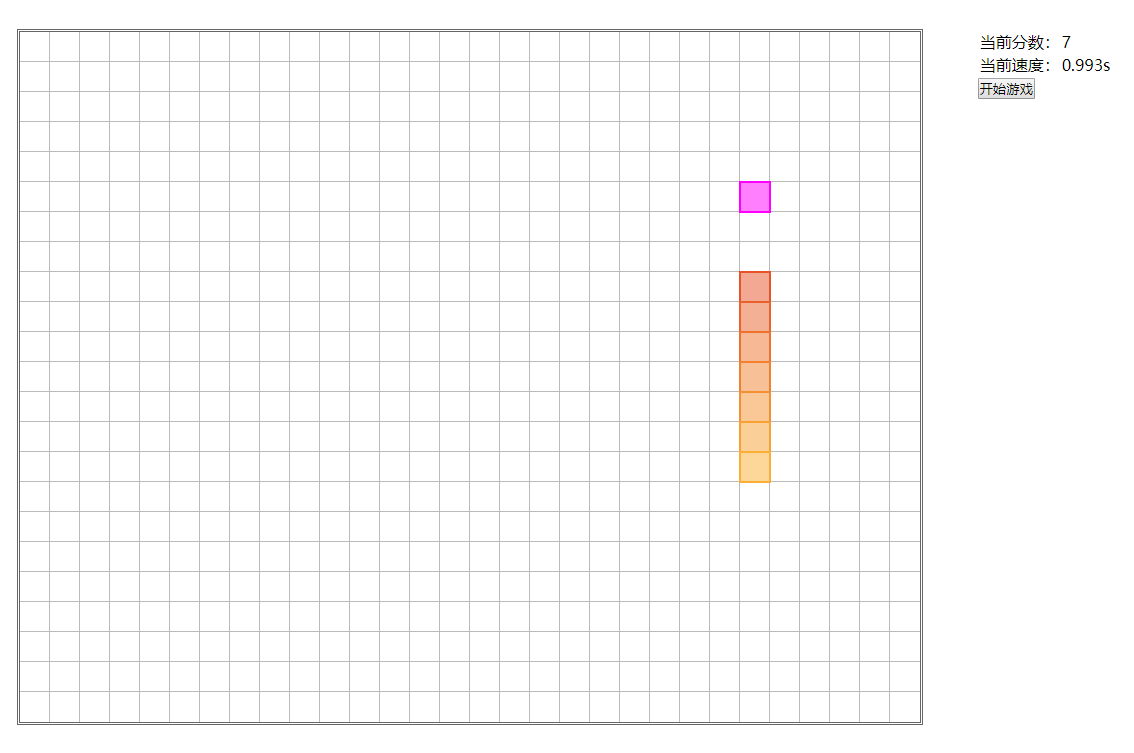
1. js snaker类
class Snaker {

    constructor() {

        this._size = 30;

        this._len = 3;

        this._width = 900;

        this._height = 690;

        this._rows = 23;

        this._cols = 30;

        this._colors = d3.scaleLinear().range(['#E75229','#FFBF35']);

        this._svg = null;

        this._currentArray = [[0,2],[0,1],[0,0]];

        this._interval = null;

        this._duration = 1000;

        this._direction = 1;//上右下左0123

        this._randomPosition = [0,6];

        this.initSvg();

        this.addKeyListener();

    }

    initSvg() {

        this._svg = d3.select('.svg-container')

            .append('svg')

            .attr('width', this._width)

            .attr('height', this._height)

        this._svg.selectAll('line.rows')

            .data(d3.range(this._rows))

            .enter()

            .append('line')

            .attr('class', 'line rows')

            .attr('x1', 0)

            .attr('y1', d => d * this._size)

            .attr('x2', this._width)

            .attr('y2', d => d * this._size)

        this._svg.selectAll('line.cols')

            .data(d3.range(this._cols))

            .enter()

            .append('line')

            .attr('class', 'line cols')

            .attr('x1', d => d * this._size)

            .attr('y1', 0)

            .attr('x2', d => d * this._size)

            .attr('y2', this._height)

    }

    addKeyListener() {

        d3.select('body').on('keydown', () => {

            switch (d3.event.keyCode) {

                case 37:

                    this.rotate(3);

                break;

                case 38:

                    this.rotate(0);

                    break;

                case 39:

                    this.rotate(1);

                    break;

                case 40:

                    this.rotate(2);

                    break;

                case 32:

                    console.log('空格');

                    break;

                case 80:

                    console.log('暂停');

                    break;

                default:

                    break;

            }

        })

    }

    rotate(num) {

        if(num == this._direction) {

            this.rotateMove();

        } else if(num % 2 != this._direction % 2) {

            this._direction = num;

            this.rotateMove();

        }

    }

    renderSnaker() {

        this._svg.selectAll('rect.active').remove();

        this._svg.selectAll('rect.active')

            .data(this._currentArray)

            .enter()

            .append('rect')

            .attr('class', 'active')

            .attr('x', d => d[1] * this._size)

            .attr('y', d => d[0] * this._size)

            .attr('width', this._size)

            .attr('height', this._size)

            .attr('fill', (d,i) => this._colors(i / this._len))

            .attr('stroke', (d,i) => this._colors(i / this._len))

    }

    canMove() {

        //下一步没有触碰边缘

        let noTouchBorder = true;

        //下一步没有触碰自身

        let noTouchSelf = true;

        //新数组

        let newArray = [];

        //判断方向

        switch(this._direction) {

            case 0:

                if(this._currentArray[0][0] == 0) {

                    noTouchBorder = false;

                } else {

                    newArray = this._currentArray.map((c,i,arr) => {

                        if(i == 0) {

                            return [c[0] - 1, c[1]]

                        } else {

                            return arr[i - 1]

                        }

                    })

                }

                break;

            case 1:

                if(this._currentArray[0][1] == this._cols - 1) {

                    noTouchBorder = false;

                } else {

                    newArray = this._currentArray.map((c,i,arr) => {

                        if(i == 0) {

                            return [c[0], c[1] + 1]

                        } else {

                            return arr[i - 1]

                        }

                    })

                }

                break;

            case 2:

                if(this._currentArray[0][0] == this._rows - 1) {

                    noTouchBorder = false;

                } else {

                    newArray = this._currentArray.map((c,i,arr) => {

                        if(i == 0) {

                            return [c[0] + 1, c[1]]

                        } else {

                            return arr[i - 1]

                        }

                    })

                }

                break;

            case 3:

                if(this._currentArray[0][1] == 0) {

                    noTouchBorder = false;

                } else {

                    newArray = this._currentArray.map((c,i,arr) => {

                        if(i == 0) {

                            return [c[0], c[1] - 1]

                        } else {

                            return arr[i - 1]

                        }

                    })

                }

                break;

        }

        //判断新数组第一个元素是否出现在后面其他元素中

        for(var i=1; i<newArray.length; i++) {

            if(newArray[0][0] == newArray[i][0] && newArray[0][1] == newArray[i][1]) {

                noTouchSelf = false;

            }

        }

        return noTouchBorder && noTouchSelf;

    }

    setScoreAndSpeed() {

        d3.select('#score').html(this._len);

        d3.select('#speed').html((this._duration * (1 - this._len / 1000) / 1000).toString().substr(0,8) + 's')

    }

    moveArray() {

        if(this.canMove()) {

            if(this._direction == 0) {

                if(this._currentArray[0][0] - 1 == this._randomPosition[0] && this._currentArray[0][1] == this._randomPosition[1]) {

                    this._currentArray.unshift(this._randomPosition);

                    this._len ++;

                    this.setScoreAndSpeed();

                    this.removeRandomPosition();

                    this.randomPosition();

                } else {

                    this._currentArray.unshift([this._currentArray[0][0] - 1,this._currentArray[0][1]])

                    this._currentArray.pop();

                }

            } else if(this._direction == 1) {

                if(this._currentArray[0][0] == this._randomPosition[0] && this._currentArray[0][1] + 1 == this._randomPosition[1]) {

                    this._currentArray.unshift(this._randomPosition);

                    this._len ++;

                    this.setScoreAndSpeed();

                    this.removeRandomPosition();

                    this.randomPosition();

                } else {

                    this._currentArray.unshift([this._currentArray[0][0],this._currentArray[0][1] + 1])

                    this._currentArray.pop();

                }

            } else if(this._direction == 2) {

                if(this._currentArray[0][0] + 1 == this._randomPosition[0] && this._currentArray[0][1] == this._randomPosition[1]) {

                    this._currentArray.unshift(this._randomPosition);

                    this._len ++;

                    this.setScoreAndSpeed();

                    this.removeRandomPosition();

                    this.randomPosition();

                } else {

                    this._currentArray.unshift([this._currentArray[0][0] + 1,this._currentArray[0][1]])

                    this._currentArray.pop();

                }

            } else if(this._direction == 3) {

                if(this._currentArray[0][0] == this._randomPosition[0] && this._currentArray[0][1] - 1 == this._randomPosition[1]) {

                    this._currentArray.unshift(this._randomPosition);

                    this._len ++;

                    this.setScoreAndSpeed();

                    this.removeRandomPosition();

                    this.randomPosition();

                } else {

                    this._currentArray.unshift([this._currentArray[0][0],this._currentArray[0][1] - 1])

                    this._currentArray.pop();

                }

            }

        } else {

            console.log('game over');

            alert('game over')

        }

    }

    removeRandomPosition() {

        d3.selectAll('rect.random').remove();

    }

    randomPosition() {

        let random = Math.floor(Math.random() * (this._cols * this._rows - this._len));

        let temp = [];

        for(var i=0; i<this._rows; i++) {

            for(var j=0; j<this._cols; j++) {

                temp.push([i,j])

            }

        }

        let emptyArray = temp.filter(a => !this._currentArray.some(b => b[0] == a[0] && b[1] == a[1]));

        this._randomPosition = emptyArray[random];

        this._svg.append('rect')

            .attr('class', 'random')

            .attr('x', this._randomPosition[1] * this._size)

            .attr('y', this._randomPosition[0] * this._size)

            .attr('width', this._size)

            .attr('height', this._size)

    }

    interval() {

        this._interval = setInterval(() => {

            this.moveArray();

            this.renderSnaker();

        }, this._duration * (1 - this._len / 1000))

    }

    //转弯附带移动一次

    rotateMove() {

        this.moveArray();

        this.renderSnaker();

    }

    initData() {

        this._currentArray = [[0,2],[0,1],[0,0]];

    }

    start() {

        this.initData();

        this.renderSnaker();

        this.interval();

        this.randomPosition();

        this.setScoreAndSpeed();

    }

}
2. css 代码
* {

  padding:;

  margin:;

}

.container {

  width: 100vw;

  height: 100vh;

}

.svg-container {

  margin: 50px;

  width: 900px;

  height: 690px;

  border: 3px double #666;

  display: inline-block;

  overflow: hidden;

}

aside {

  width: 200px;

  height: 300px;

  display: inline-block;

  vertical-align: top;

  margin-top: 50px;

}

.line {

  shape-rendering: crispEdges;

  stroke: #bbbbbb;

}

.active {

  stroke-width:;

  fill-opacity: 0.5;

}

.random {

  fill: #ff00ff;

  fill-opacity: 0.5;

  stroke: #ff00ff;

  stroke-width:;

}
3. html代码
<!DOCTYPE html>

<html lang="en">

<head>

    <meta charset="UTF-8">

    <title>$Title$</title>

    <link rel="stylesheet" type="text/css" href="css/base.css"/>

    <script type="text/javascript" src="js/d3.v4.js"></script>

    <script type="text/javascript" src="js/base.js"></script>

</head>

<body>

    <div class="container">

        <div class="svg-container"></div>

        <aside>

            <table>

                <tr>

                    <td>当前分数:</td>

                    <td id="score"></td>

                </tr>

                <tr>

                    <td>当前速度:</td>

                    <td id="speed"></td>

                </tr>

            </table>

            <button onclick="start()">开始游戏</button>

        </aside>

    </div>

<script>

var snaker = new Snaker();

function start() {

    snaker.start();

}

</script>

</body>

</html>
有想预览或者下载demo的朋友请移步至个人博客
原文地址 http://www.bettersmile.cn
d3.js 制作简单的贪吃蛇的更多相关文章
- d3.js 制作简单的俄罗斯方块
d3.js是一个不错的可视化框架,同时对于操作dom也是十分方便的.今天我们使用d3.js配合es6的类来制作一个童年小游戏--俄罗斯方块.话不多说先上图片. 1. js tetris类 由于方法拆分 ...
- js编写简单的贪吃蛇游戏
css代码 *{ margin:; padding:; } td{ width: 4px; height: 4px; background: #ccc; border: 2px solid #ccc; ...
- 使用JS制作小游戏贪吃蛇
先看效果图: 过程如下: 1.首先创建一张画布地图<div class="map"> </div>: 2.创建食物的自调用函数 (function (){ ...
- C#简单实现贪吃蛇程序(LinQ + Entity)
做梦想起来的C#简单实现贪吃蛇程序(LinQ + Entity) 最近一直在忙着单位核心开发组件的版本更新,前天加了一个通宵,昨天晚上却睡不着,脑子里面突然不知怎的一直在想贪吃蛇的实现方法.以往也有类 ...
- TOJ 3973 Maze Again && TOJ 3128 简单版贪吃蛇
TOJ3973传送门:http://acm.tzc.edu.cn/acmhome/problemdetail.do?&method=showdetail&id=3973 时间限制(普通 ...
- D3.js 制作中国地图 .net 公共基础类
D3.js 制作中国地图 from: http://d3.decembercafe.org/pages/map/index.html GeoJSON is a format for encoding ...
- Java一个简单的贪吃蛇
Java一个简单的贪吃蛇 虽然GUI已经要淘汰了,但是手动写写界面还是有助于理解语法的,像构造函数 ,函数调用,内部类,继承,接口.有助于半初学者强化理解. 直接上代码 游戏主体类: package ...
- GUI简单实战——贪吃蛇
将前面学到的GUI基础知识完成实战,完成一个简单的贪吃蛇项目 项目功能 用键盘上下左右实现贪吃蛇的自动移动 贪吃蛇吃到食物后,长度加一,分数加一 贪吃蛇吃到自己的身体,则游戏结束 按空格键实现游戏的暂 ...
- d3.js制作连线动画图和编辑器
此文章为原创文章,原文地址:https://www.cnblogs.com/eagle1098/p/11431679.html 连线动画图 编辑器 效果如上图所示.本项目使用主要d3.jsv4制作,分 ...
随机推荐
- Android平台使用Ceres Solver
在Android平台上使用Ceres求解器,官方教程不明确,且编译过程遇到了很多问题. 环境 Ubuntu 18.04 源代码 https://github.com/Great-Keith/ceres ...
- lvs模式及算法
一.三种模式 (一).Virtual Servervia Network Address Translation(VS/NAT) 通过网路地址转换,调度器重写请求报文的目标地址,根据预设的调度算法,将 ...
- python使用pip安装第三方库以及镜像使用豆瓣源安装第三方库
2018/8/7 在使用pip安装pynum第三方库时的随笔 所有的前提都是你成功安装了pip 首先第一步 打开命令提示符 输入pip show pip 查看当前pip版本 然后可以上官网搜索一下 ...
- hadoop安装解决之道
# 壹.故障现象 ```xml Microsoft Windows [版本 10.0.18362.239] (c) 2019 Microsoft Corporation.保留所有权利. C:\User ...
- 项目构建分析和 webpack 优化实践
加入新公司一个月,最近接手在做一个 chrom 浏览器插件的项目,开发过程中发现项目打包的时间很长,足足有30多秒,这是让人很难接受的,而且构建的显示了几条包体积过大的提示信息: 可以看到,打包后有三 ...
- 转载:hive分区(partiton)简介
网上有篇关于hive的partition的使用讲解的比较好,所以转载了.原文https://blog.csdn.net/akon_vm/article/details/37832511 一.背景 1. ...
- Kubernetes 服务发现
目录 什么是服务发现? 环境变量 DNS 服务 Linux 中 DNS 查询原理 Kubernetes 中 DNS 查询原理 调试 DNS 服务 存根域及上游 DNS 什么是服务发现? 服务发现就是一 ...
- 使用re.split 按标点+空格的一种分割办法
import re import string t1 = re.split("["+string.punctuation+" ]","(555) 12 ...
- Day 03--设计与完善(一)
1.今天我们把软件原型基本完成了,功能流程一套下来,像一个真正的软件了.这是几个主要模块: 首先是首页,登入小程序后可以直观地看到各个食堂,并显示自己的定位.屏幕下方还可以时刻切换查看自己以前的订单. ...
- python3.6.6在CentOS7上的安装
Python官网:https://www.python.org/ 下载指定版本的软件包: [root@General data]# yum clean all && yum rep ...