
bootstrap的表单form
(1)默认表单
<form>
<div class="form-group">
<label class="control-label" for=""></label>
<input class="form-control">
<span class="help-block"></span>
</div>
</form>
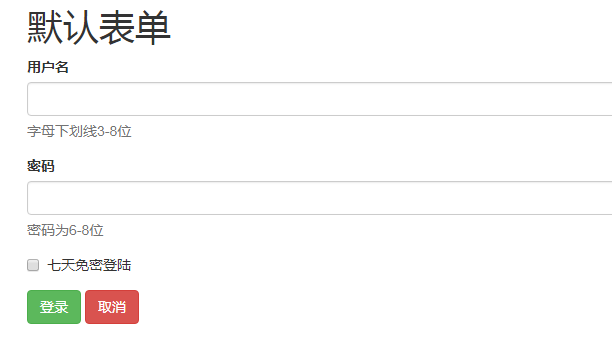
  <h1>默认表单</h1>

     <form action="#">

         <div class="form-group">

             <label for="uname" class="control-label">用户名</label>

             <input type="text" id="uname" class="form-control">

             <span class="help-block">字母下划线3-8位</span>

         </div>

         <div class="form-group">

             <label for="upwd" class="control-label">密码</label>

             <input type="password" id="upwd" class="form-control">

             <span class="help-block">密码为6-8位</span>

         </div>

         <div class="form-group">

             <div class="checkbox">

             <label><input type="checkbox">七天免密登陆</label>

             </div>

         </div>

         <div class="form-group">

             <input type="button" id="login" value="登录" class="btn btn-success">

             <input type="button" id="logout" value="取消" class="btn btn-danger">

         </div>

     </form>
(2)行内表单
<form class="form-inline">
<div class="form-group">
<label class="sr-only"></label>
<input class="form-control">
</div>
</form>
  <h1>行内表单</h1>

     <h3> Screen Reader Only sr-only</h3>

     <form action="#" class="form-inline">

         <div class="form-group">

             <label for="uname1" class="sr-only"> 用户名</label>

             <input class="form-control" type="text" placeholder="请输入用户名" id="uname1">

         </div>

         <div class="form-group">

             <lable for="upwd1" class="sr-only">密码</lable>

             <input class="form-control" type="password" placeholder="请输入密码" id="upwd1">

         </div>

         <div class="form-group"><input type="button" value="登陆" class="btn btn-success"></div>

     </form>

(3)水平表单
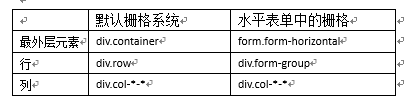
水平表单=表单+栅格系统(变种)
<form class=" form-horizontal ">
<div class="form-group">
<div class="col-*-*">
<label class="sr-only"></label>
</div>
<div class="col-*-*">
<input class="form-control">
</div>
</div>
</form>
  <h1>形式3:水平表单</h1>

     <p>水平表单=表单+栅格系统</p>

     <form action="#" class="form-horizontal"> <!--等价于div.container-->

         <div class="form-group"><!--div.row-->

             <div class="col-sm-1"><label for="uname3" class="control-label">用户名</label></div>

             <div class="col-sm-3"> <input type="text" class="form-control" id="uname3"></div>

             <div class="col-sm-5"> <span class="help-block">字母数字,,,,,</span></div>

         </div>

         <div class="form-group"><!--div.row-->

             <div class="col-sm-1"><label for="upwd2" class="control-label">密码</label></div>

             <div class="col-sm-3"> <input type="text" class="form-control" id="upwd2"></div>

             <div class="col-sm-5"> <span class="help-block">密码位数,,,,,</span></div>

         </div>

         <div class="form-group"><!--div.row-->

             <div class="col-sm-1"> <input type="button" class="btn btn-success" value="登陆"></div>

             <div class="col-sm-1"> <input type="button" class="btn btn-danger" value="取消"></div>

         </div>

bootstrap的表单form的更多相关文章
- bootstrap+font-awesome表单
bootstrap+font-awesome表单 <form action="" class="form-horizontal col-sm-offset-4&qu ...
- Bootstrap~表单Form
回到目录 在进行自己的后台改版时,大体布局都使用了bootstrap,剩下的表单部分没理由不去使用它,对于表单的美化和布局,bootstrap做的也是很不错的,有大气的边框,多功能的按钮及宏观的表单布 ...
- Bootstrap之表单控件状态
Bootstrap中的表单控件状态主要有三种:焦点状态,禁用状态,验证状态. 一.焦点状态:该状态告诉用户可输入或选择东西 焦点状态通过伪类“:focus”以实现. bootstrap.css相应 ...
- BootStrap 智能表单系列 首页 (持续更新中...)
背景:本码农.NET后端工程师,在项目开发中发现写了很多重复的代码, 于是自己整了一套根据配置来生成form表单的插件,针对表单的改动仅需要修改配置的json即可 使用中发现还是蛮实用的,于是开源出来 ...
- BootStrap 智能表单系列 六 表单数据绑定(编辑页面的数据绑定)
本章介绍如何在生成表单后,将一个model的数据展示到form表单中(一般用于编辑页面) 代码如下(连接地址:https://github.com/xiexingen/Bootstrap-SmartF ...
- BootStrap 智能表单系列 七 验证的支持
但凡是涉及到用户编辑信息然后保存的页面,都涉及到一个数据是否符合要求的检查,需要客服端和服务器端的校验的问题: 客服端的校验主要是为了提高用户体验,而服务器端的校验为了数据的合格性 该插件也为您支持到 ...
- BootStrap 智能表单系列 四 表单布局介绍
表单的布局分为自动布局和自定义布局两种: 自动布局就是根据配置项中第二级配置项中数组的长度来自动使用不同的bootstrap栅格,通过设置autoLayout为true可以实现自动布局 自动以布局就是 ...
- BootStrap 智能表单系列 三 分块表单配置的介绍
相信广大博友肯定碰到过一个编辑页面分了很多块的情况,智能表单插件已经为您支持了这种情况, 代码如下(链接地址:https://github.com/xiexingen/Bootstrap-SmartF ...
- BootStrap 智能表单系列 二 BootStrap支持的类型简介
代码如下(链接地址:https://github.com/xiexingen/Bootstrap-SmartForm/blob/master/demo/form1-basic.html): <! ...
随机推荐
- docker镜像管理(二)
docker镜像 docker镜像含有启动容器所需要的文件系统和内容,因此,其用于创建并启动docker容器 docker镜像采用分层构建机制,最底层为bootfs,其之为rootfs bootfs: ...
- vue调用高德地图:vue-amap
前言:之前没有接触过页面调用地图的项目,某次面试,老板要求我用vue-amap调用高德地图,回家以后,我去网上查了一些案例和教程,看似很简单的引入调用,我却整整弄了一宿,还没弄出来!!!百般无奈之下, ...
- day2_窗口句柄切换
#!/usr/bin/env python # -*- coding: utf-8 -*- # @Time : 2019/7/16 14:21 # @Author : 大坏男孩 # @File : d ...
- C++ 回调函数 Callback 机制例程
#include <iostream> #include <thread> #include <mutex> #include <Windows.h> ...
- Windows开机自动登录账户
如何在Windows设了账户密码的情况下开机自动登录账户,有以下两种方法. 通过Windows设置自动登录 按“Win+R”组合键打开“运行”框内输入“netplwiz”. 打开以下窗口,将“要使用本 ...
- 【CF464E】The Classic Problem(主席树+最短路)
点此看题面 大致题意: 给你一张无向图,每条边的边权为\(2^{x_i}\),求\(s\)到\(t\)的最短路. 最短路 最短路,首先考虑\(Dijkstra\).这里用\(SPFA\)似乎不太好,因 ...
- asp.net mvc 系统操作日志设计
第一步.系统登录日志 通过signalr来管理用户的登录情况,并保存用户的登录记录. 第二步 通过mvc过滤器,来横切路由访问记录. 保存方式:通过httpclient异步请求webapi 数据通过m ...
- ReverseInteger:实现int整数的反转
原文链接 Given a 32-bit signed integer, reverse digits of an integer. Example 1: Input: 123 Output: 321 ...
- 快速认识springcloud微服务
这周浅显的学习了springcloud.简单聊一下微服务.所谓的微服务远远没有我想想的那么高端难以理解,简单说,就是多个服务分布在不同的服务器上,由这些服务互相配合完成某一项任务.那服务和服务之间调用 ...
- HTTP和RPC是现代微服务架构,HTTP和RPC是现代微服务架构
.NET Core使用gRPC打造服务间通信基础设施 一.什么是RPC rpc(远程过程调用)是一个古老而新颖的名词,他几乎与http协议同时或更早诞生,也是互联网数据传输过程中非常重要的传输机制 ...