
Winform组合ComboBox和TreeView实现ComboTree
最近做Winform项目需要用到类似ComboBox的TreeView控件。
虽然各种第三方控件很多,但是存在各种版本不兼容问题。所以自己写了个简单的ComboTreeView控件。
下图是实现效果:
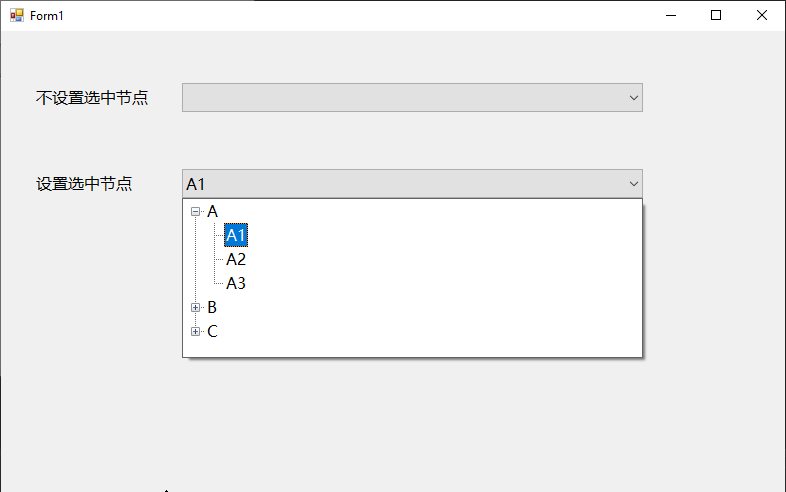
目前实现的比较简单,能满足我项目中的需求。
此处是项目中的代码简化后的版本,供大家参考。
 using System;

 using System.Collections.Generic;

 using System.Windows.Forms;

 namespace CustomControl.Tree

 {

     public abstract class ComboTreeView<T> : ComboBox where T : class

     {

         protected const int WM_LBUTTONDOWN = 0x0201, WM_LBUTTONDBLCLK = 0x0203;

         protected TreeView treeView;

         protected ToolStripControlHost treeViewHost;

         protected ToolStripDropDown dropDown;

         protected bool dropDownOpen = false;

         protected TreeNode selectedNode;

         protected T toBeSelected;

         public ComboTreeView(TreeView internalTreeView)

         {

             if (null == internalTreeView)

             {

                 throw new ArgumentNullException("internalTreeView");

             }

             this.InitializeControls(internalTreeView);

         }

         public event TreeNodeChangedEventHandler TreeNodeChanged;

         protected virtual void InitializeControls(TreeView internalTreeView)

         {

             this.treeView = internalTreeView;

             this.treeView.BorderStyle = BorderStyle.FixedSingle;

             this.treeView.Margin = new Padding();

             this.treeView.Padding = new Padding();

             this.treeView.AfterExpand += new TreeViewEventHandler(this.WhenAfterExpand);

             this.treeViewHost = new ToolStripControlHost(this.treeView);

             this.treeViewHost.Margin = new Padding();

             this.treeViewHost.Padding = new Padding();

             this.treeViewHost.AutoSize = false;

             this.dropDown = new ToolStripDropDown();

             this.dropDown.Margin = new Padding();

             this.dropDown.Padding = new Padding();

             this.dropDown.AutoSize = false;

             this.dropDown.DropShadowEnabled = true;

             this.dropDown.Items.Add(this.treeViewHost);

             this.dropDown.Closed += new ToolStripDropDownClosedEventHandler(this.OnDropDownClosed);

             this.DropDownWidth = this.Width;

             base.DropDownStyle = ComboBoxStyle.DropDownList;

             base.SizeChanged += new EventHandler(this.WhenComboboxSizeChanged);

         }

         public new ComboBoxStyle DropDownStyle

         {

             get { return base.DropDownStyle; }

             set { base.DropDownStyle = ComboBoxStyle.DropDownList; }

         }

         public virtual TreeNode SelectedNode

         {

             get { return this.selectedNode; }

             private set { this.treeView.SelectedNode = value; }

         }

         public virtual T SelectedNodeData

         {

             get { return (T)base.SelectedItem; }

             set

             {

                 this.toBeSelected = value;

                 this.UpdateComboBox(value);

             }

         }

         protected new int SelectedIndex

         {

             get { return base.SelectedIndex; }

             set { base.SelectedIndex = value; }

         }

         protected new object SelectedItem

         {

             get { return base.SelectedItem; }

             set { base.SelectedItem = value; }

         }

         public virtual string DisplayMember { get; set; } = "Name";

         /// <summary>Gets the internal TreeView control.</summary>

         public virtual TreeView TreeView => this.treeView;

         /// <summary>Gets the collection of tree nodes that are assigned to the tree view control.</summary>

         /// <returns>A <see cref="T:System.Windows.Forms.TreeNodeCollection" /> that represents the tree nodes assigned to the tree view control.</returns>

         public virtual TreeNodeCollection Nodes => this.treeView.Nodes;

         public new int DropDownHeight { get; set; } = ;

         public new int DropDownWidth { get; set; } = ;

         protected virtual void ShowDropDown()

         {

             this.dropDown.Width = this.Width;

             this.dropDown.Height = this.DropDownHeight;

             this.treeViewHost.Width = this.Width;

             this.treeViewHost.Height = this.DropDownHeight;

             this.treeView.Font = this.Font;

             this.dropDown.Focus();

             this.dropDownOpen = true;

             this.dropDown.Show(this, , base.Height);

         }

         protected virtual void HideDropDown()

         {

             this.dropDown.Hide();

             this.dropDownOpen = false;

         }

         protected virtual void ToggleDropDown()

         {

             if (!this.dropDownOpen)

             {

                 this.ShowDropDown();

             }

             else

             {

                 this.HideDropDown();

             }

         }

         protected override void WndProc(ref Message m)

         {

             if ((WM_LBUTTONDOWN == m.Msg) || (WM_LBUTTONDBLCLK == m.Msg))

             {

                 if (!this.Focused)

                 {

                     this.Focus();

                 }

                 this.ToggleDropDown();

             }

             else

             {

                 base.WndProc(ref m);

             }

         }

         protected override void Dispose(bool disposing)

         {

             if (disposing)

             {

                 if (this.dropDown != null)

                 {

                     this.dropDown.Dispose();

                     this.dropDown = null;

                 }

             }

             base.Dispose(disposing);

         }

         protected virtual void WhenTreeNodeChanged(TreeNode newValue)

         {

             if ((null != this.selectedNode) || (null != newValue))

             {

                 bool changed;

                 if ((null != this.selectedNode) && (null != newValue))

                 {

                     changed = (this.selectedNode.GetHashCode() != newValue.GetHashCode());

                 }

                 else

                 {

                     changed = true;

                 }

                 if (changed)

                 {

                     if (null != this.TreeNodeChanged)

                     {

                         try

                         {

                             this.TreeNodeChanged.Invoke(this, new TreeNodeChangedEventArgs(this.selectedNode, newValue));

                         }

                         catch (Exception)

                         {

                             // do nothing

                         }

                     }

                     this.selectedNode = newValue;

                     this.UpdateComboBox(this.GetTreeNodeData(newValue));

                 }

             }

         }

         protected virtual void OnDropDownClosed(object sender, ToolStripDropDownClosedEventArgs e)

         {

             if (null == this.toBeSelected)

             {

                 var selectedNode = this.treeView.SelectedNode;

                 this.WhenTreeNodeChanged(selectedNode);

             }

         }

         protected virtual void UpdateComboBox(T data)

         {

             base.DisplayMember = this.DisplayMember; // update DisplayMember

             if (null != data)

             {

                 this.DataSource = new List<T>() { data };

                 this.SelectedIndex = ;

             }

             else

             {

                 this.DataSource = null;

             }

         }

         protected virtual void WhenAfterExpand(object sender, TreeViewEventArgs e)

         {

             if (null != this.toBeSelected)

             {

                 if (this.SelectChildNode(e.Node.Nodes, this.toBeSelected))

                 {

                     this.toBeSelected = null;

                 }

             }

         }

         protected virtual void WhenComboboxSizeChanged(object sender, EventArgs e)

         {

             this.DropDownWidth = base.Width;

         }

         public virtual bool SelectChildNode(TreeNodeCollection nodes, T data)

         {

             var node = this.FindChildNode(nodes, data);

             if (null != node)

             {

                 this.DoSelectTreeNode(node);

                 return true;

             }

             else

             {

                 return false;

             }

         }

         protected abstract bool Identical(T x, T y);

         protected virtual void DoSelectTreeNode(TreeNode node)

         {

             this.SelectedNode = node;

             this.ExpandTreeNode(node.Parent);

         }

         public virtual TreeNode FindChildNode(TreeNodeCollection nodes, T data)

         {

             foreach (TreeNode node in nodes)

             {

                 var nodeData = this.GetTreeNodeData(node);

                 if (this.Identical(nodeData, data))

                 {

                     return node;

                 }

             }

             return null;

         }

         public virtual void ExpandTreeNode(TreeNode node)

         {

             if (null != node)

             {

                 node.Expand();

                 this.ExpandTreeNode(node.Parent);

             }

         }

         public abstract T GetTreeNodeData(TreeNode node);

     }

 }
Winform组合ComboBox和TreeView实现ComboTree的更多相关文章
- winform中ComboBox实现text和value,使显示和值分开,重写text和value属性
winform的ComboBox中只能赋值text,显示和值是一样的,很多时候不能满足根本需要,熟悉B/S开发的coder最常用的就是text和value分开的,而且web下DropDownList本 ...
- C# WinForm 中ComboBox数据绑定的问题 (转)
来自:http://blog.sina.com.cn/s/blog_5fb9e26301013wga.html C# WinForm 中ComboBox数据绑定的问题 怎样让WinForm中的Comb ...
- [C#]WinForm 中 comboBox控件之数据绑定
[C#]WinForm 中 comboBox控件之数据绑定 一.IList 现在我们直接创建一个List集合,然后绑定 IList<string> list = new List<s ...
- winform的comboBox使鼠标滑轮修改值失效
目标: winform窗体很多combobox下拉框,当他们其中的一个获得焦点的时候,如果滚动鼠标就会改变下拉框的值,要实现让鼠标滚轮不对下拉框的值造成影响 如下代码直接拷贝粘贴,不用修改 方法一: ...
- c#(winform)中ComboBox添加Key/Value项、获取选中项、根据Key
WinForm下的ComboBox默认是以多行文本来设定显示列表的, 这通常不符合大家日常的应用, 因为大家日常应用通常是键/值对的形式去绑定它的. 参考了一些网上的例子,最终写了一个辅助类用于方便对 ...
- Winform控件学习-TreeView - ContextMenuStrip
首先,要向窗体添加一个TreeView控件: 然后再添加一个ContextMenuStrip控件: 接下就要给TreeView添加一个MouseDown事件,代码如下: Example 1 priva ...
- WinForm开发中针对TreeView控件改变当前选择节点的字体与颜色
本文转载:http://www.cnblogs.com/umplatform/archive/2012/08/29/2660240.html 在B/S开发中,对TreeView控件要改变当前选中节点的 ...
- C# winform使用combobox遍历文件夹内所有文件
参考:https://www.cnblogs.com/hxh88/p/5814291.html 相关函数解析: 1.指定目录包含的文件和子目录 DirectoryInfo.GetFiles():获取目 ...
- WinForm下ComboBox设定SelectedValue总结 (SelectedValue==null解决办法)[转]
http://www.cnblogs.com/qqflying/archive/2013/05/23/3096050.html 实践发现:以SelectedIndex赋值让ComboBox自动选中时能 ...
随机推荐
- CNN卷积中多通道卷积的参数问题
通俗来讲参数[5,5,3,16],就是用16个卷积核的每一个,分别对3通道进行对应位置,对应3通道的乘积,再加和,输出作为一个输出核的对应位置,知道16个核全部完成. 下图是一个3d的RGB效果,每个 ...
- Qt最新版5.12.2在Win10环境静态编译安装和部署的完整过程(VS2017)
一.为什么要静态编译 用QtCreator编译程序时,使用的是动态编译.编译好的程序在运行时需要另外加上相应的Qt库文件,一大堆dll文件.如果想将生成的程序连同所需要的库一起完整地打包成一个可执行程 ...
- CF-920C-Swap Adjacent Elements 贪心
题意 给你一个1-n的排列. 并给你一个字符串——其中用0和1表示对应数列中的位置上的值可不可以和后面相邻的数交换. 判断该数列能否在限制中交换为不降序数列. 思路 由于刚学了树状数组,一开始以为是用 ...
- HDU 6357 Hills And Valleys
Hills And Valleys 题意:给你一个序列, 可以翻转一次区间 [l, r] 求最大 非递减的 序列长度. 题解:枚举翻转区间,然后匹配. 如果不翻转区间, 那么就相当于用b[] = {0 ...
- CodeForces 416 B Appleman and Tree DP
Appleman and Tree 题解: 定义dp[u][1] 为以u的子树范围内,u这个点已经和某个黑点相连的方案数. dp[u][0] 为在u的子树范围内, u这个点还未和某个黑点相连的方案数. ...
- codeforces 812 E. Sagheer and Apple Tree(树+尼姆博弈)
题目链接:http://codeforces.com/contest/812/problem/E 题意:有一颗苹果树,这个苹果树所有叶子节点的深度要不全是奇数,要不全是偶数,并且包括根在内的所有节点上 ...
- ubuntu下创建定时任务的两种方式及常见问题解决方案
创建定时任务的目的就是摆脱人为对程序重复性地运行. 0. 首先用下面的指令检查你是否安装crontab, crontab -l 如果本身就有的话,那么出现如下指令 LC_CTYPE="zh_ ...
- 剑指Offer(三十二):把数组排成最小的数
剑指Offer(三十二):把数组排成最小的数 搜索微信公众号:'AI-ming3526'或者'计算机视觉这件小事' 获取更多算法.机器学习干货 csdn:https://blog.csdn.net/b ...
- 拒绝一次性买卖:MyBatis的mapper和repository可重复生成工具
背景 MyBatis的历史可谓久远了,码农们也在用着各式各样的代码生成工具.然而这些工具大部分都有一个缺点,那就是只能一次性生成文件.如果我们期间在生成的文件里做了修改,再次生成时,很多工具会覆盖我们 ...
- 阿里雷卷:Reactive 基金会的成立将对开发方式带来哪些影响?
作者 | 赵钰莹 近日,Linux 基金会宣布成立 Reactive 基金会.对于 Reactive,各位开发者应该并不陌生,尤其是 Node.js 开发者,但真正了解并意识到这件事情对开发方式带来的 ...