
vue+element table的弹窗组件
在处理表格编辑相关的需求,是需要做一个弹框进行保存的;或者查看表格数据的详细信息时,也是需要做弹窗;
当然 ,这是类似于这样的 ,当然 element 已经帮我们做好 弹窗这一块
主要 我想记录的是 将 弹窗 做为组件,并且如果弹窗部分有请求部分的话,就到弹窗组件内部处理,相对于说解耦吧
也有子组件改变父组件传过来的 值

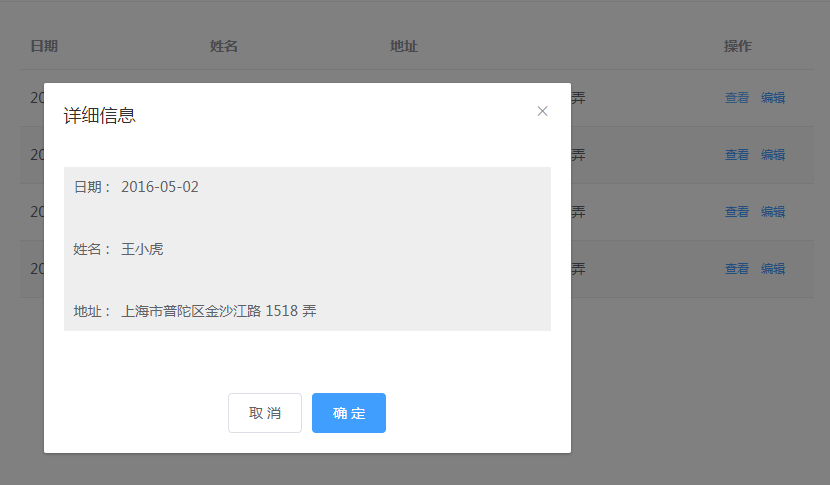
表格部分,也就是主要显示地方
<template>

  <div class="myComponent">

    <el-table :data="tableData" stripe style="width: 100%">

      <el-table-column prop="date" label="日期" width="180"></el-table-column>

      <el-table-column prop="name" label="姓名" width="180"></el-table-column>

      <el-table-column prop="address" label="地址"></el-table-column>

      <el-table-column label="操作" width="100">

        <template slot-scope="scope">

          <el-button @click="handleClick(scope.row)" type="text" size="small">查看</el-button>

          <el-button type="text" size="small">编辑</el-button>

        </template>

      </el-table-column>

    </el-table>

    <!--
    弹窗组件引入
    dialogVisible : 表示 弹框是否显示 父组件 传 子组件的值
    dialogInfo : 表示 当前点击查看的数据 父组件 传 子组件的值
    update:dialogVisible : 表示 组件 点击取消关闭确定 传过来的 是否显示弹窗 子组件 传 父组件
   -->

    <component-dialog :dialogVisible="dialogVisible" :dialogInfo="dialogInfo" @update:dialogVisible="dialogVisibles"></component-dialog>

  </div>

</template>

<script>

import componentDialog from "./components/dialog"; //引入组件

export default {
 //引入组件

  components: {

    componentDialog

  },

  name: "myComponent",

  data() {

    return {
    //控制弹窗 显示

      dialogVisible: false,
    //点击查看按钮  这条数据详细信息

      dialogInfo:{},
    //table 的假数据

      tableData: [

        {

          date: "2016-05-02",

          name: "王小虎",

          address: "上海市普陀区金沙江路 1518 弄"

        },

        {

          date: "2016-05-04",

          name: "张小虎",

          address: "上海市普陀区金沙江路 1517 弄"

        },

        {

          date: "2016-05-01",

          name: "撸小虎",

          address: "上海市普陀区金沙江路 1519 弄"

        },

        {

          date: "2016-05-03",

          name: "鞠小虎",

          address: "上海市普陀区金沙江路 1516 弄"

        }

      ]

    };

  },

  created() {},

  mounted() {},

  methods: {
  //点击查看 按钮  的事件

    handleClick(info) {

      console.log(info);

      this.dialogVisible = true;

      this.dialogInfo = info

    },
   //子组件传 过来的 数据

    dialogVisibles(v){

        this.dialogVisible = v

        console.log(v)

    }

  }

};

</script>

<style lang='scss' scoped>

</style>
弹窗组件部分
<template>

  <el-dialog title="详细信息" :visible.sync="dialogVisible" :before-close="cancelDialog" >

    <el-form class="form">

      <el-form-item label="日期 : ">

        <p>{{dialogInfo.date}}</p>

      </el-form-item>

      <el-form-item label="姓名 : ">

        <p>{{dialogInfo.name}}</p>

      </el-form-item>

      <el-form-item label="地址 : ">

        <p>{{dialogInfo.address}}</p>

      </el-form-item>

    </el-form>

    <div slot="footer" class="dialog-footer">

      <el-button @click="cancelDialog">取 消</el-button>

      <el-button type="primary" @click="cancelDialog">确 定</el-button>

    </div>

  </el-dialog>

</template>

<script>

export default {
//父组件 传 过来的 值

  props: {

    dialogVisible: {

      type: Boolean,

      default: false

    },

    dialogInfo: {

      type: Object,

      default: {}

    }

  },

  watch: {
  //监听 弹窗显示, 可以用来写 请求接口

    dialogVisible: function(newVal, oldVal) {

      if (newVal) {

        console.log(newVal);

      }

    }

  },

  components: {},

  name: "componentDialog",

  data() {

    return {};

  },

  created() {},

  mounted() {},

  methods: {
   //修改父组件传过来的值

    cancelDialog() {

      this.$emit("update:dialogVisible", false);

    }

  }

};

</script>

<style lang='scss' scoped>

.form{

    background: #eee;

    padding: 0 10px;

}

.dialog-footer{

    text-align: center;

}

</style>
vue+element table的弹窗组件的更多相关文章
- 封装Vue Element的dialog弹窗组件
我本没有想着说要封装一个弹窗组件,但有同行的朋友在问我,而且弹窗组件也确实在项目开发中用的比较多.思前想后,又本着样式统一且修改起来方便的原则,还是再为大家分享一个我所封装的弹窗组件吧. 其实,并不是 ...
- vue+element ui中select组件选择失效问题原因与解决方法
codejing 2020-07-10 09:13:31 652 收藏 分类专栏: Web Vue Element UI 版权 .当表单form赋完值后,如果后续又对form中某一属性值进行操作如 ...
- vue+ element table如何给指定的单元格添加点击事件?
今天使用vue,以及element-ui这个框架时,发现业务需要在表格里加一个连接跳转,当时立刻打开element的官网,进行查看http://element-cn.eleme.io/#/zh-CN/ ...
- 【vue】vue +element 搭建项目,组件之间通信
父子组件通信 父 通过props属性给 子传递数据 子 操作 父 this.$parent.XXX 子通过$emit传递参数 或者通过vue-bus vue-bus既可以实现父子组件之间的通信,也可 ...
- Vue+element UI实现分页组件
介绍 这是一个是基于element-UI的分页组件基础上,进行了二次封装的分页组件,在展示数据时,该分页组件采用了每显示一页数据,只请求当前页面的数据的请求策略,从而避免了一次性将数据全部请求所造成的 ...
- 解决vue element table行列不齐问题
全局加入如下样式即可(app.vue): body .el-table th.gutter{ display: table-cell!important; }
- Vue+Element Table 列标红
效果图 列方法 调用 样式
- vue+element ui 关闭弹窗前清空form表单的值
this.$refs['disposeConfigsform'].resetFields();
- 封装React AntD的dialog弹窗组件
前一段时间分享了基于vue和element所封装的弹窗组件(封装Vue Element的dialog弹窗组件),今天就来分享一个基于react和antD所封装的弹窗组件,反正所使用的技术还是那个技术, ...
随机推荐
- solr常见错误
这两天给客户部署独立的solr服务器遇到的错误,现在总结一下. 1. org.apache.solr.client.solrj.SolrServerException: Error executing ...
- lombok的介绍、使用、简单分析和插件
学习下Lombok. 关于POJO Java面向对象编程中的特性中有封闭性和安全性.封闭性即对类中的域变量进行封闭操作,即用private来修饰他们.如此一来,其他类就不能对该变量访问了.这样,我们就 ...
- Java中转换为十六进制的几种实现
public class HexUtil { private static final String[] DIGITS_UPPER = {"0", "1", & ...
- 【Python3爬虫】最新的12306爬虫
一.写在前面 我在以前写过一次12306网站的爬虫,当时实现了模拟登录和查询车票,但是感觉还不太够,所以对之前的代码加以修改,还实现了一个订购车票的功能. 二.主要思路 在使用Selenium做模拟登 ...
- SprintBoot 实现上传下载
本人在 .NET 转JAVA 的路上 ,也在学习SpringBoot相关知识,这里记录一下在Springboot中实现文件上传下载的核心代码 package com.file.demo.springb ...
- 基于.net core 3 和 Orleans 3 的 开发框架:Phenix Framework 7
Phenix Framework 7 for .net core 3 + Orleans 3 发布地址:https://github.com/phenixiii/Phenix.NET7 2019052 ...
- Laravel API跨域访问的实现步骤
本篇文章给大家带来的内容是关于Laravel API跨域访问的实现步骤,有一定的参考价值,有需要的朋友可以参考一下,希望对你有所帮助. 服务器A请求服务器B的接口,那么一般会出现跨域问题. 1 XML ...
- Python 字符串多替换时性能基准测试
结论 先说结果, 直接替换是最好的. replace 一层层用, 方法笨了一点, 还可以. 时间消耗: tx2 < tx3 < tx1 < tx4 t2 < t3 < t ...
- 使用<label>标签修改input[type="checkbox"]的样式
因为<label>的特性有两点 : ①不呈现任何效果, ②用户点击该标签, 浏览器能自动将焦点转移到相关的表单控件上. <form> <input type=" ...
- maven 镜像仓库 setting.xml修改 & 手动导入的包如何加到maven里面
如果不知道maven安装路径IDEA中打File->Settings 再点Build->Maven右边看maven安装路径,打开这个路径,再打开conf/settings.xml文件 ...